6.3 Overlapping Kernel Execution and Data Transfer
Published on 2018-06-20 | Category: CUDA , Freshman | Comments: 0 | Views:
Abstract: This article introduces how to use stream overlapping to hide host-to-device data transfer latency.
Keywords: Depth-First, Breadth-First
Overlapping Kernel Execution and Data Transfer
In the previous section, we mainly studied the behavior of multiple kernels in different streams, primarily using NVVP -- a very useful visualization tool worth studying in depth.
The Fermi and Kepler architectures have two copy engine queues, i.e., data transfer queues: one from device to host and one from host to device. Therefore, reads and writes go through different queues. The advantage is that these two operations can overlap. Note that overlapping is only possible when the directions are different. Operations in the same direction cannot overlap.
In applications, you also need to check the relationship between data transfers and kernel execution. There are two cases:
- If a kernel uses data A, then the data transfer of A must be scheduled before the kernel launch and must be in the same stream.
- If a kernel does not use data A at all, then the kernel execution and data transfer can be in different streams and overlap.
The second case is the basic approach for overlapping kernel execution and data transfer. When data transfer and kernel execution are assigned to different streams, CUDA assumes this is safe by default -- the programmer is responsible for ensuring their dependencies.
However, the first case can also achieve overlapping by partitioning the kernel. We will use vector addition to demonstrate this.
Overlapping with Depth-First Scheduling
We are very familiar with the vector addition kernel:
__global__ void sumArraysGPU(float*a,float*b,float*res,int N)
{
    int idx=blockIdx.x*blockDim.x+threadIdx.x;
    if(idx < N)
    //for delay
    {
        for(int j=0;j<N_REPEAT;j++)
            res[idx]=a[idx]+b[idx];
    }
}
The focus of this chapter is not on the kernel function, so we use this very simple kernel. The difference is that we use N_REPEAT for multiple redundant computations -- the reason is to extend the thread execution time so that nvvp can capture the runtime data.
The vector addition process is:
- Two input vectors are transferred from host to device
- The kernel computes the addition result
- The result (one vector) is transferred back from device to host
Since this is a single-step problem, we cannot overlap the kernel with data transfer because the kernel needs all the data. However, if we think about it, vector addition can execute concurrently because each element is independent. So we can partition the vector into chunks, where each chunk follows the above process, and data in chunk A is only used by chunk A's kernel, having no relationship with chunks B, C, or D. Therefore, we split the entire process into N_SEGMENT parts, with N_SEGMENT streams executing separately. The host code for stream usage is as follows:
cudaStream_t stream[N_SEGMENT];
for(int i=0;i<N_SEGMENT;i++)
{
    CHECK(cudaStreamCreate(&stream[i]));
}
cudaEvent_t start,stop;
cudaEventCreate(&start);
cudaEventCreate(&stop);
cudaEventRecord(start,0);
for(int i=0;i<N_SEGMENT;i++)
{
    int ioffset=i*iElem;
    CHECK(cudaMemcpyAsync(&a_d[ioffset],&a_h[ioffset],nByte/N_SEGMENT,cudaMemcpyHostToDevice,stream[i]));
    CHECK(cudaMemcpyAsync(&b_d[ioffset],&b_h[ioffset],nByte/N_SEGMENT,cudaMemcpyHostToDevice,stream[i]));
    sumArraysGPU<<<grid,block,0,stream[i]>>>(&a_d[ioffset],&b_d[ioffset],&res_d[ioffset],iElem);
    CHECK(cudaMemcpyAsync(&res_from_gpu_h[ioffset],&res_d[ioffset],nByte/N_SEGMENT,cudaMemcpyDeviceToHost,stream[i]));
}
//timer
CHECK(cudaEventRecord(stop, 0));
CHECK(cudaEventSynchronize(stop));
The only difference from before is:
for(int i=0;i<N_SEGMENT;i++)
{
    int ioffset=i*iElem;
    CHECK(cudaMemcpyAsync(&a_d[ioffset],&a_h[ioffset],nByte/N_SEGMENT,cudaMemcpyHostToDevice,stream[i]));
    CHECK(cudaMemcpyAsync(&b_d[ioffset],&b_h[ioffset],nByte/N_SEGMENT,cudaMemcpyHostToDevice,stream[i]));
    sumArraysGPU<<<grid,block,0,stream[i]>>>(&a_d[ioffset],&b_d[ioffset],&res_d[ioffset],iElem);
    CHECK(cudaMemcpyAsync(&res_from_gpu_h[ioffset],&res_d[ioffset],nByte/N_SEGMENT,cudaMemcpyDeviceToHost,stream[i]));
}
Data transfers use asynchronous methods. Note that data processed asynchronously must be declared as pinned memory -- not pageable. Using pageable memory may cause unknown errors.
After compilation, use nvvp to view the results:
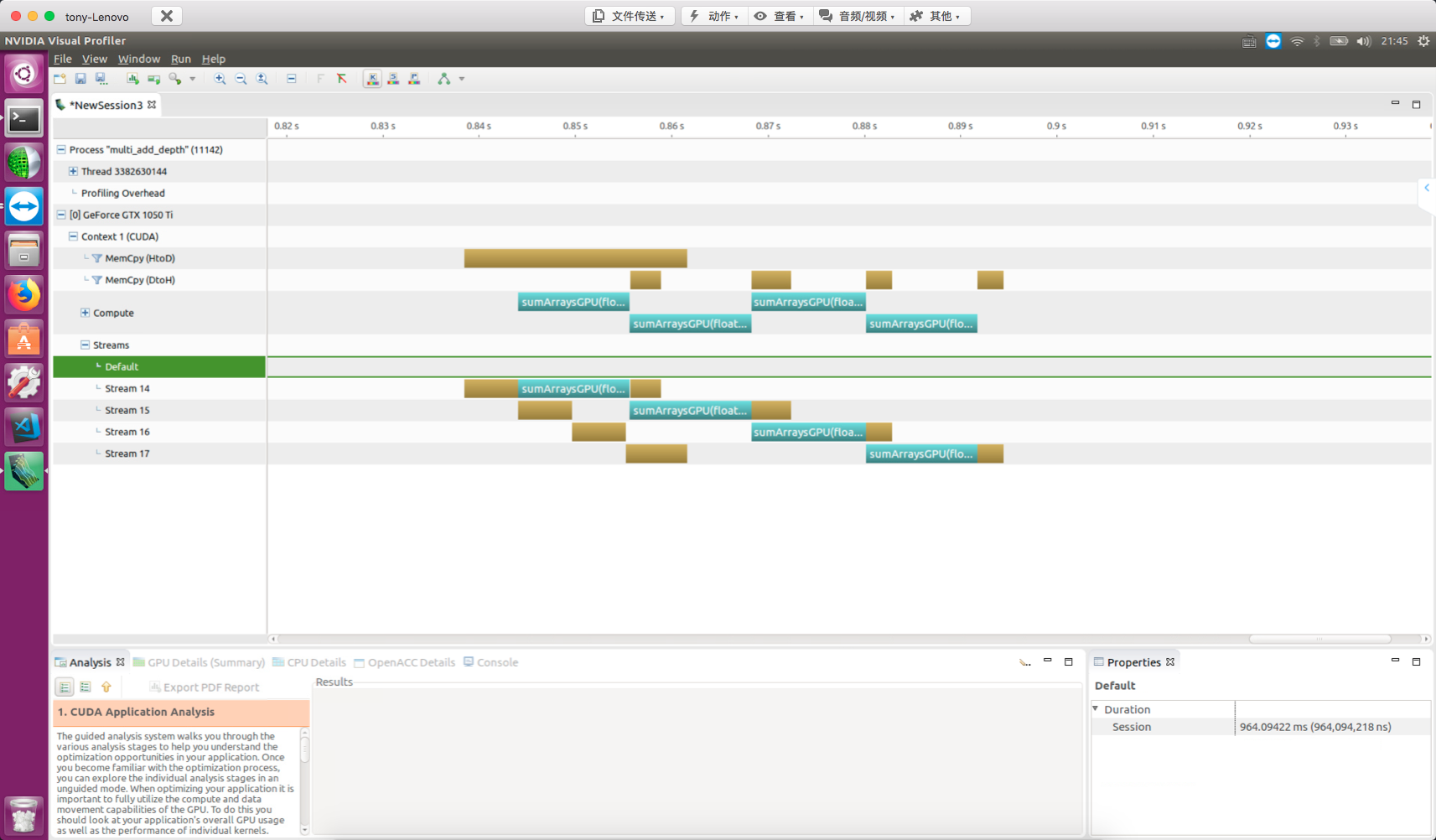
Using non-pinned host memory will produce the following error (don't ask how I know):
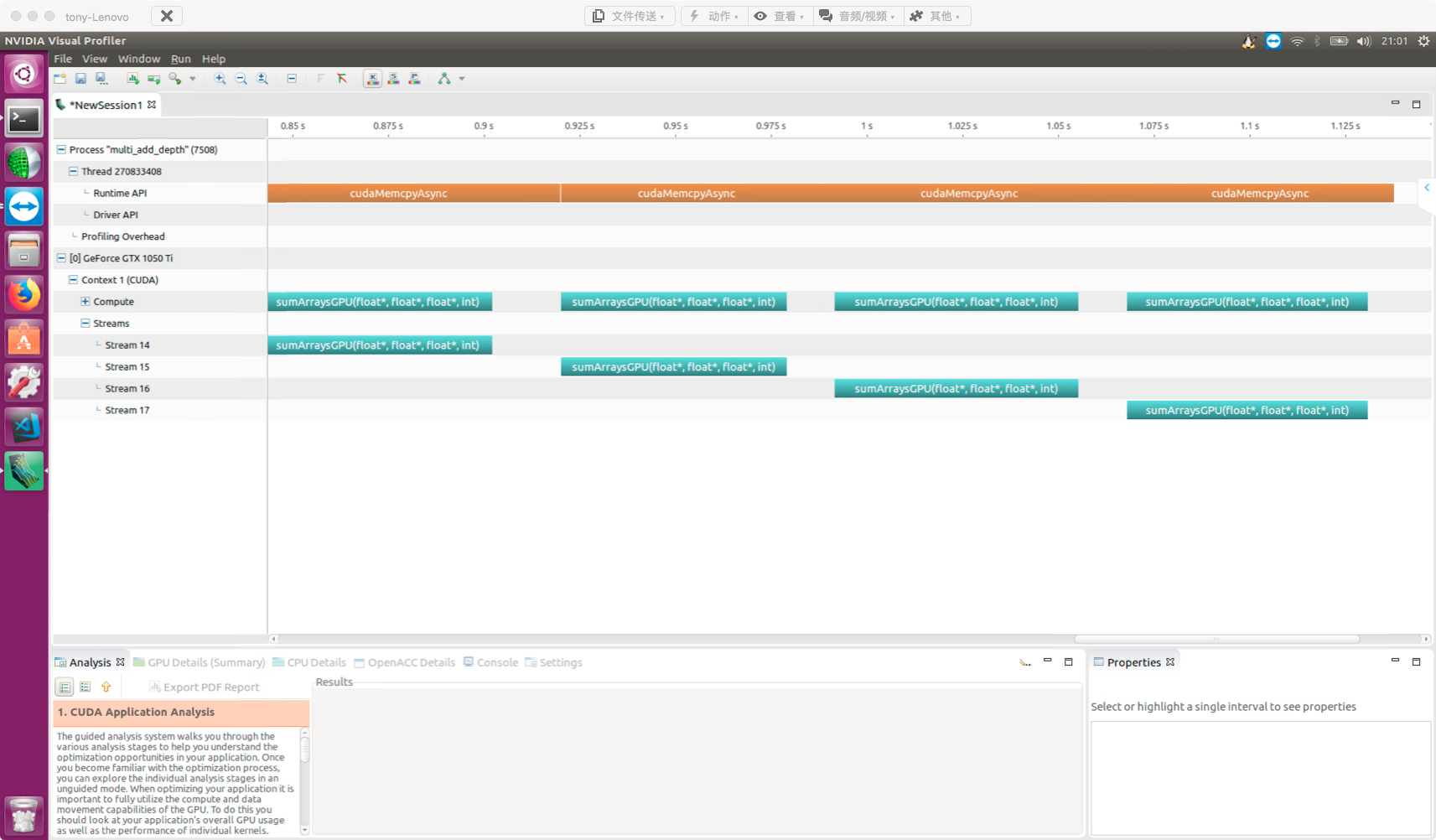
Split into four parts, data transfer and kernel execution overlap.
Observing the nvvp results:
- Kernels in different streams overlap with each other
- Kernels overlap with data transfers
The diagram also shows two types of blocking behavior:
- Kernels are blocked by preceding data transfers
- Host-to-device data transfers are blocked by preceding transfers in the same direction
When using multiple streams, be aware of the false dependency issue.
The GMU (Grid Management Unit) is a new grid and scheduling control system introduced by the Kepler architecture. The GMU can pause new grid scheduling, allowing grids to queue and wait while pausing them until they are ready to execute. This makes the runtime more flexible. The GMU also creates multiple hardware work queues, reducing the impact of false dependencies.
Overlapping with Breadth-First Scheduling
Similarly, after looking at depth-first scheduling, let's examine breadth-first scheduling.
Code:
for(int i=0;i<N_SEGMENT;i++)
{
    int ioffset=i*iElem;
    CHECK(cudaMemcpyAsync(&a_d[ioffset],&a_h[ioffset],nByte/N_SEGMENT,cudaMemcpyHostToDevice,stream[i]));
    CHECK(cudaMemcpyAsync(&b_d[ioffset],&b_h[ioffset],nByte/N_SEGMENT,cudaMemcpyHostToDevice,stream[i]));
}
for(int i=0;i<N_SEGMENT;i++)
{
    int ioffset=i*iElem;
    sumArraysGPU<<<grid,block,0,stream[i]>>>(&a_d[ioffset],&b_d[ioffset],&res_d[ioffset],iElem);
}
for(int i=0;i<N_SEGMENT;i++)
{
    int ioffset=i*iElem;
    CHECK(cudaMemcpyAsync(&res_from_gpu_h[ioffset],&res_d[ioffset],nByte/N_SEGMENT,cudaMemcpyDeviceToHost,stream[i]));
}
nvvp result:
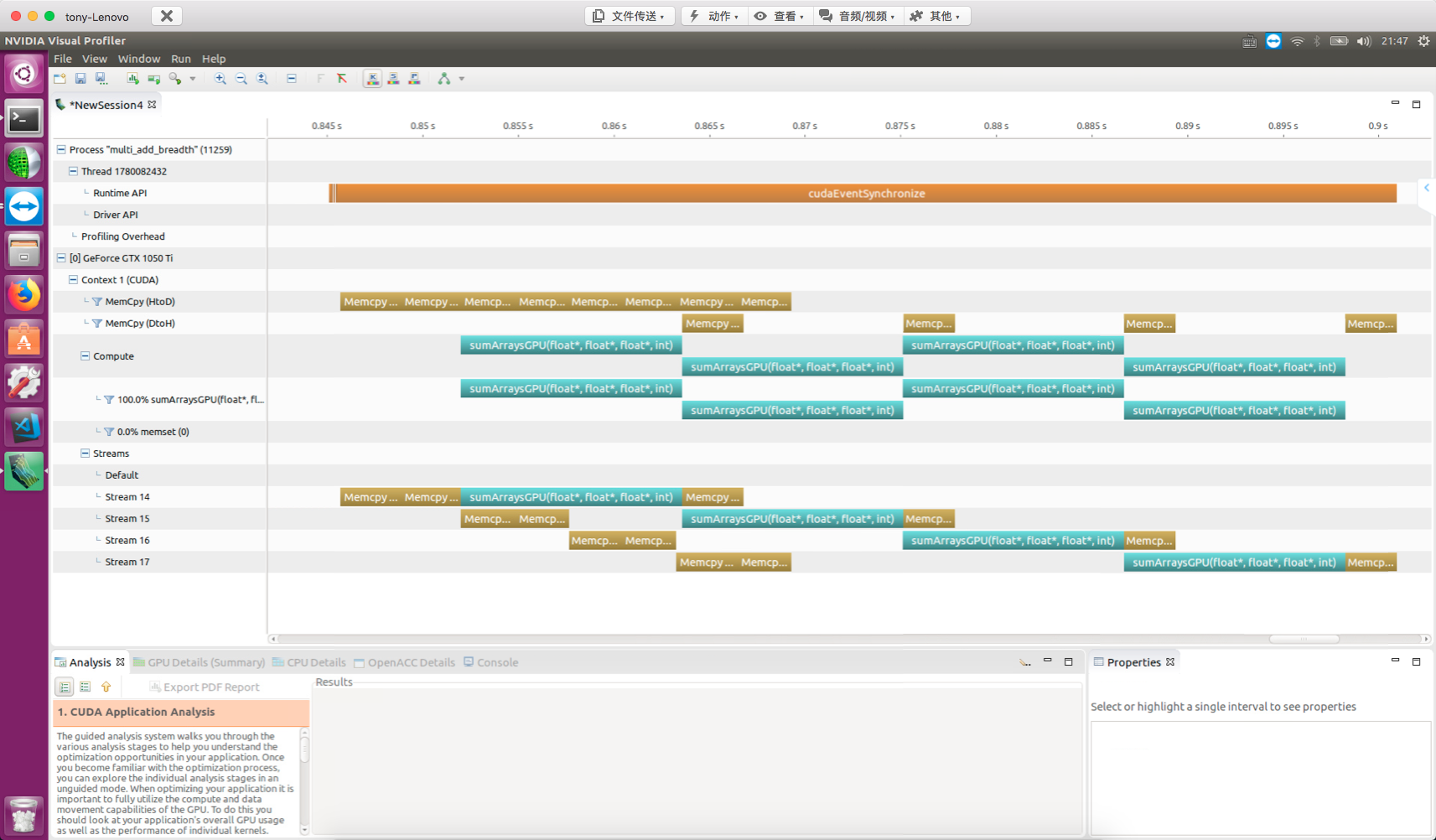
For devices with architectures after Fermi, you don't need to worry much about work scheduling order, since multiple work queues are sufficient to optimize execution. However, the Fermi architecture does require attention to this.
Summary
This article introduced how to use streams to hide data transfer latency -- a very useful technique for accelerating data-intensive applications.