4.1 Memory Model Overview
Abstract: This article introduces the memory model overview for CUDA programming, mainly covering the types of memory in CUDA, their key characteristics, and their uses. This article serves as a map to guide our subsequent writing and learning.
Keywords: CUDA Memory Model, CUDA Memory Hierarchy, Registers, Shared Memory, Local Memory, Constant Memory, Texture Memory, Global Memory
Memory Model Overview
Let's get straight to the point. If I were to name the most impressive book I read when entering the programming field, readers of my blog could probably guess -- I have recommended "Computer Systems: A Programmer's Perspective" more than once. That book introduced me to nearly all the fundamental knowledge of computer systems and programming. It was truly foundational, covering CPU structure, memory management models, assembly language, and more. In terms of knowledge level, it is very low-level, but the difficulty is certainly challenging. I estimate I only read half of it, and understood about two-thirds of that half -- meaning I only truly understood about a third of the entire book. I recommend reading it when you have time.
Memory access and management are critical to program efficiency, and this is especially true for high-performance computing. The example from the previous article about transporting raw materials illustrates a problem we encounter daily. We want large volumes of high-speed, high-capacity memory to feed data to our factory (GPU cores), but given current technology, large-capacity high-speed memory is both expensive and difficult to produce. As of now (May 2018), computing architectures still generally adopt a memory hierarchy model to achieve optimal latency and bandwidth.
CUDA also employs a memory hierarchy model, combining host and device memory systems to present a complete memory hierarchy. Most of this memory can be controlled through programming to optimize our program's performance.
If you have not managed memory much in your previous programs, please practice some C first -- it will give you a better understanding.
Advantages of the Memory Hierarchy
Programs exhibit locality characteristics, including:
- Temporal Locality
- Spatial Locality
To explain: temporal locality means that if data at a memory location is referenced at some point, it is very likely to be referenced again near that point in time. As time passes, the probability of that data being referenced gradually decreases.
Spatial locality means that if data at a certain memory location is used, nearby data is also likely to be used.
Modern computer memory structures are mainly as follows:
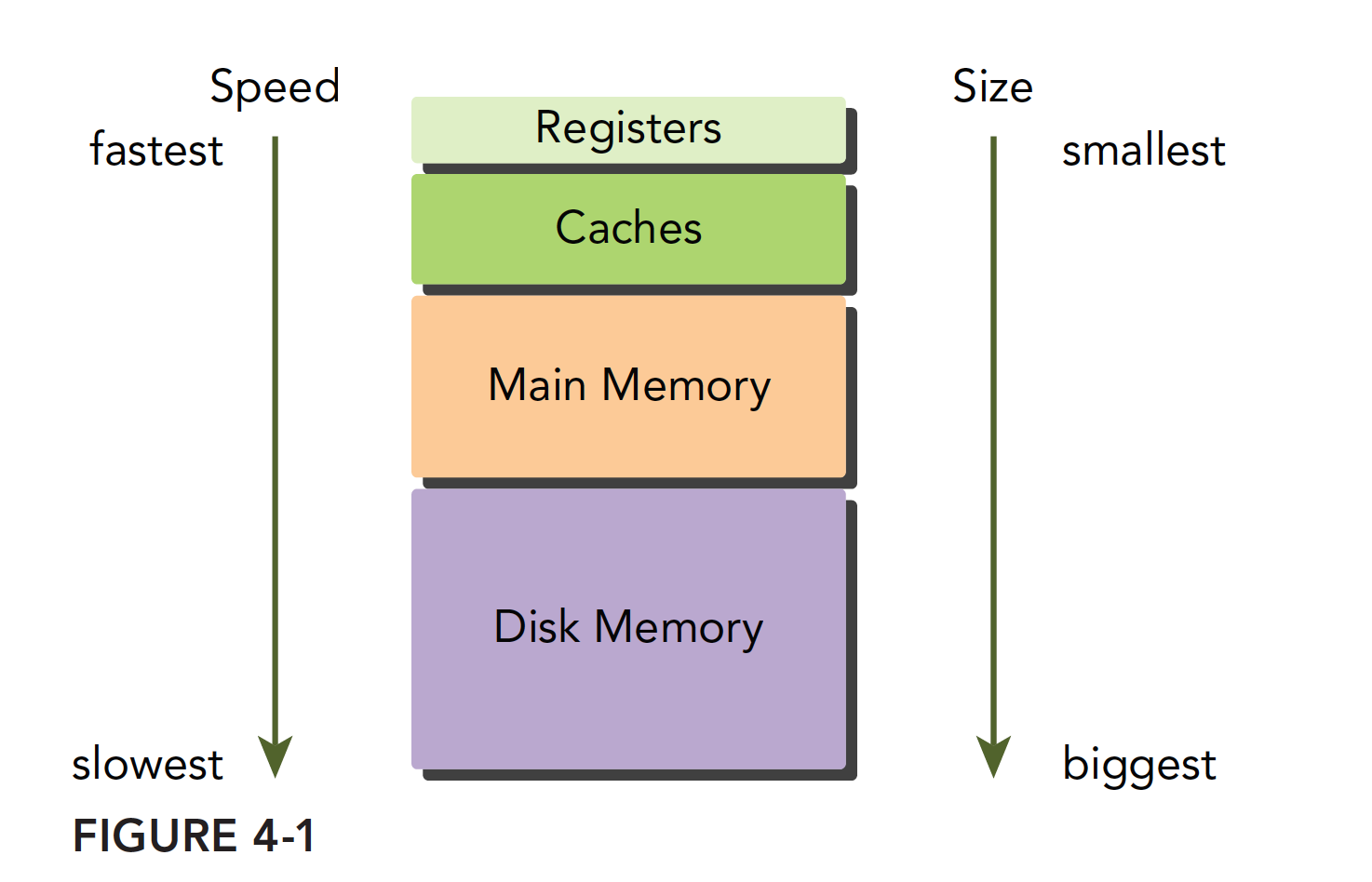
This memory model is effective when the principle of program locality holds. Those who have studied sequential programming should also be familiar with the memory model. The fastest is the register, which can operate synchronously with the CPU. Next is the cache, located on the CPU die. Then comes main memory, commonly known as RAM sticks today; graphics cards also have memory chips. Finally, there is the hard drive. The speed and capacity of these memory devices are inversely proportional -- the faster they are, the smaller they are; the slower they are, the larger they are.
Locality is a very interesting phenomenon. First, locality does not arise because of the hardware; rather, programs inherently possess this characteristic from the moment they are written. Once we discovered this property, we began designing hardware structures to exploit it -- namely the memory hierarchy model. When the memory model is designed as above, if you want to write fast and efficient programs, you must make your programs exhibit good locality. This creates a virtuous cycle: devices become increasingly optimized for locality, and programs become increasingly localized.
Summarizing the characteristics of the lowest level (hard drives, tape, etc.):
- Lower cost per bit
- Higher capacity
- Higher latency
- Lower processor access frequency
Both CPU and GPU main memory use DRAM (Dynamic Random-Access Memory), while low-latency memory such as L1 cache uses SRAM (Static Random-Access Memory). Although lower-level memory has high latency and large capacity, when data stored there is frequently used, it gets transferred to a higher level. For example, when running a program to process data, the first step is to transfer data from the hard drive into main memory.
GPU and CPU memory design share similar principles and models. The difference is that the CUDA programming model presents the memory hierarchy more explicitly to developers, allowing us to explicitly control its behavior.
CUDA Memory Model
For programmers, there are many ways to classify memory, but the most common classification for us is:
- Programmable Memory
- Non-programmable Memory
Programmable memory, as the name suggests, allows you to control the behavior of this memory with your code. Conversely, non-programmable memory is not exposed to users, meaning its behavior is fixed at manufacturing time. For non-programmable memory, all we can do is understand its principles and use the rules to speed up our programs as much as possible. However, in terms of improving speed through code adjustments, the effect is minimal.
In the CPU memory structure, L1 and L2 caches are non-programmable (completely uncontrollable) storage devices.
On the other hand, the CUDA memory model is quite rich compared to CPU. The memory devices on a GPU include:
- Registers
- Shared Memory
- Local Memory
- Constant Memory
- Texture Memory
- Global Memory
Each of the above has its own scope, lifetime, and caching behavior. In CUDA, each thread has its own private local memory; thread blocks have their own shared memory, visible to all threads within the block; all threads can access and read constant memory and texture memory, but cannot write to them because they are read-only. Global memory, constant memory, and texture memory have different purposes. For an application, global memory, constant memory, and texture memory share the same lifetime. The following figure summarizes the above, and the subsequent extensive text will introduce the properties and usage of each memory type one by one.
Registers
Registers are the fastest memory space in both CPUs and GPUs. However, unlike CPUs, GPUs have more registers, and when we declare a variable in a kernel function without any qualifier, the variable is stored in a register. CPU programs work somewhat differently -- only the currently computing variable is stored in a register; the rest reside in main memory and are transferred to registers when needed. Arrays with constant length defined in kernel functions are also allocated in registers.
Registers are private to each thread. Registers typically hold frequently used private variables. Note that these variables must not be shared; otherwise they would be invisible between threads, leading to situations where multiple threads modify the same variable without knowing about each other. The lifetime of register variables matches that of the kernel function -- from when it starts running to when it finishes. After execution completes, the registers can no longer be accessed.
Registers are a scarce resource within an SM. In the Fermi architecture, each thread can use up to 63 registers. The Kepler architecture extended this to 255 registers. If a thread uses fewer registers, more resident thread blocks can be active. The more concurrent thread blocks on an SM, the higher the efficiency and performance.
So what happens if a thread has too many variables and registers are completely insufficient? Register spillover occurs, and local memory steps in to store the excess variables. This situation has a very negative impact on efficiency, so it must be avoided unless absolutely necessary.
To avoid register spillover, you can configure additional information in the kernel code to help the compiler optimize:
__global__ void
__launch_bounds__(maxThreadsPerBlock, minBlocksPerMultiprocessor)
kernel(...) {
    /* kernel code */
}
Here, a keyword launch_bounds is added before the kernel definition, followed by two parameters:
- maxThreadsPerBlock: The maximum number of threads per thread block, where the thread block is launched by the kernel function
- minBlocksPerMultiprocessor: Optional parameter specifying the expected minimum number of resident memory blocks per SM
Note that for a given kernel function, the optimal launch bounds may differ across architectures.
You can also add the following compile option:
-maxrregcount=32
to control the maximum number of registers used by all kernel functions in a compilation unit.
CUDA Cores and Registers
Chinese Explanation: CUDA cores are merely execution units, similar to ALUs (Arithmetic Logic Units) in CPUs. They perform floating-point and integer operations but don't own storage space themselves. Think of CUDA cores as workers in a factory, while registers are shared toolboxes.
English Explanation: CUDA cores are merely execution units, similar to ALUs (Arithmetic Logic Units) in CPUs. They perform floating-point and integer operations but don't own storage space themselves. Think of CUDA cores as workers in a factory, while registers are shared toolboxes.
Actual Organization of Registers
Key Points:
- Registers are stored in the register file at the SM level
- All CUDA cores share this register file
- Registers are allocated per thread, not per CUDA core
CUDA Core Working Mechanism
Instruction Execution Flow
Key Characteristics
- CUDA cores are stateless: they don't store any data
- Shared registers: all CUDA cores access the same register file
- Parallel access: multiple CUDA cores simultaneously read/write different registers
- Dynamic mapping: thread-to-register mapping can be reconfigured
Common Misconception:
Actual Situation:
- 1 SM = 64-128 CUDA cores + 1 shared register file with 65,536 registers
- Register allocation unit: thread (not CUDA core)
- Access method: all CUDA cores access the same register file through multi-port access
Benefits of this design:
- The shared register file allows dynamic adjustment of register allocation per thread based on the specific needs of the kernel, rather than fixed allocation to CUDA cores.
- By supporting far more threads than CUDA cores, GPUs can schedule other threads to execute on CUDA cores while some threads wait for memory access.
Working Principle Example
Assume an SM has 128 CUDA cores and 65,536 registers. When executing a kernel:
- Thread allocation: 2,048 threads, each requiring 32 registers
- Register allocation: register file is divided into 2,048 portions, each with 32 registers
- Execution process: warp scheduler selects 32 threads (1 warp) at a time, assigning them to 32 CUDA cores for execution
- Data flow: CUDA cores read data from register file, execute computation, write back results
Local Memory
Variables in a kernel function that qualify for register storage but cannot fit into the register space allocated for the kernel will be stored in local memory. Variables that the compiler may place in local memory include:
- Local arrays referenced with unknown indices
- Large local arrays or structures that may consume significant register space
- Any variables that do not meet the kernel function's register constraints
Local memory is physically located in the same storage region as global memory, with the same access characteristics -- high latency and low bandwidth.
For devices with compute capability 2.0 and above, local memory is stored in each SM's L1 cache or the device's L2 cache.
Shared Memory
Memory in a kernel function declared with the following qualifier is called shared memory:
__shared__
Each SM has a certain amount of shared memory allocated by thread blocks. Shared memory is on-chip memory that is much faster compared to main memory -- that is, it has low latency and high bandwidth. It is similar to the L1 cache but is programmable.
When using shared memory, be careful not to overuse it to the point where the number of active warps on an SM decreases. In other words, if a thread block uses too much shared memory, it prevents more thread blocks from being launched on that SM, which reduces the number of active warps.
Shared memory is declared within a kernel function and has the same lifetime as the thread block. When the block starts executing, its shared memory is allocated; when the block finishes, the shared memory is released.
Since shared memory is visible to threads within a block, race conditions can exist. Shared memory can also be used for communication. To avoid memory races, you can use the synchronization statement:
void __syncthreads();
This statement acts as a barrier point during thread block execution. All threads within the block must reach this barrier point before any can proceed to the next computation. This allows you to design shared memory usage that avoids memory races.
Note that frequent use of __syncthreads(); can affect kernel execution efficiency.
The L1 cache and shared memory within an SM share a 64KB block of on-chip memory (this may have increased in newer devices). They are statically partitioned, and the ratio can be configured at runtime using:
cudaError_t cudaFuncSetCacheConfig(const void * func, enum cudaFuncCache);
This function sets the ratio between shared memory and L1 cache for a kernel. The cudaFuncCache parameter can be set to the following configurations:
cudaFuncCachePreferNone    // No preference, default setting
cudaFuncCachePreferShared  // 48KB shared memory, 16KB L1 cache
cudaFuncCachePreferL1      // 48KB L1 cache, 16KB shared memory
cudaFuncCachePreferEqual   // 32KB L1 cache, 32KB shared memory
The Fermi architecture supports the first three configurations; later devices support all four.
Constant Memory
Constant memory resides in device memory (global memory), and each SM has a dedicated constant memory cache. Constant memory uses the:
__constant__
qualifier. Constant memory is declared at the global scope outside kernel functions. For all devices, only 64KB of constant memory can be declared. Constant memory is statically declared and is visible to all kernel functions within the same compilation unit.
As the name implies, constant memory cannot be modified -- meaning it cannot be modified by kernel functions. Host-side code can initialize constant memory; otherwise, this memory would serve no purpose. After being initialized by the host, constant memory cannot be modified by kernel functions. The initialization function is:
cudaError_t cudaMemcpyToSymbol(const void* symbol, const void *src, size_t count);
Similar to cudaMemcpy in its parameter list, it copies count bytes of memory from src to symbol, which resides in device-side constant memory. In most cases, this function is synchronous, meaning it executes immediately.
Constant memory performs well when all threads in a warp fetch data from the same address. For example, when executing a polynomial calculation where coefficients are stored in constant memory, the efficiency is very high. However, if different threads access data at different addresses, constant memory is not as efficient because its read mechanism broadcasts a single read to all threads in the warp.
Texture Memory
Texture memory resides in device memory (global memory) and is cached in each SM's read-only cache. Texture memory is global memory accessed through a dedicated cache. The read-only cache includes hardware filtering support, which can perform floating-point interpolation as part of the read process. Texture memory is optimized for 2D spatial locality.
In general, texture memory was designed for GPU's primary function of display rendering, but it can be more effective for certain specific programs, such as those requiring filtering, which can be completed directly through hardware.
Global Memory
The largest memory space on a GPU, with the highest latency and the most common usage. "Global" refers to its scope and lifetime. It is generally defined in host-side code but can also be defined on the device side with a qualifier. As long as it is not destroyed, its lifetime matches that of the application. Global memory corresponds to device memory -- one is the logical representation, the other is the hardware representation.
Global memory can be declared dynamically or statically. You can use the following qualifier in device code to statically declare a variable:
__device__
All memory we previously declared for access on the GPU is global memory -- or rather, up to this point we have not performed any memory optimization.
Due to the nature of global memory, when multiple kernel functions execute simultaneously and use the same global variable, care must be taken regarding memory races.
Global memory access is aligned, meaning it reads integer multiples of a specified size (32, 64, 128) of bytes at a time. Therefore, when a warp performs memory loads/stores, the number of transactions needed typically depends on the following two factors:
- The distribution of memory addresses across threads
- The alignment of memory transactions
In general, the more transactions needed to satisfy a memory request, the more likely unused bytes are being transferred, reducing data throughput. In other words, aligned read/write patterns cause unnecessary data to be transferred, so low utilization leads to reduced throughput. Devices with compute capability below 1.1 have very strict memory access requirements (to achieve high efficiency, access is restricted) because they did not have caches at the time. Modern devices have caches, so the requirements are more relaxed.
Next, we will demonstrate how to optimize global memory access to maximize global memory data throughput.
GPU Caches
Similar to CPU caches, GPU caches are non-programmable -- their behavior is fixed at manufacturing time. There are 4 types of caches on a GPU:
- L1 Cache
- L2 Cache
- Read-only Constant Cache
- Read-only Texture Cache
Each SM has an L1 cache, and all SMs share an L2 cache. Both L1 and L2 caches are used to store data from local memory and global memory, including register spillover. For Fermi, Kepler, and later devices, CUDA allows us to configure whether read operations use both L1 and L2 caches, or only the L2 cache.
Unlike CPUs, where both reads and writes can be cached, GPU writes are not cached -- only loads are cached!
Each SM has a read-only constant cache and a read-only texture cache, which are used to improve read performance from their respective memory spaces in device memory.
CUDA Variable Declaration Summary
Summarized in a table:
| Qualifier | Variable Name | Storage | Scope | Lifetime |
|---|---|---|---|---|
| None | float var | Register | Thread | Thread |
| None | float var[100] | Local | Thread | Thread |
| shared | float var* | Shared | Block | Block |
| device | float var* | Global | Global | Application |
| constant | float var* | Constant | Global | Application |
Key characteristics of device memory:
| Memory | On-chip/Off-chip | Cache | Access | Scope | Lifetime |
|---|---|---|---|---|---|
| Register | On-chip | n/a | R/W | One thread | Thread |
| Local | Off-chip | Available on 1.0+ | R/W | One thread | Thread |
| Shared | On-chip | n/a | R/W | All threads in block | Block |
| Global | Off-chip | Available on 1.0+ | R/W | All threads + host | Host configured |
| Constant | Off-chip | Yes | R | All threads + host | Host configured |
| Texture | Off-chip | Yes | R | All threads + host | Host configured |
Static Global Memory
CPU memory has two types of allocation: dynamic and static. From a memory location perspective, dynamic allocation occurs on the heap, while static allocation occurs on the stack. In code, one requires functions like new or malloc for dynamic allocation and uses delete or free to release memory. CUDA has a similar distinction between dynamic and static allocation. What we have used so far requires cudaMalloc, so in comparison, that is dynamic allocation. Today we will look at static allocation. However, like dynamic allocation, it still requires explicitly copying memory to the device side. Let's look at the program output with the following code:
#include <cuda_runtime.h>
#include <stdio.h>

__device__ float devData;

__global__ void checkGlobalVariable()
{
    printf("Device: The value of the global variable is %f\n", devData);
    devData += 2.0;
}

int main()
{
    float value = 3.14f;
    cudaMemcpyToSymbol(devData, &value, sizeof(float));
    printf("Host: copy %f to the global variable\n", value);

    checkGlobalVariable<<<1, 1>>>();

    cudaMemcpyFromSymbol(&value, devData, sizeof(float));
    printf("Host: the value changed by the kernel to %f\n", value);

    cudaDeviceReset();
    return EXIT_SUCCESS;
}
Output:
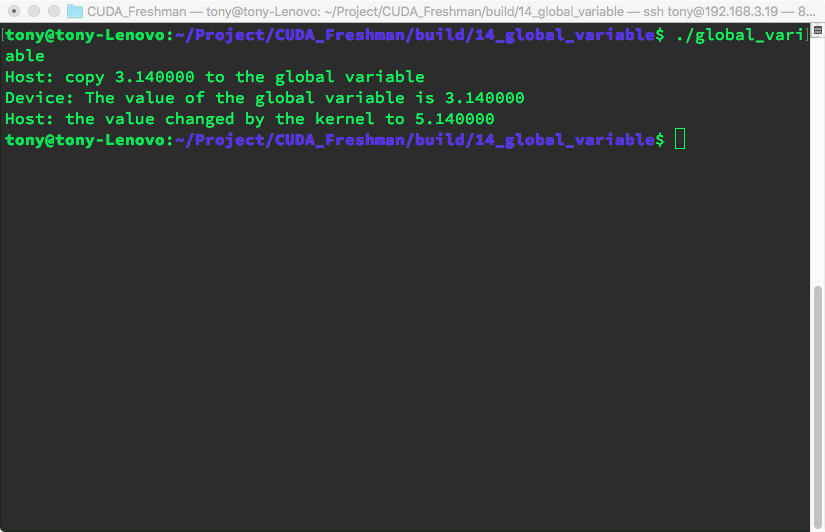
The only thing to note here is this line:
cudaMemcpyToSymbol(devData, &value, sizeof(float));
The function prototype says the first argument should be a void*, but here we pass a __device__ float devData; variable. This comes down to the difference between device variable definitions and host variable definitions. A device variable defined in code is actually a pointer. Where this pointer points to is unknown on the host side, as is its content. The only way to know the content is through explicit transfer:
cudaMemcpyFromSymbol(&value, devData, sizeof(float));
What to note here is simply:
- On the host side, devData is just an identifier, not the address of a device global memory variable
- In a kernel function, devData is a variable in global memory
Host code cannot directly access device variables, and devices cannot access host variables. This is the biggest difference between CUDA programming and CPU multi-core programming.
cudaMemcpy(&value, devData, sizeof(float));
This is not allowed! This function call is invalid! You cannot use dynamic copy to assign to a static variable!
If you insist on using cudaMemcpy, you can only use the following approach:
float *dptr = NULL;
cudaGetSymbolAddress((void**)&dptr, devData);
cudaMemcpy(dptr, &value, sizeof(float), cudaMemcpyHostToDevice);
The host side cannot take the address of a device variable! This is illegal!
To get the address of devData, you can use:
float *dptr = NULL;
cudaGetSymbolAddress((void**)&dptr, devData);
There is one exception where GPU memory can be directly referenced from the host -- CUDA pinned memory. We will study this later.
The CUDA runtime API can access host and device variables, but this depends on whether you provide the correct parameters to the correct functions. When using the runtime API, if parameters are wrong -- especially host and device pointers -- the results are unpredictable.
Summary
This article provides a comprehensive overview of the CUDA memory model, serving as an outline to introduce the content of the following two chapters.
Notes
Here is a detailed introduction to CUDA's memory model. CUDA indeed provides a richer and more hierarchical memory architecture than traditional CPUs, which is an important foundation for the efficiency of GPU parallel computing.
1. Registers
Chinese Description: Registers are the fastest storage units on a GPU, located in each thread's private space. Each thread has its own independent set of registers for storing local variables and temporary computation results. Register access latency is nearly zero, but the quantity is limited.
English Description: Registers are the fastest storage units on GPU, located in each thread's private space. Each thread has its own independent set of registers for storing local variables and temporary computation results. Register access latency is nearly zero, but the quantity is limited.
Characteristics:
- Access speed: Fastest
- Capacity: Very limited, typically 32-64KB per thread
- Scope: Thread-level private
- Latency: 1 clock cycle
2. Shared Memory
Chinese Description: Shared memory is high-speed cache accessible to all threads within the same thread block. Located on the SM (Streaming Multiprocessor), its access speed is second only to registers. Shared memory is commonly used for inter-thread data sharing and collaborative computation.
English Description: Shared memory is high-speed cache accessible to all threads within the same thread block. Located on the SM (Streaming Multiprocessor), its access speed is second only to registers. Shared memory is commonly used for inter-thread data sharing and collaborative computation.
Characteristics:
- Access speed: Very fast
- Capacity: 48KB-164KB per SM, depending on GPU architecture
- Scope: Block-level shared
- Latency: 1-32 clock cycles
3. Local Memory
Chinese Description: Local memory is actually located in global memory but logically belongs to individual threads privately. When registers are insufficient to store a thread's local variables, these variables are stored in local memory. Despite being called "local," its access speed is relatively slow.
English Description: Local memory is actually located in global memory but logically belongs to individual threads privately. When registers are insufficient to store thread's local variables, these variables are stored in local memory. Despite being called "local," its access speed is relatively slow.
Characteristics:
- Access speed: Slow, same as global memory
- Capacity: Large, limited by global memory
- Scope: Thread-level private
- Latency: 400-800 clock cycles
4. Constant Memory
Chinese Description: Constant memory is used to store data that doesn't change during kernel execution. It has a dedicated cache and can provide efficient broadcast access when multiple threads simultaneously access the same constant data. Total constant memory capacity is 64KB.
English Description: Constant memory is used to store data that doesn't change during kernel execution. It has dedicated cache and can provide efficient broadcast access when multiple threads simultaneously access the same constant data. Total constant memory capacity is 64KB.
Characteristics:
- Access speed: Fast when cache hit
- Capacity: 64KB total
- Scope: Global read-only
- Latency: 1 clock cycle when cache hit
5. Texture Memory
Chinese Description: Texture memory is a special read-only memory originally designed for graphics processing, with cache optimized for spatial locality. It supports hardware interpolation and boundary handling, suitable for data access patterns with 2D/3D spatial locality.
English Description: Texture memory is a special read-only memory originally designed for graphics processing, with cache optimized for spatial locality. It supports hardware interpolation and boundary handling, suitable for data access patterns with 2D/3D spatial locality.
Characteristics:
- Access speed: Fast with spatial locality
- Capacity: Large, limited by global memory
- Scope: Global read-only
- Special features: Hardware interpolation, boundary handling
6. Global Memory
Chinese Description: Global memory is the largest capacity but slowest access memory on a GPU. All threads can read and write to global memory, and it serves as the primary medium for data exchange between GPU and CPU. Global memory has no cache (in older architectures) with high access latency.
English Description: Global memory is the largest capacity but slowest access memory on GPU. All threads can read and write to global memory, and it serves as the primary medium for data exchange between GPU and CPU. Global memory has no cache (in older architectures) with high access latency.
Characteristics:
- Access speed: Slowest
- Capacity: Largest, GB-level
- Scope: Global read-write
- Latency: 400-800 clock cycles
Memory Hierarchy Optimization Tips
- Maximize register usage: Use local variables as much as possible
- Proper use of shared memory: Enable data sharing within thread blocks
- Avoid local memory spillover: Control the number of variables per thread
- Optimize global memory access patterns: Use coalesced access
- Leverage constant memory: Store small amounts of read-only data
This rich memory hierarchy allows CUDA programs to choose the most suitable memory type for different data access needs, thereby maximizing parallel computing performance.
Why Do GPUs Need More Registers?
1. Massive Parallel Thread Count
Chinese Explanation: GPUs need to run thousands of threads simultaneously, each requiring its own register space for local variables and computation results. If registers are insufficient, threads experience "register spilling," forcing data to be stored in slower local memory.
English Explanation: GPUs need to run thousands of threads simultaneously, each requiring its own register space for local variables and computation results. If registers are insufficient, threads experience "register spilling," forcing data to be stored in slower local memory.
2. Latency Hiding Design Requirement
Chinese Explanation: GPUs hide memory access latency by rapidly switching between large numbers of threads. More threads mean more registers are needed to maintain each thread's context state.
English Explanation: GPUs hide memory access latency by rapidly switching between large numbers of threads. More threads mean more registers are needed to maintain each thread's context state.
3. Simple vs Complex Instructions
Chinese Comparison:
- CPU: Complex instructions requiring fewer high-functionality registers with sophisticated pipelines and out-of-order execution
- GPU: Simple instructions relying on abundant registers for straightforward parallel execution
English Comparison:
- CPU: Complex instructions requiring fewer high-functionality registers with sophisticated pipelines and out-of-order execution
- GPU: Simple instructions relying on abundant registers for straightforward parallel execution
Register Allocation Strategy Differences
CPU Register Allocation
Each thread exclusively owns all registers
Thread Context Switch -> Save/restore all register states
GPU Register Allocation
Registers dynamically allocated across threads
Example: 1024 threads x 32 registers/thread = 32,768 register demand
If SM has only 65,536 registers, it supports at most 2048 concurrent threads
Performance Impact Analysis
Consequences of Register Pressure
Chinese Description: When GPU registers are insufficient, it leads to:
- Register Spilling: Variables stored to local memory, 100-1000x performance degradation
- Reduced Occupancy: Fewer threads can run simultaneously
- Latency Exposure: Cannot effectively hide memory access latency
English Description: When GPU registers are insufficient, it leads to:
- Register Spilling: Variables stored to local memory, 100-1000x performance degradation
- Reduced Occupancy: Fewer threads can run simultaneously
- Latency Exposure: Cannot effectively hide memory access latency
Optimization Strategies
// Register usage optimization example
__global__ void optimized_kernel() {
    // 1. Reduce the number of local variables
    int shared_var = threadIdx.x;  // Instead of multiple temporary variables

    // 2. Use shared memory instead of excessive registers
    __shared__ float shared_data[256];

    // 3. Moderate loop unrolling
    #pragma unroll 4  // Instead of full unrolling
    for(int i = 0; i < 16; i++) {
        // Computation logic
    }
}
Summary
The fundamental reason GPUs have a large number of registers is the demand of their massively parallel computing architecture. Although the number of registers available to a single GPU thread (typically 32-255) is still limited, GPUs support the concurrent execution of thousands of threads through dynamic allocation across tens of thousands of registers. This stands in stark contrast to the CPU's "few threads, strong single-core" design, reflecting the architectural optimization strategies of the two processor types for different computing scenarios.
This design tradeoff makes GPUs excel at processing massively parallel tasks, but also requires programmers to carefully manage register usage to avoid performance bottlenecks.