3.2 Understanding the Essence of Warp Execution (Part I)
2018-03-14 | CUDA , Freshman | 0 |
Abstract: This article introduces the most core part of the CUDA execution model -- the essence of warp execution. Part I. Keywords: CUDA Branching, Warp Divergence
Understanding the Essence of Warp Execution (Part I)
We've already introduced the general process of the CUDA execution model, including the relationships between thread grids, warps, and threads, as well as the general hardware structure, such as the approximate structure of an SM. For hardware, the essence of CUDA execution is warp execution, because the hardware has no concept of which block is which, nor does it know the order. The hardware (SM) only knows to run according to the machine code. What it's given and in what order is a direct reflection of the hardware's functional design.
From the outside, CUDA executes all threads in parallel, with no ordering. But in reality, hardware resources are limited -- it's impossible to execute millions of threads simultaneously. So from the hardware perspective, only a portion of threads execute at the physical level at any time. This portion is what we mentioned earlier as the warp.
Warps and Thread Blocks
A warp is the basic execution unit in an SM. When a grid is launched (a grid being launched is equivalent to a kernel being launched, and each kernel corresponds to its own grid), the grid contains thread blocks. After thread blocks are assigned to a specific SM, they are divided into multiple warps. Each warp typically consists of 32 threads (current GPUs all use 32 threads, but there's no guarantee the future will remain 32). Within a warp, all threads execute in SIMT (Single Instruction, Multiple Threads) fashion -- each step executes the same instruction, but processes private data. The figure below illustrates the logical, actual, and hardware visualization:
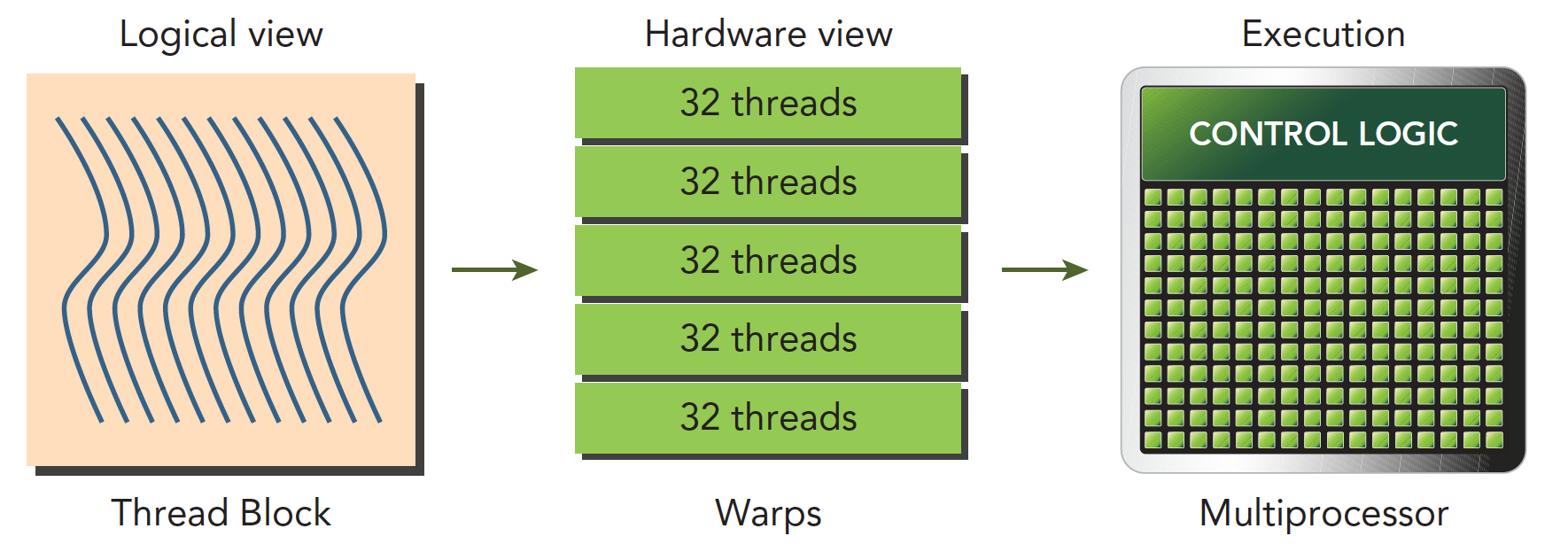
A thread block is a logical construct. In a computer, memory always exists as a linear, one-dimensional sequence, so thread block execution is also a one-dimensional access of threads. However, when writing programs, we can work in two or three dimensions -- this is for convenience. For example, when processing images or three-dimensional data, a 3D block becomes very direct and convenient.
In a block, each thread has a unique index (possibly a 3D index): threadIdx. In a grid, each thread block also has a unique index (possibly a 3D index): blockIdx. Therefore, each thread has a unique index within the grid.
When a thread block has 128 threads, it is divided into 4 warps when assigned to an SM for execution:
warp0: thread  0,........thread31
warp1: thread 32,........thread63
warp2: thread 64,........thread95
warp3: thread 96,........thread127
When using 3D indexing, x is the innermost layer, y is the middle layer, and z is the outermost layer. Think of C language arrays. If we write the above as C code, assuming a 3D array t holds all threads, then (threadIdx.x, threadIdx.y, threadIdx.z) is represented as:
t[z][y][x];
The linear address corresponding to the 3D coordinates is:
tid = threadIdx.x + threadIdx.y x blockDim.x + threadIdx.z x blockDim.x x blockDim.y
The formula above can be understood using the relative address calculation method of 3D arrays in C. If you've worked with images or matrices, this calculation should be straightforward. But for beginners, this part is often confusing -- just like when I first started writing image algorithms, I could never figure out which was length and which was width.
How many warps does a thread block contain?
WarpsPerBlock = ceil(ThreadsPerBlock/warpSize)
The ceil function rounds up to positive infinity. For example, ceil(1.98) = 2.
Warps and thread blocks -- one is a thread collection at the hardware level, the other at the logical level. For program correctness, we must think clearly at the logical level. But for faster programs, the hardware level is what we should pay attention to.
Warp Divergence
When a warp is executed, all threads are assigned the same instruction and process their own private data. Remember the fruit distribution example from earlier? Each round distributes the same fruit, but you can choose to eat or not eat. This eat-or-not-eat choice is a branch. CUDA supports C language control flow such as if...else, for, while, etc. However, if different threads within a warp have different control conditions, when we reach this control condition, we face different choices.
Let me explain CPUs first. When our program contains many branch judgments, from a program perspective, the logic is very complex because one branch gives two paths. With 10 branches, there are 1024 possible paths. CPUs use pipelined operations. If the CPU waited for each branch to complete before executing the next instruction, it would cause significant latency. So modern processors use branch prediction technology, and the CPU's capability in this area is far more advanced than GPU's. This is also the difference between GPU and CPU -- they were designed from the start to solve different problems. CPUs are suited for programs with complex logic but less computation, like operating systems and control systems. GPUs are suited for massive computation with simple logic, which is why they're used for computing.
Consider the following code:
if (condition)
{
    // do something
}
else
{
    // do something
}
Suppose this code is part of a kernel function. When a warp's 32 threads execute this code, if 16 execute the if block and the other 16 execute the else block, threads within the same warp execute different instructions -- this is called warp divergence.
We know that in every instruction cycle, all threads in a warp execute the same instruction. But warps are divergent, so this seems contradictory. In fact, these two statements don't have to conflict.
The solution to the contradiction is that every thread executes both the if and else parts. When some threads' conditions are true, they execute the if block. For threads whose conditions are false, what do they do? Execute else? Impossible -- there's only one dispatcher. So these threads wait. Just like distributing fruit -- if you don't like it, you can only watch others eat. When everyone's done, the next round (i.e., the next instruction) begins. Warp divergence causes serious performance degradation. The more conditional branches, the more parallelism is weakened.
Note that warp divergence studies threads within a single warp. Branches in different warps don't affect each other.
The execution process is shown below:
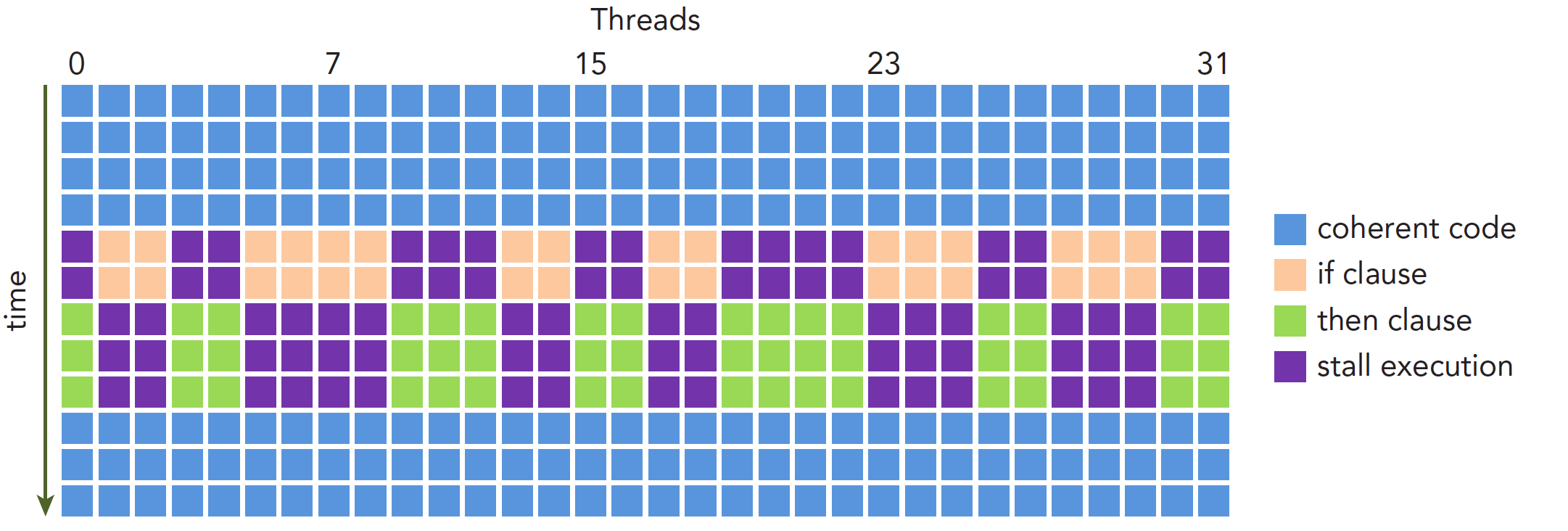
Performance degradation caused by warp divergence should be solved using warp-level approaches. The fundamental idea is to avoid divergence among threads within the same warp. The reason we can control thread behavior within a warp is that thread assignment to warps within a block follows a pattern, not randomly. This makes it feasible to design branches based on thread indices. A supplementary note: when all threads in a warp execute the if branch or all execute the else branch, there's no performance degradation. Performance drops sharply only when there's divergence within a warp.
Since we can control threads within a warp, we can pack all threads that would execute the if branch into one warp, or have all threads in a warp execute the if branch while all other threads execute the else branch. This approach can significantly improve efficiency.
The following kernel produces relatively inefficient branching:
__global__ void mathKernel1(float *c)
{
	int tid = blockIdx.x * blockDim.x + threadIdx.x;

	float a = 0.0;
	float b = 0.0;
	if (tid % 2 == 0)
	{
		a = 100.0f;
	}
	else
	{
		b = 200.0f;
	}
	c[tid] = a + b;
}
In this case, assuming we configure just one 1D thread block with x=64, there are only two warps. Odd threads (threadIdx.x is odd) execute else, even threads execute if -- divergence is severe.
But if we use a different approach to get the same but scrambled results C (the order doesn't actually matter since we can adjust it later), the following code would be much more efficient:
__global__ void mathKernel2(float *c)
{
	int tid = blockIdx.x * blockDim.x + threadIdx.x;
	float a = 0.0;
	float b = 0.0;
	if ((tid/warpSize) % 2 == 0)
	{
		a = 100.0f;
	}
	else
	{
		b = 200.0f;
	}
	c[tid] = a + b;
}
For the first warp, thread IDs tid range from 0 to 31, and tid/warpSize all equal 0, so they all execute the if statement. For the second warp, thread IDs tid range from 32 to 63, and tid/warpSize all equal 1, so they execute else. There's no divergence within warps -- efficiency is higher.
Complete code: https://github.com/Tony-Tan/CUDA_Freshman
#include <cuda_runtime.h>
#include <stdio.h>
#include <stdlib.h>
#include "freshman.h"

__global__ void warmup(float *c)
{
	int tid = blockIdx.x * blockDim.x + threadIdx.x;
	float a = 0.0;
	float b = 0.0;

	if ((tid/warpSize) % 2 == 0)
	{
		a = 100.0f;
	}
	else
	{
		b = 200.0f;
	}
	// printf("%d %d %f \n",tid,warpSize,a+b);
	c[tid] = a + b;
}

__global__ void mathKernel1(float *c)
{
	int tid = blockIdx.x * blockDim.x + threadIdx.x;

	float a = 0.0;
	float b = 0.0;
	if (tid % 2 == 0)
	{
		a = 100.0f;
	}
	else
	{
		b = 200.0f;
	}
	c[tid] = a + b;
}

__global__ void mathKernel2(float *c)
{
	int tid = blockIdx.x * blockDim.x + threadIdx.x;
	float a = 0.0;
	float b = 0.0;
	if ((tid/warpSize) % 2 == 0)
	{
		a = 100.0f;
	}
	else
	{
		b = 200.0f;
	}
	c[tid] = a + b;
}

__global__ void mathKernel3(float *c)
{
	int tid = blockIdx.x * blockDim.x + threadIdx.x;
	float a = 0.0;
	float b = 0.0;
	bool ipred = (tid % 2 == 0);
	if (ipred)
	{
		a = 100.0f;
	}
	else
	{
		b = 200.0f;
	}
	c[tid] = a + b;
}

int main(int argc, char **argv)
{
	int dev = 0;
	cudaDeviceProp deviceProp;
	cudaGetDeviceProperties(&deviceProp, dev);
	printf("%s using Device %d: %s\n", argv[0], dev, deviceProp.name);

	// set up data size
	int size = 64;
	int blocksize = 64;
	if (argc > 1) blocksize = atoi(argv[1]);
	if (argc > 2) size = atoi(argv[2]);
	printf("Data size %d ", size);

	// set up execution configuration
	dim3 block(blocksize,1);
	dim3 grid((size - 1) / block.x + 1,1);
	printf("Execution Configure (block %d grid %d)\n", block.x, grid.x);

	// allocate gpu memory
	float * C_dev;
	size_t nBytes = size * sizeof(float);
	float * C_host = (float*)malloc(nBytes);
	cudaMalloc((float**)&C_dev, nBytes);

	// run a warmup kernel to remove overhead
	double iStart, iElaps;
	cudaDeviceSynchronize();
	iStart = cpuSecond();
	warmup<<<grid,block>>>(C_dev);
	cudaDeviceSynchronize();
	iElaps = cpuSecond() - iStart;

	printf("warmup\t  <<<%d,%d>>>elapsed %lf sec \n", grid.x, block.x, iElaps);

	// run kernel 1
	iStart = cpuSecond();
	mathKernel1<<<grid,block>>>(C_dev);
	cudaDeviceSynchronize();
	iElaps = cpuSecond() - iStart;
	printf("mathKernel1<<<%4d,%4d>>>elapsed %lf sec \n", grid.x, block.x, iElaps);
	cudaMemcpy(C_host,C_dev,nBytes,cudaMemcpyDeviceToHost);
	/*
	for(int i=0;i<size;i++)
	{
		printf("%f ",C_host[i]);
	}
	*/

	// run kernel 2
	iStart = cpuSecond();
	mathKernel2<<<grid,block>>>(C_dev);
	cudaDeviceSynchronize();
	iElaps = cpuSecond() - iStart;
	printf("mathKernel2<<<%4d,%4d>>>elapsed %lf sec \n", grid.x, block.x, iElaps);

	// run kernel 3
	iStart = cpuSecond();
	mathKernel3<<<grid,block>>>(C_dev);
	cudaDeviceSynchronize();
	iElaps = cpuSecond() - iStart;
	printf("mathKernel3<<<%4d,%4d>>>elapsed %lf sec \n", grid.x, block.x, iElaps);

	cudaFree(C_dev);
	free(C_host);
	cudaDeviceReset();
	return EXIT_SUCCESS;
}
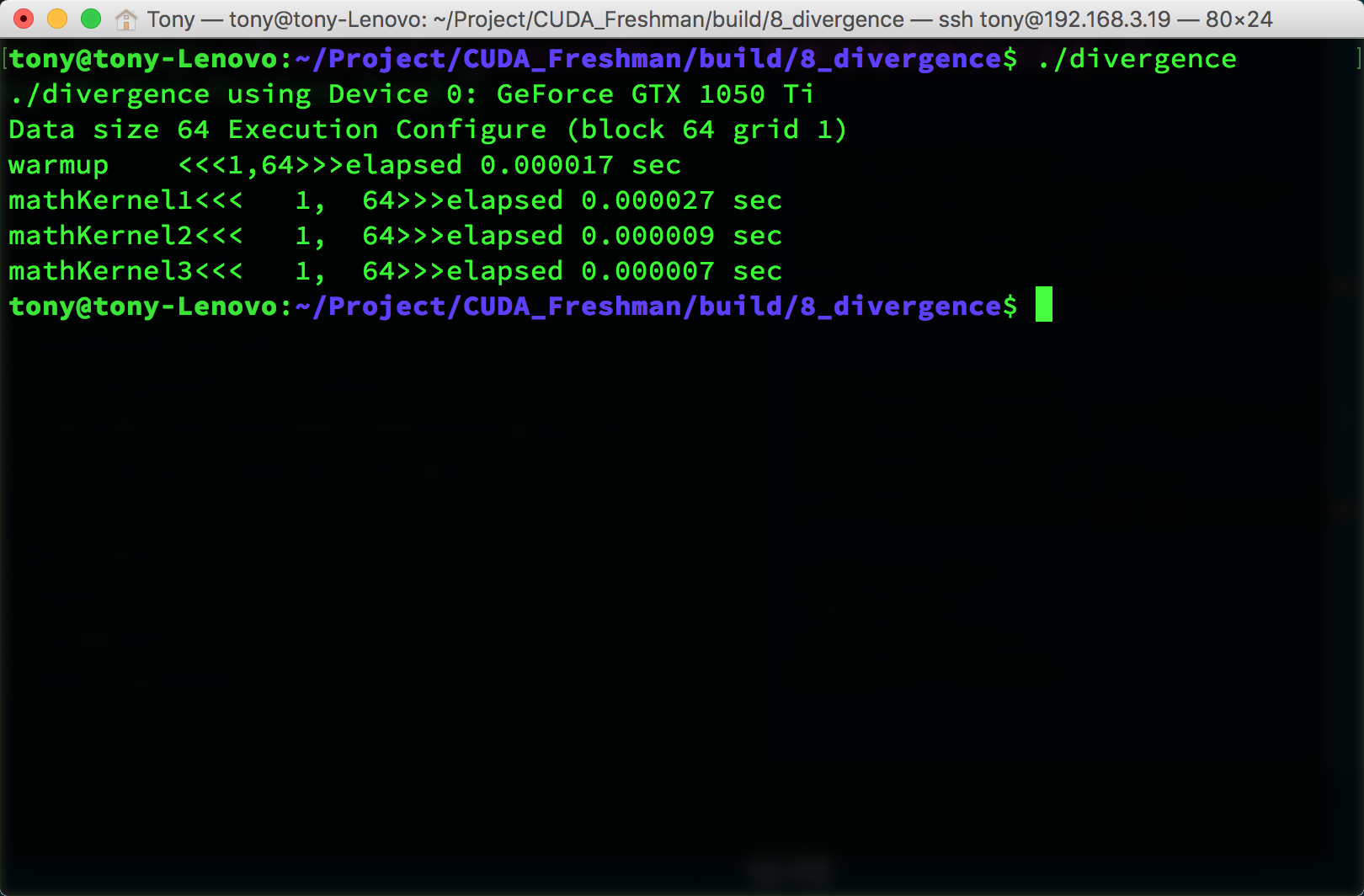
The warmup section in the code launches the GPU once beforehand because the first GPU launch is slower than the second. The exact reason is unknown -- you can look up CUDA technical documentation for more information. We can use nvprof to analyze the program's execution:
nvprof --metrics branch_efficiency ./divergence
This gives the following parameters:
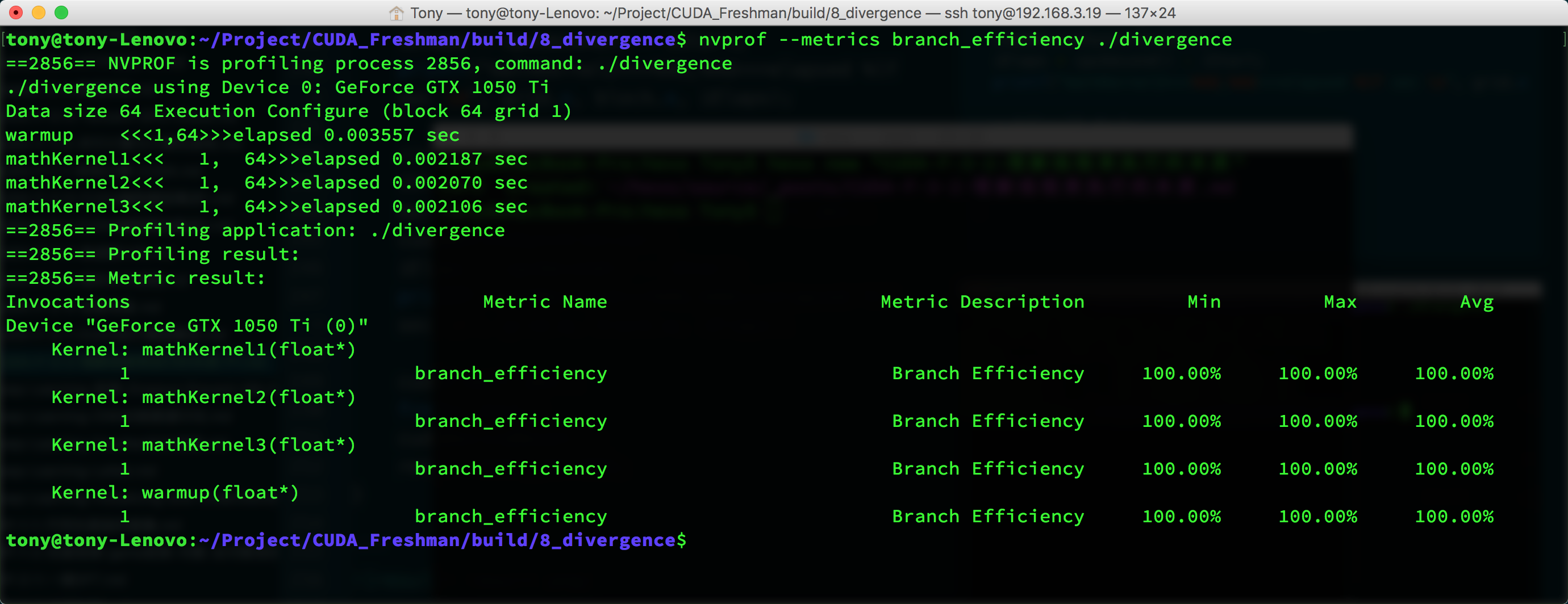
You can see that all kernels have 100% branch efficiency. This value is calculated as:
Branch Efficiency = (Branches - DivergentBranches) / Branches
But there's a problem -- kernel1 should have 50% branch efficiency, so why is the test result 100%?
Because the compiler optimized it for us. We won't go into the specific reasons in the Freshman series. We'll dive deeper in the next series, so consider this a placeholder for now.
But if we use another approach, the compiler won't optimize:
// kernel 3
__global__ void mathKernel3(float *c)
{
	int tid = blockIdx.x * blockDim.x + threadIdx.x;
	float a = 0.0;
	float b = 0.0;
	bool ipred = (tid % 2 == 0);
	if (ipred)
	{
		a = 100.0f;
	}
	else
	{
		b = 200.0f;
	}
	c[tid] = a + b;
}
The execution result is still the image above, which already includes kernel3. We can also disable branch prediction through compilation options, which makes kernel1 and kernel3 have similar efficiency. Using nvprof gives the following result, without optimization:
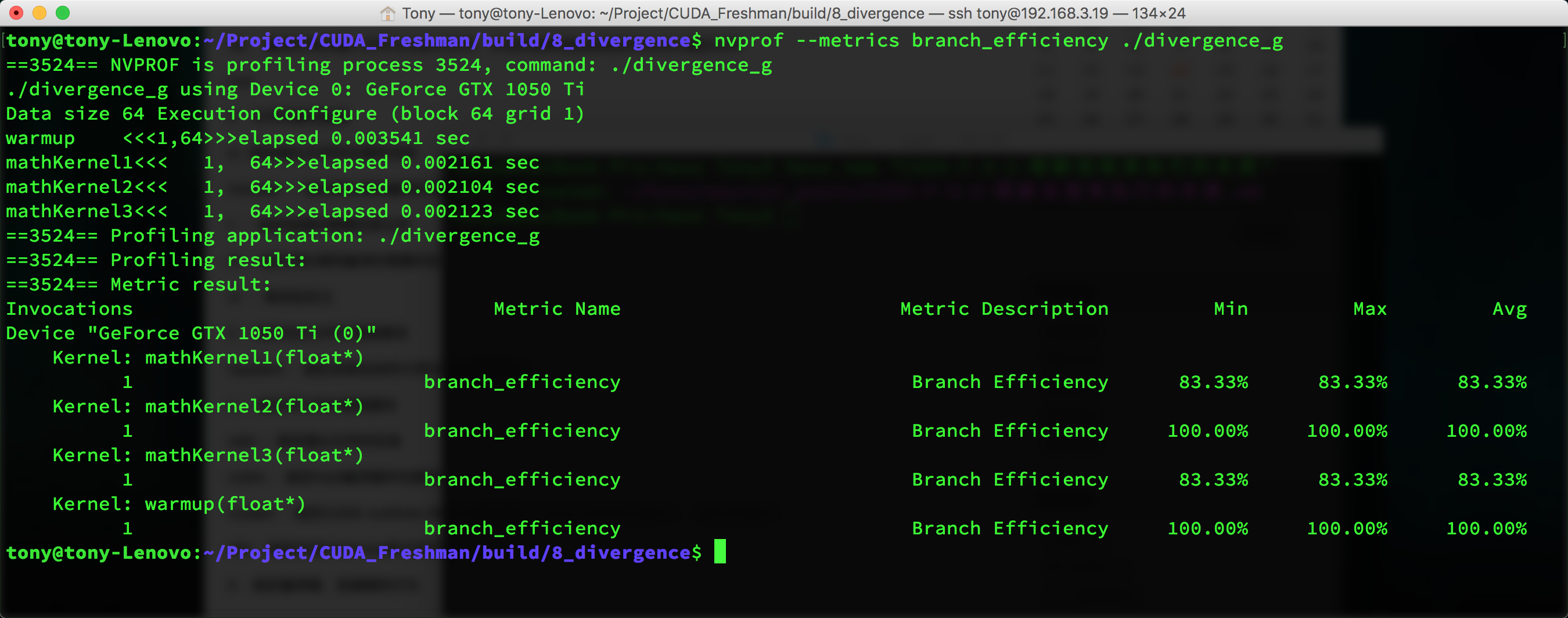
This is basically consistent with our predictions.
Let's look at event counters:
nvprof --events branch,divergent_branch ./divergence_g
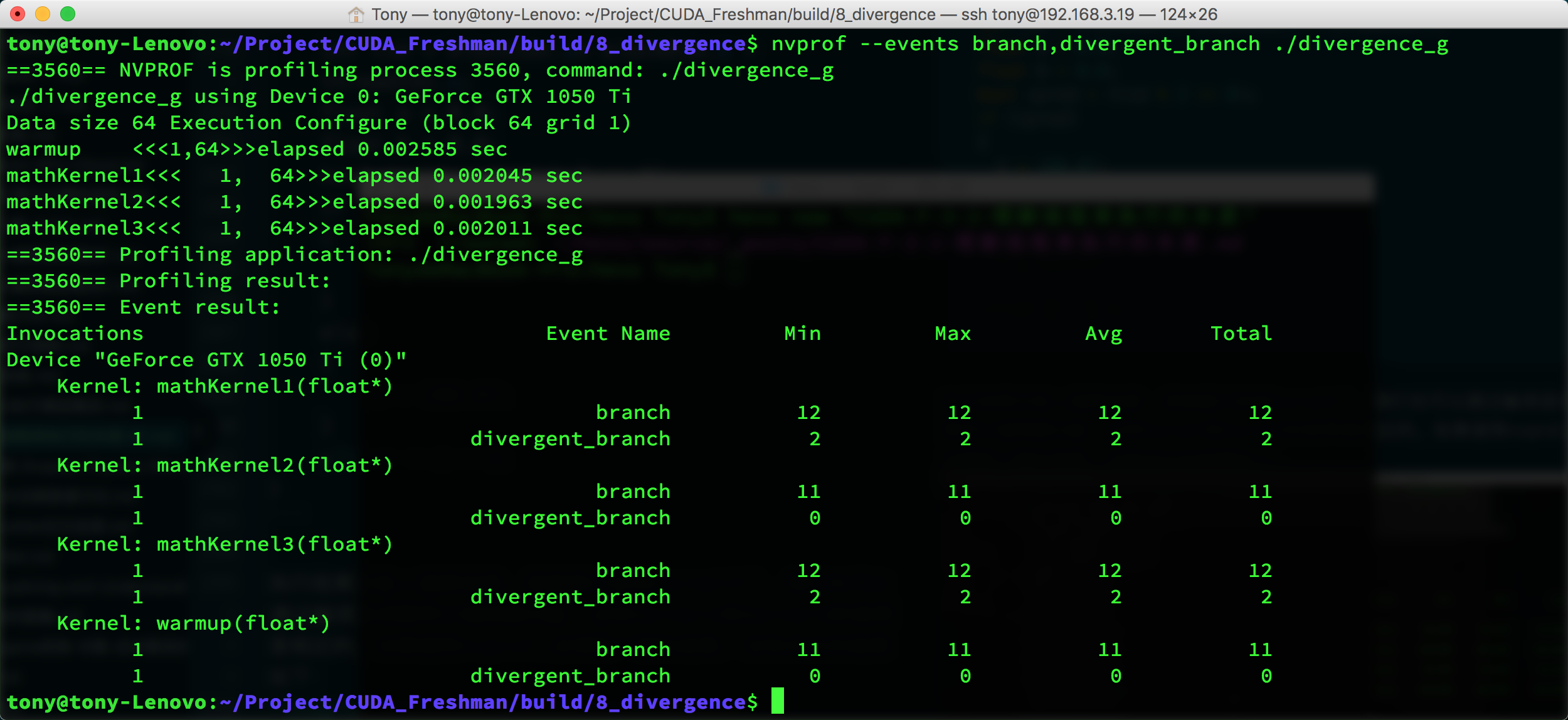
nvcc has limited optimization on 1 and 3, but utilization still exceeds 50%.
Events and Metrics
Above we mentioned events. Events are countable activities -- for example, a branch is a countable activity corresponding to a hardware counter collected during kernel execution.
Metrics are kernel characteristics computed from one or more events.
Summary
Today we introduced part of the branching topic. We'll continue with the rest in the next article.