3.1 CUDA Execution Model Overview
2018-03-12 | CUDA , Freshman | 0 |
Abstract: This article introduces the CUDA execution model -- an abstraction just one level above the hardware. Keywords: CUDA SM, SIMT, SIMD, Fermi, Kepler
CUDA Execution Model Overview
This article begins our approach to the most core part of CUDA -- the hardware and program execution model. The purpose of using CUDA is straightforward: fast computation. Squeezing performance and improving efficiency is the ultimate goal of learning CUDA. Nobody learns CUDA to display Hello World.
In the previous articles, we learned about writing and launching kernel functions, timing, and measuring execution time. Then we learned about thread and memory models. We'll cover thread and memory in much greater detail in several chapters later. This chapter introduces the lowest-level, most theoretically guided knowledge.
When we design programs along the lines of hardware design, we get optimal performance. When we deviate from the hardware design approach, we get poor results.
Overview
The CUDA execution model reveals an abstract view of the GPU's parallel architecture. When hardware is designed, its features and capabilities are already planned, and then the hardware is developed. If during this process, model features or capabilities conflict with the hardware design, both sides negotiate and compromise until the final product is finalized for mass production. These features and capabilities form the foundation of programming model design, and the programming model directly reflects the hardware design, thus reflecting the hardware characteristics of the device.
For example, the most intuitive one is the hierarchical structure of memory and threads that helps us control massive parallelism. This characteristic was originally designed at the hardware level, then integrated circuit engineers implemented it. After finalization, programmers developed drivers, and at the upper level, this execution model can be directly used to control the hardware.
Therefore, understanding the CUDA execution model can help us optimize instruction throughput and memory usage to achieve maximum speed.
GPU Architecture Overview
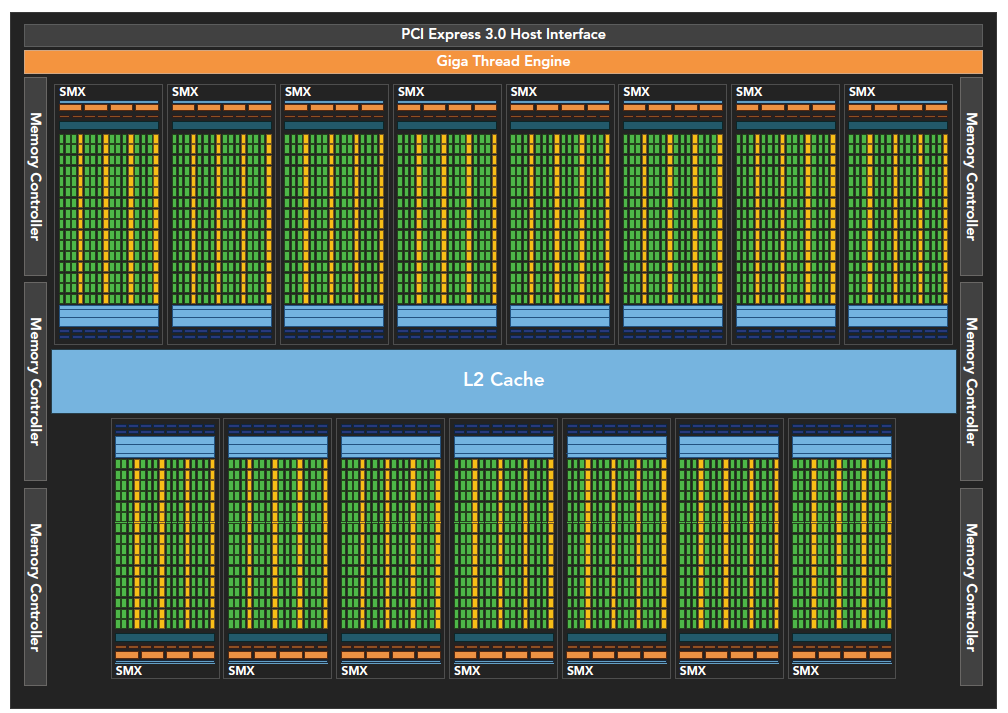
The GPU architecture is built around an expanding array of Streaming Multiprocessors (SMs). Hardware parallelism in GPUs is achieved by replicating this structure.
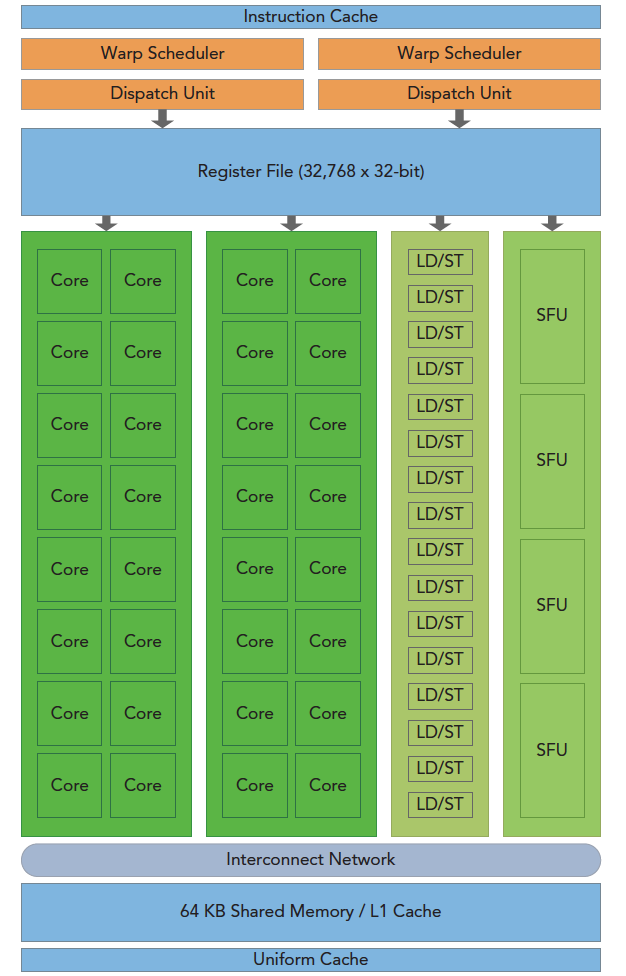
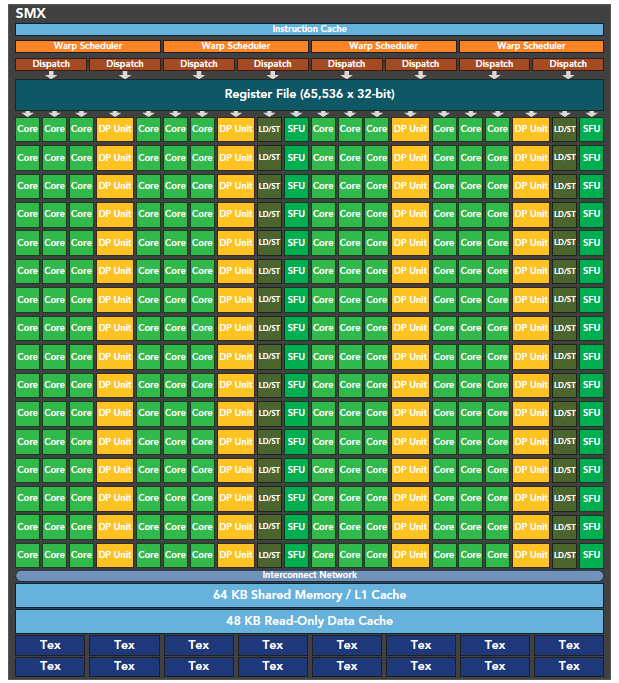
The above figure includes key components:
- CUDA cores
- Shared memory / L1 cache
- Register file
- Load/Store units
- Special Function Units
- Warp scheduler
SM
Each SM in the GPU can support hundreds of concurrent threads. Each GPU typically has multiple SMs. When a kernel's grid is launched, multiple blocks are simultaneously assigned to available SMs for execution.
Note: Once a block is assigned to an SM, it can only execute on that SM -- it cannot be reassigned to another SM. Multiple thread blocks can be assigned to the same SM.
On an SM, multiple threads within the same block perform thread-level parallelism. Within a single thread, instructions use instruction-level parallelism to pipeline the processing of individual threads.
Warp
CUDA uses the Single Instruction, Multiple Threads (SIMT) architecture to manage execution threads. Different devices have different warp sizes, but so far essentially all devices maintain it at 32. That is, each SM has multiple blocks, and each block has multiple threads (could be hundreds, but not exceeding some maximum). However, from the machine's perspective, at any given time T, the SM executes only one warp -- 32 threads executing synchronously. Each thread in a warp executes the same instruction, including branched sections, which we'll discuss later.
SIMD vs SIMT
Single Instruction, Multiple Data (SIMD) execution belongs to vector machines. For example, if we have four numbers to add to four numbers, we can use this SIMD instruction to complete what would otherwise be four operations in one step. The problem with this mechanism is that it's too rigid -- it doesn't allow different branches to have different operations. All branches must simultaneously execute the same instruction, no exceptions.
In comparison, Single Instruction, Multiple Threads (SIMT) is more flexible. Although both broadcast the same instruction to multiple execution units, SIMT allows certain threads to choose not to execute. That is, at the same moment, all threads are assigned the same instruction, but SIMD mandates everyone must execute, while SIMT allows some to not execute as needed. This way, SIMT ensures thread-level parallelism, while SIMD is more like instruction-level parallelism.
SIMT includes the following key features that SIMD does not have:
- Each thread has its own instruction address counter
- Each thread has its own register state
- Each thread can have an independent execution path
These three features are available in the programming model by giving each thread a unique label (blockIdx, threadIdx), and these three features ensure independence among threads.
32
32 is a magic number. Its existence is a result of hardware system design -- the integrated circuit engineers created it, so software engineers can only accept it.
Conceptually, 32 is the granularity of work that an SM processes simultaneously in SIMD fashion. To understand this: at any given moment on an SM, 32 threads execute the same instruction, and these 32 threads can selectively execute. Although some may not execute, they also cannot execute other instructions -- they must wait for the threads that need to execute this instruction to finish, and then proceed to the next one. It's like a teacher distributing fruit to children:
First time, apples are distributed to all 32 children. You can choose not to eat, but if you don't eat, there's nothing else -- you can only watch others eat. When everyone finishes eating, the teacher collects the uneaten apples to prevent waste.
Second time, oranges are distributed. You love them, but some other children don't. Of course, those children can't do anything else either -- they can only watch you eat. After eating, the teacher collects the uneaten oranges.
Third time, peaches are distributed. Everyone loves them, so everyone eats together. After eating, the teacher finds there are no leftovers and continues distributing other fruits, until all types of fruit have been distributed. Then school's out for the day.
A simple analogy, but the process works just like this.
CUDA Programming Components and Logic
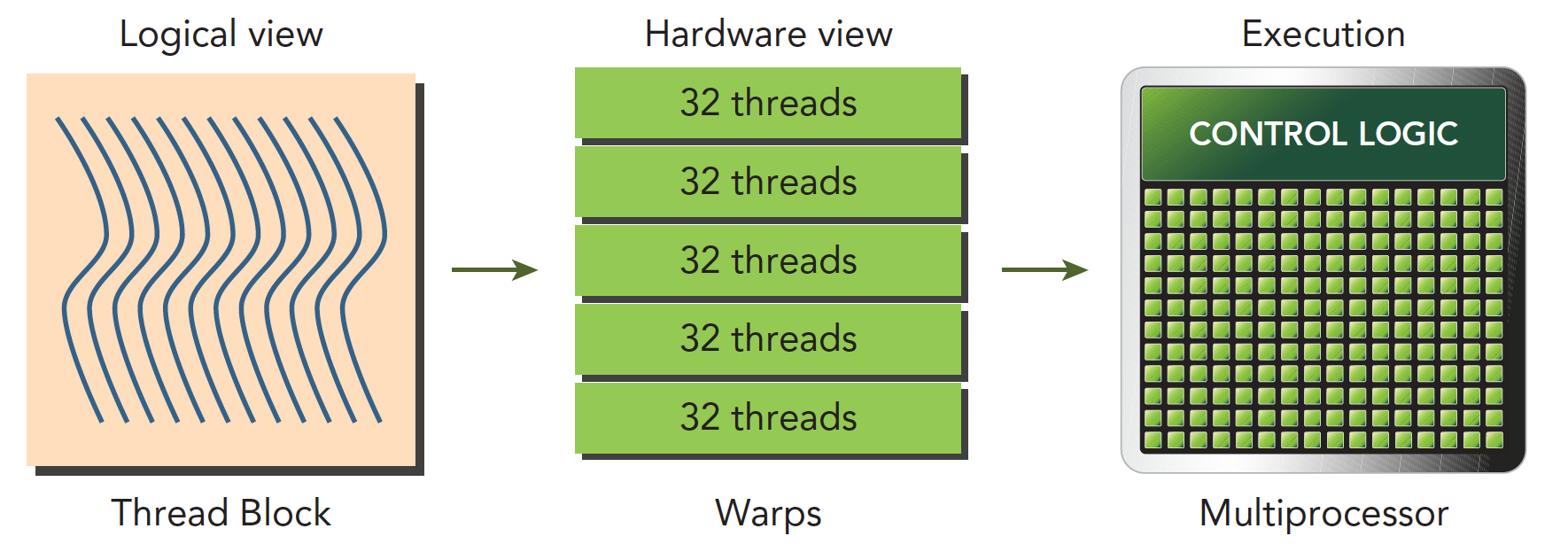
The following diagram describes the components corresponding to the CUDA programming model from both logical and hardware perspectives.
Shared memory and registers in the SM are critical resources. Threads within a thread block communicate and coordinate through shared memory and registers. The allocation of registers and shared memory can seriously affect performance!
Because SMs are limited, although at the programming model level all threads appear to execute in parallel, at the microscopic level, all thread blocks execute in batches on the physical machine. Different threads within a thread block may have different progress, but threads within the same warp share the same progress.
Parallelism leads to contention. Multiple threads accessing the same data in an undefined order leads to unpredictable behavior. CUDA only provides a way to synchronize within a block -- there's no way to synchronize between blocks!
An SM can have more than one resident warp. Some are executing, some are waiting. The state transition between them has no overhead.
Fermi Architecture
The Fermi architecture was the first complete GPU architecture, so understanding this architecture is very necessary. Just like how decades later, our microcomputer principles courses still teach the 386 -- the ancestor's genes are passed down through generations. Master the ancestors, and all descendants become easy to grasp.
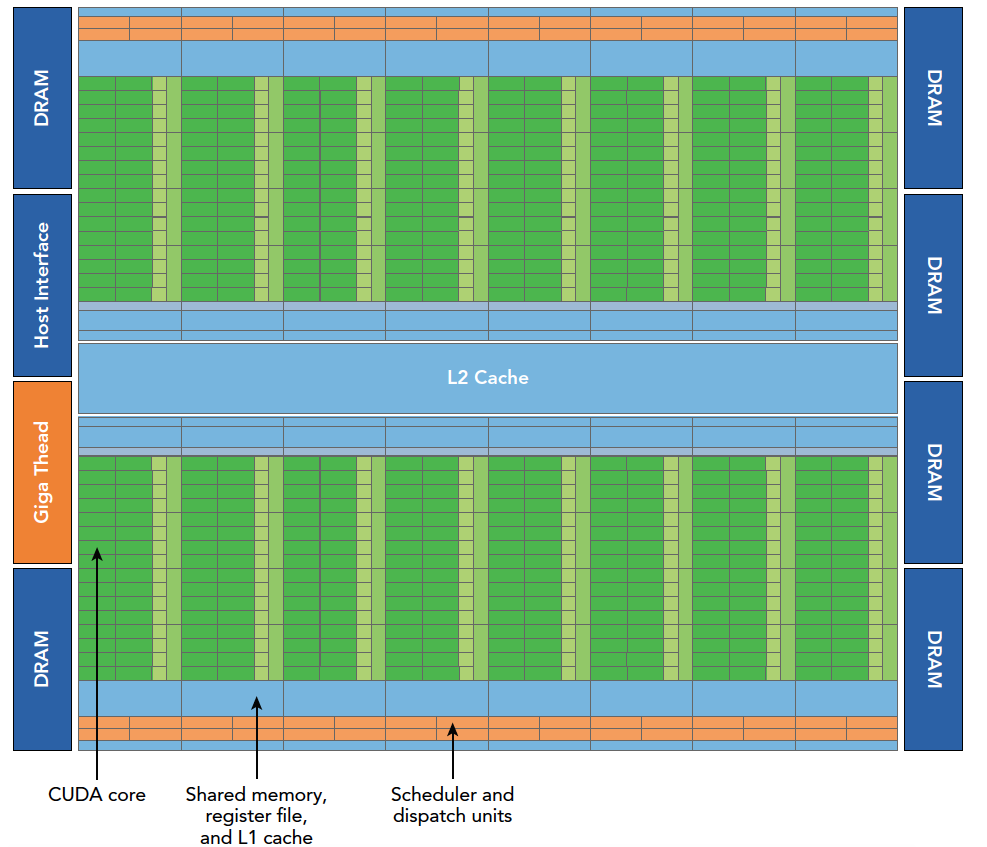
The Fermi architecture logic diagram is shown above. Specific details:
- 512 accelerator cores, CUDA cores
- Each CUDA core has a fully pipelined integer ALU and a floating-point unit FPU
- CUDA cores are organized into 16 SMs
- Six 384-bit GDDR5 memory interfaces
- Support for 6GB of global onboard memory
- GigaThread engine for distributing thread blocks to SM warp schedulers
- 768KB L2 cache, shared by all SMs
An SM includes the following resources:
- Execution units (CUDA cores)
- Warp schedulers and dispatch units for scheduling warps
- Shared memory, register file, and L1 cache
Each SM has 16 load/store units, so each clock cycle, 16 threads (half a warp) compute source and destination addresses.
The Special Function Unit (SFU) executes transcendental instructions such as sine, cosine, square root, and interpolation. The SFU executes one transcendental instruction per thread per clock cycle.
Each SM has two warp schedulers and two instruction dispatch units. When a thread block is assigned to an SM, all threads in the block are divided into warps. The two warp schedulers select two warps, and instruction dispatchers store the instructions for these two warps to execute (just like the fruit distribution example above -- we have two classes here, and each class teacher controls their own fruit; the teacher is the instruction dispatcher).
As shown in the first image, every 16 CUDA cores form a group, along with 16 load/store units or 4 special function units. When a thread block is assigned to an SM, it's divided into multiple warps. Warps execute alternately on the SM:
As mentioned earlier, each warp executes the same instruction at the same time. Switching between warps within the same block has no time overhead.
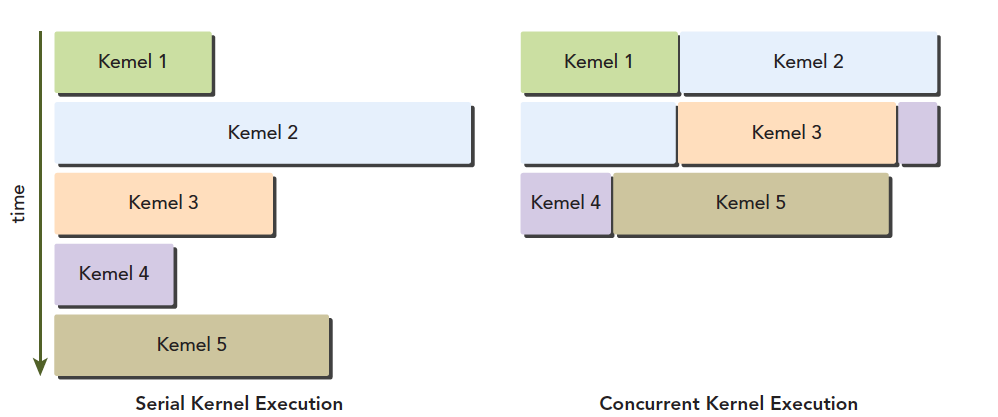
Fermi supports concurrent kernel execution. Concurrent kernel execution allows small kernel programs to fully utilize the GPU:
Kepler Architecture
As the successor to the Fermi architecture, the Kepler architecture has the following technological breakthroughs:
- Enhanced SM
- Dynamic Parallelism
- Hyper-Q technology
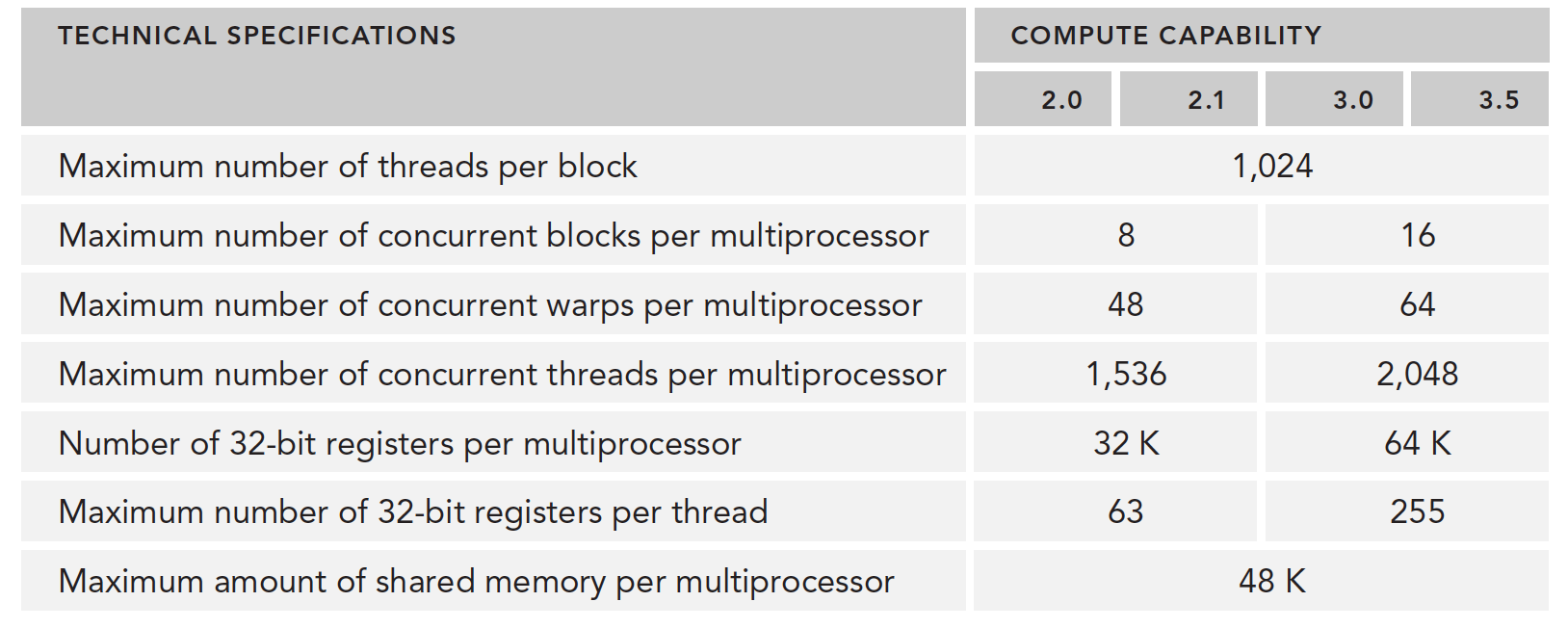
Technical specifications have also improved significantly, such as the number of CUDA cores per SM, SFU count, LD/ST count, etc.:
The most prominent feature of the Kepler architecture is that kernels can launch kernels. This enables us to use the GPU for simple recursive operations. The process is as follows:
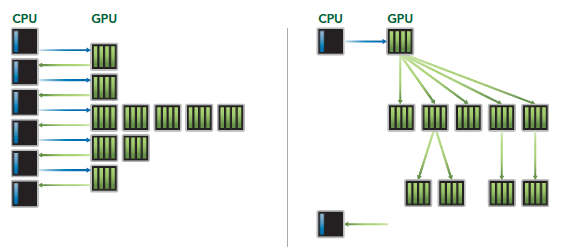
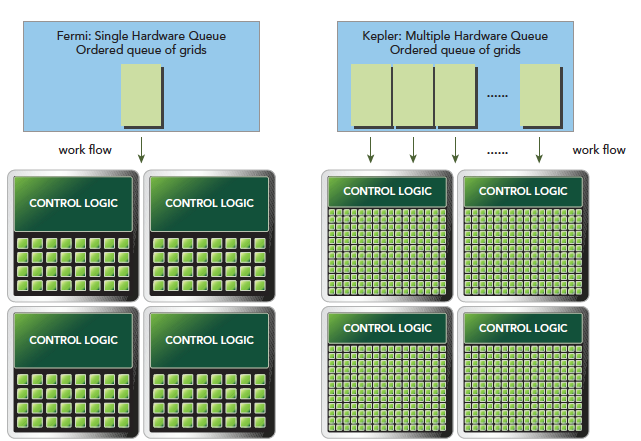
Hyper-Q technology mainly provides synchronous hardware connections between CPU and GPU to ensure the CPU can do more work while the GPU executes. Under the Fermi architecture, CPU control of the GPU had only one queue. With Kepler's Hyper-Q technology, multiple queues can be achieved:
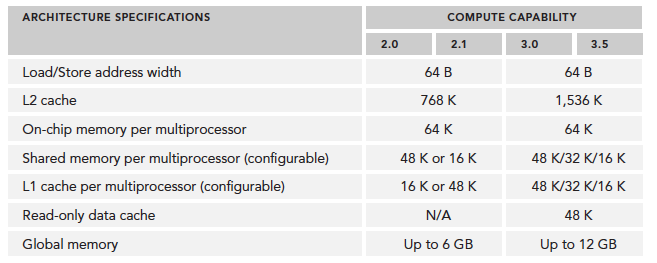
Compute capability overview:
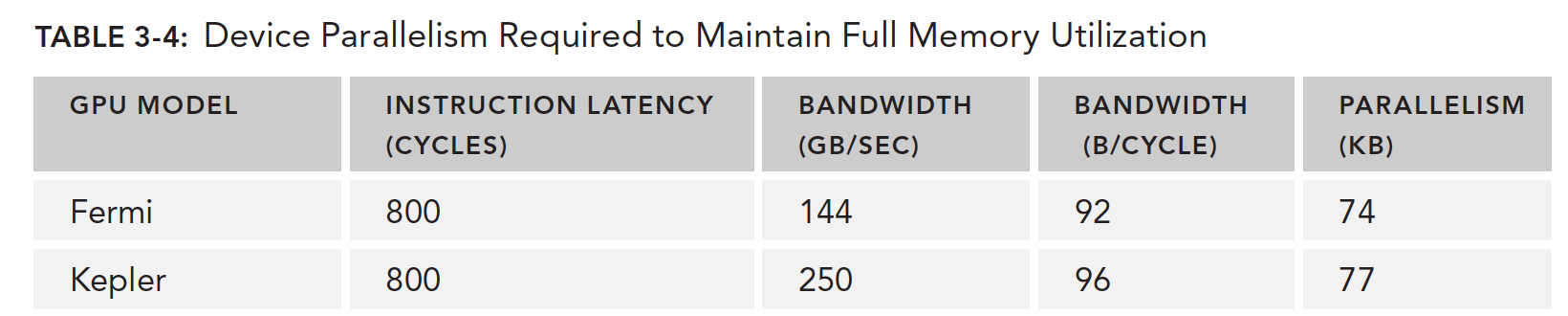
Profile-Driven Optimization
Performance analysis is conducted through the following methods:
- Spatial (memory) or time complexity of application code
- Use of special instructions
- Frequency and duration of function calls
Program optimization is built on understanding both hardware and algorithm processes. If you understand neither and rely on trial and error, the results are predictable. Understanding the platform's execution model -- the hardware characteristics -- is the foundation of performance optimization.
Two steps for developing high-performance computing programs:
- Ensure correctness and program robustness
- Optimize speed
Profiling helps us observe the internals of our program:
- A naive kernel application generally won't produce optimal results -- we basically can't write the best, fastest kernel right away. We need profiling tools to analyze performance and find bottlenecks.
- CUDA distributes computing resources in an SM among multiple resident thread blocks. This distribution may cause some resources to become performance-limiting factors. Profiling tools can help us identify how these resources are being used.
- CUDA provides an abstraction of the hardware architecture. It allows users to control thread concurrency. Profiling tools can detect, optimize, and visualize optimizations.
In summary: if you want to optimize speed, first learn how to use profiling tools.
- nvvp
- nvprof
Factors that limit kernel performance include but are not limited to:
- Memory bandwidth
- Compute resources
- Instruction and memory latency
Summary
To write faster and better CUDA programs, learn the hardware execution model, learn to use testing tools, think more, summarize more, practice more, and you'll do better!