6.1 Stream and Event Overview
Published on 2018-06-10 | Category: CUDA , Freshman | Comments: 0 | Views:
Abstract: This article introduces the theoretical description of streams and events in CUDA.
Keywords: Streams, Events
Stream and Event Overview
In the previous chapters, we focused on the GPU device. Apart from studying host-side execution code in the kernel configuration section, our code was mostly device-side. In this chapter, we discuss how to optimize CUDA applications from the host side.
CUDA Stream: A series of asynchronous CUDA operations. Our common pattern involves allocating device memory on the host (cudaMalloc), transferring data from host to device (cudaMemcpy), launching kernel functions, and copying data back to the host (cudaMemcpy). Some of these operations are asynchronous, and execution order follows the host code sequence (but the completion of asynchronous operations does not necessarily follow the code order).
Streams can encapsulate these asynchronous operations, maintain operation order, and allow operations to be queued. They ensure operations start only after all preceding operations have launched. With streams, we can query the queued status.
The general operations we mentioned above can be divided into three categories:
- Data transfer between host and device
- Kernel function launches
- Other device-executed commands issued by the host
Operations in a stream are always asynchronous relative to the host. The CUDA runtime determines when operations can execute on the device. What we need to do is control these operations so that operations requiring results do not start until those results are available.
Different operations within a single stream have strict ordering. But different streams have no restrictions between them. Multiple streams launching multiple kernels simultaneously forms grid-level parallelism.
Operations queued in CUDA streams are asynchronous to the host, so the queuing process does not block the host from running other instructions, hiding the overhead of executing these operations.
A typical CUDA programming pattern -- the general pattern we described above:
- Copy input data from host to device
- Execute a kernel on the device
- Move results from device back to host
In typical production scenarios, kernel execution time is longer than data transfer time. However, our previous examples mostly had data transfer being more time-consuming, which is not realistic. When kernel execution and data transfer operations overlap, the time cost of data movement can be hidden. Of course, the data for the currently executing kernel must be copied to the device beforehand. The simultaneous data transfer and kernel execution mentioned here refers to currently transferred data being needed by kernels later in the stream. This way, total execution time is reduced.
Streams in CUDA API calls enable pipelining and double-buffering techniques.
CUDA APIs are also divided into synchronous and asynchronous types:
- Synchronous functions block the host thread until completion
- Asynchronous functions return control to the host immediately after the call
Asynchronous behavior and streams are the pillars of grid-level parallelism.
Although we have introduced the concept of streams and grid-level parallelism from the software model, we still only have one device. If the device is idle, it can execute multiple kernels simultaneously. But if the device is already running at full capacity, our supposedly parallel instructions must also queue and wait -- PCIe bus and SM count are limited. When they are fully occupied, streams can do nothing but wait.
Next, we will study how streams operate on devices with various compute capabilities.
CUDA Streams
All our CUDA operations take place in streams. Although we may not have noticed, the instructions and kernel launches in our previous examples all occurred in CUDA streams -- they were just implicit. So there must also be explicit streams. Streams are divided into:
- Implicitly declared streams, called the null stream
- Explicitly declared streams, called non-null streams
If we do not explicitly declare a stream, all our operations take place in the default null stream. All our previous examples were in the default null stream.
The null stream cannot be managed because it has no name (and seemingly no default name). So when we want to control streams, non-null streams are essential.
Stream-based asynchronous kernel launches and data transfers support the following types of coarse-grained concurrency:
- Overlapping host and device computation
- Overlapping host computation with host-device data transfer
- Overlapping host-device data transfer with device computation
- Concurrent device computation (multiple devices)
CUDA programming differs from regular C++ in that we have two "computable devices" -- the CPU and GPU. In this case, synchronization between them does not involve every instruction communicating execution progress. The device does not know what the host is doing, and the host does not fully know what the device is doing. But data transfer is synchronous -- the host must wait for the device to receive data before doing anything else. Think of it like your parent sending you a bag of rice and then staying on the phone asking "Have you received it?" until you say yes -- that is synchronous. Kernel launch is asynchronous -- your parent sends you 500 yuan via bank transfer, the bank says it will arrive tomorrow, and they can go home and do whatever they want without waiting at the bank overnight. You receive it the next day and call to let them know -- that is asynchronous. Asynchronous operations can overlap host and device computation.
The cudaMemcpy we used before is a synchronous operation. We also mentioned implicit synchronization -- copying result data from the device to the host requires waiting for the device to finish. Of course, data transfer has an asynchronous version:
cudaError_t cudaMemcpyAsync(void* dst, const void* src, size_t count,cudaMemcpyKind kind, cudaStream_t stream = 0);
The notable parameter is the last one -- stream. Normally set to the default stream. This function is asynchronous to the host, with control returning immediately after execution. Of course, we need to declare a non-null stream:
cudaError_t cudaStreamCreate(cudaStream_t* pStream);
Now we have a manageable stream. This code creates a stream. Those with C++ experience can see this allocates necessary resources for a stream. Declaring a stream is:
cudaStream_t a;
This declares a stream called a, but it cannot be used yet -- it only has a name. Resources still need to be allocated with cudaStreamCreate.
The following is extremely important:
When performing asynchronous data transfers, host-side memory MUST be pinned (non-pageable)!!
When performing asynchronous data transfers, host-side memory MUST be pinned (non-pageable)!!
When performing asynchronous data transfers, host-side memory MUST be pinned (non-pageable)!!
As mentioned in the memory model section, the allocation methods are:
cudaError_t cudaMallocHost(void **ptr, size_t size);
cudaError_t cudaHostAlloc(void **pHost, size_t size, unsigned int flags);
Data allocated in host virtual memory can be moved in physical memory at any time. We must ensure its position remains unchanged throughout its lifetime so that asynchronous operations can accurately transfer data. Otherwise, if the operating system moves the data's physical address, our device may still access the old physical address, causing undefined errors.
To execute kernels in a non-null stream, add an additional launch configuration when launching the kernel:
kernel_name<<<grid, block, sharedMemSize, stream>>>(argument list);
The stream parameter is the additional parameter. Use the target stream's name as the parameter. For example, to add a kernel to stream a, the stream parameter becomes a.
After allocating resources for a stream, we need to reclaim them:
cudaError_t cudaStreamDestroy(cudaStream_t stream);
This reclamation function is interesting. Since streams are asynchronous to the host, when you use the above instruction to reclaim stream resources, the stream may still be executing. This instruction will execute normally but will not immediately stop the stream. Instead, it waits for the stream to finish and then immediately reclaims the resources. This is both reasonable and safe.
Of course, we can query the stream's progress. The following two functions help us check:
cudaError_t cudaStreamSynchronize(cudaStream_t stream);
cudaError_t cudaStreamQuery(cudaStream_t stream);
These two functions behave very differently. cudaStreamSynchronize blocks the host until the stream completes. cudaStreamQuery returns immediately -- if the queried stream has completed, it returns cudaSuccess; otherwise, it returns cudaErrorNotReady.
The following example code shows a common pattern for scheduling CUDA operations across multiple streams:
for (int i = 0; i < nStreams; i++) {
    int offset = i * bytesPerStream;
    cudaMemcpyAsync(&d_a[offset], &a[offset], bytePerStream, streams[i]);
    kernel<<grid, block, 0, streams[i]>>(&d_a[offset]);
    cudaMemcpyAsync(&a[offset], &d_a[offset], bytesPerStream, streams[i]);
}
for (int i = 0; i < nStreams; i++) {
    cudaStreamSynchronize(streams[i]);
}
The first for loop executes nStreams streams, each performing the series "copy data, execute kernel, copy results back to host."
The figure below is a simple timeline diagram, assuming nStreams=3, with all transfers and kernel launches concurrent:
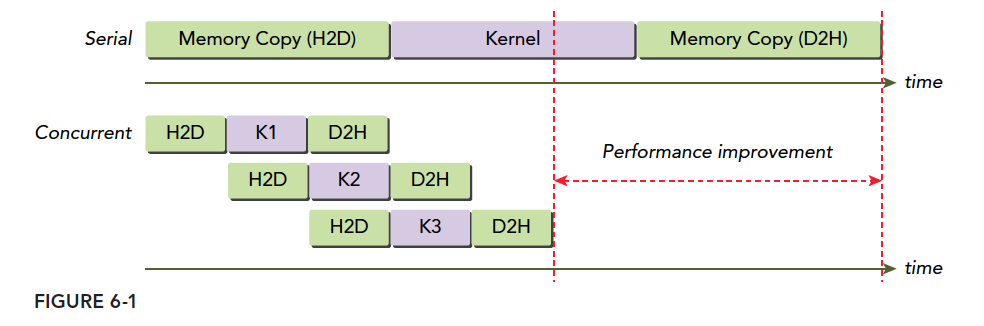
H2D is host-to-device memory transfer, D2H is device-to-host. Clearly, these operations are not concurrent but staggered. The reason is the PCIe bus is shared -- when the first stream occupies the bus, subsequent ones must wait for it to become free. There is a gap between the programming model and actual hardware execution.
When multiple host-to-device operations compete for hardware, waiting occurs. But when host-to-device and device-to-host happen simultaneously, no waiting occurs -- both proceed at the same time.
The maximum number of concurrent kernels is also limited. Different compute capabilities have different limits: Fermi supports 16-way concurrency, Kepler supports 32-way. All device resources limit concurrency -- shared memory, registers, local memory, etc.
Stream Scheduling
From the programming model, all streams can execute simultaneously. But hardware is limited and cannot support all streams like the ideal case. How hardware schedules these streams is key to understanding stream concurrency.
False Dependencies
On the Fermi architecture, 16 streams execute concurrently but all ultimately run on a single piece of hardware. Fermi has only one hardware work queue, so although they are parallel in the programming model, they are in a single queue (like serial) during hardware execution. When executing a grid, CUDA checks for task dependencies. If it depends on other results, execution must wait. A single pipeline can cause false dependencies:
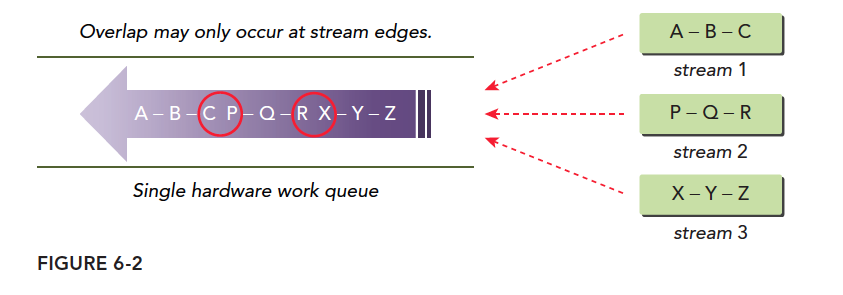
This diagram most accurately depicts false dependencies. We have three streams with operations that depend on each other -- B must wait for A's result, Z must wait for Y's result. When we pack three streams into one queue, we get the purple arrows. Tasks in this hardware queue can execute in parallel but must consider dependencies. Following the order:
- Execute A, simultaneously check if B has dependencies. B depends on A and A hasn't finished, so the entire queue blocks.
- After A finishes, execute B while checking C. Dependency found -- wait.
- After B finishes, execute C while checking. P has no dependencies -- if hardware has spare resources, P starts executing.
- During P's execution, check Q. Q depends on P -- wait.
This single-queue pattern creates the illusion that although P does not depend on B, P cannot execute until B finishes. Parallelism only occurs between the head and tail of a dependency chain -- tasks in the red circle may execute in parallel, which differs from our programming model's expectations.
Hyper-Q Technology
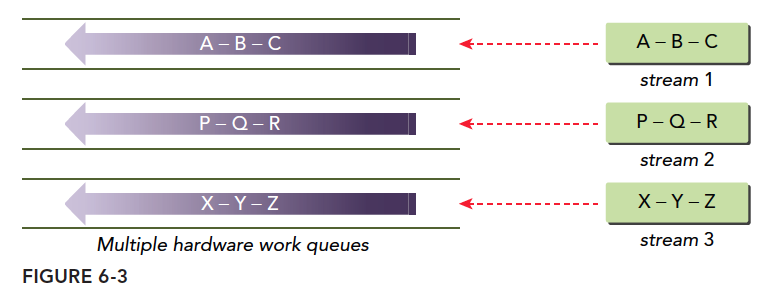
The best solution for false dependencies is multiple work queues, which fundamentally eliminates false dependencies. Hyper-Q is this technology -- 32 hardware work queues simultaneously execute multiple streams, enabling concurrency across all streams and minimizing false dependencies:
Stream Priority
Devices with compute capability 3.5 and above can set stream priorities -- higher priority streams (numerically smaller, similar to C++ operator precedence) take precedence.
Priority only affects kernel functions, not data transfers. High-priority streams can claim computational resources from low-priority streams.
The following function creates a stream with a specified priority:
cudaError_t cudaStreamCreateWithPriority(cudaStream_t* pStream, unsigned int flags,int priority);
Different devices have different priority levels. The following function queries the current device's priority distribution:
cudaError_t cudaDeviceGetStreamPriorityRange(int *leastPriority, int *greatestPriority);
leastPriority is the lowest priority (integer, far from 0).
greatestPriority is the highest priority (integer, closer to 0).
If the device does not support priorities, returns 0.
CUDA Events
CUDA events are different from the memory transactions described earlier -- do not confuse them. Events are also software-level concepts. An event is essentially a marker associated with a specific point in its stream. Events can be used for two basic tasks:
- Synchronizing stream execution
- Monitoring device progress
Events can be inserted at any point in a stream via API, along with functions to query event completion. An event only triggers completion when all operations preceding it in its stream are complete. For events set in the default stream, completion triggers only when all preceding operations are done.
Events are like road signs -- they do not perform any function themselves, much like the countless printf statements we inserted when first learning to test C programs.
Creation and Destruction
Event declaration:
cudaEvent_t event;
After declaration, allocate resources:
cudaError_t cudaEventCreate(cudaEvent_t* event);
Reclaim event resources:
cudaError_t cudaEventDestroy(cudaEvent_t event);
If the reclamation instruction executes before the event completes, it finishes immediately, and resources are reclaimed as soon as the event completes.
Recording Events and Measuring Execution Time
A primary use of events is recording time intervals between events.
Events are added to CUDA streams with:
cudaError_t cudaEventRecord(cudaEvent_t event, cudaStream_t stream = 0);
Events in streams primarily wait for preceding operations to complete or test completion of operations in a specified stream. The following event testing instruction (similar to the stream version) blocks the host thread until the event is complete:
cudaError_t cudaEventSynchronize(cudaEvent_t event);
There is also an asynchronous version:
cudaError_t cudaEventQuery(cudaEvent_t event);
This does not block the host thread but returns results directly, similar to the stream version.
Another function used with events records the time interval between two events:
cudaError_t cudaEventElapsedTime(float* ms, cudaEvent_t start, cudaEvent_t stop);
This function records the time interval between events start and stop, in milliseconds. The two events do not need to be in the same stream. The interval may be slightly larger than actual because cudaEventRecord is asynchronous -- execution timing is completely uncontrollable, and the interval between two events cannot be guaranteed to be exactly the time between them.
A simple example of recording event time intervals:
// create two events
cudaEvent_t start, stop;
cudaEventCreate(&start);
cudaEventCreate(&stop);
// record start event on the default stream
cudaEventRecord(start);
// execute kernel
kernel<<<grid, block>>>(arguments);
// record stop event on the default stream
cudaEventRecord(stop);
// wait until the stop event completes
cudaEventSynchronize(stop);
// calculate the elapsed time between two events
float time;
cudaEventElapsedTime(&time, start, stop);
// clean up the two events
cudaEventDestroy(start);
cudaEventDestroy(stop);
This code shows events inserted into the null stream, with two events as markers recording the time interval between them.
cudaEventRecord is asynchronous, so the interval may not be accurate -- pay special attention to this.
Stream Synchronization
When studying thread parallelism, we found that once parallelism begins, controlling it requires bringing everyone to a fixed stopping point -- synchronization. The benefit of synchronization is reducing the risk of potential memory races and enabling coordinated communication. The downside is reduced efficiency, because while some threads wait, some device resources are idle, causing performance loss.
Similarly, streams have synchronization. Let's study stream synchronization.
Streams are divided into blocking and non-blocking streams. In non-null streams, all operations are non-blocking, so after a stream starts, the host still needs to complete its own tasks. Sometimes synchronization between the host and streams, or between streams, is needed.
From the host's perspective, CUDA operations can be divided into two categories:
- Memory-related operations
- Kernel launches
Kernel launches are always asynchronous. Although some memory operations are synchronous, they also have asynchronous versions.
We mentioned two stream types earlier:
- Asynchronous streams (non-null streams)
- Synchronous streams (null stream / default stream)
Streams without explicit declaration are default synchronous streams. Explicitly declared streams are asynchronous streams. Asynchronous streams typically do not block the host. Some operations in synchronous streams cause blocking -- the host waits, doing nothing until the operation completes.
Non-null streams are not all non-blocking. They can be divided into two types:
- Blocking streams
- Non-blocking streams
Although non-null streams are normally asynchronous and do not block the host, they can sometimes be blocked by operations in the null stream. If a non-null stream is declared as non-blocking, nothing can block it. If declared as blocking, it can be blocked by the null stream.
This may be confusing. Non-null streams sometimes need to communicate with the host mid-execution. In such cases, we want them to be blockable rather than uncontrolled. So we can set whether a stream is controllable -- that is, whether it can be blocked.
Blocking and Non-Blocking Streams
cudaStreamCreate creates a blocking stream, meaning some operations will be blocked until certain operations in the null stream complete.
The null stream does not need explicit declaration -- it is implicit and blocking, synchronizing with all blocking streams.
The following process is important:
When operation A is issued to the null stream, before A executes, CUDA waits for all operations preceding A to be issued to blocking streams. All operations issued to blocking streams are suspended, waiting, until operations preceding this instruction complete before executing.
This is somewhat complex because it involves both the coding process and execution process. Let's look at an example:
kernel_1<<<1, 1, 0, stream_1>>>();
kernel_2<<<1, 1>>>();
kernel_3<<<1, 1, 0, stream_2>>>();
This code has three streams -- two named and one null stream. Assume stream_1 and stream_2 are blocking streams, and the null stream is blocking. All three kernels execute on blocking streams. Specifically: kernel_1 is launched, control returns to the host, then kernel_2 is launched. But kernel_2 will not execute immediately -- it waits until kernel_1 finishes. Similarly, after launching kernel_2, control returns immediately to the host, which launches kernel_3. kernel_3 also waits until kernel_2 finishes. But from the host's perspective, all three kernels are asynchronous -- control returns immediately after launch.
Then we want to create a non-blocking stream because the default is blocking:
cudaError_t cudaStreamCreateWithFlags(cudaStream_t* pStream, unsigned int flags);
The second parameter selects blocking or non-blocking:
cudaStreamDefault;// Default blocking stream
cudaStreamNonBlocking: // Non-blocking stream, null stream blocking behavior is disabled.
If stream_1 and stream_2 above were declared non-blocking, the result would be all three kernels executing simultaneously.
Implicit Synchronization
In previous chapters when timing kernels, we mentioned synchronization and that cudaMemcpy can implicitly synchronize. We also introduced:
cudaDeviceSynchronize;
cudaStreamSynchronize;
cudaEventSynchronize;
These are synchronization instructions for different objects. They are explicitly called, unlike the implicit synchronization above.
Implicit synchronization instructions have primary functions that are not synchronization -- the synchronization effect is implicit. We must pay close attention to this, as ignoring implicit synchronization causes performance degradation. Synchronization means blocking. Overlooked implicit synchronization is overlooked blocking. Implicit operations often appear in memory operations:
- Pinned host memory allocation
- Device memory allocation
- Device memory initialization
- Memory copy between two addresses on the same device
- L1 cache, shared memory configuration changes
These operations must always be handled carefully because their blocking behavior is very hard to notice.
Explicit Synchronization
Explicit synchronization is more straightforward -- one instruction, one purpose, no side effects. Common synchronization includes:
- Synchronizing the device
- Synchronizing streams
- Synchronizing events in streams
- Using events for cross-stream synchronization
The following function blocks the host thread until the device completes all operations:
cudaError_t cudaDeviceSynchronize(void);
We commonly use this function but should minimize its use as it slows efficiency.
Then the stream version. We can synchronize streams with:
cudaError_t cudaStreamSynchronize(cudaStream_t stream);
cudaError_t cudaStreamQuery(cudaStream_t stream);
The first synchronizes a stream, blocking the host until completion. The second enables non-blocking stream testing -- testing whether a stream has completed.
For events, their purpose is setting markers in streams for synchronization and checking whether execution has reached key points (event locations):
cudaError_t cudaEventSynchronize(cudaEvent_t event);
cudaError_t cudaEventQuery(cudaEvent_t event);
These functions behave similarly to the above.
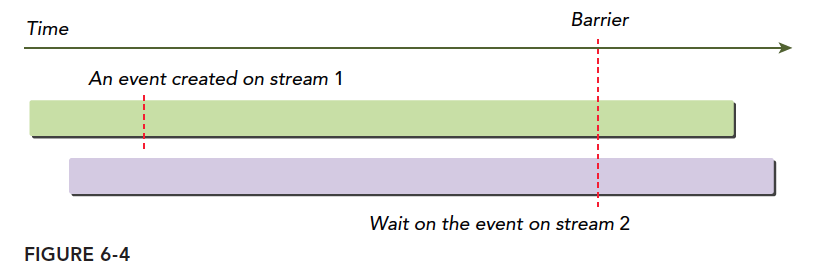
Events provide a method for cross-stream synchronization:
cudaError_t cudaStreamWaitEvent(cudaStream_t stream, cudaEvent_t event);
This command means the specified stream waits for the specified event. The stream can only continue after the event completes. The event can be in this stream or another. When in different streams, this achieves cross-stream synchronization.
As shown:
Configurable Events
CUDA provides a function for controlling event behavior and performance:
cudaError_t cudaEventCreateWithFlags(cudaEvent_t* event, unsigned int flags);
Parameters are:
cudaEventDefault
cudaEventBlockingSync
cudaEventDisableTiming
cudaEventInterprocess
cudaEventBlockingSync specifies that using cudaEventSynchronize will cause the calling thread to block. By default, cudaEventSynchronize uses CPU cycles to repeatedly query event status. When cudaEventBlockingSync is specified, the query is placed in another thread while the original thread continues executing. Only when the event condition is met is the original thread notified. This reduces CPU waste but introduces some latency due to communication time.
cudaEventDisableTiming indicates the event is not used for timing, reducing unnecessary system overhead and improving cudaStreamWaitEvent and cudaEventQuery efficiency.
cudaEventInterprocess indicates the event may be used between processes.
Summary
This article is heavy on theory with little verification. If it is hard to understand, try looking at the following examples first, then return to study the theory.