4.2 Memory Management
Published on 2018-05-01 | Category: CUDA, Freshman | Comments: 0 | Views:
Abstract: This article mainly introduces CUDA memory management and the characteristics of various types of memory in the CUDA memory model.
Keywords: CUDA Memory Management, CUDA Memory Allocation and Release, CUDA Memory Transfer, Pinned Memory, Zero-Copy Memory, Unified Virtual Addressing, Unified Memory Addressing
Memory Management
Confusion and uncertainty can hinder our progress. Completely eliminating them may not be possible, but we must recognize the power of conviction. Focus on what you are passionate about, and you will find your way through the fog.
The purpose of CUDA programming is to accelerate our programs, especially for machine learning and artificial intelligence computations that CPUs cannot perform efficiently. At the end of the day, we are controlling hardware. Languages for controlling hardware are low-level languages, like C, and the most headache-inducing aspect is memory management. Languages like Python and PHP have their own memory management mechanisms. C's memory management mechanism -- the programmer manages it. The advantage is that it is extremely difficult to learn, but once you master it, you will find it incredibly satisfying because of the freedom -- you can control the computer's computation process at will. CUDA is an extension of the C language, and in terms of memory, it essentially integrates C's approach, with the programmer controlling CUDA memory. Of course, the physical device for this memory is on the GPU, and unlike CPU memory allocation where allocation is a one-time operation, GPU also involves data transfer -- transfers between host and device.
What we need to understand next is:
- Allocating and freeing device memory
- Transferring memory between host and device
To achieve optimal performance, CUDA provides functions for preparing device memory on the host side, explicitly transferring data to the device, and explicitly retrieving data from the device.
Memory Allocation and Release
We have already used memory allocation and release many times before. All the computation examples we have seen include this step:
cudaError_t cudaMalloc(void ** devPtr, size_t count)
This function has been used many times. The only thing to note is the first parameter, which is a pointer to a pointer. The general usage is that we first declare a pointer variable, then call this function:
float * devMem = NULL;
cudaError_t cudaMalloc((void**) &devMem, count);
Here, devMem is a pointer, initialized to NULL at definition. This is safe and avoids wild pointers. The cudaMalloc function needs to modify the value of devMem, so its address must be passed to the function. If devMem itself is passed as a parameter, after the function returns, the pointer's content will still be NULL.
This mechanism may need some explanation: if you want a parameter to be modified inside a function, you must pass its address to the function. If you only pass the value itself, the function uses pass-by-value and will not change the parameter's value.
Memory allocation supports all data types, including int, float, etc. This does not matter because allocation is done in bytes -- any variable whose size is a positive integer number of bytes can be allocated.
If the function fails, it returns: cudaErrorMemoryAllocation.
After allocation, you can use the following function for initialization:
cudaError_t cudaMemset(void * devPtr, int value, size_t count)
Usage is similar to memset, but note that the memory we are operating on corresponds to physical memory on the GPU.
When allocated memory is no longer needed, use the following statement to free it:
cudaError_t cudaFree(void * devPtr)
Note that this parameter must be memory allocated by cudaMalloc or similar functions (there are other allocation functions). If an invalid pointer parameter is provided, a cudaErrorInvalidDevicePointer error is returned. Attempting to free the same space twice will also result in an error.
So far, the approach is basically the same as C. However, device memory allocation and release significantly impact performance, so reuse memory as much as possible!
Memory Transfer
Next, we introduce something that C does not have. In C, after memory allocation, you can directly read and write it. But for heterogeneous computing, this does not work because host threads cannot access device memory, and device threads cannot access host memory. This is where we need to transfer data:
cudaError_t cudaMemcpy(void *dst, const void * src, size_t count, enum cudaMemcpyKind kind)
This function has been used repeatedly before. Note that the parameters here are pointers, not pointers to pointers. The first parameter dst is the destination address, the second parameter src is the source address, followed by the memory size to copy, and finally the transfer type. Transfer types include:
- cudaMemcpyHostToHost
- cudaMemcpyHostToDevice
- cudaMemcpyDeviceToHost
- cudaMemcpyDeviceToDevice
Four methods, all self-explanatory. The only slightly questionable one is host-to-host, which was likely designed for certain special application scenarios.
This example needs no further explanation -- you can find any previous example with data transfer and it will have these two steps: from host to device, then computation, and finally from device to host.
Code omitted, here is an image:
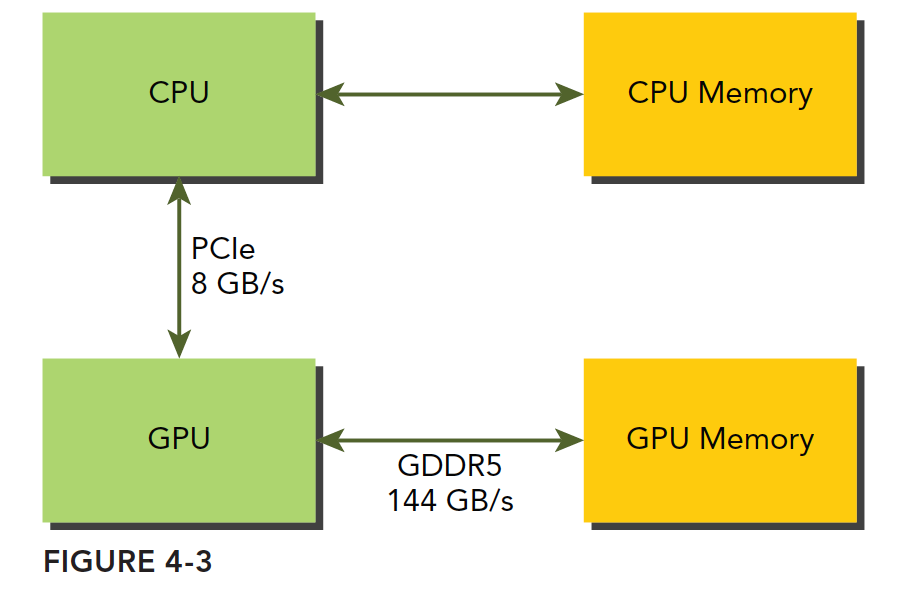
GPU memory uses DDR5 format, while host memory at the time (2011) was mainly DDR3, with DDR4 coming later. However, GPUs have always used higher-specification memory, primarily because GPUs require higher memory bandwidth. The point we want to make is that GPU memory has a very high theoretical peak bandwidth -- for the Fermi C2050 it is 144 GB/s, a value that current GPUs should all exceed. Communication between CPU and GPU goes through the PCIe bus, which has a much lower theoretical peak -- around 8 GB/s. This means that if management is poor and the system needs to read data from the host mid-computation, efficiency will be instantly limited by PCIe.
CUDA programming requires reducing memory transfers between host and device.
Pinned Memory
Host memory uses paged management. In simple terms, the operating system divides physical memory into "pages" and gives an application a large block of memory, but this large block may span non-contiguous pages. The application can only see virtual memory addresses, and the operating system may swap physical page addresses at any time (copying from the original address to another) without the application noticing. However, when transferring from host to device, if a page move occurs during the transfer, it would be fatal. Therefore, before data transfer, the CUDA driver will lock the pages, or directly allocate pinned host memory, copy the host source data to the pinned memory, and then transfer data from the pinned memory to the device:
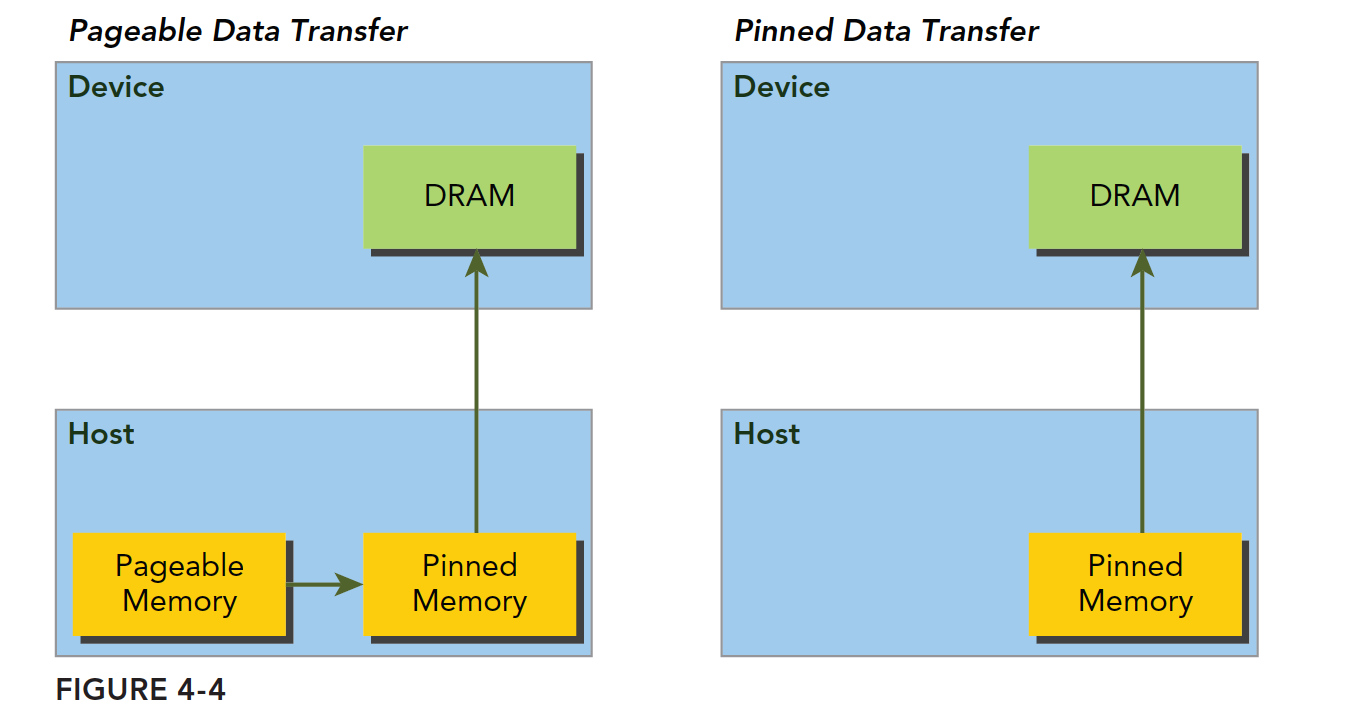
In the figure above, the left side shows normal memory allocation. The transfer process is: lock pages -> copy to pinned memory -> copy to device.
The right side shows pinned memory allocated from the start, transferring directly to the device.
The following function allocates pinned memory:
cudaError_t cudaMallocHost(void ** devPtr, size_t count)
Allocates count bytes of pinned memory. This memory is page-locked and can be transferred to the device more efficiently, which significantly increases transfer bandwidth.
Pinned host memory is freed using:
cudaError_t cudaFreeHost(void *ptr)
We can test the transfer efficiency of pinned memory versus paged memory. The code is as follows:
#include <cuda_runtime.h>
#include <stdio.h>
#include "freshman.h"

void sumArrays(float * a, float * b, float * res, const int size)
{
    for(int i = 0; i < size; i += 4)
    {
        res[i] = a[i] + b[i];
        res[i+1] = a[i+1] + b[i+1];
        res[i+2] = a[i+2] + b[i+2];
        res[i+3] = a[i+3] + b[i+3];
    }
}

__global__ void sumArraysGPU(float*a, float*b, float*res)
{
    int i = blockIdx.x * blockDim.x + threadIdx.x;
    res[i] = a[i] + b[i];
}

int main(int argc, char **argv)
{
    int dev = 0;
    cudaSetDevice(dev);

    int nElem = 1 << 14;
    printf("Vector size:%d\n", nElem);
    int nByte = sizeof(float) * nElem;
    float *a_h = (float*)malloc(nByte);
    float *b_h = (float*)malloc(nByte);
    float *res_h = (float*)malloc(nByte);
    float *res_from_gpu_h = (float*)malloc(nByte);
    memset(res_h, 0, nByte);
    memset(res_from_gpu_h, 0, nByte);

    float *a_d, *b_d, *res_d;
    // pinned memory malloc
    CHECK(cudaMallocHost((void**)&a_d, nByte));
    CHECK(cudaMallocHost((void**)&b_d, nByte));
    CHECK(cudaMalloc((void**)&res_d, nByte));

    initialData(a_h, nElem);
    initialData(b_h, nElem);

    CHECK(cudaMemcpy(a_d, a_h, nByte, cudaMemcpyHostToDevice));
    CHECK(cudaMemcpy(b_d, b_h, nByte, cudaMemcpyHostToDevice));

    dim3 block(1024);
    dim3 grid(nElem/block.x);
    sumArraysGPU<<<grid, block>>>(a_d, b_d, res_d);
    printf("Execution configuration<<<%d,%d>>>\n", grid.x, block.x);

    CHECK(cudaMemcpy(res_from_gpu_h, res_d, nByte, cudaMemcpyDeviceToHost));
    sumArrays(a_h, b_h, res_h, nElem);

    checkResult(res_h, res_from_gpu_h, nElem);
    cudaFreeHost(a_d);
    cudaFreeHost(b_d);
    cudaFree(res_d);

    free(a_h);
    free(b_h);
    free(res_h);
    free(res_from_gpu_h);

    return 0;
}
Note that this kernel function will be used by all programs in this article. Today's focus is on the host memory allocation part, so we chose the simplest kernel. Just observe the efficiency.
Using:
nvprof ./pinned_memory
If you get the error:
Error: CUDA profiling error.
Try running with root privileges. If root does not have the nvprof program, use the full path as shown in the figure, or add it to your path.
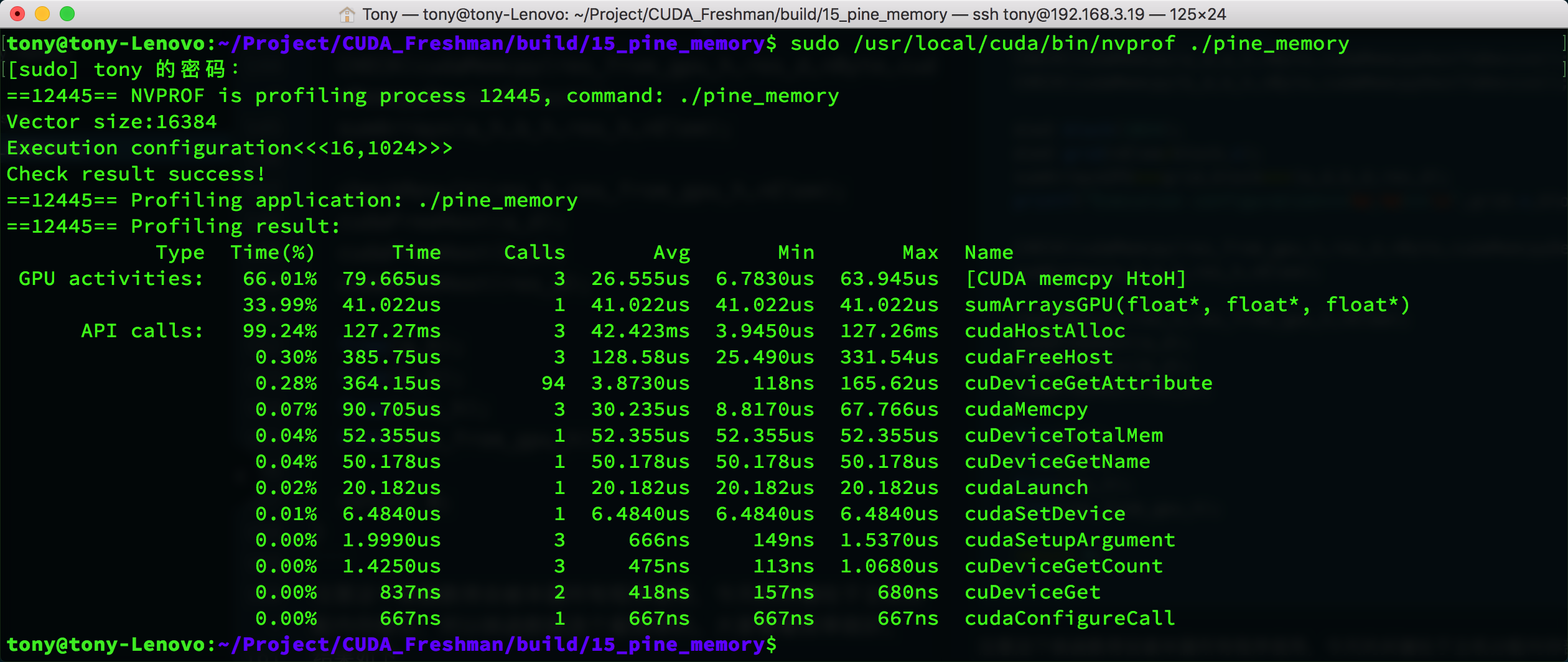
Results:
As a comparison, we modified the code to use the regular memory copy method, and the times are as follows:
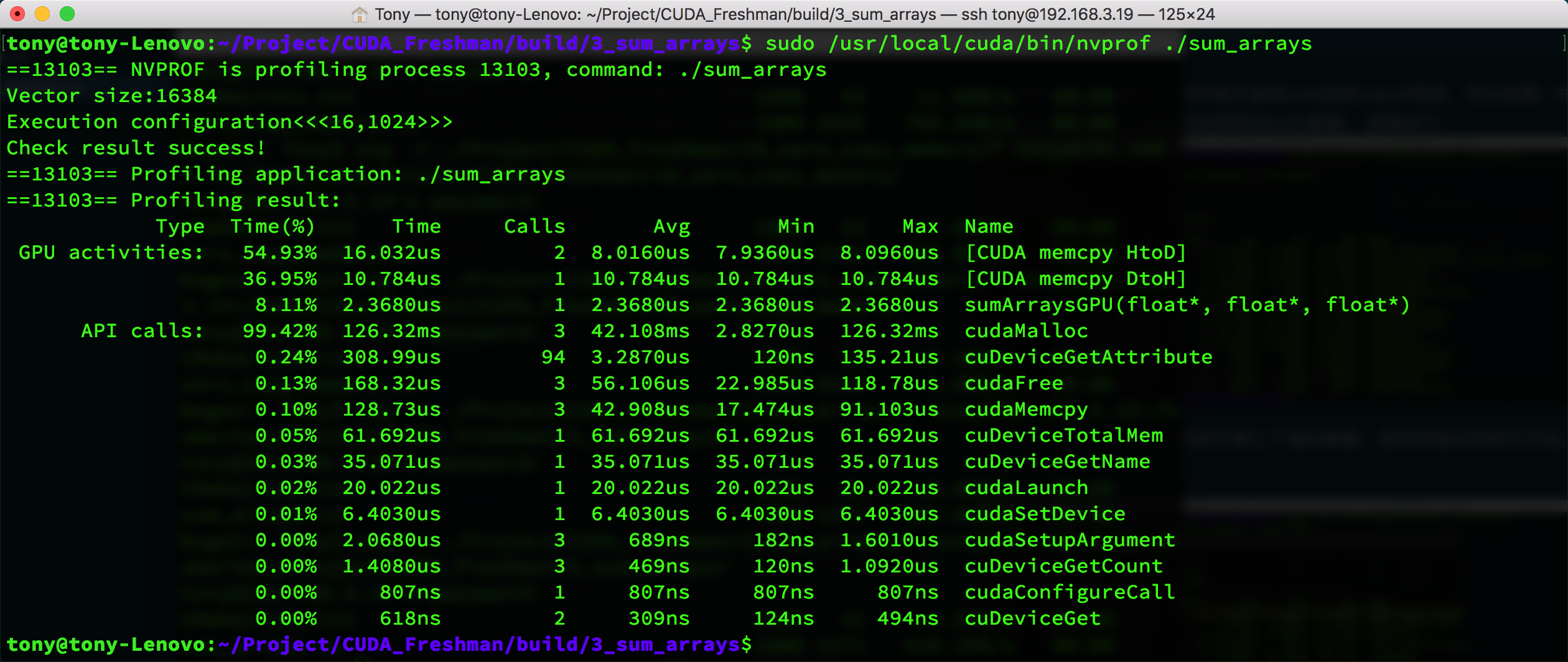
The result is somewhat special -- the pinned memory indicator shows HtoH, which is host-to-host memory copy, while the regular copy shows HtoD (host to device). But looking at the memcpy speed, pinned memory does take less time (30us vs 42us).
You can also see that cudaHostAlloc and cudaMalloc have similar times. When data increases, this will differ -- cudaHostAlloc will be much slower.
Conclusion: The allocation and deallocation cost of pinned memory is much higher than pageable memory, but the transfer speed is faster. Therefore, for large-scale data, pinned memory is more efficient.
It is recommended to use streams to allow memory transfers and computation to overlap. Chapter 6 covers this in detail.
Zero-Copy Memory
Up to now, the foundation of the memory knowledge we have covered is: the host cannot directly access device memory, and the device cannot directly access host memory. For early devices, this was definitely true. But later, an exception appeared -- zero-copy memory.
GPU threads can directly access zero-copy memory, which resides in host memory. CUDA kernel functions use zero-copy memory in the following situations:
- When device memory is insufficient, host memory can be utilized
- Avoid explicit memory transfers between host and device
- Improve PCIe transfer rates
We previously mentioned being careful about memory races between threads because they can simultaneously access the same memory address. Now that device and host can simultaneously access the same device address, we must be careful about host and device memory races when using zero-copy memory.
Zero-copy memory is pinned memory and cannot be pageable. It can be created using the following function:
cudaError_t cudaHostAlloc(void ** pHost, size_t count, unsigned int flags)
The last flags parameter can be set to one of the following values:
- cudaHostAllocDefault
- cudaHostAllocPortable
- cudaHostAllocWriteCombined
- cudaHostAllocMapped
cudaHostAllocDefault is the same as the cudaMallocHost function. cudaHostAllocPortable returns pinned memory that can be used by all CUDA contexts. cudaHostAllocWriteCombined returns write-combined memory, which may have higher transfer efficiency on certain devices. cudaHostAllocMapped produces zero-copy memory.
Note that although zero-copy memory does not need to be explicitly transferred to the device, the device still cannot access the corresponding memory address directly through pHost. To allow the device to access zero-copy memory on the host, another address must be obtained. This address helps the device access the corresponding host memory:
cudaError_t cudaHostGetDevicePointer(void ** pDevice, void * pHost, unsigned flags);
pDevice is the pointer that the device uses to access host zero-copy memory!
Here, flags must be set to 0. More details will be covered later.
Zero-copy memory can be thought of as a slower device than the device's main memory.
For frequent read/write operations, zero-copy memory has extremely low efficiency. This is very easy to understand because every access must go through PCIe -- thousands of vehicles stuck on a single bridge, speed is definitely slow. If there are frequent back-and-forth transfers, it becomes even worse. Let's do a small experiment with array addition, adapted from previous code, to see the effect:
Main function code (kernel function same as the previous section):
int main(int argc, char **argv)
{
    int dev = 0;
    cudaSetDevice(dev);
    int power = 10;
    if(argc >= 2)
        power = atoi(argv[1]);
    int nElem = 1 << power;
    printf("Vector size:%d\n", nElem);
    int nByte = sizeof(float) * nElem;
    float *res_from_gpu_h = (float*)malloc(nByte);
    float *res_h = (float*)malloc(nByte);
    memset(res_h, 0, nByte);
    memset(res_from_gpu_h, 0, nByte);

    float *a_host, *b_host, *res_d;
    double iStart, iElaps;
    dim3 block(1024);
    dim3 grid(nElem/block.x);
    res_from_gpu_h = (float*)malloc(nByte);
    float *a_dev, *b_dev;
    CHECK(cudaHostAlloc((void**)&a_host, nByte, cudaHostAllocMapped));
    CHECK(cudaHostAlloc((void**)&b_host, nByte, cudaHostAllocMapped));
    CHECK(cudaMalloc((void**)&res_d, nByte));
    initialData(a_host, nElem);
    initialData(b_host, nElem);

    //=============================================================//
    iStart = cpuSecond();
    CHECK(cudaHostGetDevicePointer((void**)&a_dev, (void*) a_host, 0));
    CHECK(cudaHostGetDevicePointer((void**)&b_dev, (void*) b_host, 0));
    sumArraysGPU<<<grid, block>>>(a_dev, b_dev, res_d);
    CHECK(cudaMemcpy(res_from_gpu_h, res_d, nByte, cudaMemcpyDeviceToHost));
    iElaps = cpuSecond() - iStart;
    //=============================================================//
    printf("zero copy memory elapsed %lf ms \n", iElaps);
    printf("Execution configuration<<<%d,%d>>>\n", grid.x, block.x);

    //-----------------------normal memory---------------------------
    float *a_h_n = (float*)malloc(nByte);
    float *b_h_n = (float*)malloc(nByte);
    float *res_h_n = (float*)malloc(nByte);
    float *res_from_gpu_h_n = (float*)malloc(nByte);
    memset(res_h_n, 0, nByte);
    memset(res_from_gpu_h_n, 0, nByte);

    float *a_d_n, *b_d_n, *res_d_n;
    CHECK(cudaMalloc((void**)&a_d_n, nByte));
    CHECK(cudaMalloc((void**)&b_d_n, nByte));
    CHECK(cudaMalloc((void**)&res_d_n, nByte));

    initialData(a_h_n, nElem);
    initialData(b_h_n, nElem);
    //=============================================================//
    iStart = cpuSecond();
    CHECK(cudaMemcpy(a_d_n, a_h_n, nByte, cudaMemcpyHostToDevice));
    CHECK(cudaMemcpy(b_d_n, b_h_n, nByte, cudaMemcpyHostToDevice));
    sumArraysGPU<<<grid, block>>>(a_d_n, b_d_n, res_d_n);
    CHECK(cudaMemcpy(res_from_gpu_h, res_d, nByte, cudaMemcpyDeviceToHost));
    iElaps = cpuSecond() - iStart;
    //=============================================================//
    printf("device memory elapsed %lf ms \n", iElaps);
    printf("Execution configuration<<<%d,%d>>>\n", grid.x, block.x);
    //--------------------------------------------------------------------

    sumArrays(a_host, b_host, res_h, nElem);
    checkResult(res_h, res_from_gpu_h, nElem);

    cudaFreeHost(a_host);
    cudaFreeHost(b_host);
    cudaFree(res_d);
    free(res_h);
    free(res_from_gpu_h);

    cudaFree(a_d_n);
    cudaFree(b_d_n);
    cudaFree(res_d_n);

    free(a_h_n);
    free(b_h_n);
    free(res_h_n);
    free(res_from_gpu_h_n);
    return 0;
}
Results:
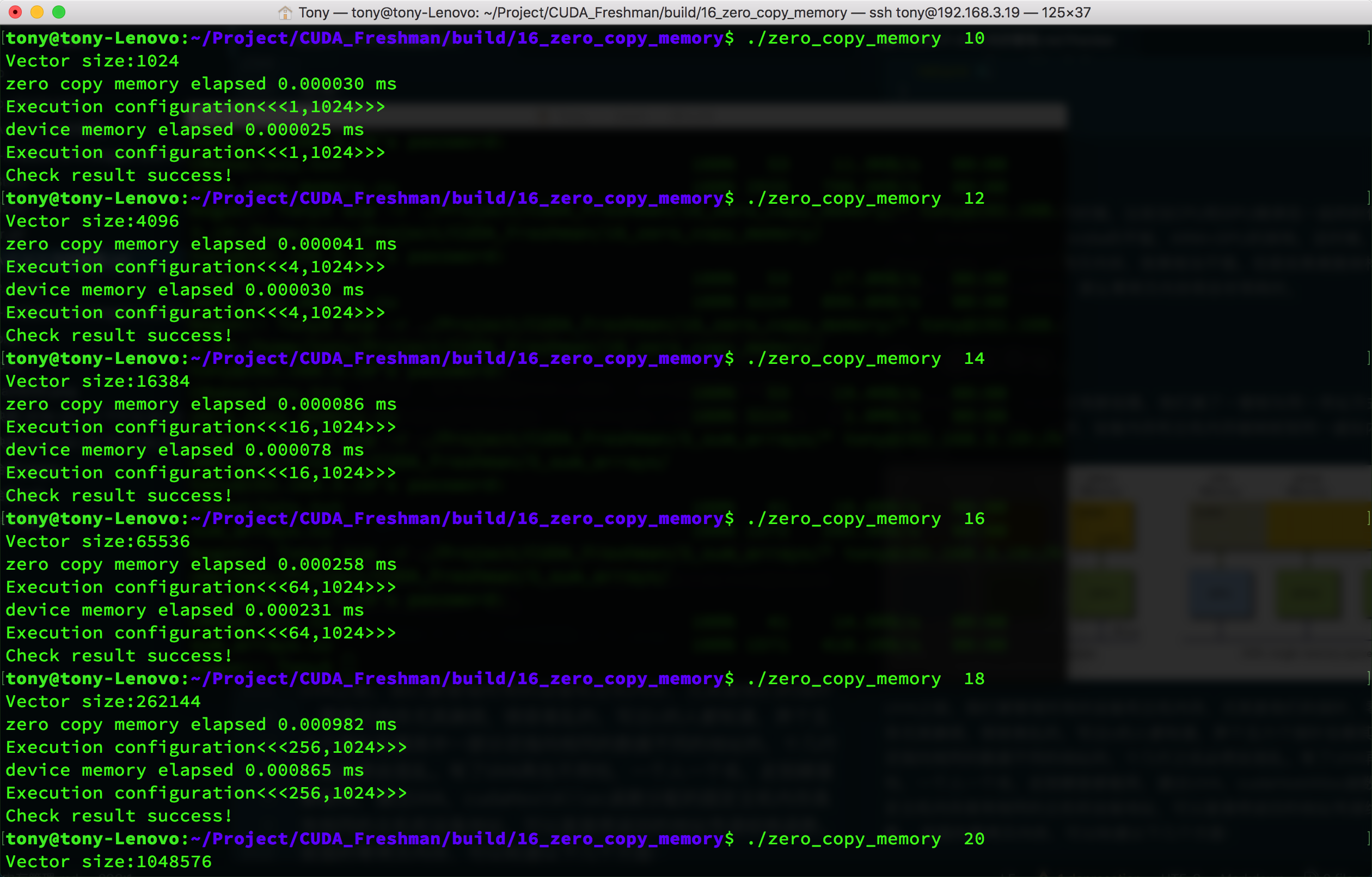
We summarize the results in a table:
| Data Size n(2^n) | Regular Memory (us) | Zero-Copy Memory (us) |
|---|---|---|
| 10 | 2.5 | 3.0 |
| 12 | 3.0 | 4.1 |
| 14 | 7.8 | 8.6 |
| 16 | 23.1 | 25.8 |
| 18 | 86.5 | 98.2 |
| 20 | 290.9 | 310.5 |
These results were obtained by observing execution time. You can also use nvprof to get kernel execution times:
| Data Size n(2^n) | Regular Memory (us) | Zero-Copy Memory (us) |
|---|---|---|
| 10 | 1.088 | 4.257 |
| 12 | 1.056 | 8.00 |
| 14 | 1.920 | 24.578 |
| 16 | 4.544 | 86.63 |
The data speaks for itself -- too many figures to include. However, this comparison method has some issues because zero-copy memory effectively performs memory transfer work during kernel execution. So I think memory transfer time should also be included; then the speeds would be roughly similar. But if regular memory can be reused after transfer, that is another matter.
However, zero-copy memory has exceptions. For example, when CPU and GPU are integrated, such as in ARM+GPU architectures, they share physical memory. In this case, zero-copy memory performs quite well. But for discrete architectures where host and device are connected via PCIe, zero-copy memory will be very time-consuming.
Unified Virtual Addressing
Starting from device architecture 2.0, NVIDIA introduced a new concept -- Unified Virtual Addressing (UVA). With UVA, device memory and host memory are mapped to the same virtual memory address space. As shown:
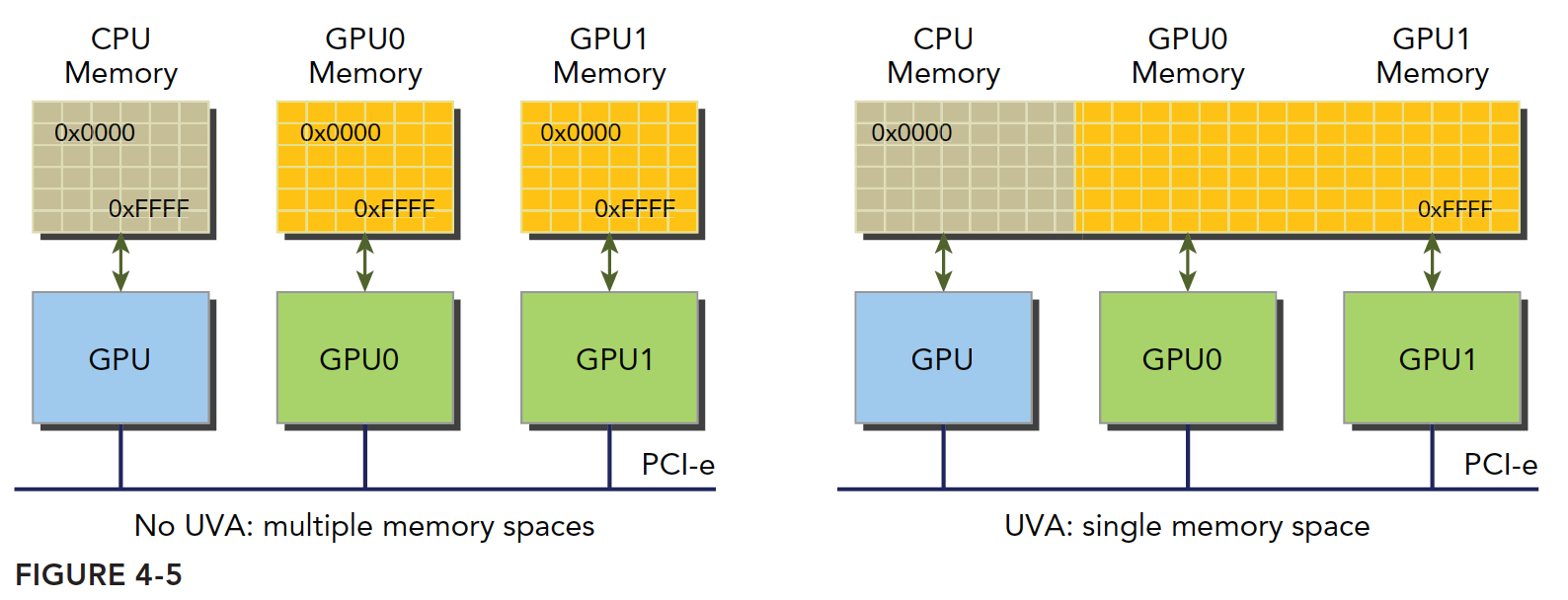
Before UVA, we had to manage all device and host memory, especially their pointers. Zero-copy memory was particularly troublesome and easy to get confused. Anyone who has written C knows that with five or six pointers, some pointing to the same data at different addresses, after a dozen lines things inevitably get confusing. With UVA, you no longer need to worry -- one pointer, one address, works everywhere. Through UVA, pinned host memory allocated by cudaHostAlloc has the same host and device addresses, so the returned address can be directly passed to kernel functions.
For the zero-copy memory discussed earlier, we can summarize the following steps:
- Allocate mapped pinned host memory
- Use CUDA runtime functions to obtain device pointers mapped to the pinned memory
- Pass the device pointer to the kernel function
With UVA, you no longer need the function to obtain device pointers for accessing zero-copy memory:
cudaError_t cudaHostGetDevicePointer(void ** pDevice, void * pHost, unsigned flags);
After UVA arrived, this function is essentially unemployed.
Experiment code:
float *a_host, *b_host, *res_d;
CHECK(cudaHostAlloc((void**)&a_host, nByte, cudaHostAllocMapped));
CHECK(cudaHostAlloc((void**)&b_host, nByte, cudaHostAllocMapped));
CHECK(cudaMalloc((void**)&res_d, nByte));
res_from_gpu_h = (float*)malloc(nByte);

initialData(a_host, nElem);
initialData(b_host, nElem);

dim3 block(1024);
dim3 grid(nElem/block.x);
sumArraysGPU<<<grid, block>>>(a_host, b_host, res_d);
The main advantage of UVA code is eliminating the step of obtaining pointers. UVA can directly use host-side addresses.
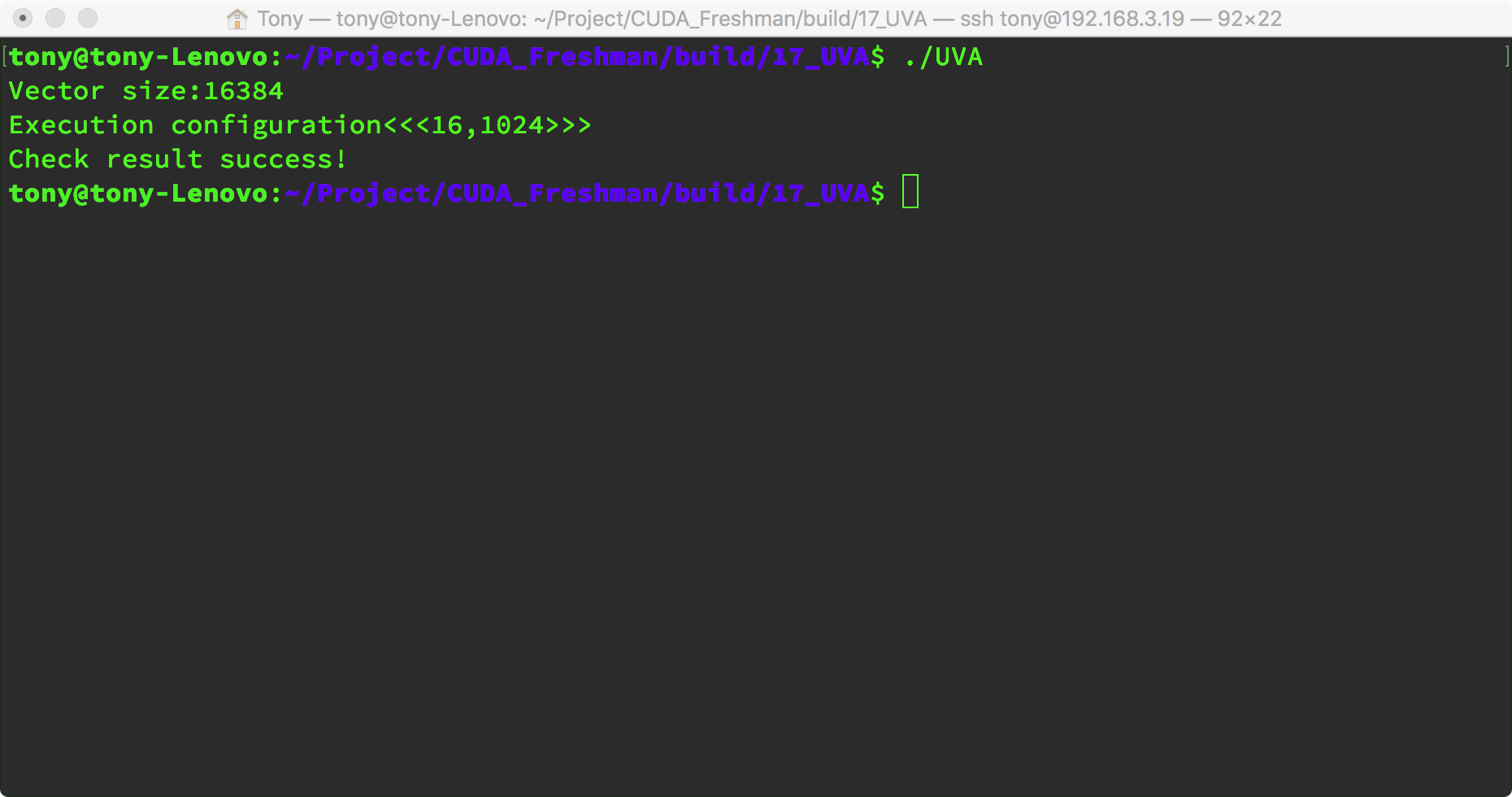
Result:
Unified Memory Addressing
NVIDIA engineers continued to introduce new features. With CUDA 6.0 came Unified Memory Addressing (Unified Memory). Note this is not Unified Virtual Addressing. The purpose is also to simplify memory management. Unified Memory creates a managed memory pool (on both CPU and GPU). Allocated space within the pool can be directly accessed by both CPU and GPU through the same pointer. The underlying system automatically handles transfers between device and host within the unified memory space. Data transfers are transparent to the application, greatly simplifying the code.
It creates a memory pool where the memory uses a single pointer to represent both host and device memory addresses. It builds upon UVA but is a completely different technology.
Unified Memory Addressing provides a "pointer-to-data" programming model, conceptually similar to zero-copy. However, zero-copy memory allocation happens on the host and requires mutual transfers, while unified addressing is different.
Managed memory refers to unified memory automatically allocated by the underlying system. Unmanaged memory is memory we allocate ourselves. Kernel functions can receive both types of memory -- managed and unmanaged -- simultaneously.
Managed memory can be static or dynamic. Add the managed keyword to declare managed memory variables. Statically declared managed memory has file scope -- worth noting.
Managed memory allocation method:
cudaError_t cudaMallocManaged(void ** devPtr, size_t size, unsigned int flags = 0)
This function has the same structure as the previous functions. Just pay attention to the function name; the parameters are self-explanatory.
In CUDA 6.0, device code cannot call cudaMallocManaged -- only the host can call it. All managed memory must be dynamically declared in host code or declared as global static. In section 4.5, we will study Unified Memory Addressing in detail.
Summary
This article introduced several techniques in CUDA memory management. Pay attention to their similarities and differences.
Code repository: https://github.com/tony-tan