6.2 Concurrent Kernel Execution
Published on 2018-06-18 | Category: CUDA , Freshman | Comments: 0 | Views:
Abstract: This article introduces concurrent kernel execution and related knowledge.
Keywords: Streams, Events, Depth-First, Breadth-First, Hardware Work Queues, Default Stream Blocking Behavior
Concurrent Kernel Execution
Continuing from the previous content, we discussed concepts of streams, events, and synchronization, along with some function usage. The next few examples introduce several basic issues of concurrent kernels, including but not limited to:
- Scheduling work with depth-first or breadth-first methods
- Adjusting hardware work queues
- Avoiding false dependencies on Kepler and Fermi devices
- Examining default stream blocking behavior
- Adding dependencies between non-default streams
- Examining how resource usage affects concurrency
Concurrent Kernels in Non-Null Streams
In this article, we begin using another NVIDIA visualization tool, nvvp, for performance analysis. Its greatest use is visualizing concurrent kernel function execution. In the first example, we can clearly see how each kernel function executes. This example uses the same kernel function, duplicated multiple times, ensuring each kernel's computation takes enough time for the profiling tool to accurately capture the execution process.
Our kernel functions are:
__global__ void kernel_1()
{
    double sum=0.0;
    for(int i=0;i<N;i++)
        sum=sum+tan(0.1)*tan(0.1);
}
__global__ void kernel_2()
{
    double sum=0.0;
    for(int i=0;i<N;i++)
        sum=sum+tan(0.1)*tan(0.1);
}
__global__ void kernel_3()
{
    double sum=0.0;
    for(int i=0;i<N;i++)
        sum=sum+tan(0.1)*tan(0.1);
}
__global__ void kernel_4()
{
    double sum=0.0;
    for(int i=0;i<N;i++)
        sum=sum+tan(0.1)*tan(0.1);
}
Four kernel functions with N=100. The tan calculation should have an optimized fast version on the GPU, but even optimized, it is relatively time-consuming -- enough for our observation.
Following our previous approach, we create streams, place different kernel functions or instructions in different streams, and observe their behavior.
Complete code on GitHub: https://github.com/Tony-Tan/CUDA_Freshman (Stars are welcome!)
In this chapter, we mainly focus on host code. Below is the stream creation code:
cudaStream_t *stream=(cudaStream_t*)malloc(n_stream*sizeof(cudaStream_t));
for(int i=0;i<n_stream;i++)
{
    cudaStreamCreate(&stream[i]);
}
First, declare a stream header structure using malloc (remember to free it later).
Then allocate resources for each stream header -- the Create process. Now we have n_stream streams available. Next, we add kernel functions to streams and observe the execution:
dim3 block(1);
dim3 grid(1);
cudaEvent_t start,stop;
cudaEventCreate(&start);
cudaEventCreate(&stop);
cudaEventRecord(start);
for(int i=0;i<n_stream;i++)
{
    kernel_1<<<grid,block,0,stream[i]>>>();
    kernel_2<<<grid,block,0,stream[i]>>>();
    kernel_3<<<grid,block,0,stream[i]>>>();
    kernel_4<<<grid,block,0,stream[i]>>>();
}
cudaEventRecord(stop);
CHECK(cudaEventSynchronize(stop));
float elapsed_time;
cudaEventElapsedTime(&elapsed_time,start,stop);
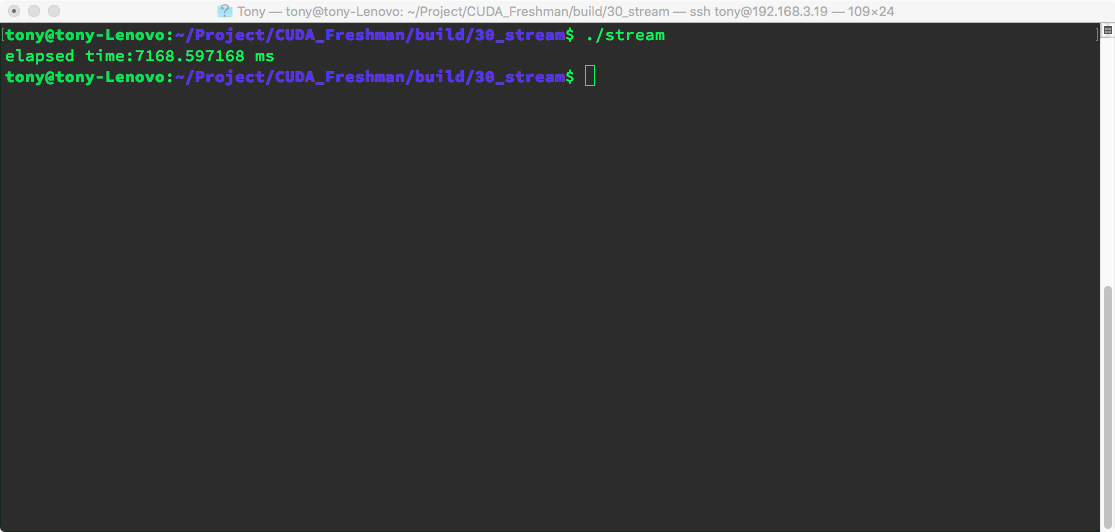
printf("elapsed time:%f ms\n",elapsed_time);
This is not complete code. This loop puts each kernel into different streams. Assuming 10 streams, each stream executes the 4 kernels in the above order.
Note that without:
cudaEventSynchronize(stop)
nvvp will not work because all these are asynchronous operations -- control returns to the host after launch without waiting for completion. Without a blocking instruction, the host process finishes and exits, losing contact with the device. nvvp will also report errors accordingly.
We create two events and record the time interval between them. This interval is not very accurate because it is asynchronous.
Result:
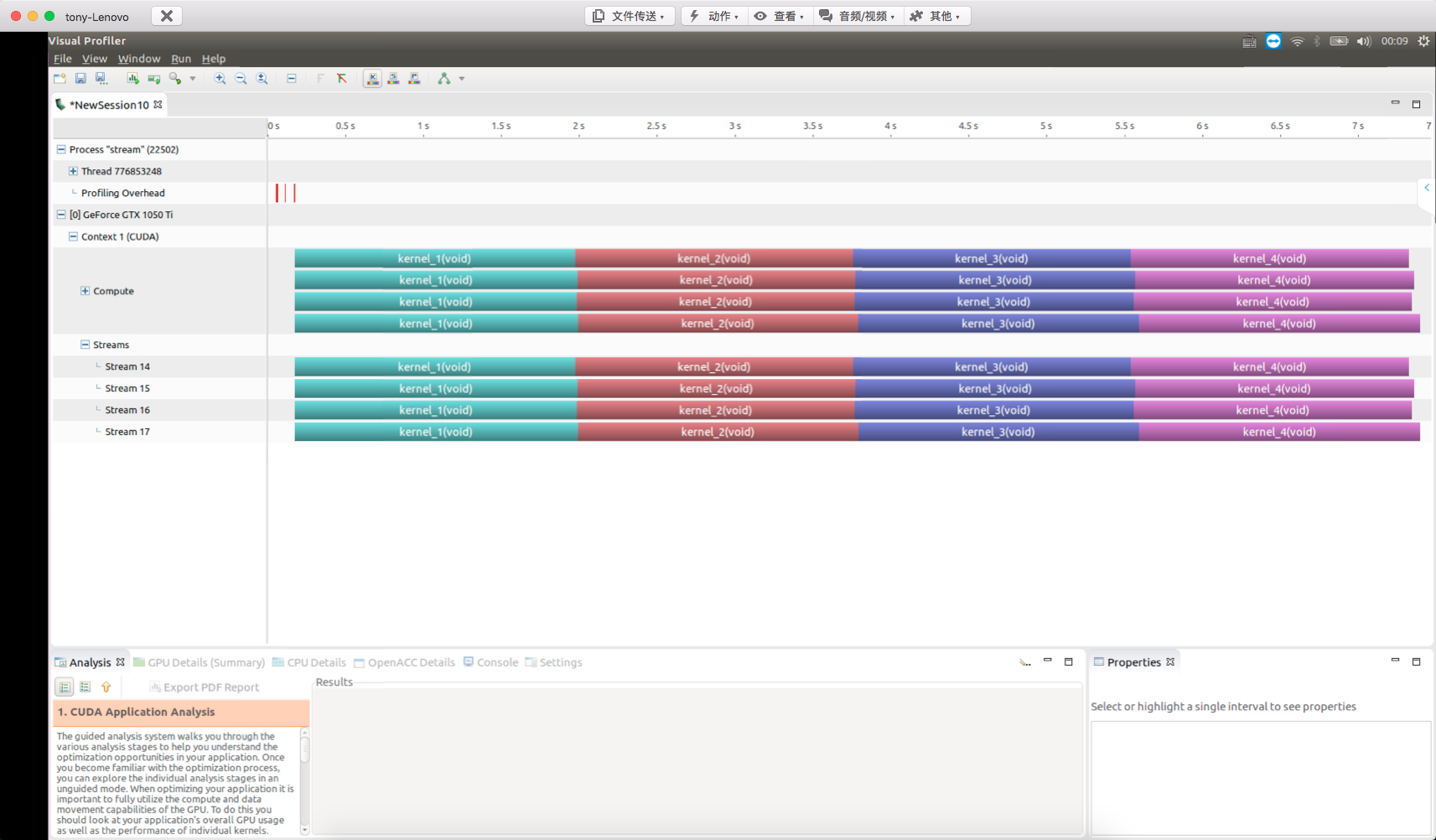
Using nvvp for detection:
False Dependencies on Fermi GPU
False dependencies were discussed in the previous article. This situation typically occurs on the older Fermi architecture because it has only one hardware work queue. Since it is now difficult to find Fermi architecture GPUs, we can only look at the nvvp results from the book:
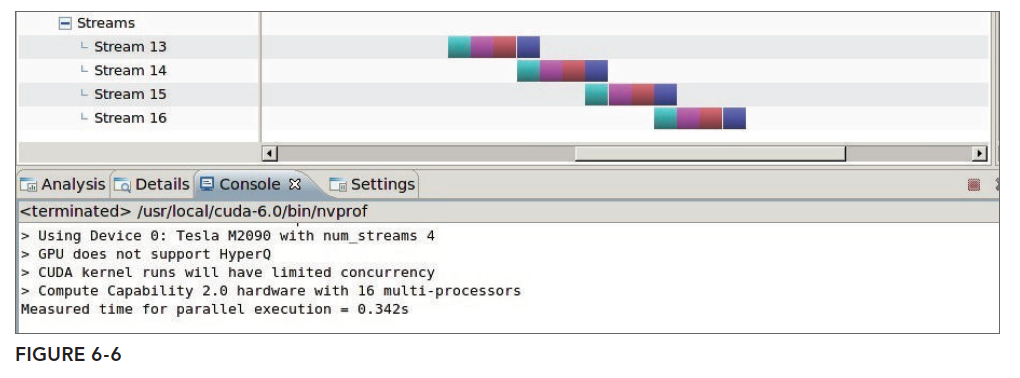
The theoretical cause of false dependencies was described in the Stream and Event Overview. We will not explain again here.
If you only have old hardware, false dependencies can also be solved. The principle is using the breadth-first method, organizing tasks as follows:
// dispatch job with breadth first way
for (int i = 0; i < n_streams; i++)
kernel_1<<<grid, block, 0, streams[i]>>>();
for (int i = 0; i < n_streams; i++)
kernel_2<<<grid, block, 0, streams[i]>>>();
for (int i = 0; i < n_streams; i++)
kernel_3<<<grid, block, 0, streams[i]>>>();
for (int i = 0; i < n_streams; i++)
kernel_4<<<grid, block, 0, streams[i]>>>();
The logical diagram is not:

But rather:
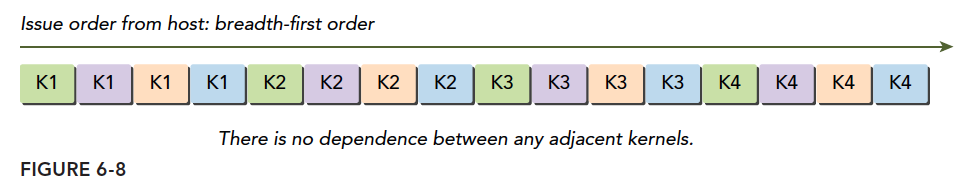
This avoids the problem at the abstract model level.
The breadth-first nvvp result:
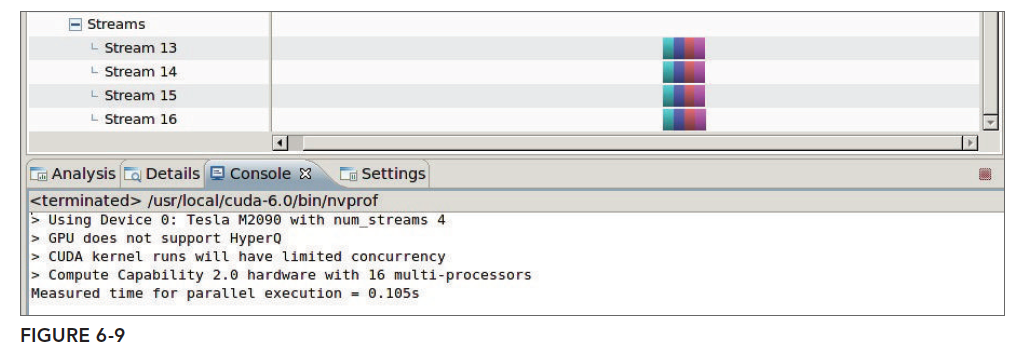
Note: the above conclusions are taken verbatim from the book.
Scheduling with OpenMP
OpenMP is a very useful parallel tool, more convenient than pthread though not as flexible. Here we not only want kernel functions or device operations to be processed by multiple streams, but also have the host work in multiple threads. We try using each thread to operate one stream:
omp_set_num_threads(n_stream);
#pragma omp parallel
    {
        int i=omp_get_thread_num();
        kernel_1<<<grid,block,0,stream[i]>>>();
        kernel_2<<<grid,block,0,stream[i]>>>();
        kernel_3<<<grid,block,0,stream[i]>>>();
        kernel_4<<<grid,block,0,stream[i]>>>();
    }
Code explanation:
omp_set_num_threads(n_stream);
#pragma omp parallel
Calls OpenMP's API to create n_stream threads. The macro directive tells the compiler that the code in the following braces is what each thread executes -- similar to a kernel function, or parallel unit.
Other code is the same as the regular code above. Note that OpenMP support on macOS is not very good -- you need to install GCC. Configuration on Linux and Windows is simple: Linux just requires linking the library, and Windows with VS IDE just needs to toggle a switch in properties. Let's observe the results. Note this code uses command-line compilation rather than CMake:
nvcc -O3 -Xcompiler -fopenmp stream_omp.cu -o stream_omp -lgomp -I ../include/
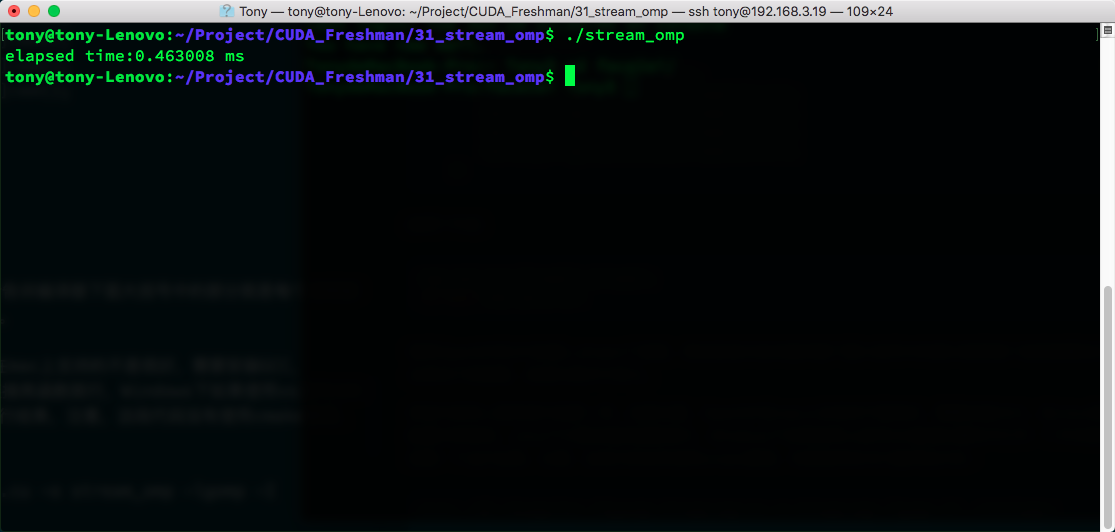
The CUDA advanced series will cover OpenMP and CUDA integration in more detail later.
Adjusting Stream Behavior with Environment Variables
Kepler's maximum Hyper-Q work queue count is 32, but by default not all are enabled -- they are limited to 8. The reason is that each work queue consumes resources when enabled. If 32 are not needed, resources can be reserved for the 8 queues needed. The configuration is changed through host system environment variables.
For Linux systems:
#For Bash or Bourne Shell:
export CUDA_DEVICE_MAX_CONNECTIONS=32
#For C-Shell:
setenv CUDA_DEVICE_MAX_CONNECTIONS 32
Another method is to write directly in the program, which is better for modifying hardware configuration through the underlying driver:
setenv("CUDA_DEVICE_MAX_CONNECTIONS", "32", 1);
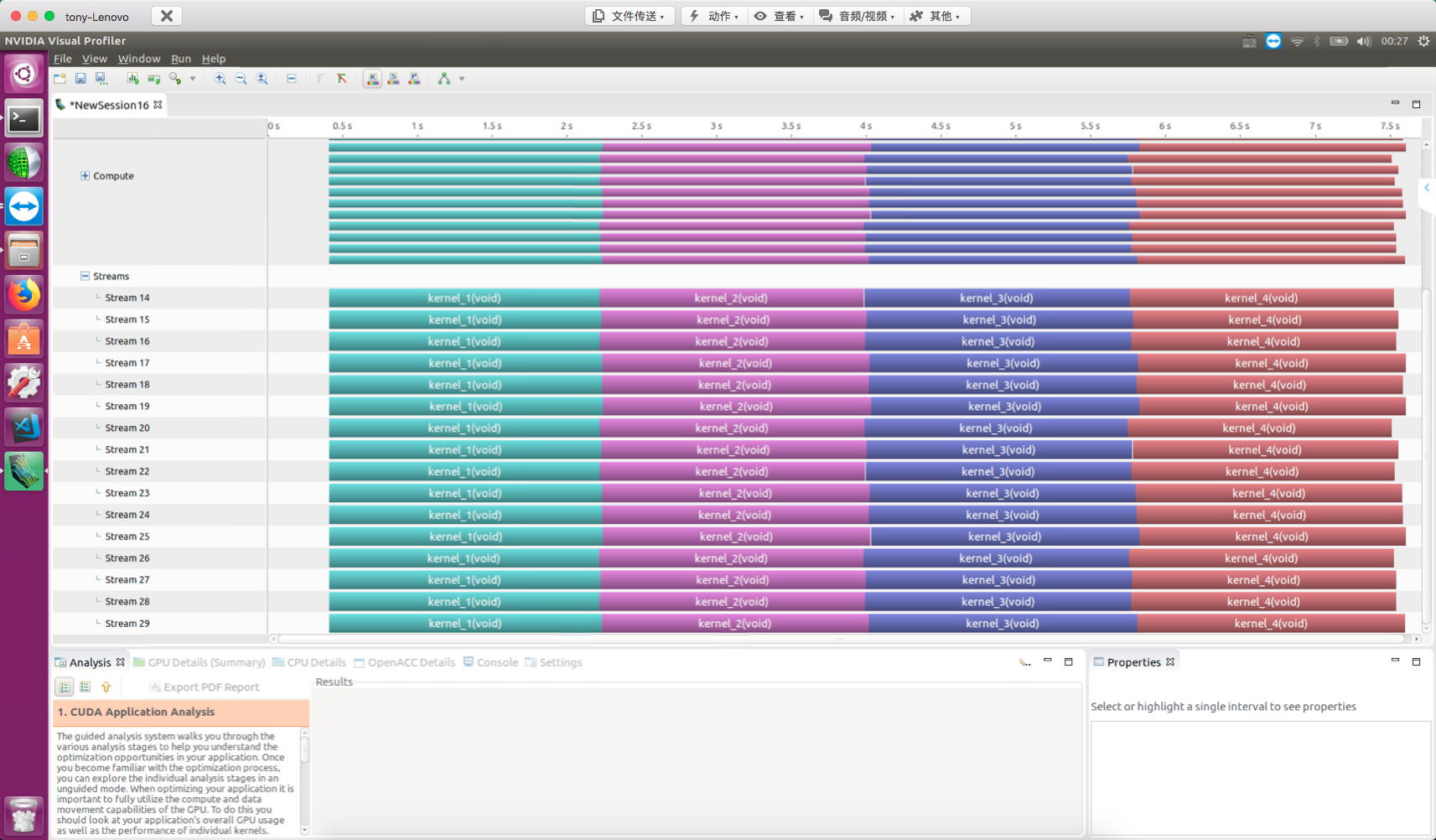
Then we modify the depth-first code from earlier, add the above instruction, and change n_stream to 16:
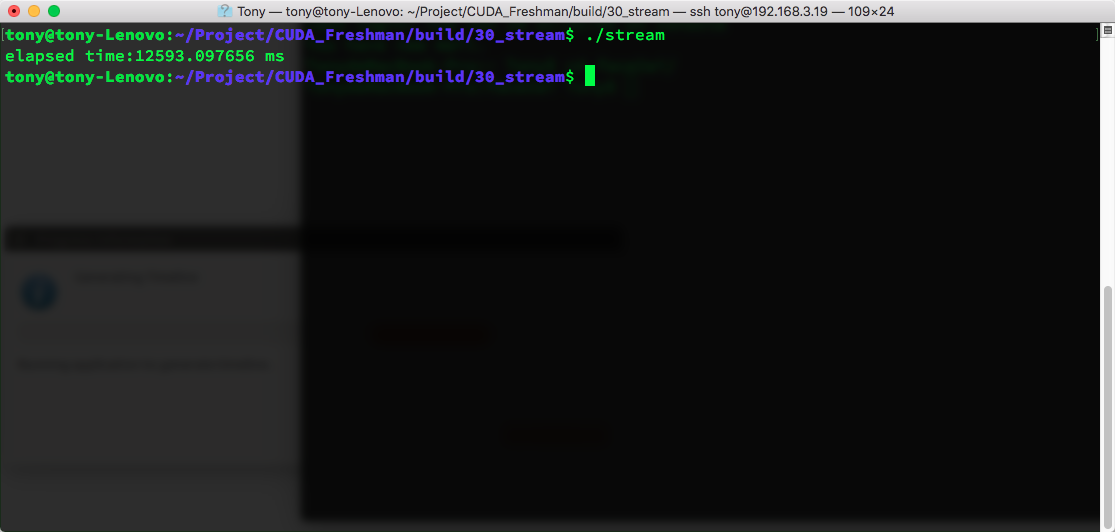
16 streams, 8 work queues:
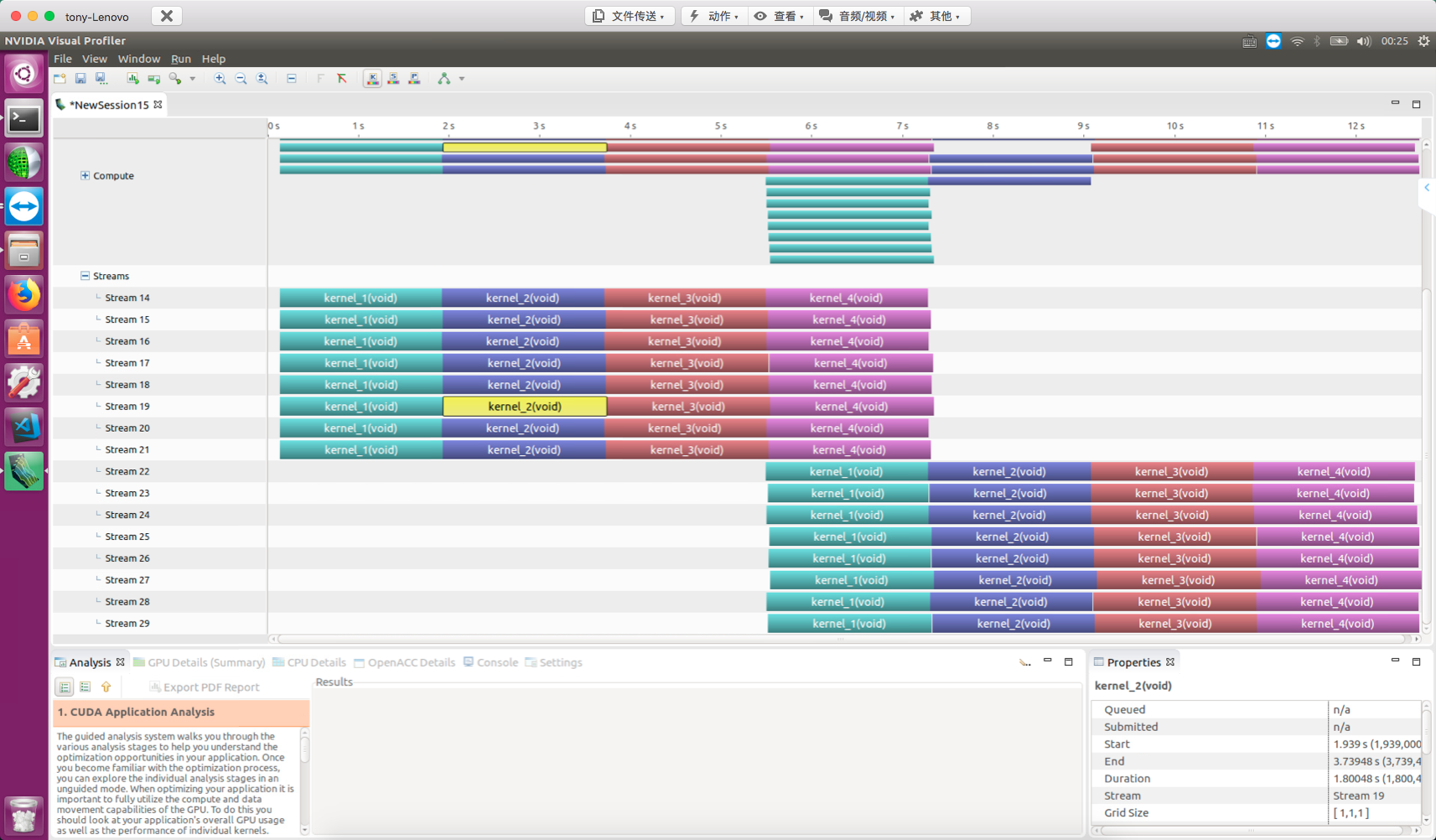
Change to 32 queues:
setenv("CUDA_DEVICE_MAX_CONNECTIONS", "32", 1);
16 streams, 32 work queues:
GPU Resource Concurrency Limits
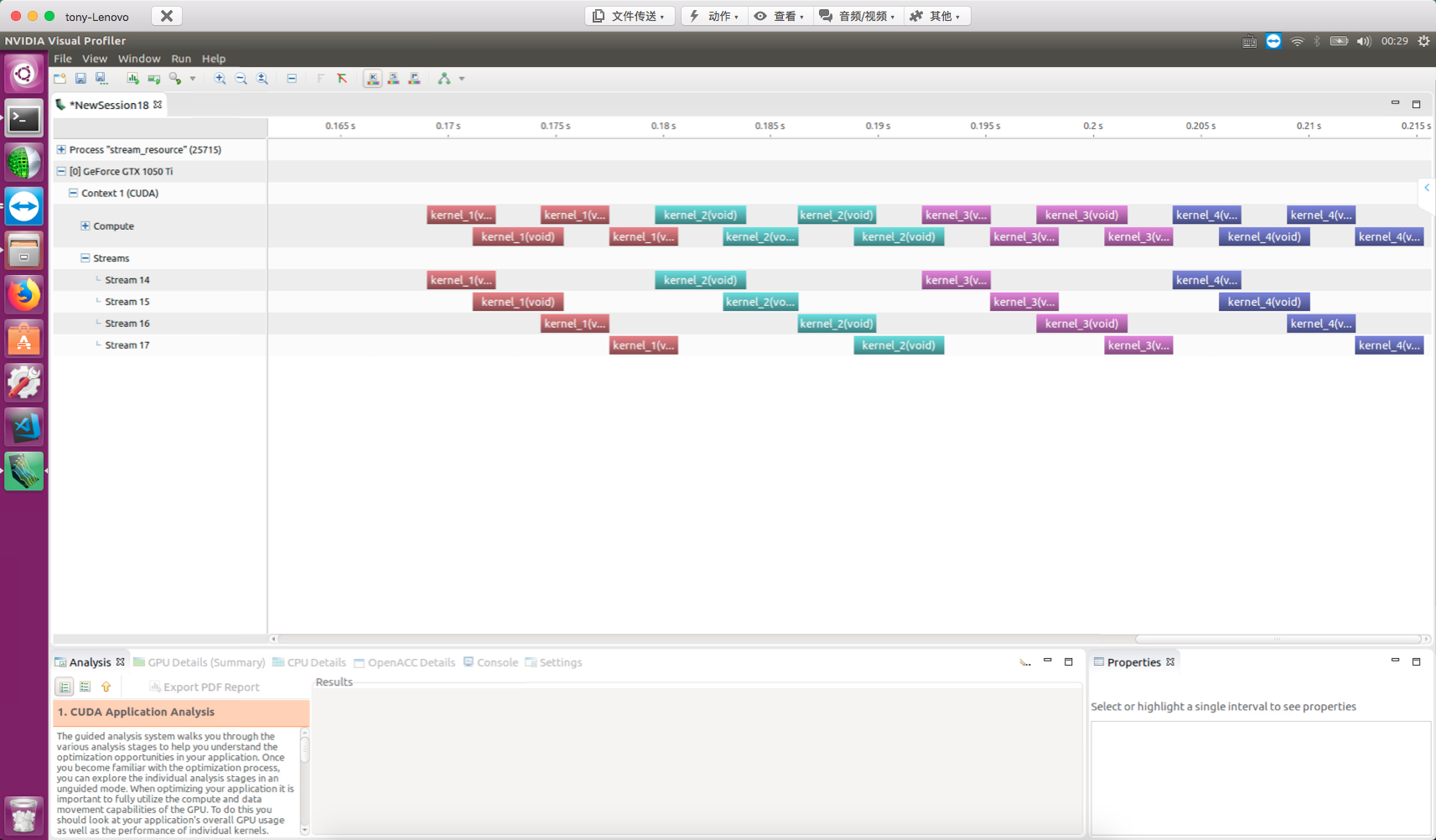
The fundamental limit on kernel concurrency is GPU resources. Resources are the limit of performance. Maximum performance is simply the highest resource utilization (ignoring algorithm evolution). When each kernel's thread count increases, kernel-level parallelism decreases. For example, upgrading:
dim3 block(1);
dim3 grid(1);
To:
dim3 block(16,32);
dim3 grid(32);
With 4 streams, nvvp result:
Default Stream Blocking Behavior
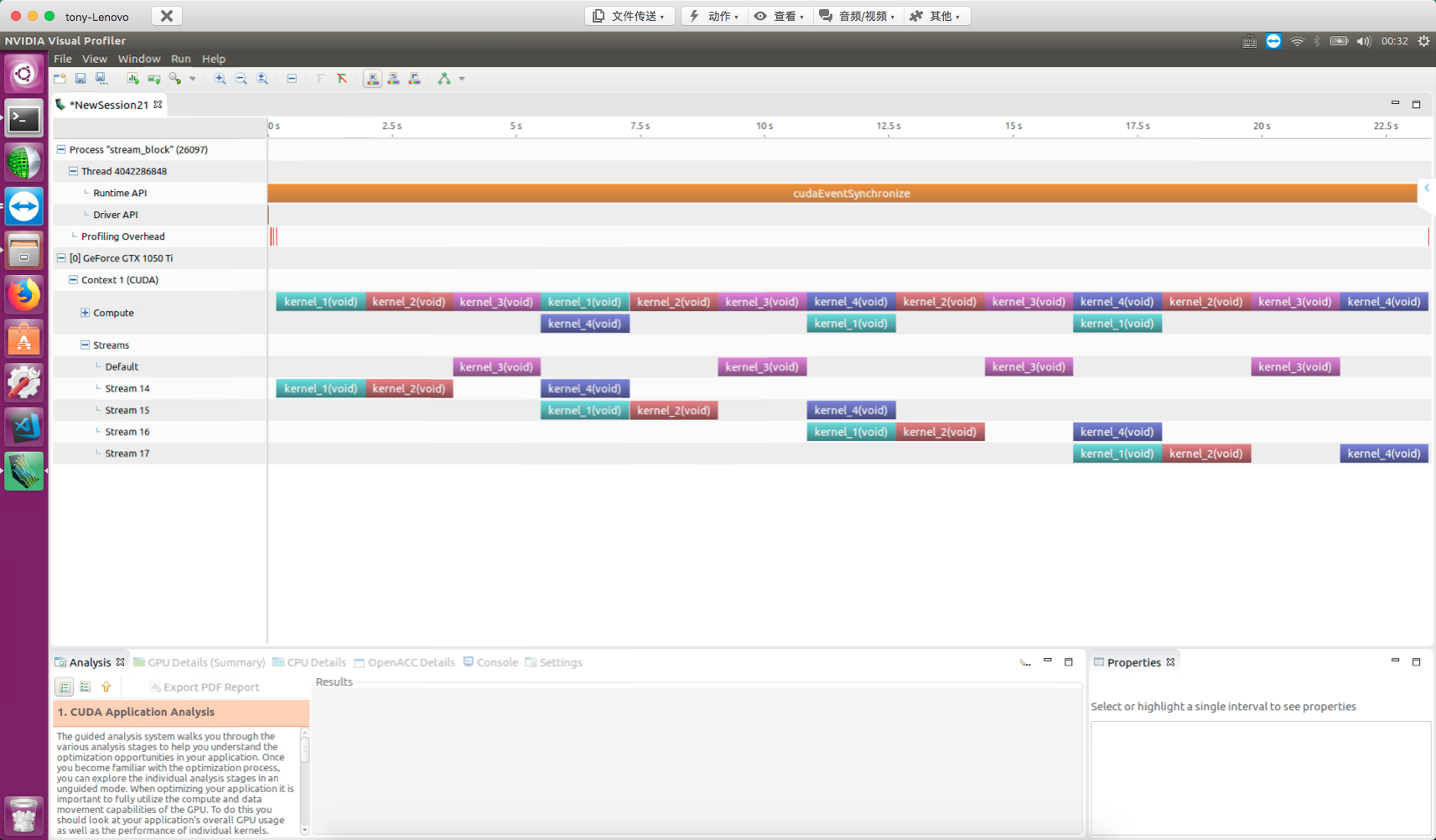
The default stream (null stream) has a blocking effect on blocking non-null streams. This statement is somewhat hard to understand. First, GPU operations and kernel functions without explicitly declared streams execute on the null stream. The null stream is blocking. Similarly, streams we explicitly declare are also blocking by default. In other words, their common characteristic -- both null and non-null streams -- is blocking.
The blocking behavior of the null stream (default stream) on non-null streams needs attention:
for(int i=0;i<n_stream;i++)
{
    kernel_1<<<grid,block,0,stream[i]>>>();
    kernel_2<<<grid,block,0,stream[i]>>>();
    kernel_3<<<grid,block>>>();
    kernel_4<<<grid,block,0,stream[i]>>>();
}
Note that kernel_3 is on the null stream (default stream). From the NVVP results, after all kernel_3 launches, all operations in other streams are blocked:
Creating Inter-Stream Dependencies
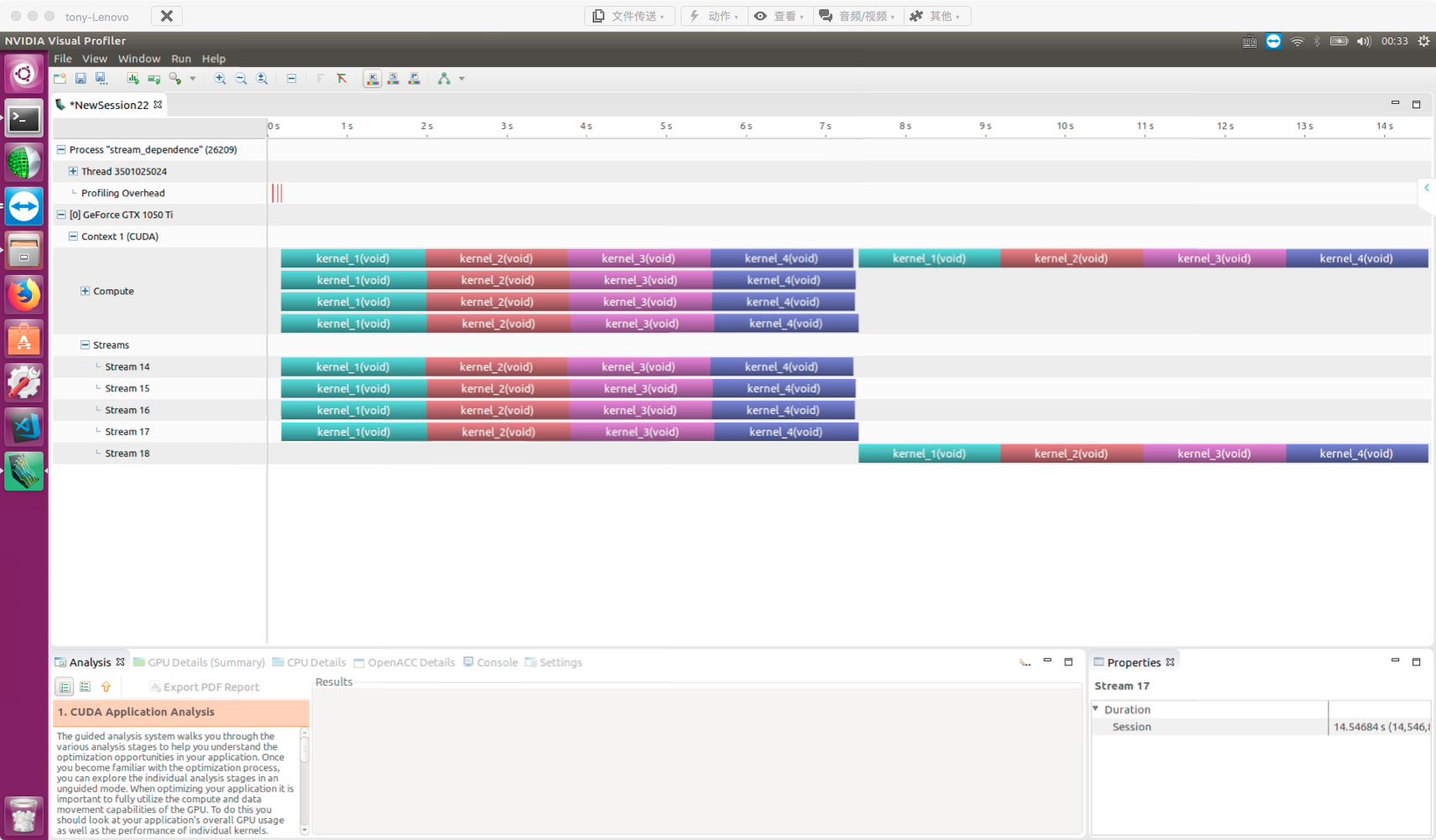
False dependencies between streams need to be avoided, while designed dependencies can ensure synchronization between streams and prevent memory races. The tool we use is events. In other words, we can make a specific stream wait for a specific event. This event can be in any stream -- the waiting stream can only continue after the event completes.
Events are often not used for timing, so they can be declared as cudaEventDisableTiming synchronization events:
cudaEvent_t * event=(cudaEvent_t *)malloc(n_stream*sizeof(cudaEvent_t));
for(int i=0;i<n_stream;i++)
{
    cudaEventCreateWithFlags(&event[i],cudaEventDisableTiming);
}
Add instructions to the stream:
for(int i=0;i<n_stream;i++)
{
    kernel_1<<<grid,block,0,stream[i]>>>();
    kernel_2<<<grid,block,0,stream[i]>>>();
    kernel_3<<<grid,block,0,stream[i]>>>();
    kernel_4<<<grid,block,0,stream[i]>>>();
    cudaEventRecord(event[i],stream[i]);
    cudaStreamWaitEvent(stream[n_stream-1],event[i],0);
}
At this point, the last stream (5th stream) waits until all events in all preceding streams complete before finishing itself. nvvp result:
Summary
This article studied how to use concurrent kernels to improve overall application efficiency, along with stream blocking knowledge.
The next article introduces a more practical technique -- using streams to hide data transfer latency.