1.1 Heterogeneous Computing and CUDA
2018-02-15 | CUDA , Freshman | 0 |
Abstract: An introduction to heterogeneous computing and a CUDA overview, culminating in GPU outputting Hello World! Keywords: Heterogeneous Computing, CUDA
Heterogeneous Computing and CUDA
Heterogeneous Computing
To understand heterogeneous computing, you first need to understand what "heterogeneous" means. Different computer architectures constitute heterogeneity. We discussed computer architecture in the previous article precisely to introduce the concept of heterogeneity -- classified by instruction set or by memory structure. However, I think that even two CPUs of different models should be considered heterogeneous (I'll keep this thought for now -- not sure if it's right or wrong).
The original task of GPUs was graphics processing -- converting data into graphical images. Images have the characteristic of being highly parallel; essentially, pixels beyond a certain distance are computed independently, making it a parallel task.
Before GPUs were programmable, or rather before programming interfaces were open to users, they were designed for graphics computation to drive displays. Although they weren't user-programmable, once the hardware was sold to you, the manufacturer couldn't stop you. Hackers started finding ways to program GPUs to help them complete large-scale computations, so they studied shading languages or graphics processing primitives to communicate with GPUs. Later, Jensen Huang realized this was a new capability, and had people develop a platform -- CUDA. Then deep learning became popular, and along with it, CUDA exploded in popularity.
Just in with the latest news: NVIDIA's new GPU architecture will be named Turing. A small comfort -- I deeply admire those who have made outstanding contributions to the progress of the world. They are the hope for humanity's future.
The x86 CPU + GPU heterogeneous combination is probably the most common. There are also CPU + FPGA, CPU + DSP, and various other combinations. CPU + GPU can be found in every laptop or desktop computer. Of course, most supercomputers also adopt heterogeneous computing to increase throughput.
Although heterogeneous architectures have greater computational power than traditional homogeneous architectures, their application complexity is higher because computation, control, and data transfer must be performed across two devices, all requiring manual intervention. In homogeneous architectures, the hardware handles control automatically without the need for manual design.
Heterogeneous Architecture
Let me use my own workstation as an example. I use a workstation consisting of an Intel i7-4790 CPU and two Titan X GPUs. The GPUs are inserted into PCIe slots on the motherboard. When running programs, the CPU acts as a controller, directing the two Titans to complete their work, then summarizing results and planning the next steps. So we can think of the CPU as a commander -- the host side, host -- while the GPUs performing the heavy computation are our computing devices, device.
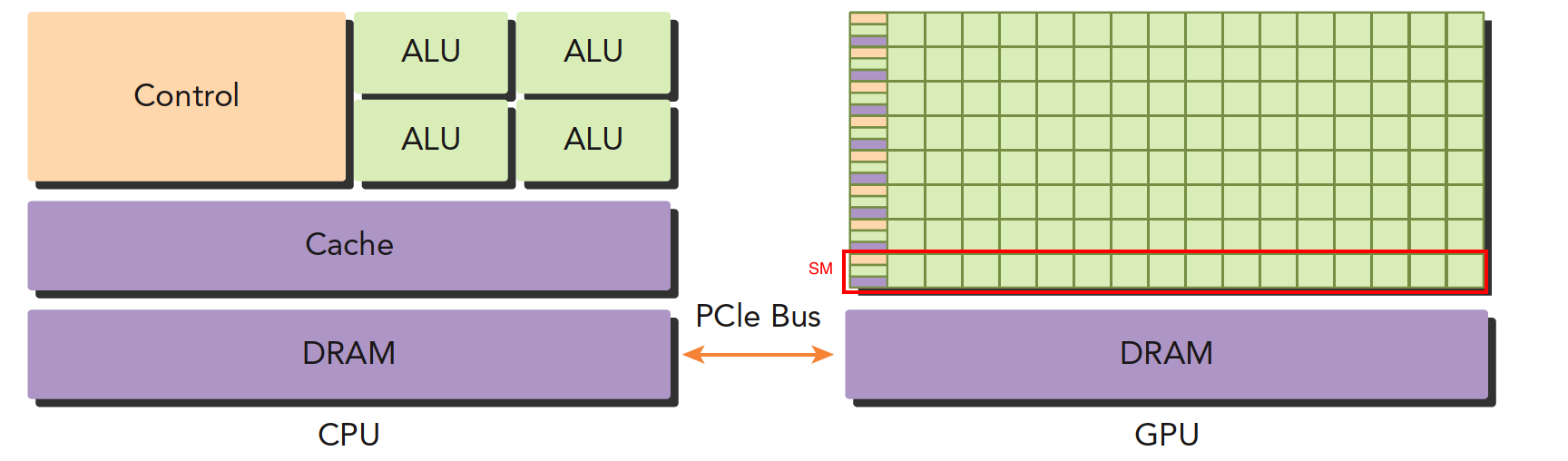
The above image roughly illustrates the architectural differences between CPU and GPU.
- Left image: A quad-core CPU typically has four ALUs. The ALU is the core component for logical computation -- it's what we refer to when we say "quad-core" or "octa-core." The control unit and cache are also on-chip. DRAM is memory, generally not on-chip. The CPU accesses memory through a bus.
- Right image: GPU. The small green squares are ALUs. Notice the red-boxed section -- the SM. This group of ALUs shares a single Control unit and Cache. This part is equivalent to a complete multi-core CPU. The difference is that there are more ALUs and a smaller control section, meaning computing power is increased while control capability is reduced. For programs with complex control (logic), a single GPU SM cannot compare with a CPU. But for tasks with simple logic and large data volumes, GPUs are more efficient. Moreover, note that a GPU has many SMs, and the number keeps growing.
CPUs and GPUs are connected via the PCIe bus for transmitting instructions and data. This is also one of the performance bottlenecks we'll discuss later.
A heterogeneous application contains two or more architectures, so the code also includes more than one part:
- Host code
- Device code
Host code runs on the host side and is compiled into machine code for the host architecture. Device code runs on the device and is compiled into machine code for the device architecture. Therefore, the host machine code and device machine code are isolated -- each executes its own code and cannot exchange execution.
Host code primarily controls the device, handling data transfers and other control tasks. The device's main task is computation.
Because even without a GPU, the CPU can still perform these computations (just much slower), the GPU can be considered an accelerator for the CPU.
NVIDIA's current computing platforms (not architectures) include:
- Tegra
- GeForce
- Quadro
- Tesla
Each platform targets different application scenarios. For example, Tegra is for embedded systems, GeForce is what we normally use for gaming, and Tesla is what we rented from Tencent Cloud yesterday, mainly used for computation.
The above classifies several platforms by application scenario.
The primary capacity characteristics for measuring GPU computing capability are:
- Number of CUDA cores (more is better)
- Memory size (larger is better)
There are also performance metrics for computing capability:
- Peak computing capability
- Memory bandwidth
NVIDIA has its own system for describing GPU computing capability, called "Compute Capability," mainly used to distinguish different architectures. Earlier architectures don't necessarily have lower computing capability than newer ones:
| Compute Capability | Architecture Name |
|---|---|
| 1.x | Tesla |
| 2.x | Fermi |
| 3.x | Kepler |
| 4.x | Maxwell |
| 5.x | Pascal |
| 6.x | Volta |
The Tesla architecture here is different from the Tesla platform mentioned above -- don't confuse them. One is a platform name, the other is an architecture name.
Examples
CPUs and GPUs work together, each with its own strengths and weaknesses. It's naive to say that GPUs are simply better than CPUs:
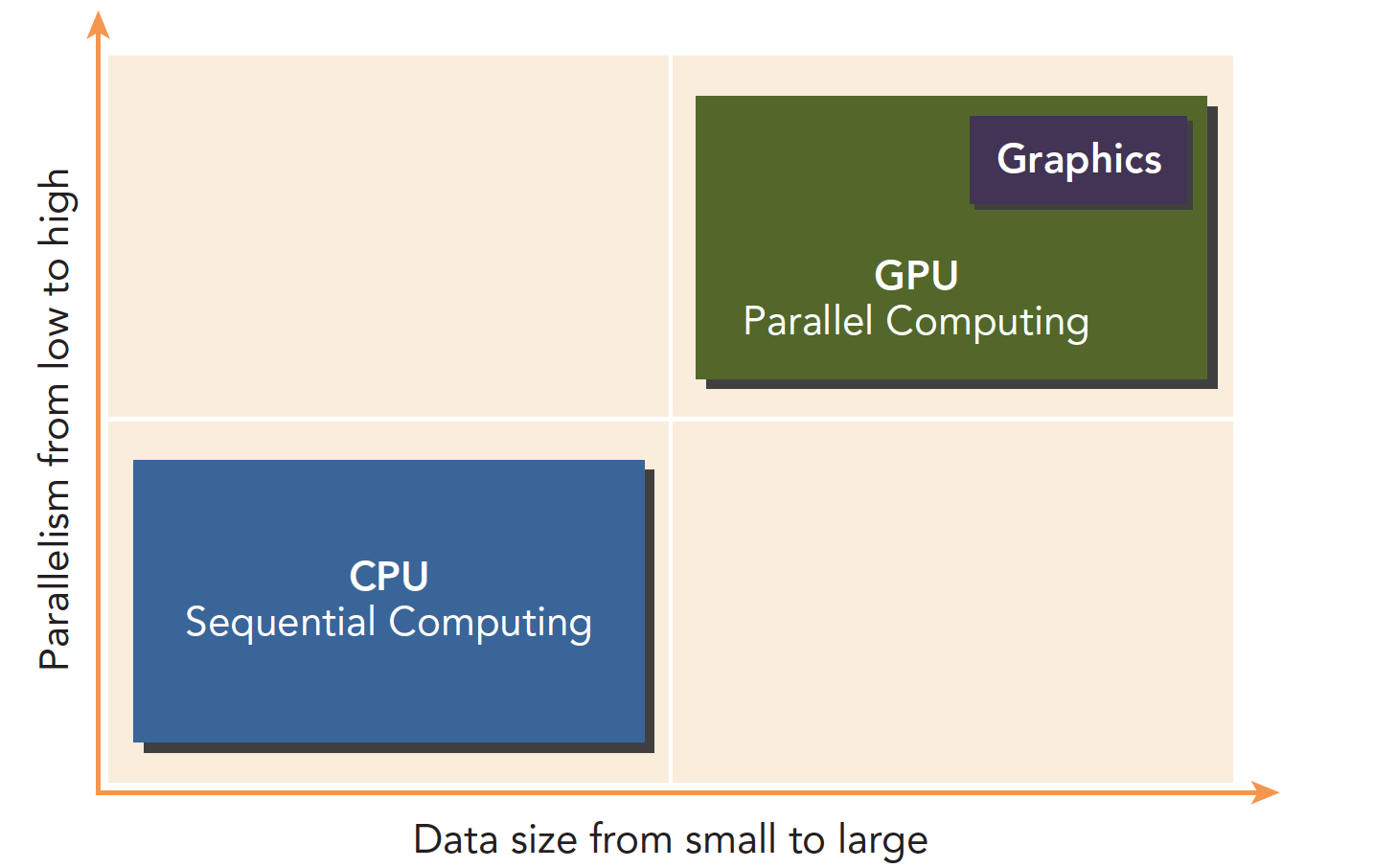
Programs with low parallelism and complex logic are suited for CPUs. Tasks with high parallelism, simple logic, and large data volumes are suited for GPUs.
A program can be decomposed into serial and parallel parts:
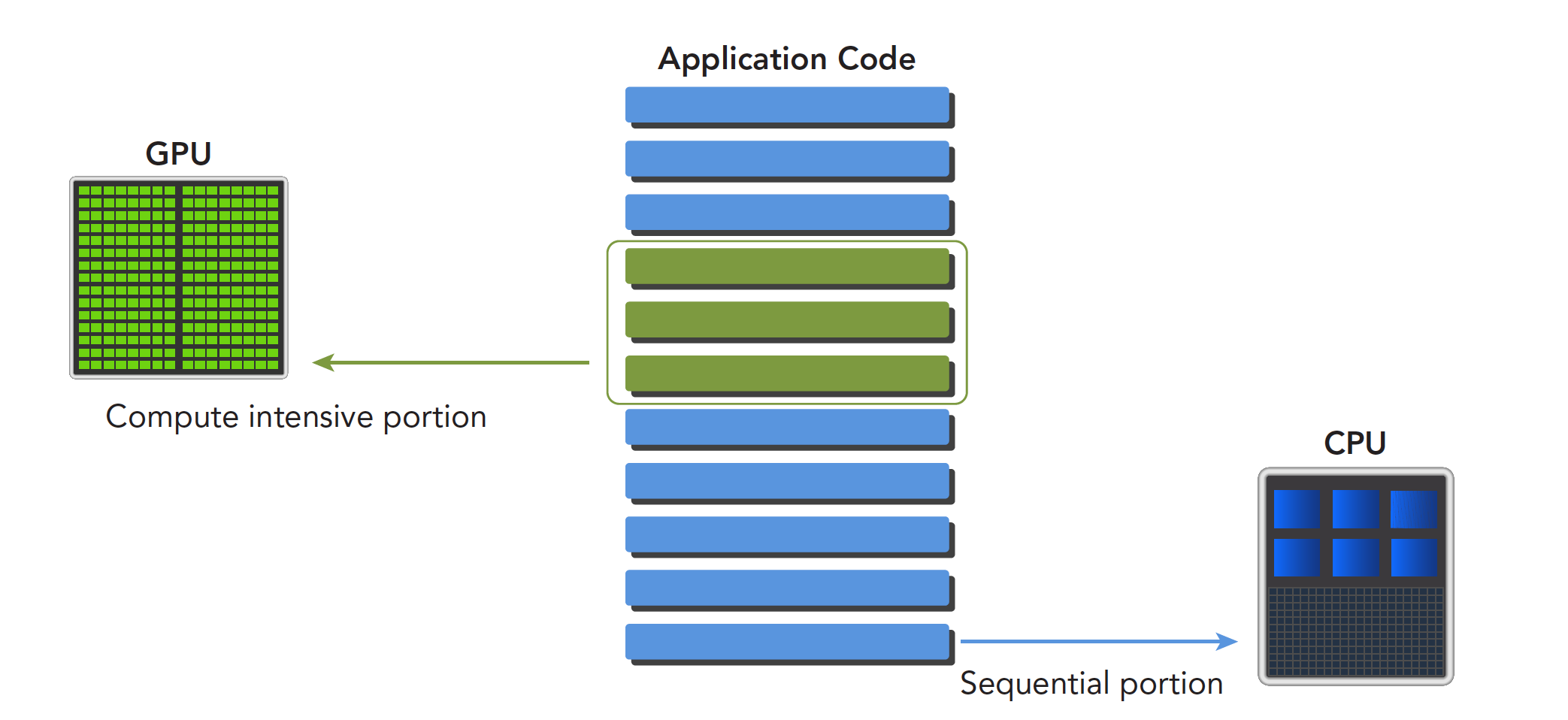
Differences between CPU and GPU threads:
- CPU threads are heavyweight entities. The operating system schedules threads by alternating execution, and thread context switching is expensive.
- GPU threads are lightweight. GPU applications typically contain thousands of threads, most in a queued state. Switching between threads has essentially no overhead.
- CPU cores are designed to minimize the latency of running one or two threads, while GPU cores maximize throughput through a large number of threads.
CUDA: A Heterogeneous Computing Platform
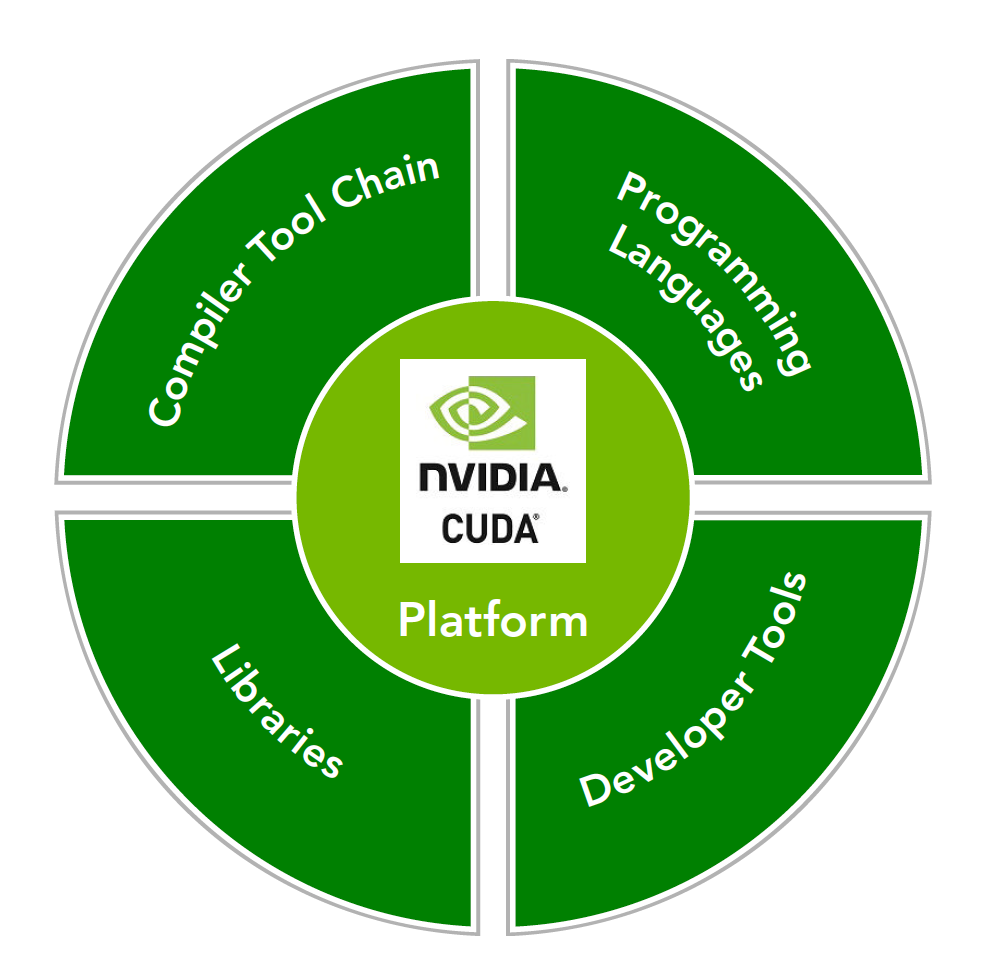
The CUDA platform refers not just to software or hardware, but to an entire platform built on NVIDIA GPUs, extended with multi-language support:
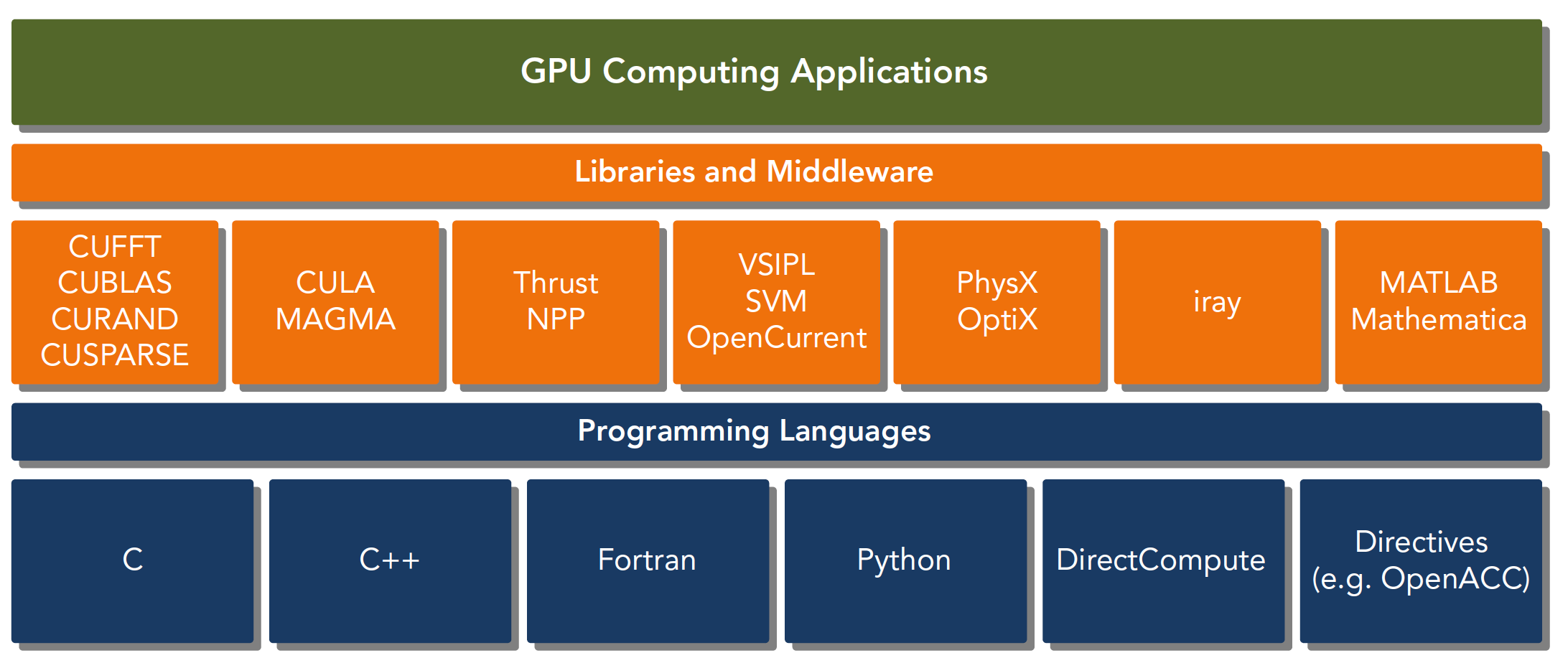
CUDA C is an extension of standard ANSI C, adding some syntax and keywords for writing device-side code. The CUDA library itself provides a large number of APIs for operating devices and performing computation.
There are also two different levels of APIs:
- CUDA Driver API
- CUDA Runtime API
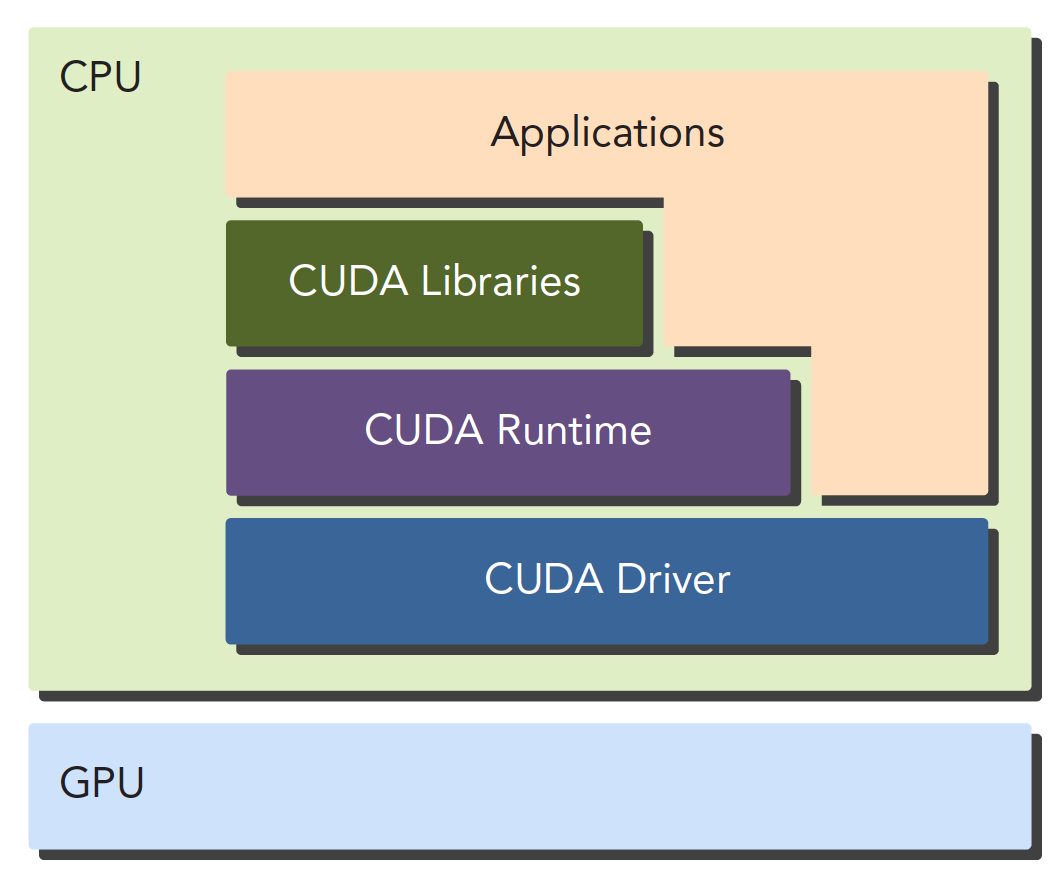
The Driver API is a low-level API that is relatively difficult to use. The Runtime API is a high-level API that is simple to use, and its implementation is based on the Driver API.
These two APIs are mutually exclusive -- you can only use one. Functions from the two libraries cannot be mixed; you must use one or the other.
A CUDA application can typically be decomposed into two parts:
- CPU host-side code
- GPU device-side code
The CUDA nvcc compiler automatically separates the different parts of your code. As shown in the figure, host code is written in C and compiled with the local C language compiler. Device code, i.e., kernel functions, is written in CUDA C and compiled through nvcc. During the linking stage, runtime libraries are added when kernel functions are called or explicit GPU device operations occur.
Note: The kernel function is the main piece of code we'll be working with -- it's the program segment that executes on the device.
nvcc is developed based on the LLVM open-source compiler system.
The CUDA toolkit provides compilers, math libraries, debugging and optimization tools, and of course CUDA's documentation is quite comprehensive. You can look it up yourself. However, starting with the documentation directly without understanding the basic structure first can make the learning process mechanical.
"Hello World!"
Hello World is something every programming beginner loves. Previously, GPUs couldn't do printf. I was confused at the time -- GPUs are display devices, so why can't they output? Later, it became possible to print information directly from CUDA kernels. Let's write the following program:
/*
 * hello_world.cu
 */
#include <stdio.h>

__global__ void hello_world(void)
{
    printf("GPU: Hello world!\n");
}

int main(int argc, char **argv)
{
    printf("CPU: Hello world!\n");
    hello_world<<<1,10>>>();
    cudaDeviceReset(); // Without this line, the GPU cannot output Hello World
    return 0;
}
The complete code can be cloned from the following project:
https://github.com/Tony-Tan/CUDA_Freshman
A brief introduction to some of the keywords:
__global__
This tells the compiler that this is a kernel function that can execute on the device.
hello_world<<<1,10>>>();
This syntax doesn't exist in C. <<< >>> is a parameter for configuring the device -- it's part of the CUDA extension.
cudaDeviceReset();
Without this line, the program won't run correctly because it includes implicit synchronization. GPU and CPU execute asynchronously. After a kernel function is called, control immediately returns to the host thread regardless of whether the GPU has finished executing the kernel. So in the above program, the GPU just starts executing and the CPU has already exited the program. We need to wait for the GPU to finish before exiting the host thread.
A typical CUDA program follows these steps:
- Allocate GPU memory
- Copy memory to the device
- Call the CUDA kernel function to perform computation
- Copy the computed data back to the host
- Free memory
The hello world above only goes to step three -- there's no memory exchange.
Is CUDA C Difficult?
The main difference between CPU and GPU programming lies in familiarity with GPU architecture. Understanding machine structure has a huge impact on programming efficiency. Know your machine, and you can write better code. The architecture of current computing devices means that locality significantly affects efficiency.
Data locality comes in two forms:
- Spatial locality
- Temporal locality
These two properties tell us that when data is used, nearby data will soon be used as well. When data has just been used, the probability of it being reused decreases over time -- but data may be reused.
In CUDA, two models determine performance:
- Memory hierarchy
- Thread hierarchy
When writing kernel functions in CUDA C, we only write a small serial code segment, but this code is executed by thousands of threads. All threads execute the same code. The CUDA programming model provides a hierarchical organization of threads that directly affects execution order on the GPU.
CUDA abstracts the hardware implementation:
- Thread group hierarchy
- Memory hierarchy
- Barrier synchronization
These are all things we'll study later. Threads and memory are the main research subjects. We have quite a rich set of tools at our disposal. NVIDIA provides us with:
- NVIDIA Nsight Integrated Development Environment
- CUDA-GDB Command Line Debugger
- Visual Profiler
- CUDA-MEMCHECK Tool
- GPU Device Management Tools
Summary
This article provides a broad overview of CUDA as an efficient heterogeneous computing platform, and outlines the challenges we'll face and the tools we'll use. Once we've learned CUDA, writing efficient heterogeneous computing programs will be as natural as writing serial programs.