1.0 Parallel Computing and Computer Architecture
2018-02-14 | CUDA , Freshman | 0 |
Abstract: This article provides a big picture view of CUDA programming. All subsequent articles build upon the foundation laid here. Keywords: Parallel Computing, Serial Programming, Parallel Programming, Computer Architecture, Parallelism, Heterogeneous Architecture, CUDA
Parallel Computing and Computer Architecture
I once heard a line from a movie -- not from a famous person, but I think it's well worth reflecting on: "Slow is smooth, smooth is fast." Our development moves so fast that we end up with things like "Master C++ in 21 Days" and "Learn Machine Learning in 10 Days."
Take it easy. Build a solid foundation first, and then you'll have the chance to move on to better things.
Big Picture
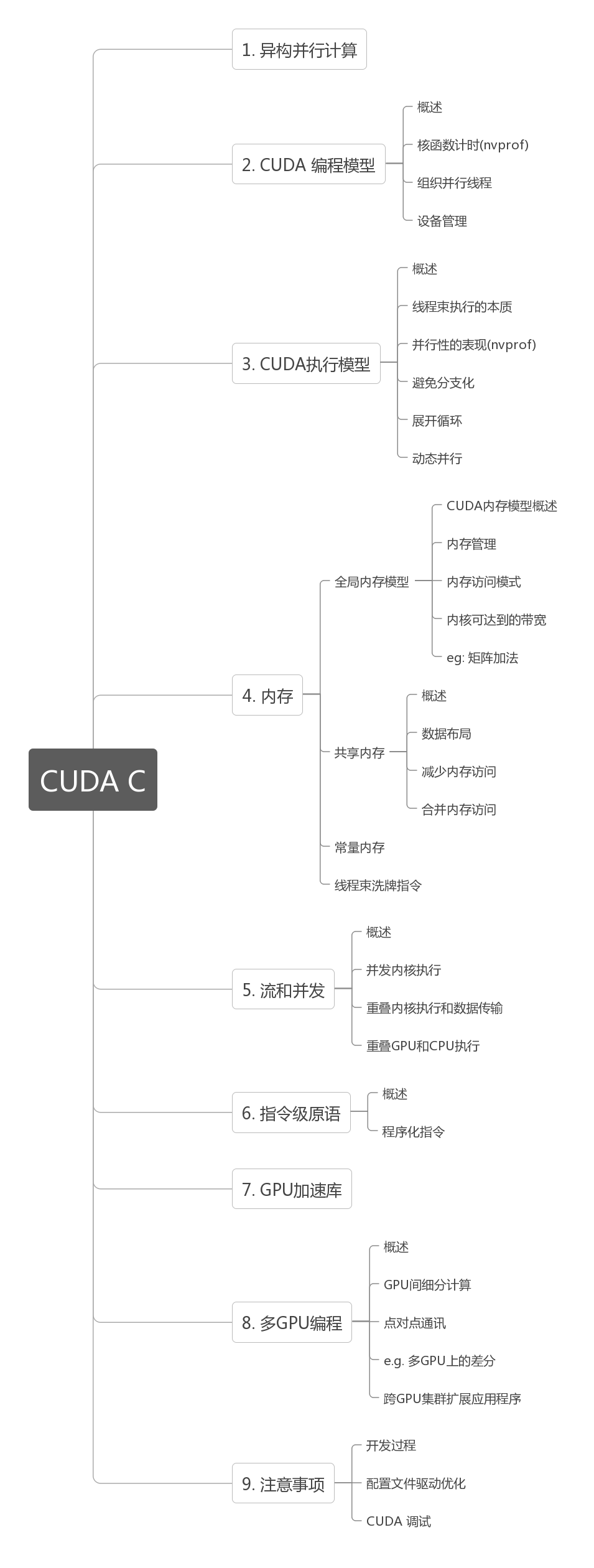
Our primary reference for learning CUDA is the book "CUDA C Programming Guide," and our blog basically follows the chapters in that book.
Structure:
Getting CUDA to run isn't difficult, but writing it well truly requires some study. Various experts on Zhihu recommend reading the official CUDA documentation. I've read through the documentation before, but the docs mainly teach you how to write code without explaining the hardware architecture in detail (perhaps in other docs -- I only read the programming guide). When learning programming, we should simultaneously understand the language, the programming model, the hardware execution model, and optimization methods. Simply learning to write code that runs is the boot camp approach.
Remember what Feng-ge said: if you understand compiler theory and operating systems (software and hardware), any language is the same.
Reading this series requires the following knowledge:
- C/C++ programming experience -- this goes without saying. If you haven't learned C yet and want to jump into CUDA, I think that's unwise. A weak foundation is something I've always opposed.
- This series is "Freshman," and there will be a "Junior" series later with different main content. Currently, the plan is for Freshman to cover basic knowledge, including hardware fundamentals, the programming model, basic performance analysis, and simple optimization (including memory, etc.), as well as some practical project techniques. The Junior section will mainly cover more advanced performance optimization techniques, such as PTX, advanced memory handling, etc. The biggest optimization opportunity lies in parallel algorithm design, which is outside the scope of this series -- that's a separate topic.
Parallel Computing
Our computers, from the earliest ENIAC to today's various supercomputers, were all created for applications. Software and hardware stimulate each other and progress together -- parallel computing emerged in the same way. Our earliest computers were certainly not parallel, but they could be made multi-threaded. Since a CPU at that time had only one core, it was impossible for a single core to execute two computations simultaneously. Later, applications gradually demanded higher computational power, so single-core computing speeds increased steadily. Then large-scale parallel applications appeared, and we urgently needed machines capable of processing many data items simultaneously, such as image processing and server backends handling massive concurrent access.
Parallel computing actually involves two distinct technical domains:
- Computer Architecture (hardware)
- Parallel Programming Design (software)
These are easy to understand: one produces tools, and the other uses tools to create various applications.
The primary goal of hardware is to provide faster computation speed, lower power-performance ratios, and hardware-level support for faster parallelism.
The primary purpose of software is to squeeze the highest performance out of current hardware, providing applications with more stable and faster computation results.
Our traditional computer architecture is generally the Harvard architecture, which mainly consists of three parts:
- Memory (instruction memory, data memory)
- Central Processing Unit (control unit and arithmetic logic unit)
- Input/output interfaces
The later von Neumann architecture treats both data and instructions as data -- I won't go into that here. I recommend the book "Computer Systems: A Programmer's Perspective" again, where you can find the relevant knowledge.
The biggest difference between writing parallel programs and serial programs is that writing serial programs may not require learning about different hardware platforms, but writing parallel programs does require some understanding of hardware.
Parallelism
Writing parallel programs is mainly about decomposing tasks. We generally view a program as a combination of instructions and data, and parallelism can be divided into these two types:
- Instruction-level parallelism
- Data-level parallelism
Our tasks focus more on data parallelism, so our main task is to analyze data dependencies -- which parts can be parallelized and which cannot.
If you're not familiar with parallelism, you should first learn pThread and OpenMP to understand how parallelism works on multi-core CPUs, such as parallelizing a for loop with OpenMP.
Task parallelism appears frequently in various management systems, like the payment systems we use every day. At any given moment, many people are using them simultaneously, requiring the backend to process these requests in parallel -- otherwise the whole nation would be queuing up, making it even more chaotic than Spring Festival travel.
What we study is large-scale data computation where the computation process is relatively uniform (different data essentially uses the same computation process) but the data volume is enormous, so we primarily focus on data parallelism. Analyzing data dependencies determines our program design.
CUDA is very well suited for data parallelism.
The first step in data parallel programming is to partition data across threads:
- Block Partitioning: Divide a whole block of data into smaller chunks, each randomly assigned to a thread. The execution order of each block is random (for concepts about threads, see "Computer Systems: A Programmer's Perspective").
| thread | 1 | 2 | 3 | 4 | 5 |
|---|---|---|---|---|---|
| block | 1 2 3 | 4 5 6 | 7 8 9 | 10 11 12 | 13 14 15 |
- Cyclic Partitioning: Threads process data blocks in order, with each thread handling multiple data blocks. For example, with five threads, thread 1 processes block 1, thread 2 processes block 2... thread 5 processes block 5, then thread 1 processes block 6.
| thread | 1 | 2 | 3 | 4 | 5 | 1 | 2 | 3 | 4 | 5 | 1 | 2 | 3 | 4 | 5 |
|---|---|---|---|---|---|---|---|---|---|---|---|---|---|---|---|
| block | 1 | 2 | 3 | 4 | 5 | 6 | 7 | 8 | 9 | 10 | 11 | 12 | 13 | 14 | 15 |
Below is a diagram -- note that blocks of the same color use the same thread. From an execution order perspective:
Below is the data set partitioning view:
Different data partitioning strategies significantly affect program performance, so for different problems and different computer architectures, we need to determine the optimal data partitioning through both theory and experimentation.
Computer Architecture
Flynn's Taxonomy
There are many ways to classify different computer architectures. A widely used method is called Flynn's Taxonomy, which classifies computers based on how instructions and data enter the CPU, into four categories:
Analyzing separately by data and instructions:
- Single Instruction, Single Data (SISD) (traditional serial computer, 386)
- Single Instruction, Multiple Data (SIMD) (parallel architecture, such as vector machines. All cores execute the same instruction but process different data. Modern CPUs basically all have this type of vector instruction.)
- Multiple Instruction, Single Data (MISD) (rare, multiple instructions processing the same data)
- Multiple Instruction, Multiple Data (MIMD) (parallel architecture, multi-core, multiple instructions, parallel processing of multiple data streams to achieve spatial parallelism. MIMD in most cases includes SIMD -- that is, MIMD has many computing cores, and each core supports SIMD.)
To improve parallel computing capability, we need to achieve the following performance improvements architecturally:
- Reduce latency
- Increase bandwidth
- Increase throughput
Latency refers to the time required for an operation from start to finish, usually measured in microseconds. Lower latency is better.
Bandwidth is the amount of data processed per unit of time, usually expressed in MB/s or GB/s.
Throughput is the number of operations successfully processed per unit of time, usually expressed in GFLOPS (billions of floating-point operations). Throughput and latency are related -- both reflect computing speed. One is time divided by the number of operations, giving the time per operation -- latency. The other is operations divided by time, giving operations per unit time -- throughput.
Classification by Memory
Computer architecture can also be classified by memory:
- Multi-node systems with distributed memory
- Multi-processor systems with shared memory
The first type is larger, usually called a cluster -- a server room with many chassis, each chassis having its own memory, processor, power supply, and other hardware, interconnected via a network. This forms a distributed system.
The second type is a single motherboard with multiple processors that share the same on-board memory, with the same memory address space, interacting with memory through a bus.
Multiple processors can be divided into multi-chip processors and single-chip multi-core (many-core). That is, some motherboards have multiple processor chips mounted on them, while others have a single processor that contains hundreds of cores.
GPU belongs to the many-core system category. Of course, modern CPUs are also multi-core, but there are significant differences:
- CPUs are suited for executing complex logic, such as multi-branch scenarios. Their cores are "heavy" (complex).
- GPUs are suited for executing simple logic with massive data computation. Their throughput is higher, but their cores are "light" (structurally simple).
Summary
This article mainly introduces the classification of computer architectures and the basics of parallel computing. Next, we'll continue with heterogeneous computing and CUDA.