2.3 Organizing Parallel Threads
2018-03-09 | CUDA , Freshman | 0 |
Abstract: This article introduces the thread organization pattern in the CUDA model. Keywords: Thread, Block, Grid
Organizing Parallel Threads
In 2.0 CUDA Programming Model we roughly introduced the key points of CUDA programming, including memory, kernel, and the thread organization forms we'll discuss today. In 2.0 we also introduced that each thread's index is determined by the block's coordinates (blockIdx.x, etc.), the grid size (gridDim.x, etc.), thread index (threadIdx.x, etc.), and thread size (blockDim.x, etc.).
This article details how each thread determines its unique index, establishes parallel computation, and how different thread organization forms affect performance:
- 2D grid with 2D thread blocks
- 1D grid with 1D thread blocks
- 2D grid with 1D thread blocks
Building Matrix Indices with Blocks and Threads
The advantage of multi-threading is that each thread processes different data. The challenge is how to assign each thread different data so that multiple threads don't process the same data, or avoid threads accessing memory in a disorganized manner. If multi-threads can't work in an organized fashion, they can't leverage the advantages of parallel computing. Organized, rule-based computation is the only kind that makes sense.
Our thread model was briefly introduced in 2.0, but the following diagram very vividly illustrates the thread model. Note, however, that the actual hardware execution and storage don't follow this model -- please distinguish between them:
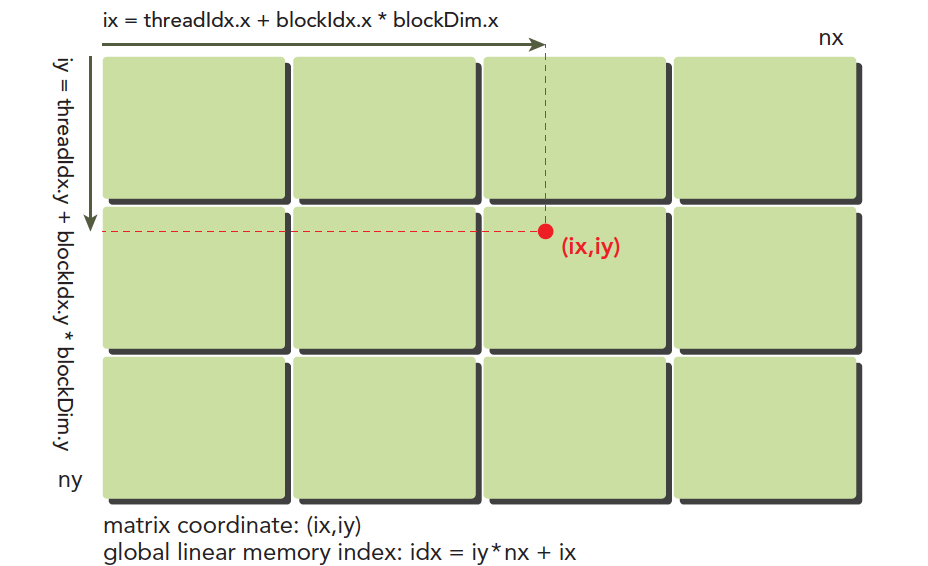
Here (ix,iy) is the index of any thread in the entire thread model, also called the global coordinate. The local coordinate is (threadIdx.x,threadIdx.y). Of course, this local coordinate isn't very useful by itself -- it can only index threads within a thread block. Different thread blocks have the same local index values. For example, in the same residential complex, Building A has a 16th floor and Building B also has a 16th floor. Buildings A and B are like blockIdx, and 16 is like threadIdx.
The horizontal coordinate in the diagram is:
ix = threadIdx.x + blockIdx.x x blockDim.x
The vertical coordinate is:
iy = threadIdx.y + blockIdx.y x blockDim.y
This gives us a unique label for each thread, and the kernel can access this label at runtime. As mentioned earlier, each CUDA thread executes the same code -- in heterogeneous computing terms, this is multi-thread single-instruction. If each different thread executes the same code and processes the same set of data, they'll produce multiple identical results, which is obviously meaningless. To have different threads process different data, the common CUDA approach is to map different threads to different data, using the thread's global label to correspond to different data sets.
Device memory and host memory both exist linearly. For example, a two-dimensional matrix (8x6) is stored in memory like this:

What we need to manage is:
- Thread and block indices (to calculate a thread's global index)
- The coordinates (ix,iy) of a given point in the matrix
- The linear memory position corresponding to (ix,iy)
The linear position is calculated as:
idx = ix + iy x nx
We've already calculated the thread's global coordinates. By mapping the thread's global coordinates to the matrix coordinates -- that is, the thread's coordinates (ix,iy) correspond to the matrix element at (ix,iy) -- we establish a one-to-one mapping. Different threads process different data in the matrix. For a concrete example, the thread at ix=10, iy=10 processes the matrix data at (10,10). Of course, you can design other mapping patterns, but this method is the simplest with the lowest chance of errors.
The following code outputs each thread's label information:
#include <cuda_runtime.h>
#include <stdio.h>
#include "freshman.h"

__global__ void printThreadIndex(float *A, const int nx, const int ny)
{
    int ix = threadIdx.x + blockIdx.x * blockDim.x;
    int iy = threadIdx.y + blockIdx.y * blockDim.y;
    unsigned int idx = iy * nx + ix;
    printf("thread_id(%d,%d) block_id(%d,%d) coordinate(%d,%d) "
           "global index %2d ival %2d\n", threadIdx.x, threadIdx.y,
           blockIdx.x, blockIdx.y, ix, iy, idx, A[idx]);
}

int main(int argc, char** argv)
{
    initDevice(0);
    int nx = 8, ny = 6;
    int nxy = nx * ny;
    int nBytes = nxy * sizeof(float);

    // Malloc
    float* A_host = (float*)malloc(nBytes);
    initialData(A_host, nxy);
    printMatrix(A_host, nx, ny);

    // cudaMalloc
    float *A_dev = NULL;
    CHECK(cudaMalloc((void**)&A_dev, nBytes));

    cudaMemcpy(A_dev, A_host, nBytes, cudaMemcpyHostToDevice);

    dim3 block(4, 2);
    dim3 grid((nx - 1) / block.x + 1, (ny - 1) / block.y + 1);

    printThreadIndex<<<grid, block>>>(A_dev, nx, ny);

    CHECK(cudaDeviceSynchronize());
    cudaFree(A_dev);
    free(A_host);

    cudaDeviceReset();
    return 0;
}
This code outputs a randomly generated matrix, and the kernel function prints its own thread label. Note that the kernel's ability to call printf was a feature added to CUDA later -- the earliest versions couldn't do printf. Output:
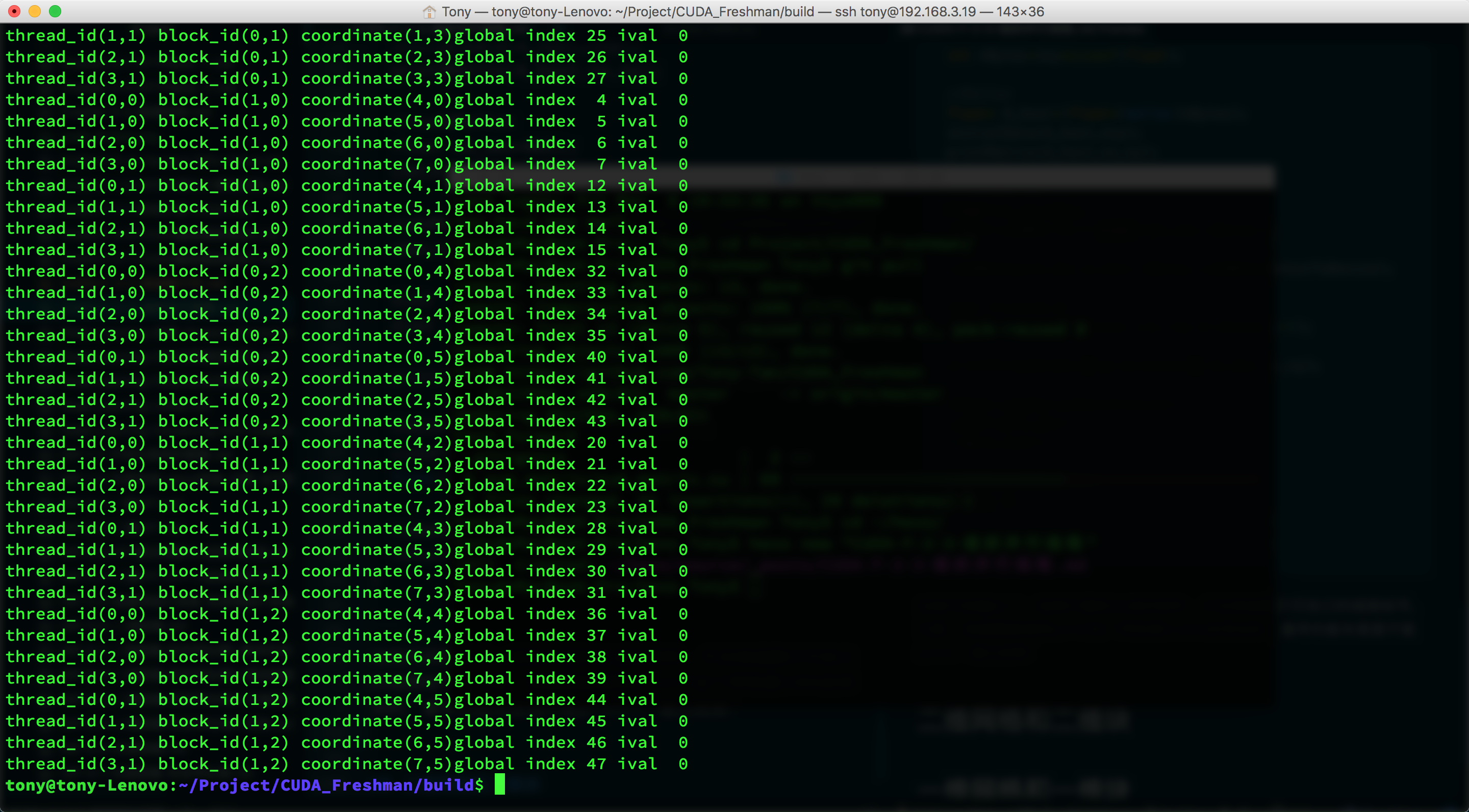
Since the screenshot is incomplete, some of the printed information above wasn't fully captured. But we can see that each thread has been mapped to different data. Now we'll use this method to perform computation -- the simplest being two-dimensional matrix addition.
2D Matrix Addition
Using the thread-to-data mapping from above, we completed the following kernel function:
__global__ void sumMatrix(float * MatA, float * MatB, float * MatC, int nx, int ny)
{
    int ix = threadIdx.x + blockDim.x * blockIdx.x;
    int iy = threadIdx.y + blockDim.y * blockIdx.y;
    int idx = ix + iy * nx;
    if (ix < nx && iy < ny)
    {
        MatC[idx] = MatA[idx] + MatB[idx];
    }
}
Below we adjust different thread organization forms, test different efficiencies, and ensure we get correct results. Finding the best efficiency is something to consider later -- what we need to do now is get correct results with various thread organization forms.
2D Grid and 2D Block
First, let's look at the 2D grid and 2D block code:
// 2d block and 2d grid
dim3 block_0(dimx, dimy);
dim3 grid_0((nx - 1) / block_0.x + 1, (ny - 1) / block_0.y + 1);
iStart = cpuSecond();
sumMatrix<<<grid_0, block_0>>>(A_dev, B_dev, C_dev, nx, ny);
CHECK(cudaDeviceSynchronize());
iElaps = cpuSecond() - iStart;
printf("GPU Execution configuration<<<(%d,%d),(%d,%d)>>> Time elapsed %f sec\n",
       grid_0.x, grid_0.y, block_0.x, block_0.y, iElaps);
CHECK(cudaMemcpy(C_from_gpu, C_dev, nBytes, cudaMemcpyDeviceToHost));
checkResult(C_host, C_from_gpu, nxy);
Result:
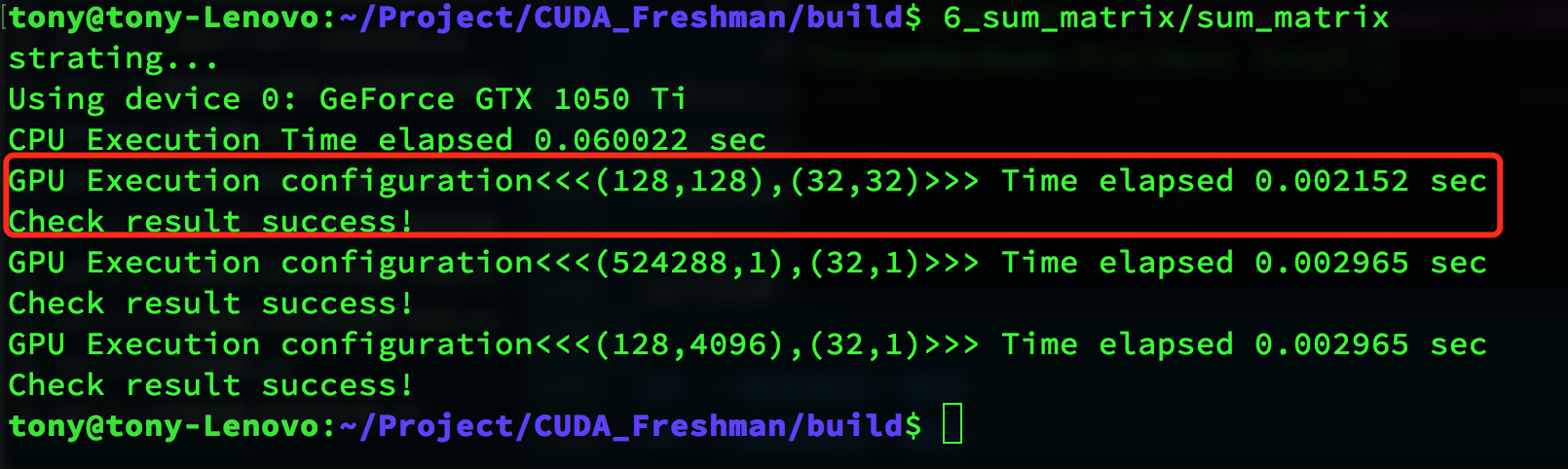
The red box contains the execution result. We write a CPU matrix computation and compare the results. Our computation result is correct, taking 0.002152 seconds.
1D Grid and 1D Block
Next, we use a 1D grid and 1D block:
// 1d block and 1d grid
dimx = 32;
dim3 block_1(dimx);
dim3 grid_1((nxy - 1) / block_1.x + 1);
iStart = cpuSecond();
sumMatrix<<<grid_1, block_1>>>(A_dev, B_dev, C_dev, nx * ny, 1);
CHECK(cudaDeviceSynchronize());
iElaps = cpuSecond() - iStart;
printf("GPU Execution configuration<<<(%d,%d),(%d,%d)>>> Time elapsed %f sec\n",
       grid_1.x, grid_1.y, block_1.x, block_1.y, iElaps);
CHECK(cudaMemcpy(C_from_gpu, C_dev, nBytes, cudaMemcpyDeviceToHost));
checkResult(C_host, C_from_gpu, nxy);
Result:
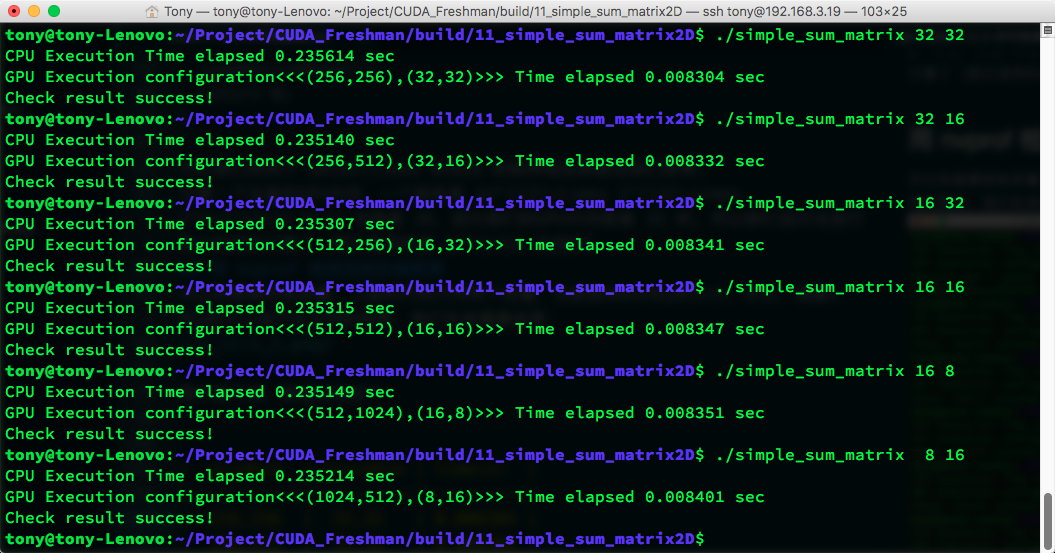
The result is also correct.
2D Grid and 1D Block
2D grid and 1D block:
// 2d grid and 1d block
dimx = 32;
dim3 block_2(dimx);
dim3 grid_2((nx - 1) / block_2.x + 1, ny);
iStart = cpuSecond();
sumMatrix<<<grid_2, block_2>>>(A_dev, B_dev, C_dev, nx, ny);
CHECK(cudaDeviceSynchronize());
iElaps = cpuSecond() - iStart;
printf("GPU Execution configuration<<<(%d,%d),(%d,%d)>>> Time elapsed %f sec\n",
       grid_2.x, grid_2.y, block_2.x, block_2.y, iElaps);
CHECK(cudaMemcpy(C_from_gpu, C_dev, nBytes, cudaMemcpyDeviceToHost));
checkResult(C_host, C_from_gpu, nxy);
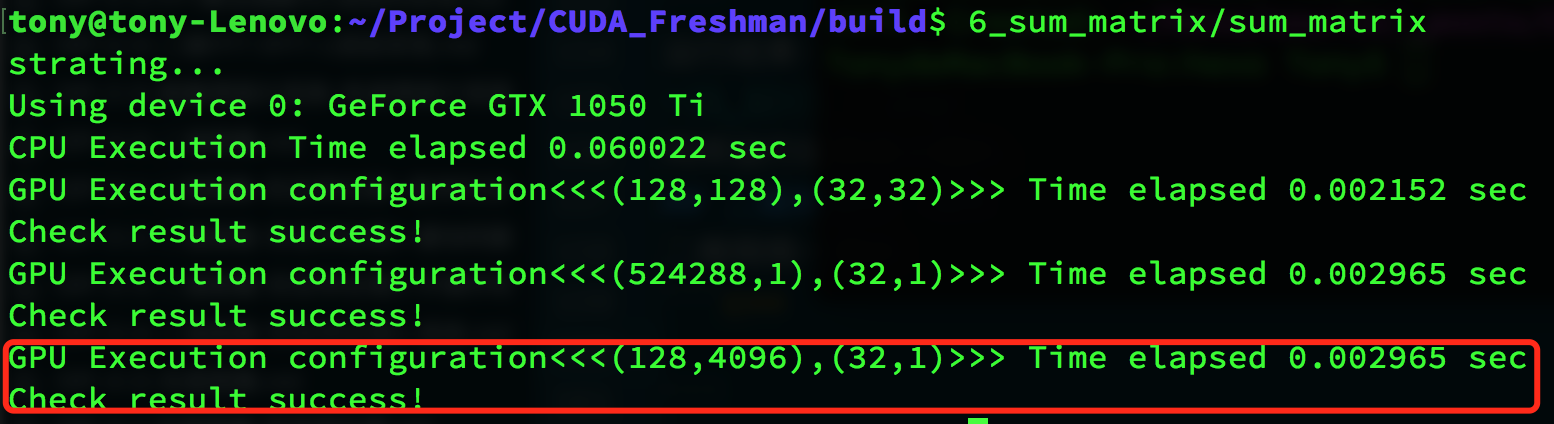
Result:
Summary
Using different thread organization forms produces correct results, but with different efficiencies:
| Thread Configuration | Execution Time |
|---|---|
| CPU single thread | 0.060022 |
| (128,128),(32,32) | 0.002152 |
| (524288,1),(32,1) | 0.002965 |
| (128,4096),(32,1) | 0.002965 |
The results don't show much difference, but they're obviously much faster than CPU. Most importantly, this article achieved correct results with different thread organization patterns, and:
- Changing the execution configuration (thread organization) yields different performance
- Traditional kernel functions may not achieve the best results
- For a given kernel function, adjusting grid and thread block sizes can yield better results
We'll dig into the hardware level and pursue the root causes of efficiency differences in the Chapter 3 execution model.
Complete code is available in the repository: https://github.com/Tony-Tan/CUDA_Freshman