4.5 Vector Addition with Unified Memory
Published on 2018-05-14 | Category: CUDA, Freshman | Comments: 0 | Views:
Abstract: A CUDA program using unified memory -- vector addition
Keywords: Unified Memory, Unified Memory
Vector Addition with Unified Memory
This article supplements and practices the previous content on unified memory. For details, refer to: Memory Management
Unified Memory Vector Addition
The basic idea of unified memory is to reduce the number of different pointers pointing to the same address. For example, we commonly allocate memory on the host, transfer it to the device, then transfer it back from the device. With unified memory, these explicit steps are no longer needed -- the driver handles them for us.
The specific approach is:
CHECK(cudaMallocManaged((void**)&a_d, nByte));
CHECK(cudaMallocManaged((void**)&b_d, nByte));
CHECK(cudaMallocManaged((void**)&res_d, nByte));
Use cudaMallocManaged to allocate memory. This memory appears accessible on both the device and host, but the internal process is the same as our manual copying before -- memory transfer is the essence, and this simply wraps it.
Let's look at the complete code:
#include <cuda_runtime.h>
#include <stdio.h>
#include "freshman.h"

void sumArrays(float * a, float * b, float * res, const int size)
{
    for(int i = 0; i < size; i += 4)
    {
        res[i] = a[i] + b[i];
        res[i+1] = a[i+1] + b[i+1];
        res[i+2] = a[i+2] + b[i+2];
        res[i+3] = a[i+3] + b[i+3];
    }
}

__global__ void sumArraysGPU(float*a, float*b, float*res, int N)
{
    int i = blockIdx.x * blockDim.x + threadIdx.x;
    if(i < N)
        res[i] = a[i] + b[i];
}

int main(int argc, char **argv)
{
    // set up device
    initDevice(0);

    int nElem = 1 << 24;
    printf("Vector size:%d\n", nElem);
    int nByte = sizeof(float) * nElem;
    float *res_h = (float*)malloc(nByte);
    memset(res_h, 0, nByte);

    float *a_d, *b_d, *res_d;
    CHECK(cudaMallocManaged((void**)&a_d, nByte));
    CHECK(cudaMallocManaged((void**)&b_d, nByte));
    CHECK(cudaMallocManaged((void**)&res_d, nByte));

    initialData(a_d, nElem);
    initialData(b_d, nElem);

    // Using unified memory, no explicit memory transfer needed
    //CHECK(cudaMemcpy(a_d, a_h, nByte, cudaMemcpyHostToDevice));
    //CHECK(cudaMemcpy(b_d, b_h, nByte, cudaMemcpyHostToDevice));

    dim3 block(512);
    dim3 grid((nElem-1)/block.x+1);

    double iStart, iElaps;
    iStart = cpuSecond();
    sumArraysGPU<<<grid, block>>>(a_d, b_d, res_d, nElem);
    cudaDeviceSynchronize();
    iElaps = cpuSecond() - iStart;
    printf("Execution configuration<<<%d,%d>>> Time elapsed %f sec\n", grid.x, block.x, iElaps);

    // Using unified memory, no explicit memory transfer needed
    //CHECK(cudaMemcpy(res_from_gpu_h, res_d, nByte, cudaMemcpyDeviceToHost));
    sumArrays(a_d, b_d, res_h, nElem);

    checkResult(res_h, res_d, nElem);

    // Unified memory is freed with cudaFree
    cudaFree(a_d);
    cudaFree(b_d);
    cudaFree(res_d);

    free(res_h);

    return 0;
}
Note the commented-out parts -- these are the code sections that are omitted.
Result:
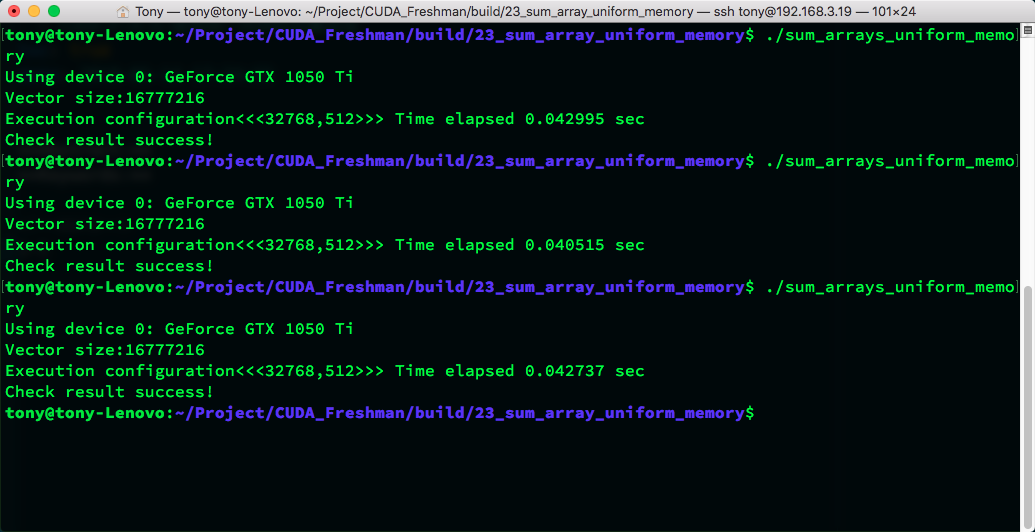
From this code, using unified memory or manual control results in similar execution speeds.
There is a new concept here called page fault. The unified memory address we allocate is a virtual address corresponding to both host and GPU addresses. When the host accesses this virtual address, a page fault occurs. When the CPU accesses managed memory located on the GPU, unified memory uses CPU page faults to trigger data transfer from device to CPU. The "fault" here is not a failure but a form of communication, similar to an interrupt.
The number of faults is directly related to the amount of data being transferred.
Using:
nvprof --unified-memory-profiling per-process-device ./sum_arrays_unified_memory
You can view the actual parameters:
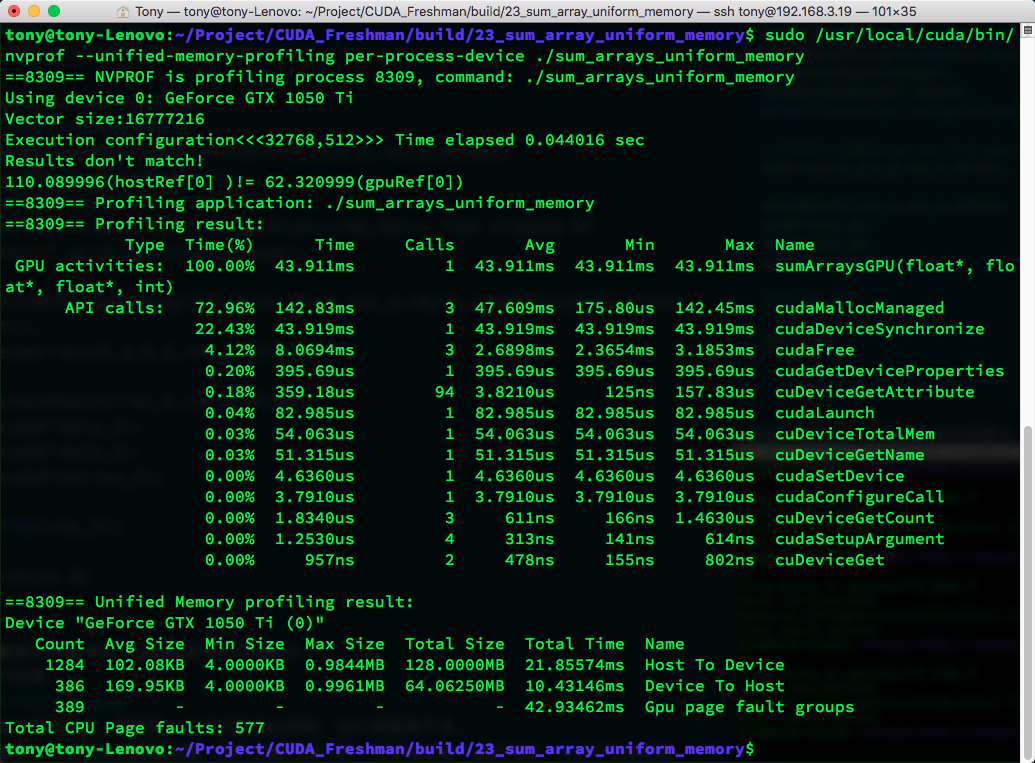
You can also use nvvp to view, with similar results.
How Unified Memory Works
The mechanism of unified memory is based on the following key concepts:
- Virtual Address Space: Unified memory provides a unified virtual address space that both CPU and GPU can access
- On-Demand Migration: Data is automatically migrated between CPU and GPU as needed
- Page Fault Handling: When data not on the current device is accessed, a page fault triggers automatic data migration
Advantages
- Simple Programming: No need to explicitly manage data transfers between CPU and GPU
- Fewer Errors: Avoids errors that may arise from manual memory management
- Code Readability: Code is more concise and logic is clearer
Disadvantages
- Performance Overhead: Page faults and data migration may introduce additional overhead
- Control Granularity: Cannot precisely control data transfer timing like manual management
- Hardware Requirements: Requires GPU hardware that supports unified memory
Performance Comparison
In practical applications, the performance difference between unified memory and manual memory management mainly manifests in:
- Data Access Patterns: If data access patterns are predictable, manual management is usually more efficient
- Data Size: For small datasets, the convenience of unified memory may outweigh the performance loss
- Algorithm Complexity: For complex data flows, unified memory can simplify the development process
Summary
Although unified memory management makes coding more convenient, and in many cases the speed is acceptable, experiments show that manual control generally outperforms unified memory management in terms of performance. In other words, the precise control of a programmer is more efficient than the automatic management of the compiler and current devices.
Therefore, in practical development, the following approach is recommended:
- Prototyping Phase: Use unified memory to quickly verify algorithm correctness
- Performance Optimization Phase: Consider using manual memory management for best performance
- Balanced Consideration: Make trade-offs between development efficiency and runtime performance based on specific application scenarios
Overall, unified memory is an important development direction for CUDA programming. It lowers the barrier to CUDA programming, but to achieve the best performance, in-depth understanding and manual control of memory management are still necessary.