5.1 CUDA Shared Memory Overview
Published on 2018-06-01 | Category: CUDA, Freshman | Comments: 0 | Views:
Abstract: This article provides an overview of CUDA memory, introducing the shared memory model, allocation, access, configuration, and synchronization.
Keywords: Model, Allocation, Access, Configuration, Synchronization
CUDA Shared Memory Overview
First, a clarification: when we previously said that cache is "programmable," that was not entirely accurate. It should be said to be "controllable." The shared memory we discuss today is truly programmable in the real sense.
Without further ado, we have completed more than half of this CUDA content series. I hope we all grow from completing the series, rather than just passively reading or typing.
GPU memory can be classified by type (physical location) into:
- On-board memory
- On-chip memory
Global memory is larger on-board memory with high latency. Shared memory is smaller on-chip memory with low latency and high bandwidth. Using the factory analogy from before: global memory is the material warehouse, requiring trucks to transport materials; shared memory is the room inside the factory for storing temporary raw materials -- the distance for fetching materials is short and speed is high.
Shared memory is a programmable cache. Common uses of shared memory include:
- A communication channel between threads within a block
- A programmable cache for global memory data
- High-speed scratchpad memory for transforming data to optimize global memory access patterns
In this chapter, we study two examples:
- Reduction kernel
- Matrix transposition kernel
Shared Memory
Shared memory (SMEM) is a critical component of the GPU. Physically, each SM has a small memory pool that is shared by all threads in thread blocks executing on that SM. Shared memory enables threads within the same thread block to collaborate, helping maximize on-chip memory utilization and reduce the latency of returning to global memory.
Shared memory is controlled by our code, making it the most flexible optimization tool at our disposal.
Combining the L1 and L2 caches we studied earlier with today's shared memory, and the upcoming read-only and constant caches, their relationship is shown in the following figure:
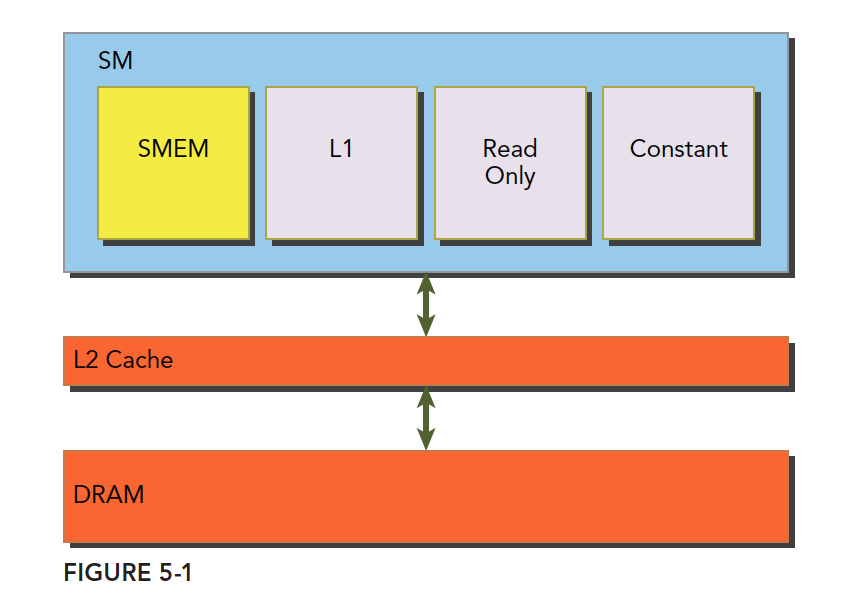
The SM has shared memory, L1 cache, read-only cache, and constant cache. All data coming from DRAM global memory must pass through L2 cache. In contrast, SMEM, L1, read-only, and constant caches, being closer to the SM computational cores, have faster read speeds. SMEM and L1 have roughly 20-30x lower latency than L2, with about 10x the bandwidth.
Let's now understand the lifecycle and access properties of shared memory.
Shared memory is established when its owning thread block executes and is released when the thread block finishes. The thread block and its shared memory have the same lifecycle.
For each thread's access request to shared memory:
- Best case: Every thread in the current warp accesses a non-conflicting shared memory location (we will explain what this looks like later). In this case, everyone operates without interference, and the entire warp's access completes in one transaction -- maximum efficiency.
- When access conflicts occur (we will explain the details of conflicts later): A warp of 32 threads requires 32 transactions.
- If all 32 threads in a warp access the same address: One thread reads the data and broadcasts it to the others.
The entire chapter focuses on how to avoid access conflicts and use shared memory efficiently.
Note that we said shared memory's lifecycle matches its owning thread block -- this shared memory is at the programming model level. Physically, all executing thread blocks on an SM share the physical shared memory. Therefore, shared memory also limits the number of active thread blocks. The larger the shared memory, or the less shared memory a block uses, the higher the thread block-level parallelism.
Shared memory -- a high-efficiency limited resource -- use it wisely!
Regarding programmability: the serial form of matrix multiplication is most simply done with three nested loops. By adjusting the loops, you can achieve better cache hit rates. This question appeared in job placement exams. When I was in college taking job exams, I would naively write comments on exam questions saying you could improve cache hit rates by adjusting loop order. But thinking about it now, CPU caches are uncontrollable -- you can only adjust your program to adapt.
The advantage of GPUs is that you do not just have one programmable cache, but several.
Shared Memory Allocation
There are multiple methods for allocating and defining shared memory. Both dynamic and static declarations are possible. It can be inside a kernel function or outside (i.e., local and global -- referring to variable scope within a file). CUDA supports 1D, 2D, and 3D shared memory declarations. Newer versions may support more dimensions, but check the manual. In general, we assume at most three dimensions.
Shared memory is declared with the keyword:
__shared__
To declare a 2D floating-point shared memory array:
__shared__ float a[size_x][size_y];
Here, size_x and size_y are the same as declaring a C++ array -- they must be compile-time constants, not variables.
To dynamically declare a shared memory array, use the extern keyword and add a third parameter when launching the kernel.
Declaration:
extern __shared__ int tile[];
When launching the kernel with the above declaration, use this configuration:
kernel<<<grid, block, isize*sizeof(int)>>>(...);
isize is the size of the array to store in shared memory. For example, for a 10-element int array, isize would be 10.
Note: dynamic declaration only supports one-dimensional arrays.
Shared Memory Banks and Access Patterns
Declarations and definitions create shared memory at the code level. Next, let's look at how shared memory is stored and accessed. In the previous chapter, we studied global memory and explicitly learned how bandwidth and latency affect kernel performance. Shared memory is one of the primary tools for hiding global memory latency and improving bandwidth performance. The way to master the tool is to understand its working principle and the characteristics of each component.
Memory Banks
Shared memory is a one-dimensional address space. Note that this means shared memory addresses are one-dimensional -- linear, like all memory we have discussed. Two-dimensional, three-dimensional, and higher-dimensional addresses must be converted to one-dimensional to correspond to physical memory addresses.
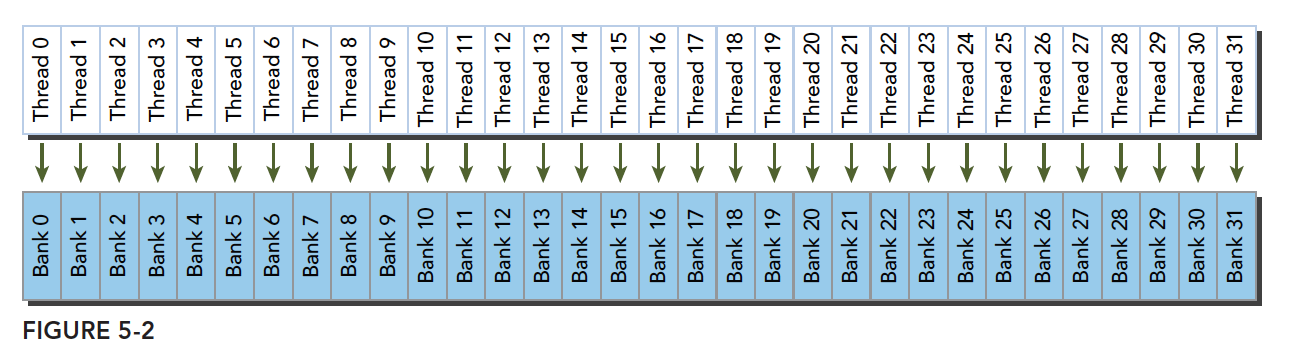
Shared memory has a special form: it is divided into 32 equally-sized memory modules called banks, which can be accessed simultaneously. The purpose of the 32 banks corresponds to the 32 threads in a warp. When these threads access shared memory, if they all access different banks (no conflict), one transaction can complete the access. Otherwise (conflict), multiple memory transactions are needed, reducing bandwidth utilization.
We will explain below what constitutes a conflict and how conflicts occur.
Bank Conflicts
Conflicts occur when multiple threads want to access the same bank. Note this means accessing the same bank, not the same address. Accessing the same address does not cause a conflict (it uses broadcast). When conflicts occur, there is waiting and more transactions, which seriously impacts efficiency.
When a warp accesses shared memory, there are 3 classic patterns:
- Parallel access: Multiple addresses accessing multiple banks
- Serial access: Multiple addresses accessing the same bank
- Broadcast access: Single address reading from a single bank
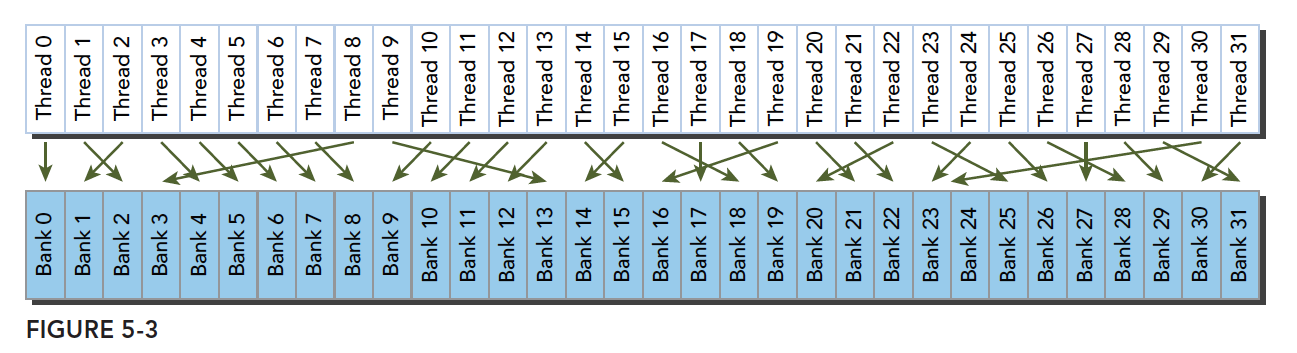
Parallel access is the most common and most efficient pattern. It can be further divided into completely conflict-free and partially conflicting cases. Completely conflict-free is the ideal mode -- all threads in a warp complete their requests through a single memory transaction, without interference, achieving maximum efficiency. With minor conflicts, the non-conflicting portion completes in one transaction, while conflicting portions are split into additional non-conflicting transactions, slightly reducing efficiency.
The above minor conflicts becoming full conflicts results in serial mode -- the worst case. All threads access the same bank (not the same address, but the same bank, which has many addresses). This is serial access.
Broadcast access is when all threads access the same address. One thread reads the data and broadcasts it to all other threads. Although the latency is not slower compared to fully parallel access, it only reads one piece of data, resulting in poor bandwidth utilization.
Optimal access pattern (parallel, no conflict):
Irregular access pattern (parallel, no conflict):
Irregular access pattern (parallel, may or may not conflict):
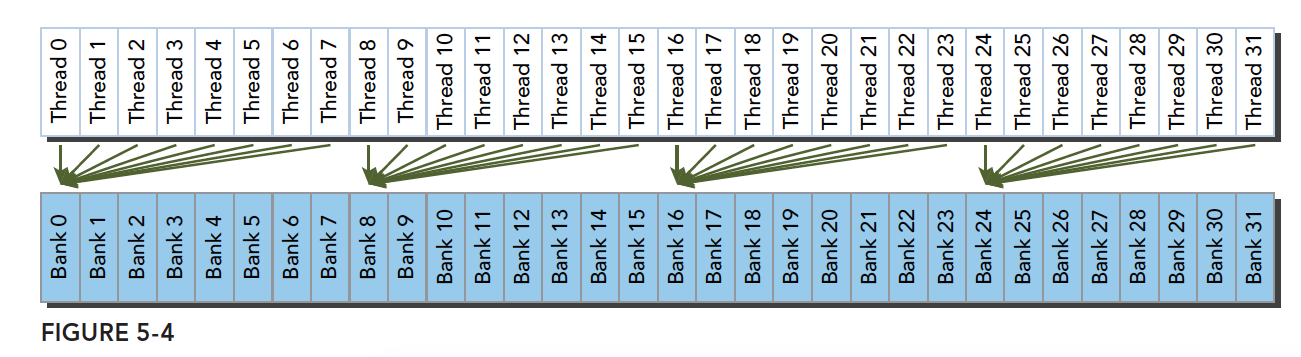
There are two possibilities:
- Conflict: Waiting is required
- No conflict: Threads accessing the same bank are all accessing the same address, resolved through broadcast
These are the fundamental causes of conflicts. We should adjust data, code, and algorithms to avoid conflicts and improve performance.
Access Patterns
What is the relationship between shared memory banks and addresses? This relationship determines the access pattern. Memory bank width varies with device compute capability:
- Compute capability 2.x devices: 4 bytes (32-bit)
- Compute capability 3.x devices: 8 bytes (64-bit)
How to understand width? Imagine 32 buckets, each bucket as a bank. The bucket opening size is fixed. If we use buckets to hold watermelons, and each bucket can hold 4 watermelons at a time through its opening, the width is 4; if 8, the width is 8. This is a plain explanation.
Now we number a row of watermelons from 0 to n, and we have 32 numbered buckets (0-31) lined up. We load watermelons into the buckets simultaneously. Since we can only load 4 at a time, we put watermelons 0-3 into bucket 0, 4-7 into bucket 1, and so on. When we reach bucket 31, we load watermelons 124-127. Now each bucket has 4 watermelons. Then we put watermelons 128-131 into bucket 0, starting the next round.
This is the shared memory bank access pattern:
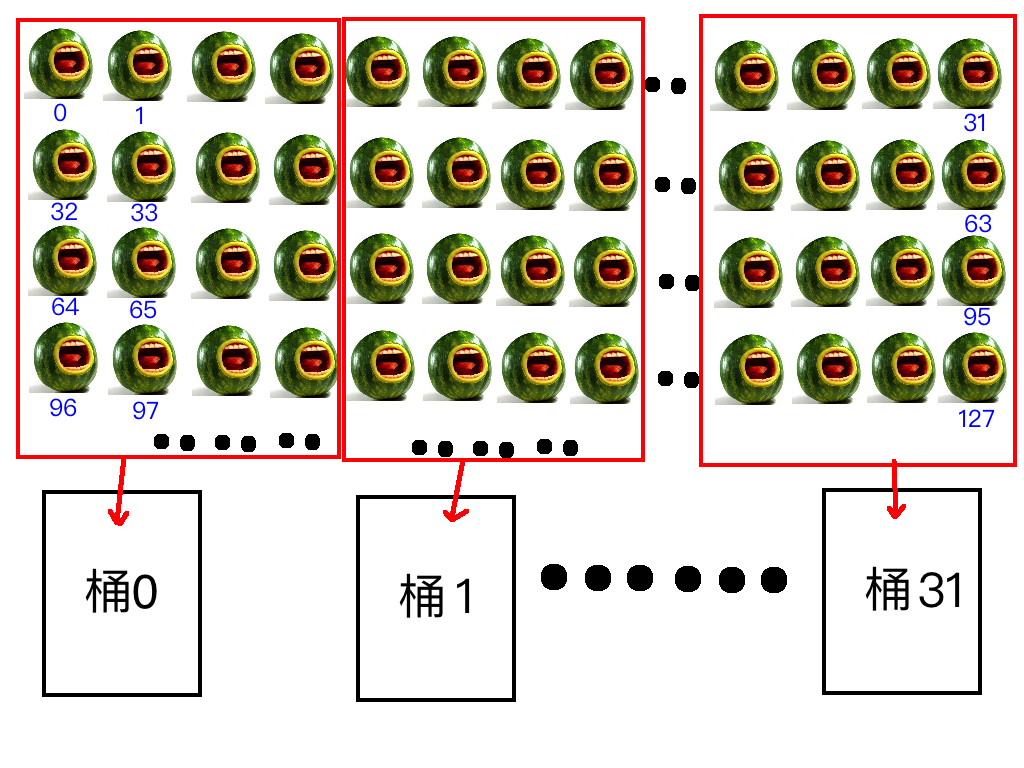
Given a watermelon's number, how do we know which bucket it is in?
Formula:
 Bank ID = (Watermelon Number / Width) % Number of Banks
Of course, this is our example. Converted to memory addresses, watermelon number corresponds to byte address, width is 4 bytes (or 8 bytes), and 32 buckets correspond to 32 banks:
 Bank ID = (Byte Address / Bank Width) % 32
In the formula above, % denotes the modulo operation.
Let's look at a formal diagram:
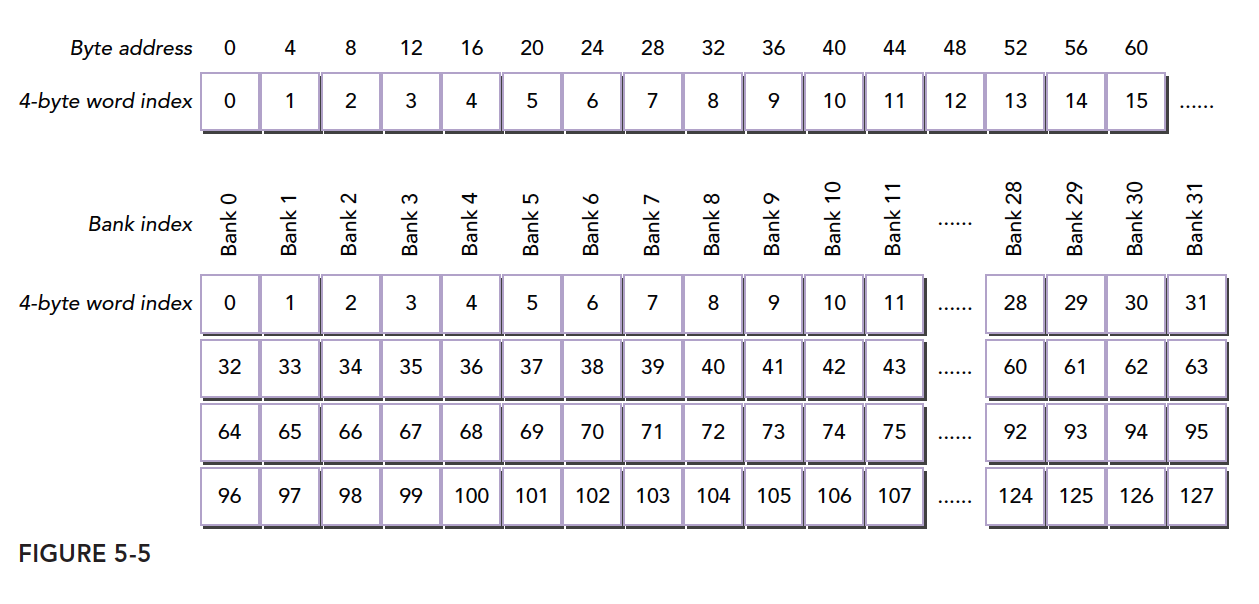
This is the same content as our watermelon diagram, except the first byte address is laid out in a straight line, while I laid out watermelons in 2D. The one-dimensional version is actually accurate.
Two threads within the same warp accessing the same address will not cause a conflict. One thread reads and broadcasts to threads with the same request. However, for writes, this is uncertain, and the results are unpredictable.
The bank width we described above is for width 4. Width 8 works the same way, but with wider banks, bandwidth increases. For example, previously we could only take 4 watermelons at a time, but now we can take 8. If two threads access the same bank, according to our earlier explanation, one case is accessing the same address, which is resolved through broadcast. The other conflict case requires waiting. When the bucket is wider, if one thread wants the watermelon on the left side and another wants the one on the right, there is no conflict because the bucket is wide enough.
Alternatively, we can understand it as a wider bucket with an internal divider creating two separate spaces on each side -- reads do not interfere. If both threads want the left-side watermelon, they wait; if one wants the left and the other wants the right, both can proceed simultaneously without conflict.
Replacing buckets with banks:
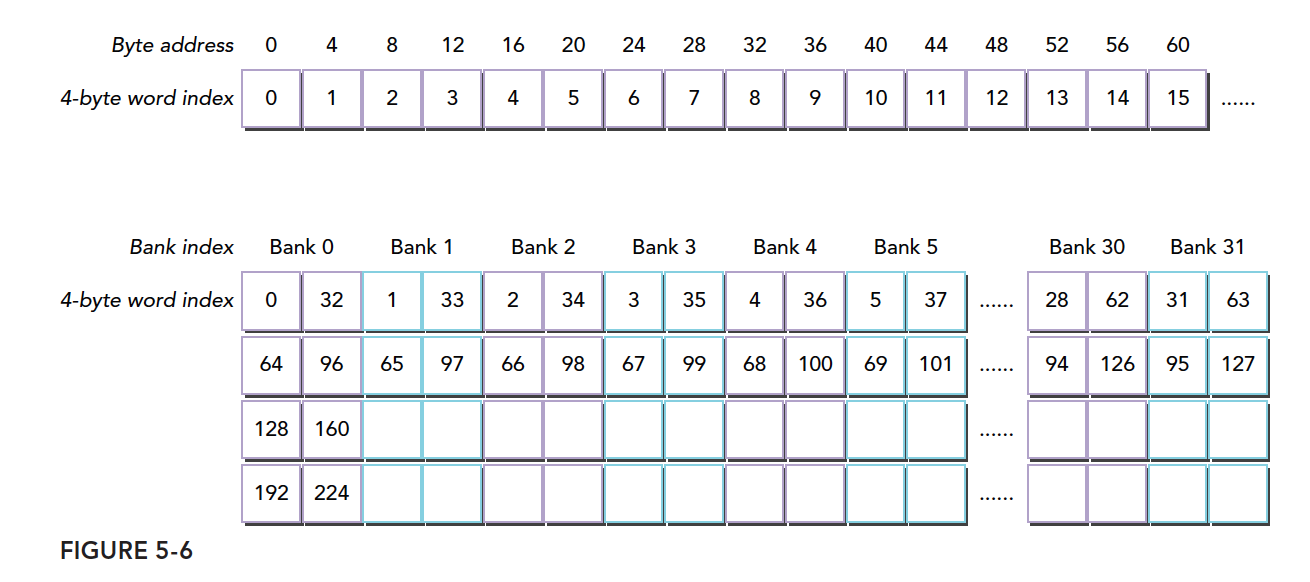
The figure below shows one case of conflict-free access with 64-bit wide banks, where each bank is divided into two parts:
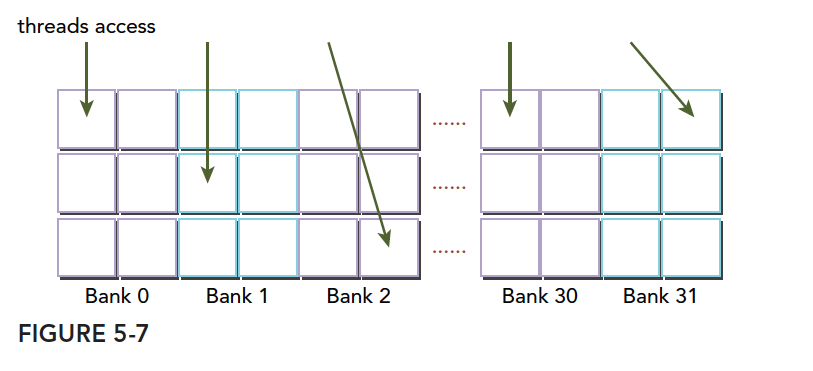
Another conflict-free pattern:
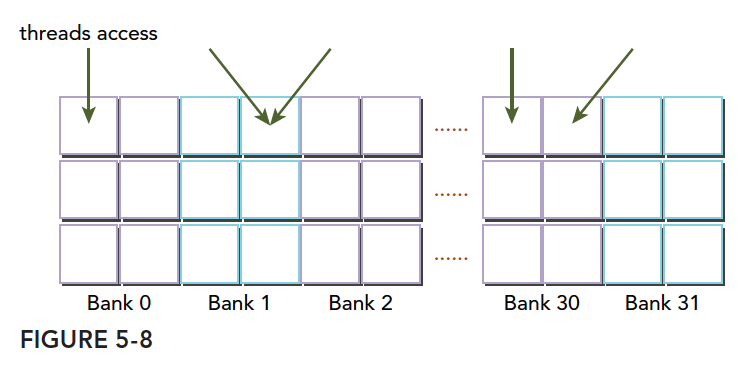
A conflict case -- two threads accessing the same half-bank:
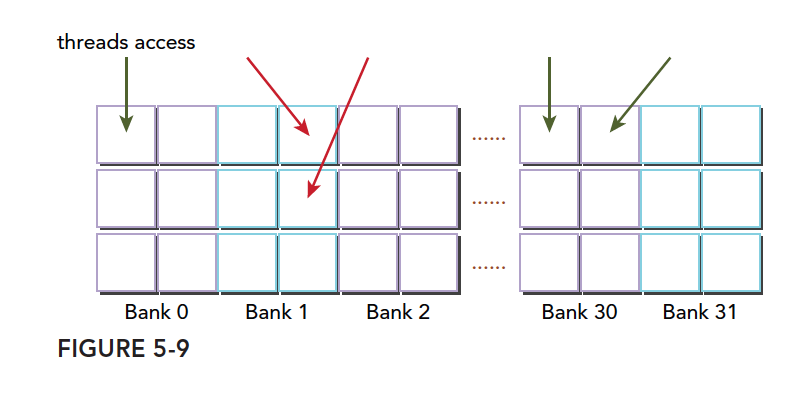
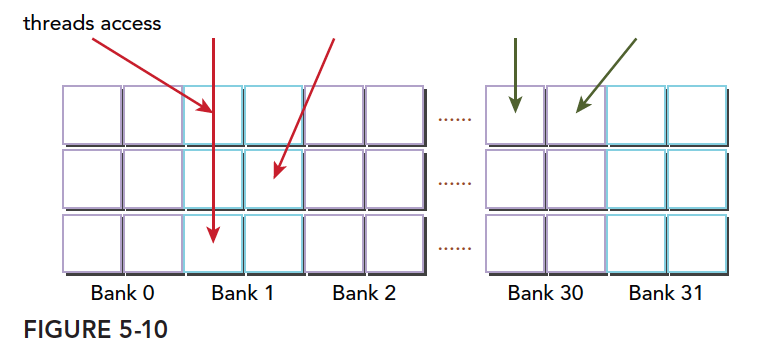
Another conflict case -- three threads accessing the same half-bank:
Memory Padding
Bank conflicts seriously impact shared memory efficiency. When severe conflicts occur, we can use padding to offset data and reduce conflicts.
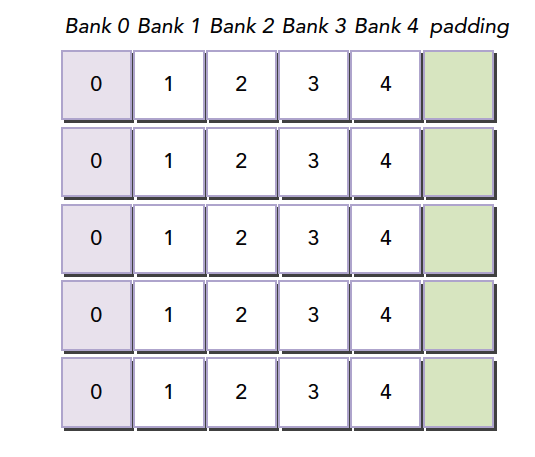
Suppose our current bank data layout is as follows (assuming 4 banks; in reality there are 32):
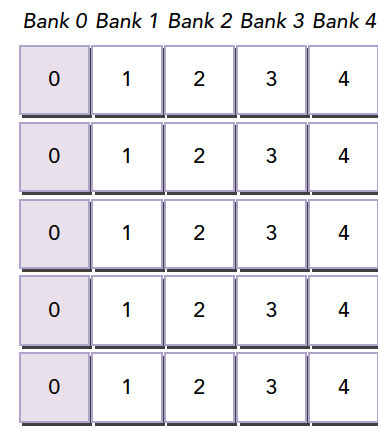
When our warp accesses different data in bank 0, a 5-way conflict occurs. If our memory declaration is:
__shared__ int a[5][4];
We get the memory layout shown above. But if we change the declaration to:
__shared__ int a[5][5];
This creates the effect of adding a padding column during programming:
The compiler then redistributes this 2D array into banks. Since there are only 4 banks and each row has 5 elements, one element spills into the next row of banks. This way, all elements are offset, eliminating conflicts.
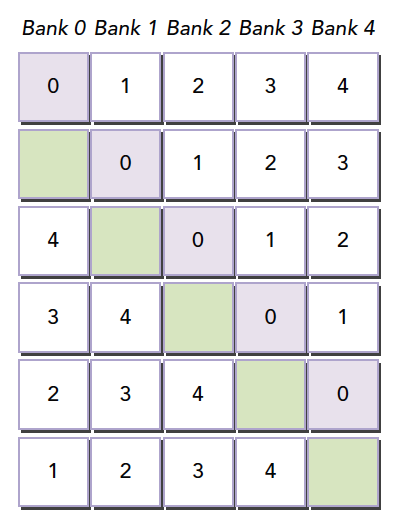
This example may be hard to understand. Let's use the watermelon analogy again: when we load up to the 31st watermelon, we don't want watermelons 32, 33, 34, and 35 to go into bucket 0. What to do? Bring 4 winter melons to occupy the spaces. They should be placed after position 31 -- add 4 columns of winter melons.
When the size of shared memory is determined (e.g., at compile time), which bank each address belongs to is already fixed. To change the distribution, adjust the shared memory declaration. It has nothing to do with the data that will be stored in shared memory.
Note: When shared memory is declared, it determines which bank each address belongs to. To adjust the bank mapping of each address, you must expand the declared shared memory size. How much to expand requires careful calculation using the formulas above. This is the most difficult part of the article to understand.
Access Pattern Configuration
Access pattern query: You can query whether the bank width is 4 bytes or 8 bytes using:
cudaError_t cudaDeviceGetSharedMemConfig(cudaSharedMemConfig * pConfig);
The returned pConfig can be one of:
cudaSharedMemBankSizeFourByte
cudaSharedMemBankSizeEightByte
On configurable devices, you can set a new bank size with:
cudaError_t cudaDeviceSetSharedMemConfig(cudaSharedMemConfig config);
Where config can be:
cudaSharedMemBankSizeDefault
cudaSharedMemBankSizeFourByte
cudaSharedMemBankSizeEightByte
Changing shared memory configuration between different kernel launches may require an implicit device synchronization point. Changing the shared memory bank size does not increase shared memory usage or affect kernel occupancy, but it may have a significant impact on performance. Larger banks may have higher bandwidth but may cause more conflicts. Analyze based on specific circumstances.
Configuring Shared Memory
Each SM has 64KB of on-chip memory. Shared memory and L1 share this 64KB and can be configured. CUDA provides two methods for configuring L1 cache and shared memory:
- Per-device configuration
- Per-kernel configuration
Configuration function:
cudaError_t cudaDeviceSetCacheConfig(cudaFuncCache cacheConfig);
Configuration parameters:
cudaFuncCachePreferNone: no preference (default)
cudaFuncCachePreferShared: prefer 48KB shared memory and 16KB L1 cache
cudaFuncCachePreferL1: prefer 48KB L1 cache and 16KB shared memory
cudaFuncCachePreferEqual: prefer 32KB L1 cache and 32KB shared memory
Which is better depends on the kernel:
- If shared memory usage is heavy, more shared memory is better
- If register usage is heavy, more L1 is better
Another function automatically configures based on different kernel functions:
cudaError_t cudaFuncSetCacheConfig(const void* func, enum cudaFuncCache cacheConfig);
Here, func is a kernel function pointer. When we call a kernel, if its configured L1 and shared memory differ from the current configuration, reconfiguration occurs; otherwise, it executes directly.
L1 cache and shared memory are both on-chip, but their behavior is very different. Shared memory relies on banks to manage data, while L1 uses cache lines for access. We have absolute control over shared memory, but L1 replacement is handled by hardware.
GPU caches are harder to understand than CPU caches. GPUs use heuristic algorithms to evict data. Because more threads use caches on GPUs, data eviction is more frequent and unpredictable. Shared memory, on the other hand, can be well controlled, reducing inefficiency from unnecessary evictions and ensuring SM locality.
Synchronization
Synchronization is an important mechanism in parallel programming. Its primary purpose is to prevent conflicts. Basic synchronization methods:
- Barriers
- Memory fences
A barrier is a point where all calling threads wait for all other calling threads to reach the barrier point.
A memory fence ensures that all calling threads must wait until all memory modifications are visible to other threads before continuing.
A bit confusing? Don't worry, let's first understand the prerequisite knowledge for these concepts.
Weak Ordering Memory Model
CUDA uses a relaxed memory model, meaning memory accesses do not necessarily occur in the order they appear in the program. The relaxed memory model enables more aggressive compilers.
The following point is extremely important:
The order in which a GPU thread writes data to different memories (such as SMEM, global memory, pinned memory, or peer device memory) is not necessarily the same as the order these memories are accessed in the source code. When a thread's write order becomes visible to other threads, it may not match the actual order in which writes were executed.
Instructions are independent of each other. The order in which a thread reads data from different memories is not necessarily the same as the order of read instructions in the program.
In other words, two consecutive memory access instructions in a kernel function, if independent, are not guaranteed to execute in order.
In this chaotic situation, for controllability, synchronization techniques must be used. Otherwise, it is truly like a thousand unleashed huskies stampeding.
Explicit Barriers
In CUDA, barrier points are set in kernel functions. Note this instruction can only be called within kernel functions and is only effective for threads within the same thread block.
void __syncthreads();
-
__syncthreads()acts as a barrier point, ensuring that all threads in the same thread block cannot continue past this point until all have reached it. -
All global memory and shared memory operations before this barrier point within the same thread block are visible to subsequent threads.
-
This solves memory race issues within a thread block. Synchronization ensures ordering, preventing chaos.
-
Avoid deadlocks. For example, the following situation would cause a kernel deadlock:
if (threadID % 2 == 0) {__syncthreads();} else {__syncthreads();} -
Can only synchronize threads within a single block. For inter-block synchronization, you can only use kernel function launches and completions. (Use the point that needs synchronization as the end of a kernel function to implicitly synchronize thread blocks.)
Memory Fences
Memory fences ensure that kernel memory writes before the fence are visible to other threads after the fence. There are three types: block, grid, and system.
-
Thread block level:
void __threadfence_block();Ensures that other threads in the same block can see memory writes before the fence.
-
Grid-level memory fence:
void __threadfence();Suspends the calling thread until all writes to global memory are visible to all threads within the same grid.
-
System-level fence, across the system including host and device:
void __threadfence_system();Suspends the calling thread to ensure that all writes to global memory, pinned host memory, and other device memory are visible to threads on all devices and host threads.
Volatile Qualifier
Declaring a variable as volatile prevents compiler optimization and prevents the variable from being cached. If the variable happens to be modified by another thread, it would cause memory-cache inconsistency. Therefore, volatile-declared variables always reside in global memory.
Summary
This article is somewhat long, but as an overview, everything in subsequent articles will revolve around it. There is not much code here -- it is mostly theoretical. Read more, understand more, consult more references, and read more books.