4.3 Memory Access Patterns
Published on 2018-05-03 | Category: CUDA, Freshman | Comments: 0 | Views:
Abstract: This article introduces the memory access process -- the complete operation from when an application makes a request to the hardware implementation. This is the key to optimizing memory bottlenecks and the foundation of CUDA program optimization.
Keywords: Memory Access Patterns, Alignment, Coalescing, Cache, Array of Structures, Structure of Arrays
Memory Access Patterns
"Things have roots and branches; affairs have endings and beginnings. Know what comes first and what follows, and you will be near the Way." -- "The Great Learning"
This quote from "The Great Learning" is also instructive for technical learning. In the learning process, understanding the essence and developmental patterns of things, and grasping the sequence of learning, leads to better mastery of knowledge.
For CUDA programming, memory access patterns are the foundation of performance optimization -- they are the "root." Various specific optimization techniques are the "branches." Only by deeply understanding the essential patterns of memory access can you effectively apply various optimization techniques in practice.
Today we will learn one of the most important lessons in CUDA. This article will use simple but sufficiently apt analogies and examples to make things easier to understand.
Most GPU programs are limited by memory bandwidth, so maximizing the utilization of global memory bandwidth and improving global load efficiency are fundamental to kernel function performance. If global memory usage is not properly managed, optimization efforts may have minimal effect.
The CUDA execution model tells us that the basic unit of CUDA execution is a warp. Therefore, memory access is also issued and executed in warp-sized units. In this article, we study the memory access of a single warp. Different memory requests from different threads, with different target locations, can produce many different scenarios. This article studies these scenarios and how to achieve optimal global memory access.
Note: Access can be either a load or a store.
Aligned and Coalesced Access
Global memory loads and stores through caches follow the process shown below:
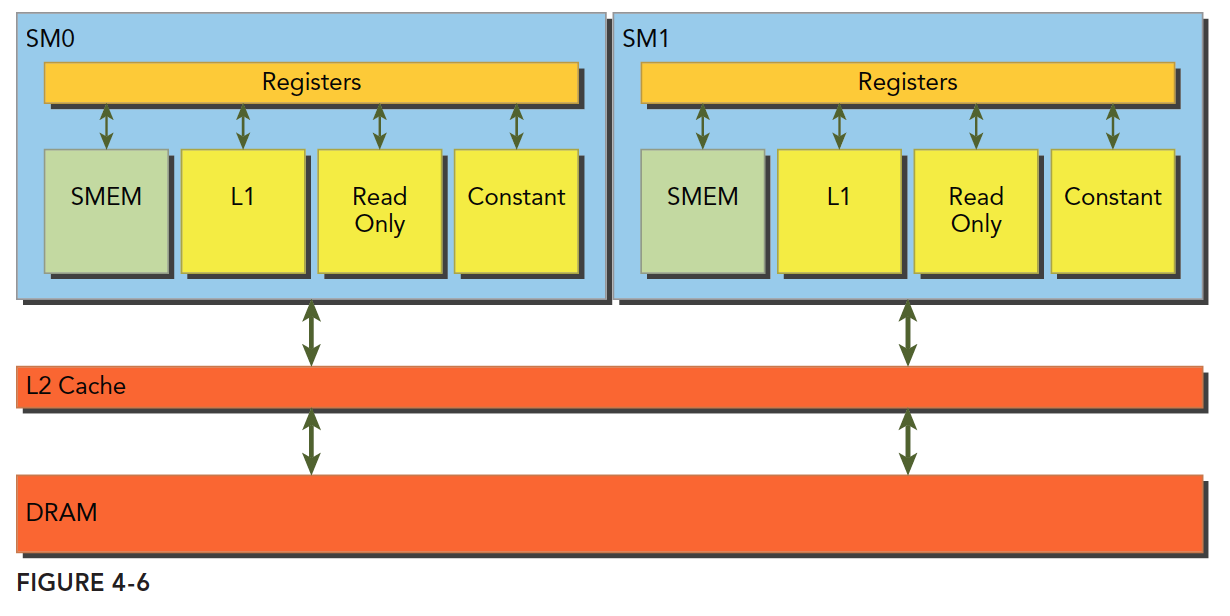
Global memory is a logical-level model. When we program, we consider two models: one is the logical level, which includes the one-dimensional (or multi-dimensional) arrays, structures, and variables we write in programs (both serial and parallel); the other is the hardware perspective, which involves electrical signals on a DRAM chip and the digital signal processing performed by the lowest-level memory driver code.
L1 represents the L1 cache. Each SM has its own L1, but L2 is shared by all SMs. In addition to the L1 cache, there are read-only caches and constant caches, which we will cover in detail later.
When a kernel function runs, it reads data from global memory (DRAM) in only two granularities, and this is key:
- 128 bytes
- 32 bytes
Explaining "granularity" -- it can be understood as the smallest unit. That is, every time the kernel reads from memory, even if it reads a single byte variable, it reads either 128 bytes or 32 bytes. Whether it is 32 or 128 depends on the access method:
- Using L1 cache
- Not using L1 cache
For CPUs, L1 and L2 caches cannot be programmed, but CUDA supports disabling the L1 cache through compiler options. If L1 is enabled, the granularity for loading data from DRAM is 128 bytes. If L1 is not used and only L2 is used, the granularity is 32 bytes.
It is also important to emphasize the CUDA memory model's read and write behavior. What we are discussing applies to a single SM; multiple SMs are simply copies of the scenario we describe. The basis of SM execution is the warp, meaning that when a thread in an SM needs to access memory, the other 31 threads in the same warp also access memory. This means that even if each thread only accesses one byte, at execution time, any memory request is at least 32 bytes. Hence, memory loads without L1 have a granularity of 32 bytes, not less.
When optimizing memory, the two properties to focus on most are:
- Aligned memory access
- Coalesced memory access
We call a single memory request -- from when the kernel initiates the request to when the hardware responds with data -- a memory transaction (both loads and stores).
When the first address of a memory transaction is an even multiple of the cache granularity (32 or 128 bytes) -- for example, even multiples of 64 for the 32-byte L2 cache, or 256 for the 128-byte granularity -- it is called aligned memory access. Unaligned access is anything else. Unaligned memory access wastes bandwidth.
Coalesced access occurs when all threads in a warp access memory within the same memory block.
Aligned and coalesced access is the ideal and most efficient access pattern. When all threads in a warp access data within a single memory block, and the data starts from the block's base address, aligned and coalesced access is achieved. To maximize the ideal state of global memory access, try to organize warp memory access in an aligned, coalesced manner for maximum efficiency. Let's look at an example.
-
A warp loads data using the L1 cache, with all requested data within a single 128-byte aligned segment. The requested data is contiguous here, though it does not need to be contiguous as long as it does not cross boundaries.
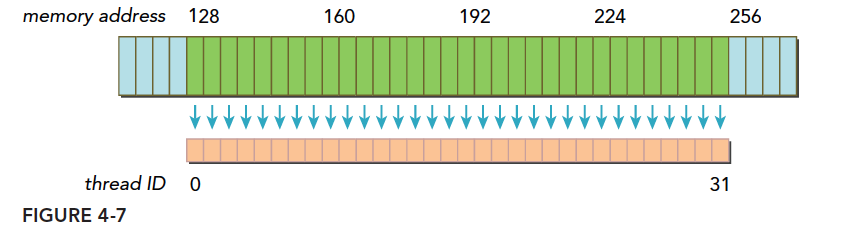
Blue represents global memory above; orange below is the data the warp needs; green is the aligned segment.
-
If a transaction's data spans multiple aligned segments, there are two scenarios:
- Contiguous but not within a single aligned segment. For example, requested data spans addresses 1
128, so both the 0127 and 128~255 segments need to be transferred to the SM -- requiring two transfers. - Not contiguous and not within a single aligned segment. For example, requested data spans addresses 0
63 and 128191. This obviously also requires two loads.
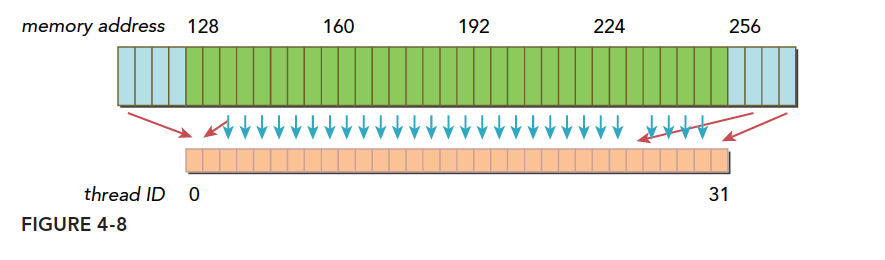
The figure above shows a typical warp where data is scattered. Thread 0's request is before 128, with more requests after 256, requiring three memory transactions. The utilization -- the ratio of data fetched from main memory that is actually used -- is only 128/(128*3). Low utilization wastes bandwidth. The extreme case is when each thread's request is in a different segment, meaning only 1 out of 128 bytes in each transaction is useful, giving a utilization of 1/128.
- Contiguous but not within a single aligned segment. For example, requested data spans addresses 1
Here is a summary of the key to optimizing memory transactions: satisfy the most memory requests with the fewest transactions. The number of transactions and throughput requirements vary with the device's compute capability.
Global Memory Reads
Note that we are talking about reads (loads) -- writes (stores) are a different matter!
SM loads data through three paths, depending on the device and type:
- L1 and L2 caches
- Constant cache
- Read-only cache
The standard path is L1 and L2 caches. Using constant and read-only caches requires explicit declaration in the code. However, improving performance mainly depends on the access pattern.
Control of whether global loads go through the L1 cache can be managed through compiler options. Of course, older devices may not have L1 cache at all.
The compiler option to disable L1 cache is:
-Xptxas -dlcm=cg
The compiler option to enable L1 cache is:
-Xptxas -dlcm=ca
When L1 is disabled, global memory load requests go directly to L2. If L2 misses, DRAM fulfills the request.
Each memory transaction can be executed in one, two, or four segments, with each segment being 32 bytes -- that is, 32, 64, or 128 bytes at a time (note that whether L1 is used determines whether the read granularity is 128 or 32 bytes; the 64-byte option here does not fall into that case, so be careful).
With L1 enabled, when an SM has a global load request, it first tries L1. If L1 misses, it tries L2. If L2 also misses, DRAM is accessed directly.
On some devices, L1 is not used for caching global memory accesses but only for storing register-spilled local data, such as on Kepler K10 and K20.
Memory loads can be classified into two categories:
- Cached loads
- Uncached loads
Memory access has the following characteristics:
- Whether cache is used: Whether L1 is involved in the load process
- Aligned vs unaligned: Whether the first address is a multiple of 32
- Coalesced vs uncoalesced: Whether contiguous data blocks are accessed
Cached Loads
Below is the load process using L1 cache. The images are self-explanatory, and we provide only brief descriptions:
-
Aligned coalesced access -- 100% utilization

-
Aligned but not contiguous -- each thread's data is within a single block but positions are interleaved -- 100% utilization

-
Contiguous but unaligned -- the warp requests 32 contiguous but unaligned 4-byte values. Data spans two blocks but is not aligned. With L1 enabled, two 128-byte transactions are needed.

-
All threads in the warp request the same address -- this falls within a single cache line (a cache line is a segment of main memory that can be read into the cache in one operation). If the request is for 4-byte data, L1 utilization is 4/128 = 3.125%.

-
A relatively bad case -- mentioned earlier as the worst case where each thread in the warp requests data in a different cache line. The relatively bad case here is when all data is spread across N cache lines, where 1 ≤ N ≤ 32. For 32 4-byte requests, N transactions are needed, and utilization is 1/N.

CPU and GPU L1 caches have significant differences. GPU L1 can be controlled through compiler options, while CPU L1 cannot. CPU L1 replacement algorithms have usage frequency and temporal locality, while GPU does not.
Uncached Loads
Uncached loads bypass the L1 cache. The L2 cache is unavoidable.
When L1 is not used, the memory transaction granularity becomes 32 bytes. The benefit of finer granularity is improved utilization. This is easy to understand: imagine you can only choose between a large 500ml bottle or a small 250ml bottle of water. When you are very thirsty and need 400ml, the large bottle is more convenient because one small bottle is not enough and you need another. But when you only need 200ml, the small bottle's utilization is much higher. Fine-grained access is like drinking from small bottles -- although smaller, each one has much higher utilization. For scenario 5 above using cache, this might be more effective.
Continuing with our illustrations:
-
Aligned coalesced access of 128 bytes -- still the ideal case, using 4 segments, 100% utilization

-
Aligned but non-contiguous access of 128 bytes -- all within four segments, all different, 100% utilization

-
Contiguous but unaligned -- a segment is 32 bytes, so a contiguous 128-byte request, even if unaligned, will not exceed 5 segments. Utilization is 4/5 = 80%. If unclear why it cannot exceed 5 segments, note the contiguous premise -- it is impossible to exceed 5 segments in this case.

-
All threads access a single 4-byte value -- utilization is 4/32 = 12.5%

-
Worst case -- all target data scattered across memory, requiring N memory segments. Compared to L1, this still has advantages because N * 128 is still much larger than N * 32. Here we assume N does not change between 128 and 32, but in practice, with larger cache lines, N might decrease.

Unaligned Read Example
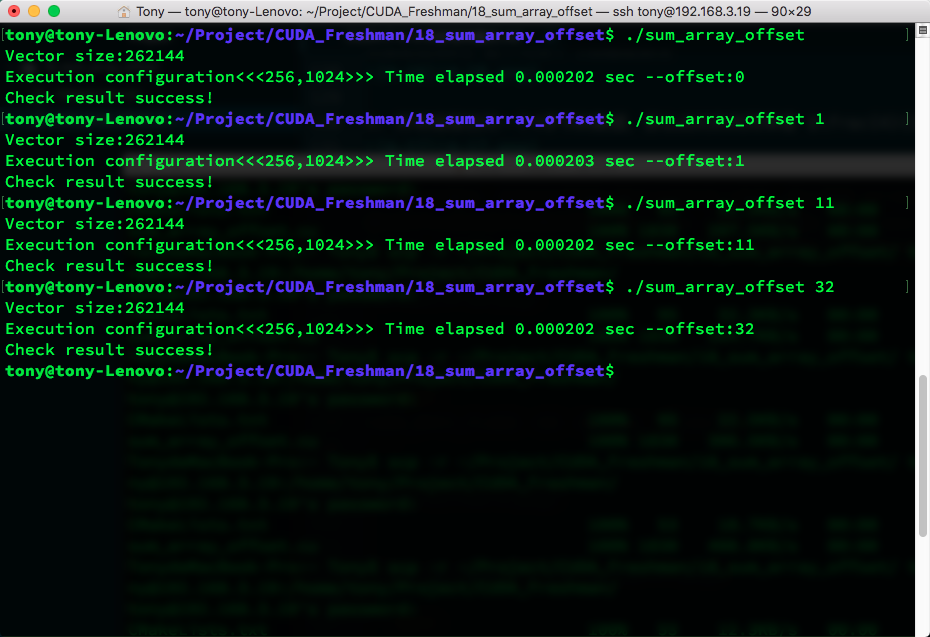
Let's demonstrate unaligned reads. The code is as follows:
#include <cuda_runtime.h>
#include <stdio.h>
#include "freshman.h"

void sumArrays(float * a, float * b, float * res, int offset, const int size)
{
    for(int i = 0, k = offset; k < size; i++, k++)
    {
        res[i] = a[k] + b[k];
    }
}

__global__ void sumArraysGPU(float*a, float*b, float*res, int offset, int n)
{
    int i = blockIdx.x * blockDim.x + threadIdx.x;
    int k = i + offset;
    if(k < n)
        res[i] = a[k] + b[k];
}

int main(int argc, char **argv)
{
    int dev = 0;
    cudaSetDevice(dev);

    int nElem = 1 << 18;
    int offset = 0;
    if(argc >= 2)
        offset = atoi(argv[1]);
    printf("Vector size:%d\n", nElem);
    int nByte = sizeof(float) * nElem;
    float *a_h = (float*)malloc(nByte);
    float *b_h = (float*)malloc(nByte);
    float *res_h = (float*)malloc(nByte);
    float *res_from_gpu_h = (float*)malloc(nByte);
    memset(res_h, 0, nByte);
    memset(res_from_gpu_h, 0, nByte);

    float *a_d, *b_d, *res_d;
    CHECK(cudaMalloc((void**)&a_d, nByte));
    CHECK(cudaMalloc((void**)&b_d, nByte));
    CHECK(cudaMalloc((void**)&res_d, nByte));
    CHECK(cudaMemset(res_d, 0, nByte));
    initialData(a_h, nElem);
    initialData(b_h, nElem);

    CHECK(cudaMemcpy(a_d, a_h, nByte, cudaMemcpyHostToDevice));
    CHECK(cudaMemcpy(b_d, b_h, nByte, cudaMemcpyHostToDevice));

    dim3 block(1024);
    dim3 grid(nElem/block.x);
    double iStart, iElaps;
    iStart = cpuSecond();
    sumArraysGPU<<<grid, block>>>(a_d, b_d, res_d, offset, nElem);
    cudaDeviceSynchronize();
    iElaps = cpuSecond() - iStart;
    CHECK(cudaMemcpy(res_from_gpu_h, res_d, nByte, cudaMemcpyDeviceToHost));
    printf("Execution configuration<<<%d,%d>>> Time elapsed %f sec --offset:%d \n", grid.x, block.x, iElaps, offset);

    sumArrays(a_h, b_h, res_h, offset, nElem);

    checkResult(res_h, res_from_gpu_h, nElem);
    cudaFree(a_d);
    cudaFree(b_d);
    cudaFree(res_d);

    free(a_h);
    free(b_h);
    free(res_h);
    free(res_from_gpu_h);

    return 0;
}
Compile command:
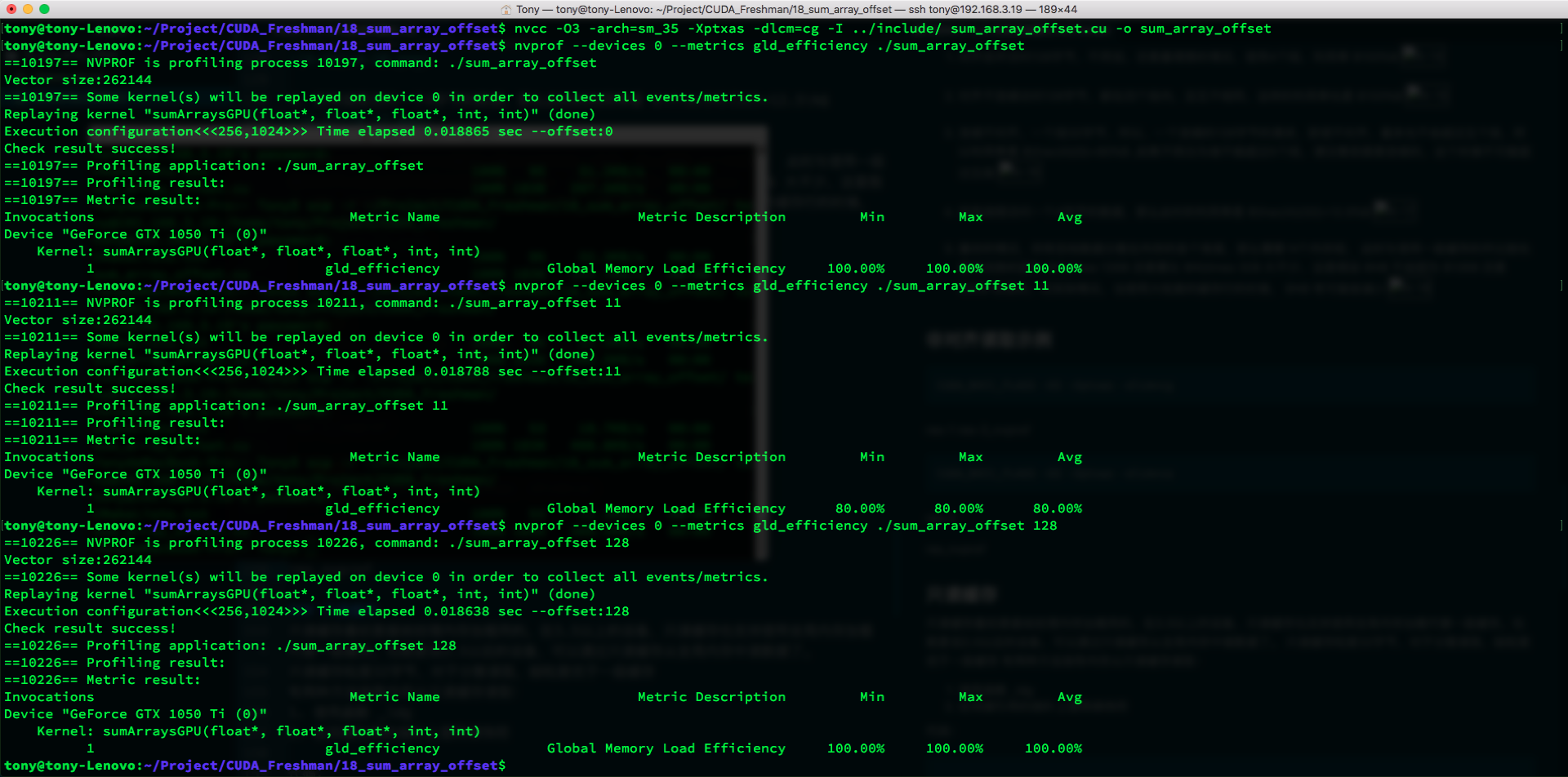
nvcc -O3 -arch=sm_35 -Xptxas -dlcm=cg -I ../include/ sum_array_offset.cu -o sum_array_offset
Results:
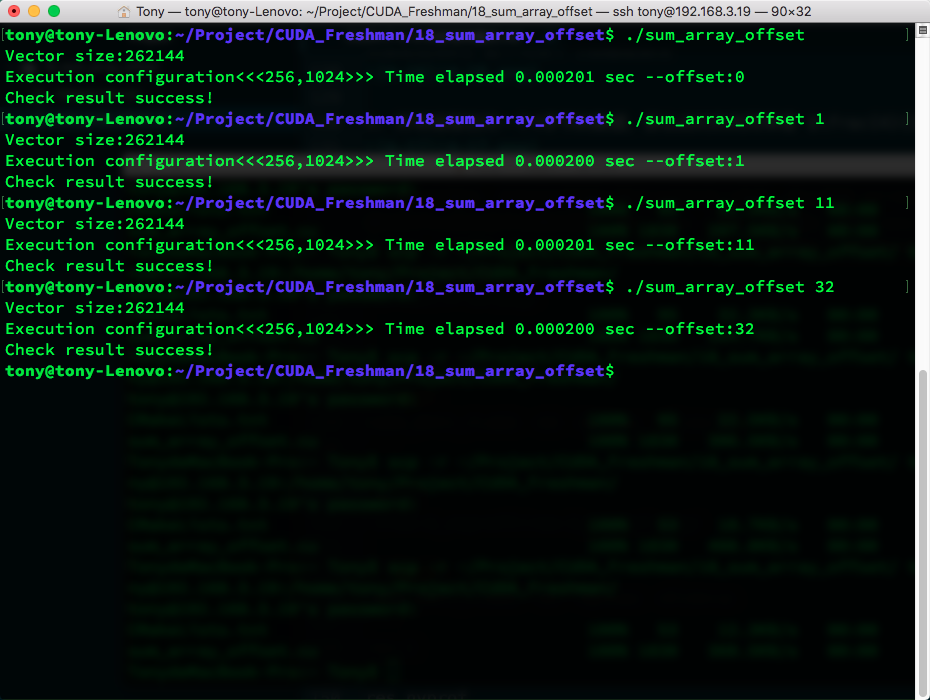
Compile command with L1 enabled:
nvcc -O3 -arch=sm_35 -Xptxas -dlcm=ca -I ../include/ sum_array_offset.cu -o sum_array_offset
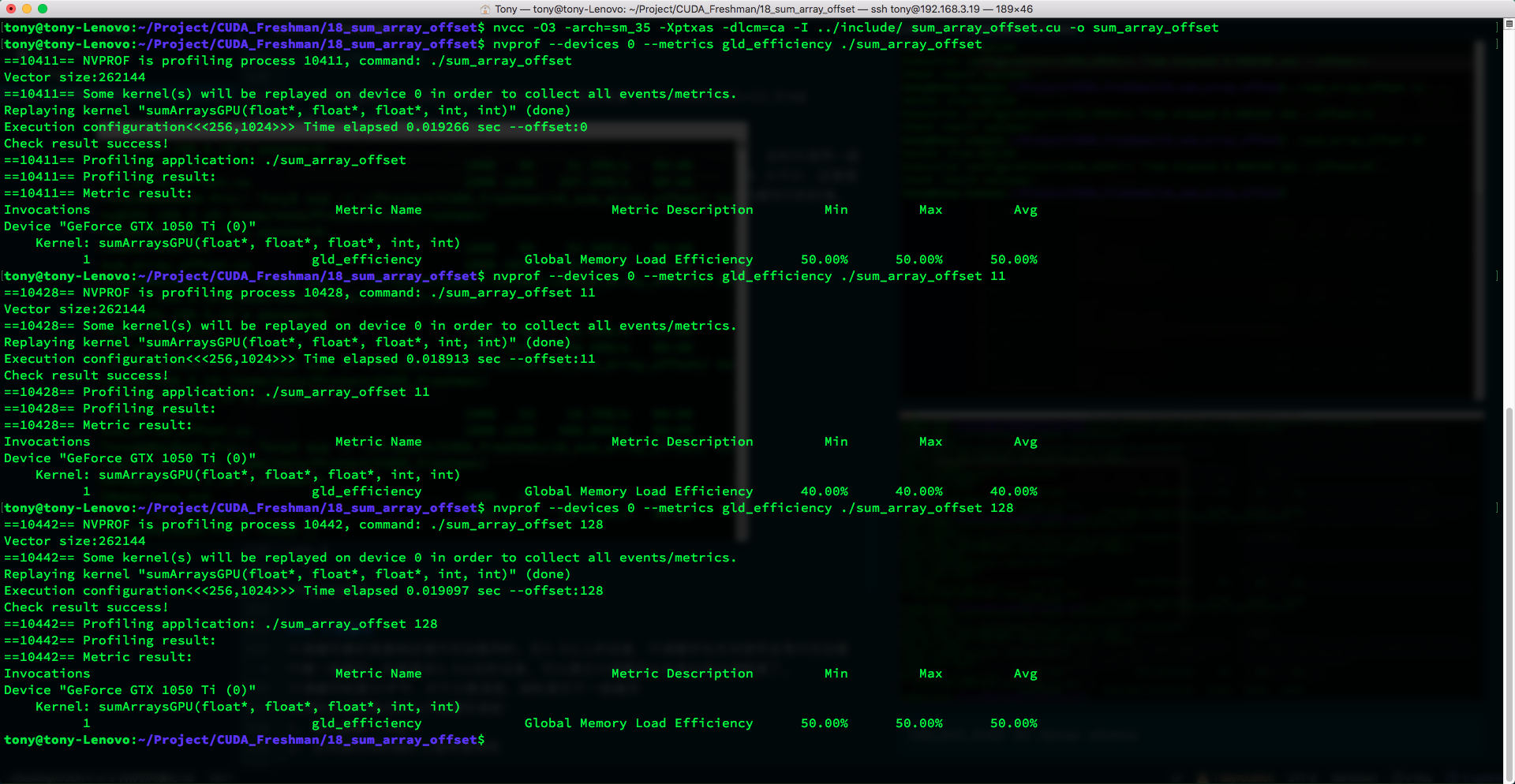
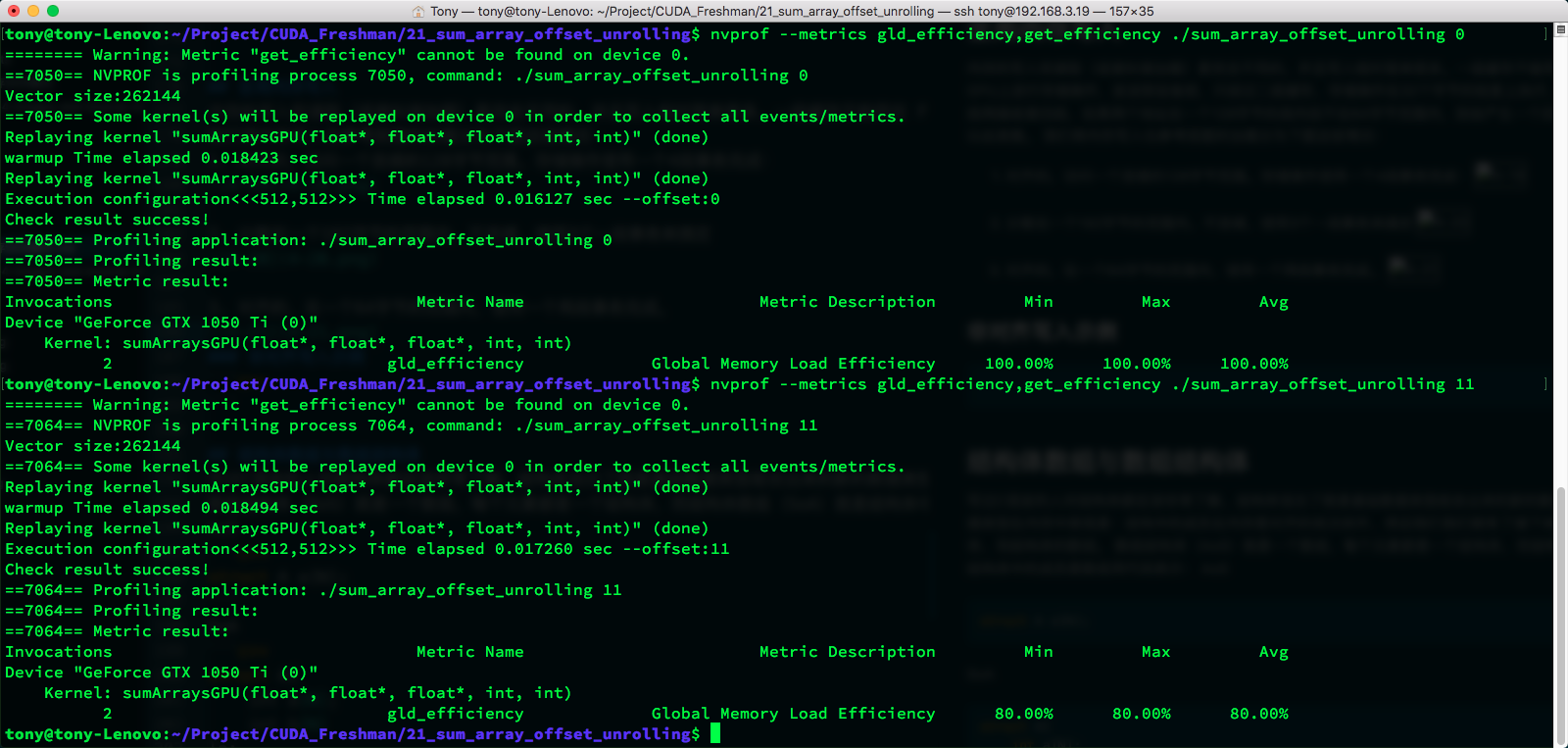
The metric we use here is:
Global Load Efficiency = Requested Global Memory Load Throughput / Required Global Memory Load Throughput
Read-Only Cache
The read-only cache was originally reserved for texture memory loads. On devices with compute capability 3.5 and above, the read-only cache also supports global memory loads as a replacement for L1. That is, on devices 3.5 and above, data can be read from global memory through the read-only cache.
The read-only cache has a 32-byte granularity, which is better than L1 for scattered reads due to its finer granularity.
There are two methods to direct memory reads through the read-only cache:
- Using the __ldg function
- Using a qualifier on dereferenced pointers
Code:
__global__ void copyKernel(float * in, float* out)
{
    int idx = blockDim.x * blockIdx.x + threadIdx.x;
    out[idx] = __ldg(&in[idx]);
}
Note the function parameter, and you can force the use of the read-only cache.
Global Memory Writes
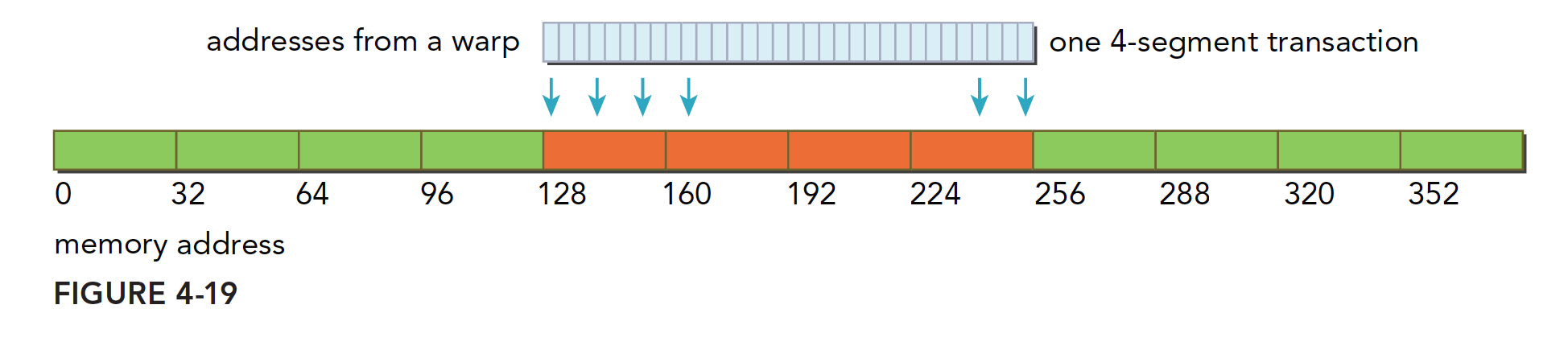
Memory writes and reads (loads) are completely different, and writes are much simpler. L1 cannot be used for store operations on Fermi and Kepler GPUs. Before being sent to the device, stores only go through L2. Store operations are performed at 32-byte granularity. Memory transactions are also divided into one-segment, two-segment, or four-segment. If two addresses are within a 128-byte segment but not within a 64-byte range, a four-segment transaction is generated, and so on for other cases.
We classify memory writes similarly to loads:
-
Aligned, accessing a contiguous 128-byte range. The store operation is completed with one four-segment transaction:
-
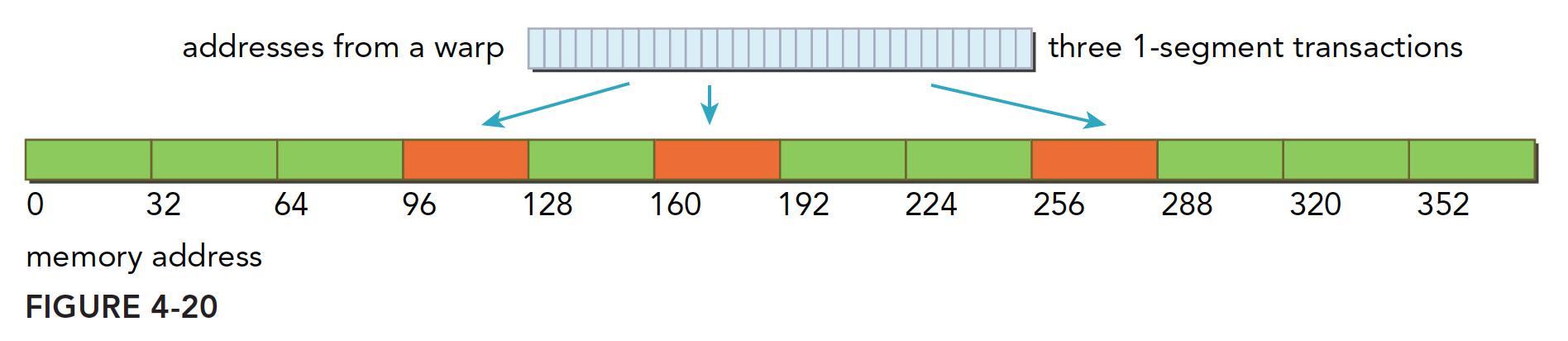
Scattered within a 192-byte range, non-contiguous. Completed with three one-segment transactions:
-
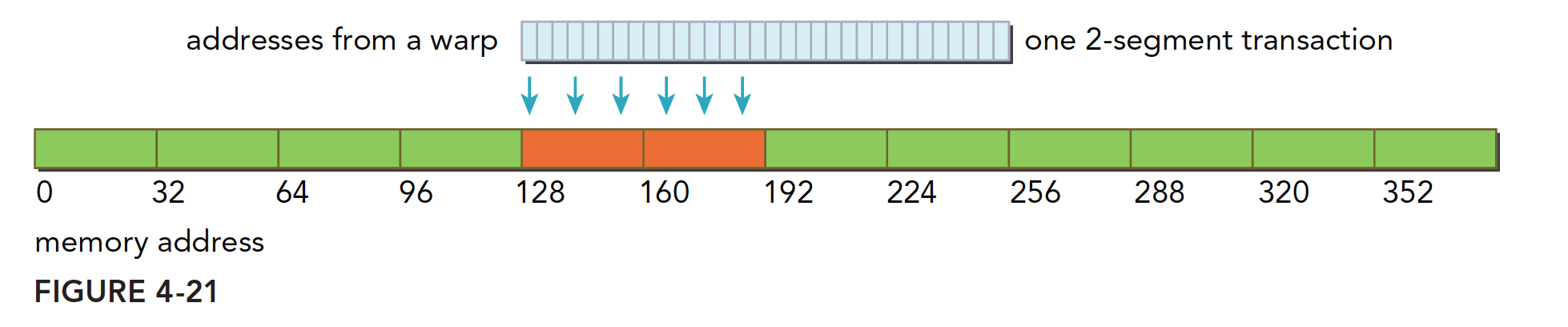
Aligned, within a 64-byte range. Completed with one two-segment transaction:
Unaligned Write Example
Similar to the read case, and simpler since L1 is never involved. We skip this experiment.
Array of Structures and Structure of Arrays
Anyone who has written C should be very familiar with structures. A structure is essentially a new data type composed of basic data types. In memory, a structure appears as: its members are aligned and laid out sequentially. This brings us to our next topic: Array of Structures (AoS) and Structure of Arrays (SoA).
An Array of Structures (AoS) is an array where each element is a structure. A Structure of Arrays (SoA) is a structure whose members are arrays. In code:
AoS (Array of Structures):
struct A a[N];
SoA (Structure of Arrays):
struct A{
    int a[N];
    int b[N];
} a;
If you cannot distinguish the two names, it does not matter -- just remember AoS is an array. CUDA is very friendly to fine-grained arrays but not as friendly to coarse-grained arrays composed of structures, specifically in terms of low memory access utilization. For example, when a thread accesses a member of a structure, with 32 threads accessing simultaneously, SoA access is contiguous while AoS is not:
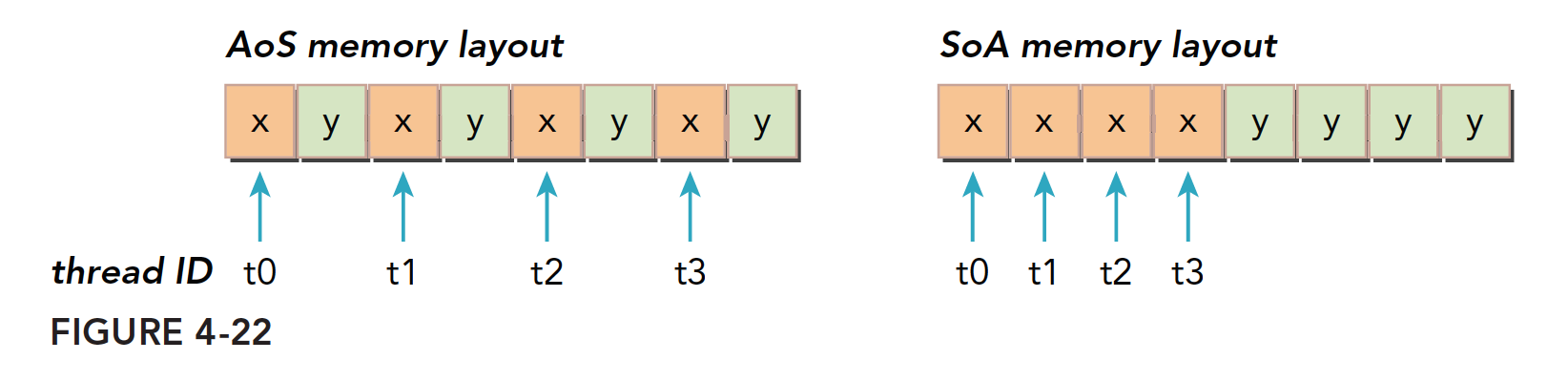
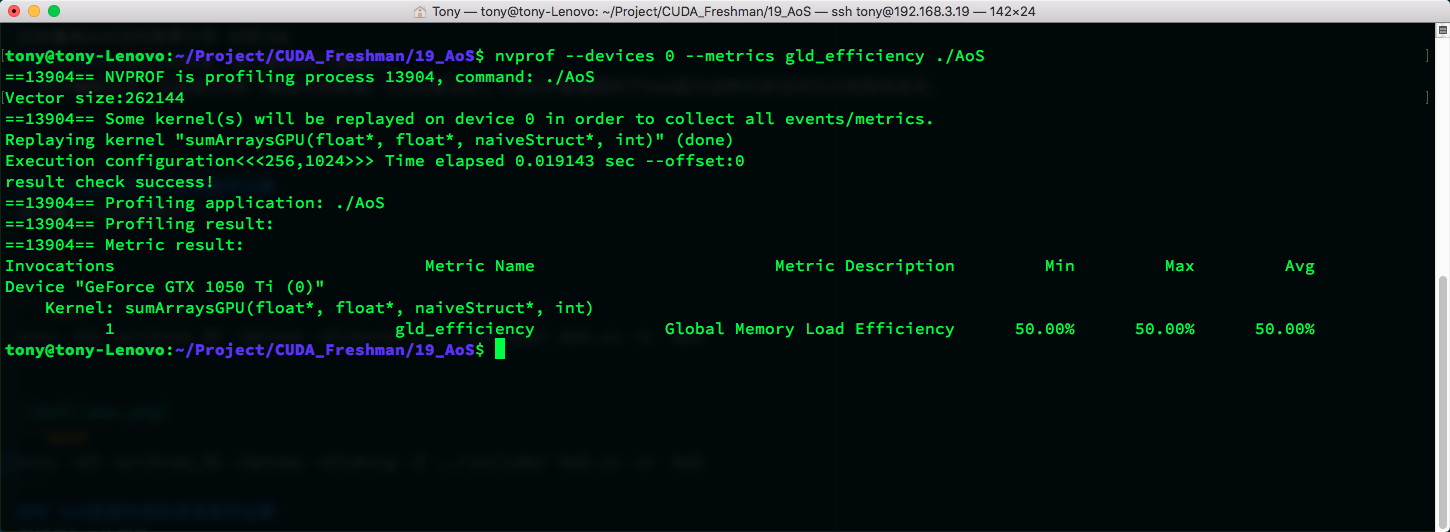
This means AoS access efficiency is only 50%.
Comparing the memory layouts of AoS and SoA, we can draw the following conclusion:
- The parallel programming paradigm, especially SIMD (Single Instruction Multiple Data), is more friendly to SoA. CUDA generally favors SoA because such memory access can be effectively coalesced.
Simple Math Operations with AoS Data Layout
Let's look at an AoS example:
#include <cuda_runtime.h>
#include <stdio.h>
#include "freshman.h"

struct naiveStruct{
    float a;
    float b;
};

void sumArrays(float * a, float * b, float * res, const int size)
{
    for(int i = 0; i < size; i++)
    {
        res[i] = a[i] + b[i];
    }
}

__global__ void sumArraysGPU(float*a, float*b, struct naiveStruct* res, int n)
{
    int i = blockIdx.x * blockDim.x + threadIdx.x;
    if(i < n)
        res[i].a = a[i] + b[i];
}

void checkResult_struct(float* res_h, struct naiveStruct*res_from_gpu_h, int nElem)
{
    for(int i = 0; i < nElem; i++)
        if (res_h[i] != res_from_gpu_h[i].a)
        {
            printf("check fail!\n");
            exit(0);
        }
    printf("result check success!\n");
}

int main(int argc, char **argv)
{
    int dev = 0;
    cudaSetDevice(dev);

    int nElem = 1 << 18;
    int offset = 0;
    if(argc >= 2)
        offset = atoi(argv[1]);
    printf("Vector size:%d\n", nElem);
    int nByte = sizeof(float) * nElem;
    int nByte_struct = sizeof(struct naiveStruct) * nElem;
    float *a_h = (float*)malloc(nByte);
    float *b_h = (float*)malloc(nByte);
    float *res_h = (float*)malloc(nByte_struct);
    struct naiveStruct *res_from_gpu_h = (struct naiveStruct*)malloc(nByte_struct);
    memset(res_h, 0, nByte);
    memset(res_from_gpu_h, 0, nByte);

    float *a_d, *b_d;
    struct naiveStruct* res_d;
    CHECK(cudaMalloc((void**)&a_d, nByte));
    CHECK(cudaMalloc((void**)&b_d, nByte));
    CHECK(cudaMalloc((void**)&res_d, nByte_struct));
    CHECK(cudaMemset(res_d, 0, nByte_struct));
    initialData(a_h, nElem);
    initialData(b_h, nElem);

    CHECK(cudaMemcpy(a_d, a_h, nByte, cudaMemcpyHostToDevice));
    CHECK(cudaMemcpy(b_d, b_h, nByte, cudaMemcpyHostToDevice));

    dim3 block(1024);
    dim3 grid(nElem/block.x);
    double iStart, iElaps;
    iStart = cpuSecond();
    sumArraysGPU<<<grid, block>>>(a_d, b_d, res_d, nElem);
    cudaDeviceSynchronize();
    iElaps = cpuSecond() - iStart;
    CHECK(cudaMemcpy(res_from_gpu_h, res_d, nByte_struct, cudaMemcpyDeviceToHost));
    printf("Execution configuration<<<%d,%d>>> Time elapsed %f sec\n", grid.x, block.x, iElaps);

    sumArrays(a_h, b_h, res_h, nElem);

    checkResult_struct(res_h, res_from_gpu_h, nElem);
    cudaFree(a_d);
    cudaFree(b_d);
    cudaFree(res_d);

    free(a_h);
    free(b_h);
    free(res_h);
    free(res_from_gpu_h);

    return 0;
}
Compile command:
nvcc -O3 -arch=sm_35 -Xptxas -dlcm=ca -I ../include/ AoS.cu -o AoS
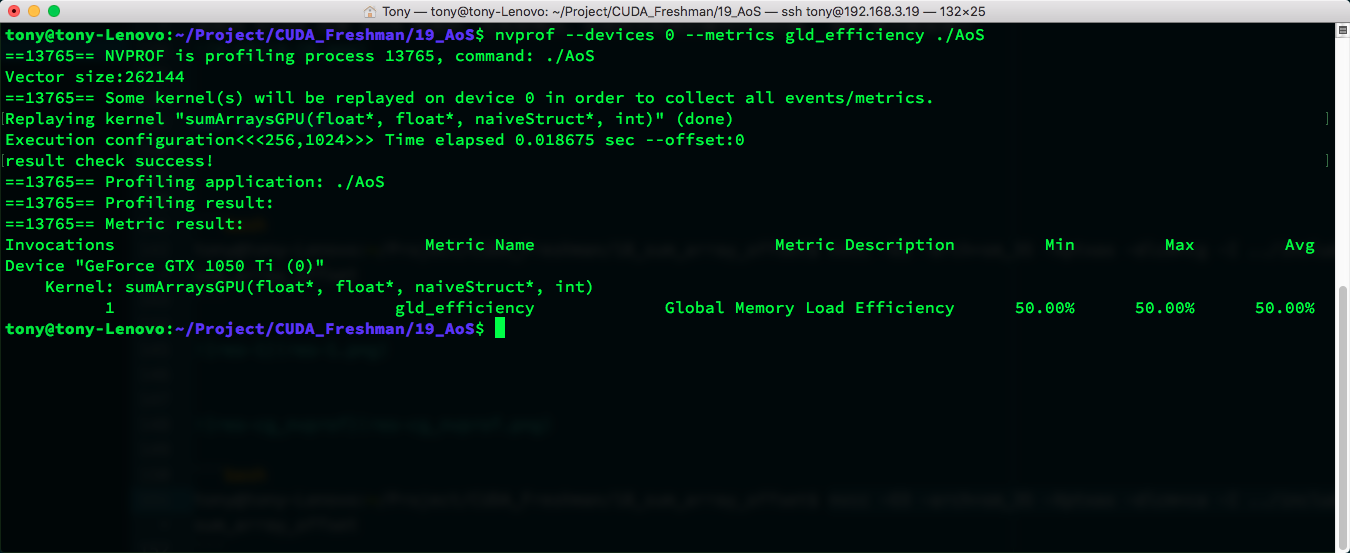
nvcc -O3 -arch=sm_35 -Xptxas -dlcm=cg -I ../include/ AoS.cu -o AoS
Simple Math Operations with SoA Data Layout
Now let's look at the SoA example:
#include <cuda_runtime.h>
#include <stdio.h>
#include "freshman.h"

void sumArrays(float * a, float * b, float * res, int offset, const int size)
{
    for(int i = 0, k = offset; k < size; i++, k++)
    {
        res[i] = a[k] + b[k];
    }
}

__global__ void sumArraysGPU(float*a, float*b, float*res, int offset, int n)
{
    int i = blockIdx.x * blockDim.x * 4 + threadIdx.x;
    int k = i + offset;
    if(k + 3 * blockDim.x < n)
    {
        res[i] = a[k] + b[k];
        res[i + blockDim.x] = a[k + blockDim.x] + b[k + blockDim.x];
        res[i + blockDim.x * 2] = a[k + blockDim.x * 2] + b[k + blockDim.x * 2];
        res[i + blockDim.x * 3] = a[k + blockDim.x * 3] + b[k + blockDim.x * 3];
    }
}

int main(int argc, char **argv)
{
    int dev = 0;
    cudaSetDevice(dev);
    int block_x = 512;
    int nElem = 1 << 18;
    int offset = 0;
    if(argc == 2)
        offset = atoi(argv[1]);
    else if(argc == 3)
    {
        offset = atoi(argv[1]);
        block_x = atoi(argv[2]);
    }
    printf("Vector size:%d\n", nElem);
    int nByte = sizeof(float) * nElem;
    float *a_h = (float*)malloc(nByte);
    float *b_h = (float*)malloc(nByte);
    float *res_h = (float*)malloc(nByte);
    float *res_from_gpu_h = (float*)malloc(nByte);
    memset(res_h, 0, nByte);
    memset(res_from_gpu_h, 0, nByte);

    float *a_d, *b_d, *res_d;
    CHECK(cudaMalloc((void**)&a_d, nByte));
    CHECK(cudaMalloc((void**)&b_d, nByte));
    CHECK(cudaMalloc((void**)&res_d, nByte));
    CHECK(cudaMemset(res_d, 0, nByte));
    initialData(a_h, nElem);
    initialData(b_h, nElem);

    CHECK(cudaMemcpy(a_d, a_h, nByte, cudaMemcpyHostToDevice));
    CHECK(cudaMemcpy(b_d, b_h, nByte, cudaMemcpyHostToDevice));

    dim3 block(block_x);
    dim3 grid(nElem/block.x);
    double iStart, iElaps;
    iStart = cpuSecond();
    sumArraysGPU<<<grid, block>>>(a_d, b_d, res_d, offset, nElem);
    cudaDeviceSynchronize();
    iElaps = cpuSecond() - iStart;

    printf("warmup Time elapsed %f sec\n", iElaps);
    iStart = cpuSecond();
    sumArraysGPU<<<grid, block>>>(a_d, b_d, res_d, offset, nElem);
    cudaDeviceSynchronize();
    iElaps = cpuSecond() - iStart;
    CHECK(cudaMemcpy(res_from_gpu_h, res_d, nByte, cudaMemcpyDeviceToHost));
    printf("Execution configuration<<<%d,%d>>> Time elapsed %f sec --offset:%d \n", grid.x, block.x, iElaps, offset);

    sumArrays(a_h, b_h, res_h, offset, nElem);

    checkResult(res_h, res_from_gpu_h, nElem - 4 * block_x);
    cudaFree(a_d);
    cudaFree(b_d);
    cudaFree(res_d);

    free(a_h);
    free(b_h);
    free(res_h);
    free(res_from_gpu_h);

    return 0;
}
Compile command:
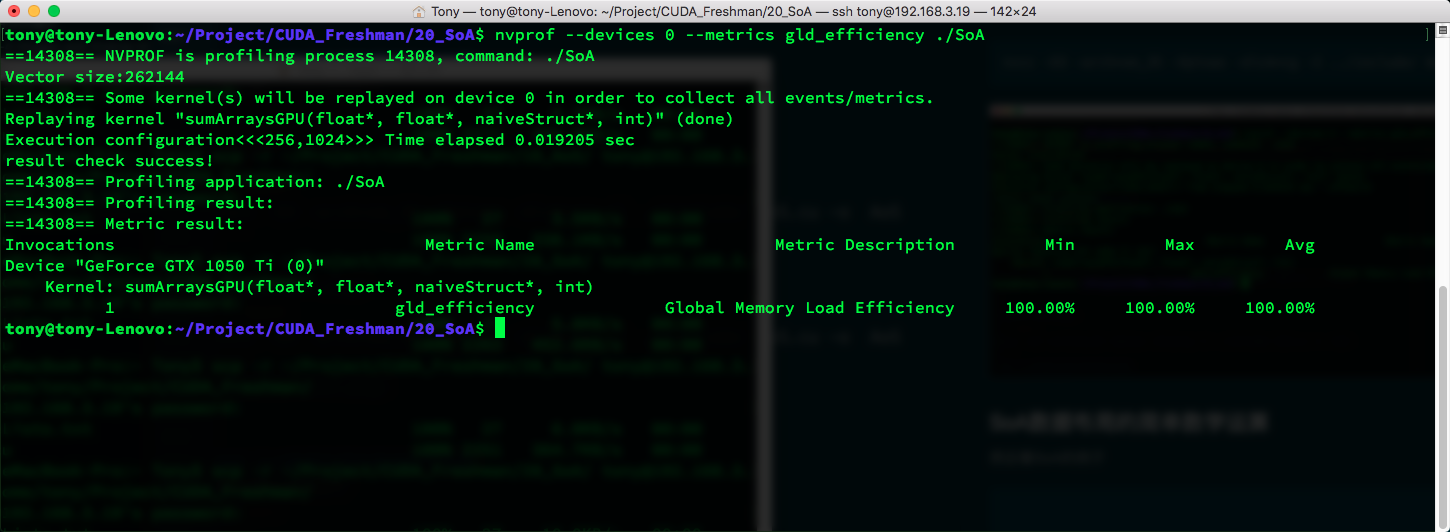
nvcc -O3 -arch=sm_35 -Xptxas -dlcm=ca -I ../include/ SoA.cu -o SoA
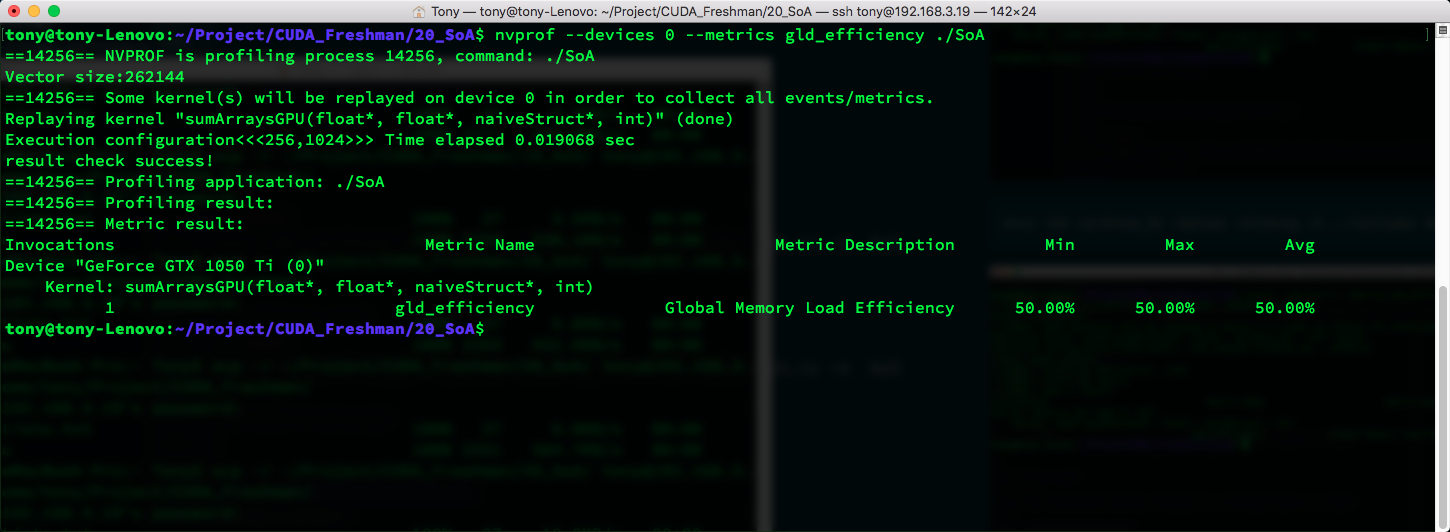
nvcc -O3 -arch=sm_35 -Xptxas -dlcm=cg -I ../include/ SoA.cu -o SoA
Performance Tuning
There are two goals for optimizing device memory bandwidth utilization:
- Aligned and coalesced memory access to reduce bandwidth waste
- Sufficient concurrent memory operations to hide memory latency
In Chapter 3, we discussed optimizing instruction throughput in kernel functions. Maximizing concurrent memory access is achieved through:
- Increasing the number of independent memory operations per thread
- Experimenting with kernel launch execution configurations to fully utilize the parallelism of each SM
Next, we optimize our programs following this approach: unrolling techniques and increasing parallelism.
Unrolling Technique
Applying the unrolling technique discussed earlier to vector addition, let's see its impact on memory efficiency:
Code:
#include <cuda_runtime.h>
#include <stdio.h>
#include "freshman.h"

void sumArrays(float * a, float * b, float * res, int offset, const int size)
{
    for(int i = 0, k = offset; k < size; i++, k++)
    {
        res[i] = a[k] + b[k];
    }
}

__global__ void sumArraysGPU(float*a, float*b, float*res, int offset, int n)
{
    int i = blockIdx.x * blockDim.x * 4 + threadIdx.x;
    int k = i + offset;
    if(k + 3 * blockDim.x < n)
    {
        res[i] = a[k] + b[k];
        res[i + blockDim.x] = a[k + blockDim.x] + b[k + blockDim.x];
        res[i + blockDim.x * 2] = a[k + blockDim.x * 2] + b[k + blockDim.x * 2];
        res[i + blockDim.x * 3] = a[k + blockDim.x * 3] + b[k + blockDim.x * 3];
    }
}

int main(int argc, char **argv)
{
    int dev = 0;
    cudaSetDevice(dev);
    int block_x = 512;
    int nElem = 1 << 18;
    int offset = 0;
    if(argc == 2)
        offset = atoi(argv[1]);
    else if(argc == 3)
    {
        offset = atoi(argv[1]);
        block_x = atoi(argv[2]);
    }
    printf("Vector size:%d\n", nElem);
    int nByte = sizeof(float) * nElem;
    float *a_h = (float*)malloc(nByte);
    float *b_h = (float*)malloc(nByte);
    float *res_h = (float*)malloc(nByte);
    float *res_from_gpu_h = (float*)malloc(nByte);
    memset(res_h, 0, nByte);
    memset(res_from_gpu_h, 0, nByte);

    float *a_d, *b_d, *res_d;
    CHECK(cudaMalloc((void**)&a_d, nByte));
    CHECK(cudaMalloc((void**)&b_d, nByte));
    CHECK(cudaMalloc((void**)&res_d, nByte));
    CHECK(cudaMemset(res_d, 0, nByte));
    initialData(a_h, nElem);
    initialData(b_h, nElem);

    CHECK(cudaMemcpy(a_d, a_h, nByte, cudaMemcpyHostToDevice));
    CHECK(cudaMemcpy(b_d, b_h, nByte, cudaMemcpyHostToDevice));

    dim3 block(block_x);
    dim3 grid(nElem/block.x);
    double iStart, iElaps;
    iStart = cpuSecond();
    sumArraysGPU<<<grid, block>>>(a_d, b_d, res_d, offset, nElem);
    cudaDeviceSynchronize();
    iElaps = cpuSecond() - iStart;

    printf("warmup Time elapsed %f sec\n", iElaps);
    iStart = cpuSecond();
    sumArraysGPU<<<grid, block>>>(a_d, b_d, res_d, offset, nElem);
    cudaDeviceSynchronize();
    iElaps = cpuSecond() - iStart;
    CHECK(cudaMemcpy(res_from_gpu_h, res_d, nByte, cudaMemcpyDeviceToHost));
    printf("Execution configuration<<<%d,%d>>> Time elapsed %f sec --offset:%d \n", grid.x, block.x, iElaps, offset);

    sumArrays(a_h, b_h, res_h, offset, nElem);

    checkResult(res_h, res_from_gpu_h, nElem - 4 * block_x);
    cudaFree(a_d);
    cudaFree(b_d);
    cudaFree(res_d);

    free(a_h);
    free(b_h);
    free(res_h);
    free(res_from_gpu_h);

    return 0;
}
Compile command:
nvcc -O3 sum_array_offset_unrolling.cu -o sum_array_offset_unrolling -arch=sm_35 -Xptxas -dlcm=cg -I ../include/
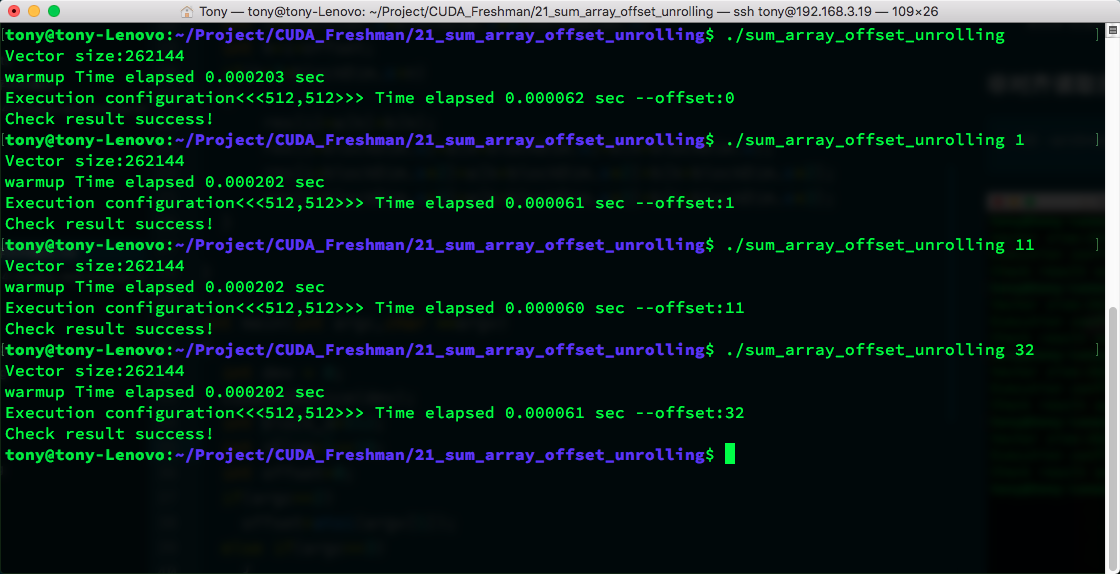
nvprof memory efficiency:
Increasing Parallelism
Achieving parallelism adjustment by tuning the block size is a technique we have covered before. Our focus is still on memory utilization efficiency.
Code is the same as the unrolling technique above.
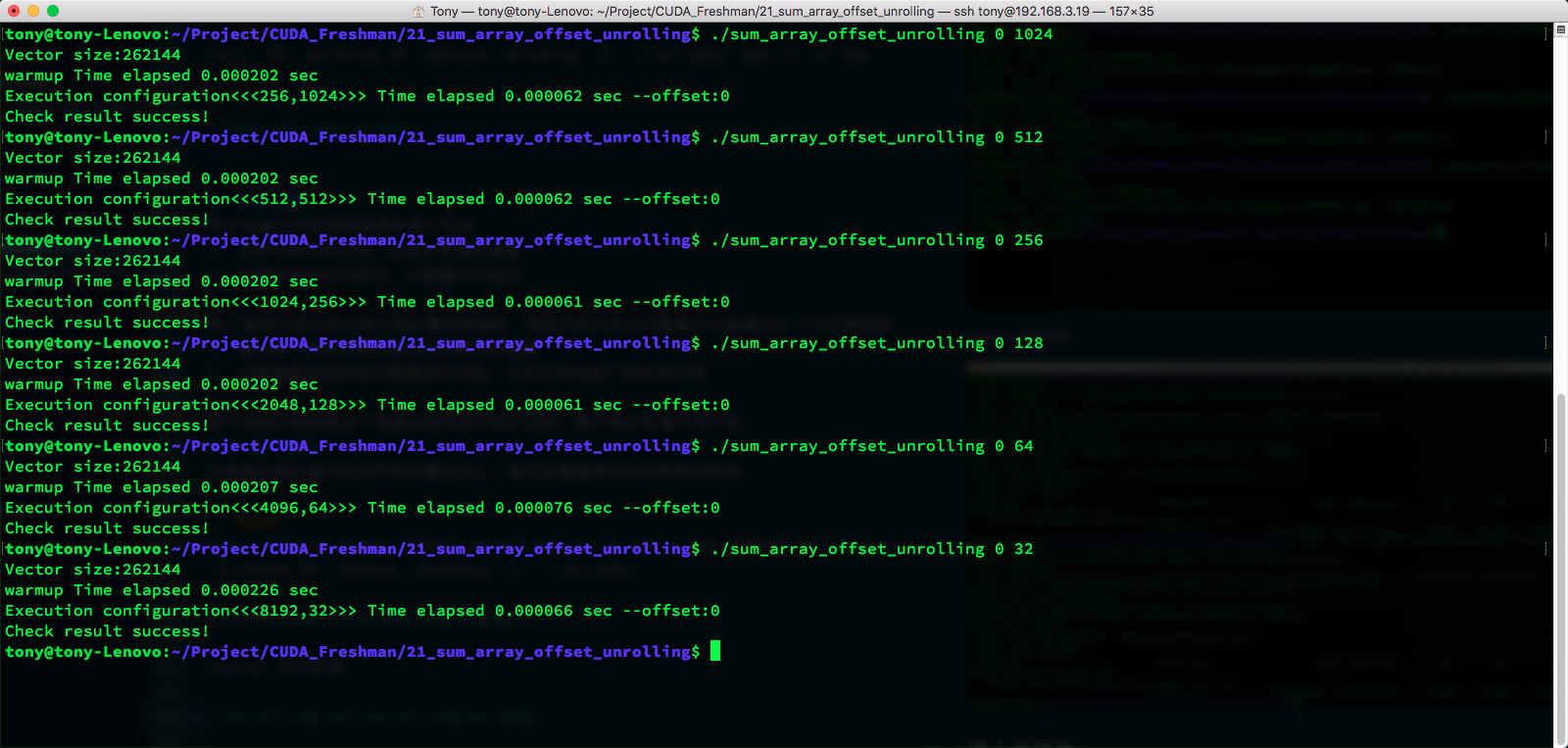
When offset=11:
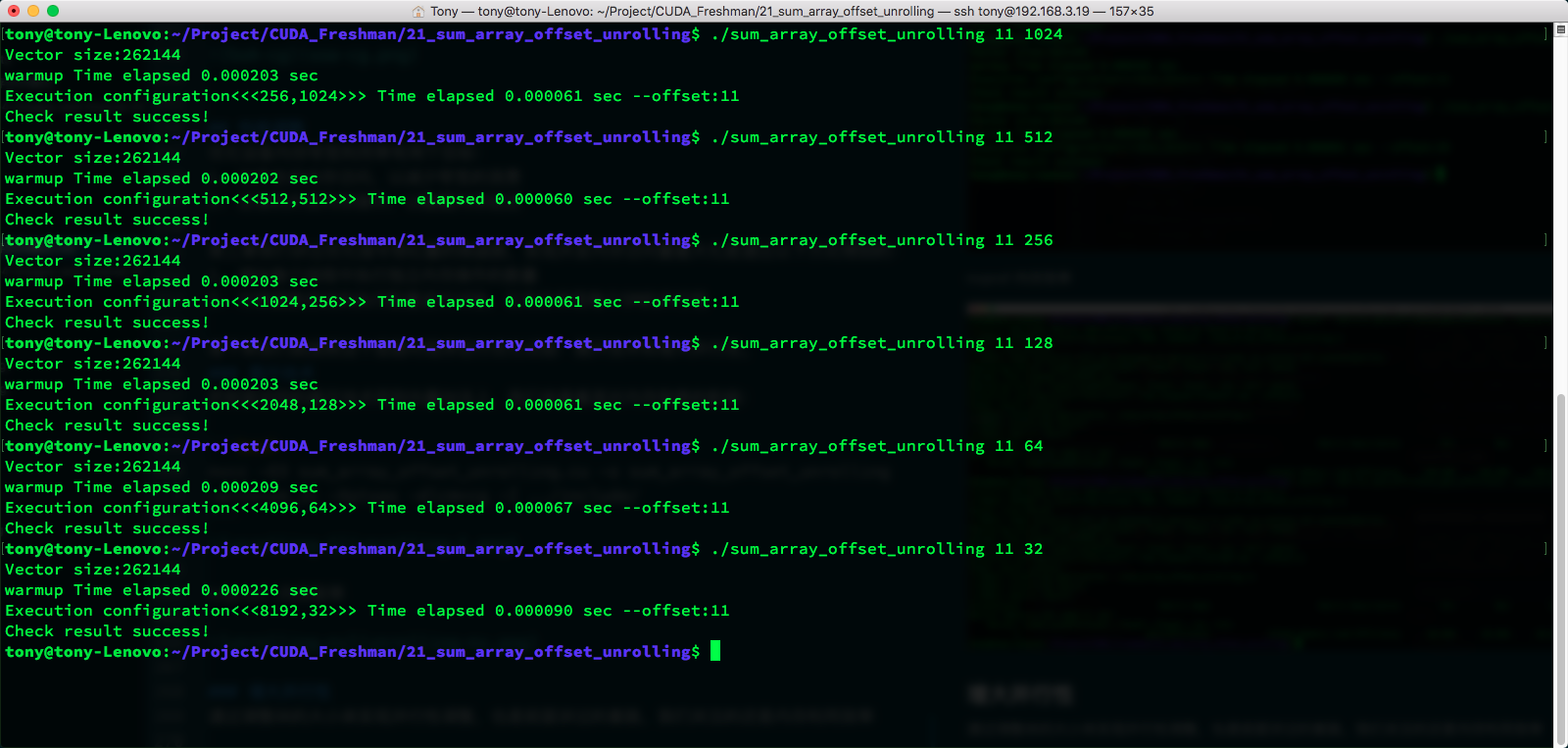
Due to the relatively small data volume, the time difference is not significant. 512 has the best speed, not only because of memory but also due to parallelism and other factors, which we have mentioned before. You need to consider the overall capability.
The complete code for this article is available on GitHub: https://github.com/Tony-Tan/CUDA_Freshman
Summary
This is the longest blog post I have written this year -- it took three days, mainly because there is a lot of code and many results. Here we did not use CMake but used command-line compilation, because it is easier to modify compiler options. The reason the time difference in experiments is not obvious is due to the small data volume. Some results differ from the book, mainly because the book is somewhat old and GPU generations change quickly.
Global memory is fairly well covered in this article. There is more memory knowledge to come, so let's continue.