Ding Zhiyu Week 3 Study Report: MPI Study
[TOC]
MPI Basics
A Basic MPI Program Framework
#include <mpi.h>
#include <stdio.h>

int main(int argc, char *argv[]) {
    // 初始化MPI环境
    MPI_Init(&argc, &argv);

    // 获取当前进程的排名
    int world_rank;
    MPI_Comm_rank(MPI_COMM_WORLD, &world_rank);

    // 获取总进程数
    int world_size;
    MPI_Comm_size(MPI_COMM_WORLD, &world_size);

    // 让每个进程打印出它的排名和总的进程数
    printf("Hello world from rank %d out of %d processors\n", world_rank, world_size);

    // 清理MPI环境
    MPI_Finalize();

    return 0;
}
Timing Framework
#include <stdio.h>
#include <mpi.h>

int main(int argc, char *argv[])
{
    MPI_Init(&argc, &argv);

    int rank;
    MPI_Comm_rank(MPI_COMM_WORLD, &rank);
    int size;
    MPI_Comm_size(MPI_COMM_WORLD, &size);

    double start_time = MPI_Wtime();

    // ... 在这里执行你的并行代码 ...


    // ... 在这里执行你的并行代码 ...

    double end_time = MPI_Wtime();
    double elapsed_time = end_time - start_time;

    // 在所有进程中找到最大的运行时间
    double max_elapsed_time;
    MPI_Reduce(&elapsed_time, &max_elapsed_time, 1, MPI_DOUBLE, MPI_MAX, 0, MPI_COMM_WORLD);

    // 在主进程中打印最大运行时间
    if (rank == 0)
    {
        printf("\ntime:\n");
        printf("Max elapsed time: %f seconds\n", max_elapsed_time);
    }

    MPI_Finalize();
    return 0;
}
Compilation and Execution
To compile and run this MPI program, you need to have an MPI library installed and use an MPI-enabled compiler, such as mpicc. The compilation command would be something like:
mpicc -o mpi_hello_world mpi_hello_world.c
When running the MPI program, you need to use the mpirun or mpiexec command and specify the number of processes, for example:
mpirun -np 4 ./mpi_hello_world
This command will start 4 processes running your program. Each process will print its rank and the total number of processes, but the order of printing may be nondeterministic since they are running in parallel.
Point-to-Point Communication
MPI (Message Passing Interface) is a communication protocol used for programming inter-process communication between parallel computers running on different nodes. It is designed to work on distributed memory systems, which typically do not have a global address space. In such systems, communication between processes must be achieved through sending and receiving messages.
MPI_Send Function
MPI_Send is the basic function in MPI for sending messages. Its prototype is:
int MPI_Send(const void *buf, int count, MPI_Datatype datatype, int dest, int tag, MPI_Comm comm)
Parameter descriptions:
buf: Pointer to the buffer containing the data to be sent.count: Number of data elements in the buffer.datatype: Data type of the data elements to be sent.dest: Rank of the destination process.tag: Message tag; the receiver can selectively receive messages based on this tag.comm: Communicator, which defines a group of processes and the communication context between them.
MPI_Recv Function
MPI_Recv is the basic function in MPI for receiving messages. Its prototype is:
int MPI_Recv(void *buf, int count, MPI_Datatype datatype, int source, int tag, MPI_Comm comm, MPI_Status *status)
Parameter descriptions:
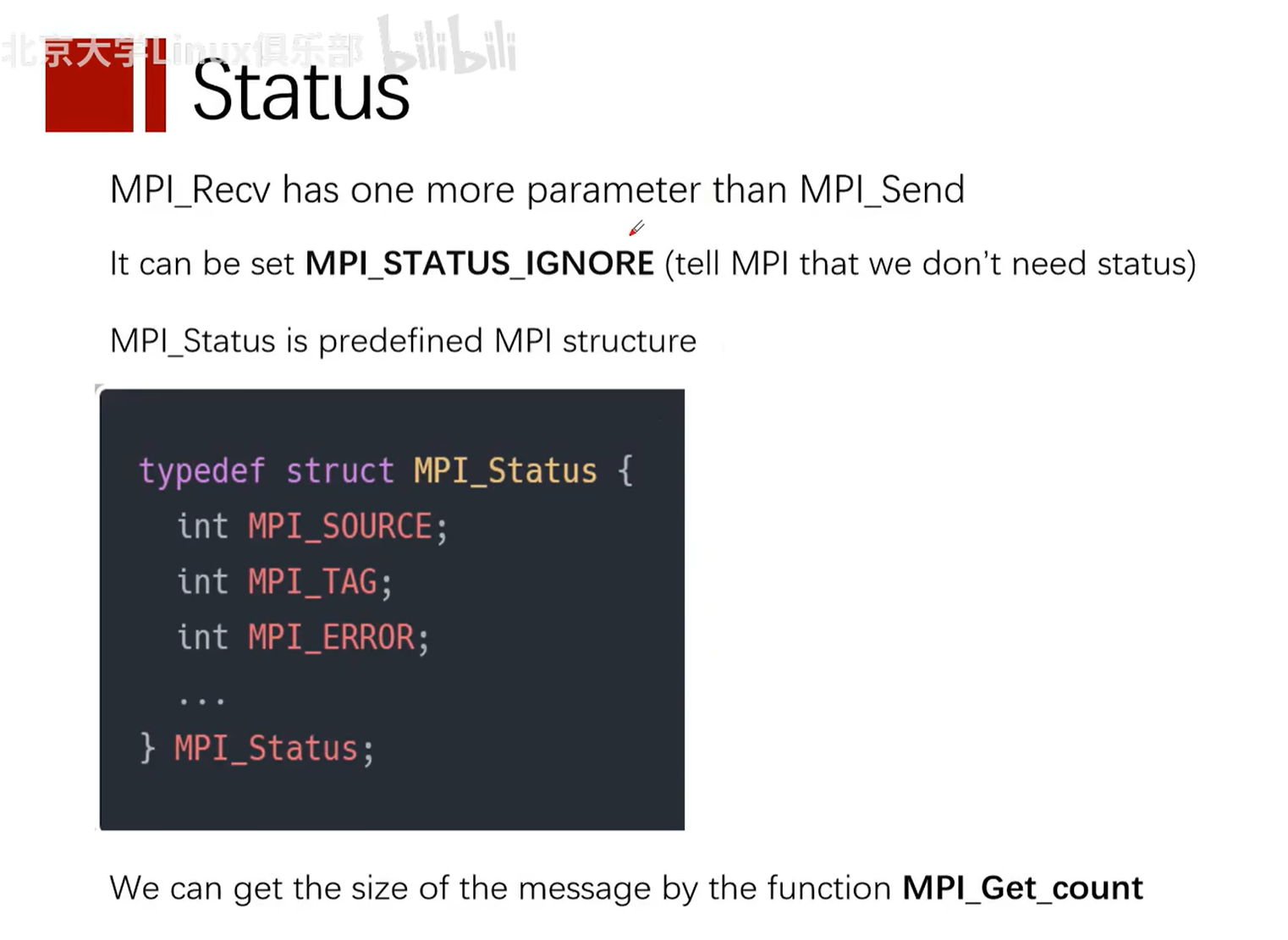
buf: Pointer to the buffer for receiving data.count: Maximum number of data elements in the buffer.datatype: Data type of the data elements to be received.source: Rank of the source process.tag: Message tag, corresponding to the tag used during sending.comm: Communicator.status: A structure used to return information about the received message, such as the source rank, tag, and error code.
Example
Below is a simple MPI program example that uses MPI_Send and MPI_Recv functions to pass an integer message between two processes.
#include <mpi.h>
#include <stdio.h>

int main(int argc, char** argv) {
    // 初始化 MPI 环境
    MPI_Init(&argc, &argv);

    // 获取总的进程数
    int world_size;
    MPI_Comm_size(MPI_COMM_WORLD, &world_size);

    // 获取当前进程的排名
    int world_rank;
    MPI_Comm_rank(MPI_COMM_WORLD, &world_rank);

    int number;
    if (world_rank == 0) {
        // 如果是排名为 0 的进程,则发送一个整数到排名为 1 的进程
        number = -1;
        MPI_Send(&number, 1, MPI_INT, 1, 0, MPI_COMM_WORLD);
    } else if (world_rank == 1) {
        // 如果是排名为 1 的进程,则从排名为 0 的进程接收一个整数
        MPI_Recv(&number, 1, MPI_INT, 0, 0, MPI_COMM_WORLD, MPI_STATUS_IGNORE);
        printf("Process 1 received number %d from process 0\n", number);
    }

    // 清理 MPI 环境
    MPI_Finalize();
    return 0;
}
In this example, process 0 sends an integer (-1) to process 1. Process 1 receives this integer and prints it. Note that this code needs to be compiled and run in an MPI-enabled environment, typically using the following commands:
mpicc -o mpi_example mpi_example.c
mpirun -np 2 ./mpi_example
Here, mpicc is the compiler used to compile MPI programs, while mpirun is used to launch MPI programs, and -np 2 specifies using two processes.
Notes
Can the buf parameters in Send and Recv functions be different?
In MPI, the MPI_Send and MPI_Recv functions are used to send and receive messages between processes. The buf parameters in these functions refer to the buffers for sending and receiving data. The data types and counts of the buffers should match in send and receive operations, but the actual buffer pointers (i.e., memory addresses) can be different.
Here is a simple explanation:
- Sender (
MPI_Send): Thebufparameter is a pointer to the send buffer, which contains the data to be sent. - Receiver (
MPI_Recv): Thebufparameter is a pointer to the receive buffer, which is used to store the received data.
The buf parameters of the sender and receiver typically point to different memory locations in their respective processes. This is because memory spaces are isolated across different processes, so even the same relative address may map to different physical memory in different processes.
The key to ensuring correct communication is that the buffer size and data type pointed to by the buf parameter should match the count and datatype parameters specified in the MPI_Send and MPI_Recv calls. If the data types or counts do not match between send and receive operations, it may lead to data errors or program crashes.
Here is a simple example:
Sender:
int send_data[10]; // 发送缓冲区
MPI_Send(send_data, 10, MPI_INT, dest, tag, MPI_COMM_WORLD);
Receiver:
int recv_data[10]; // 接收缓冲区
MPI_Recv(recv_data, 10, MPI_INT, source, tag, MPI_COMM_WORLD, &status);
In this example, the sender has an array named send_data, and the receiver has an array named recv_data. Although they are different arrays (possibly in different memory locations), they are both integer arrays of size 10, so they can be correctly matched.
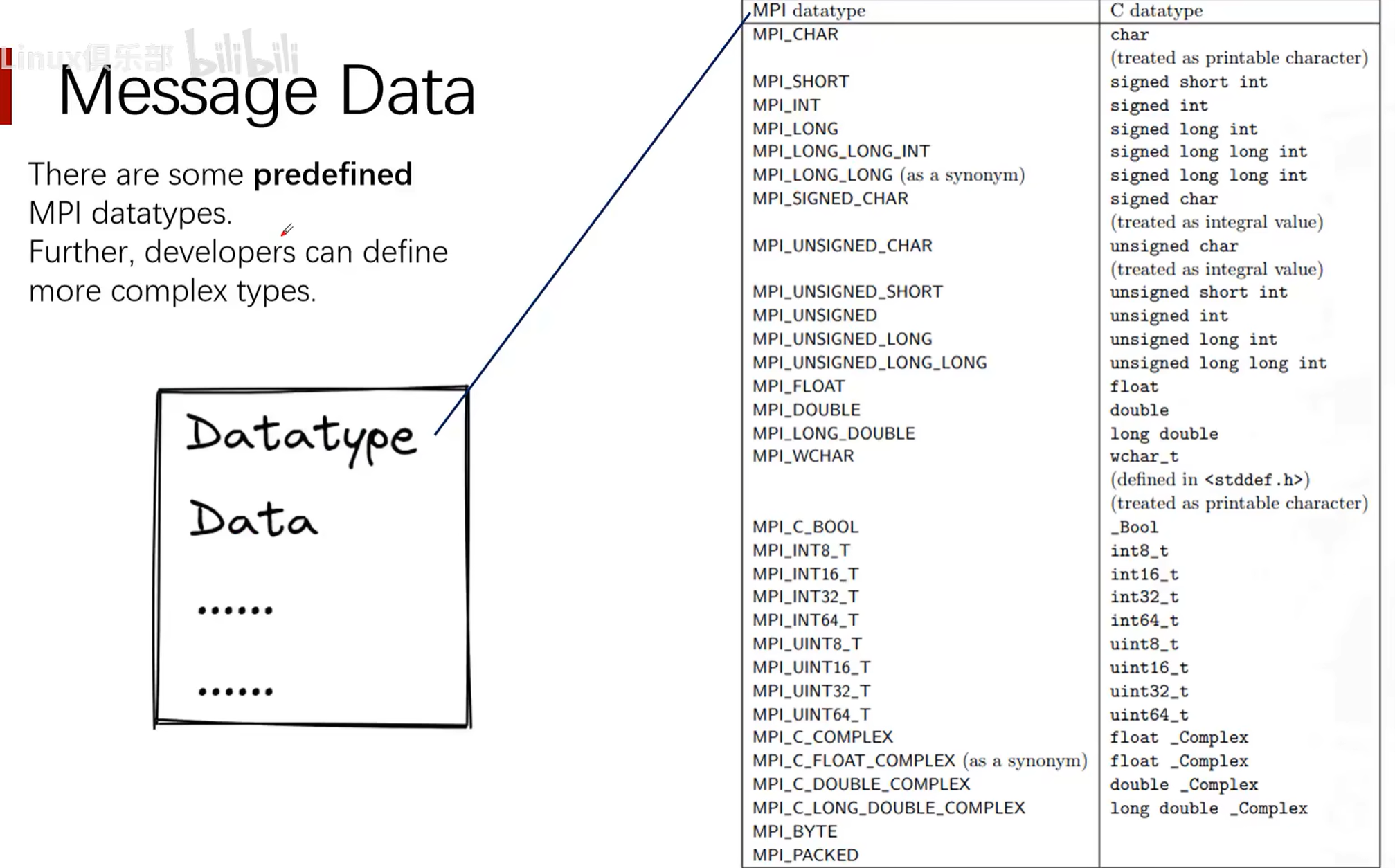
MPI Predefined Data Types (MPI_Datatype datatype)
Wildcards in MPI
MPI (Message Passing Interface) is a standardized and portable message passing system designed for parallel computers composed of various computers. The MPI standard defines a series of APIs for inter-process communication, including a set of wildcards and special constants that are used to simplify programming and provide flexible communication patterns.
Here are several common wildcards and special constants in MPI:
-
MPI_ANY_SOURCE:- This wildcard is used in the source address parameter of
MPI_Recvand related functions, indicating that messages from any process will be received. - When using
MPI_ANY_SOURCE, if multiple messages satisfy the receive conditions, MPI will select one message to receive based on its internal mechanism. - Since the specific sending source is not specified, you usually need to use the
MPI_Statusobject to determine the actual message source.
- This wildcard is used in the source address parameter of
-
MPI_STATUS_IGNORE:- This is a special parameter that can be used in function calls requiring an
MPI_Statusobject, indicating that the user is not interested in status information and it can be ignored. - Using
MPI_STATUS_IGNOREcan reduce some system overhead because MPI does not need to fill in the status object. - If
MPI_STATUS_IGNOREis used, detailed information about the received message cannot be obtained, such as the sender's identity and message tag.
- This is a special parameter that can be used in function calls requiring an
-
MPI_ANY_TAG:- Similar to
MPI_ANY_SOURCE, this wildcard is used in the message tag parameter ofMPI_Recvand related functions, indicating that messages with any tag will be received. - When using
MPI_ANY_TAG, the received message can have any tag that matches other conditions (such as the sending source).
- Similar to
-
MPI_PROC_NULL:- This constant represents a "null" process and can be used in send and receive operations to indicate that no actual message transfer should occur.
- When using
MPI_PROC_NULLas the destination, the send operation becomes a no-op, and no message is sent. - When using
MPI_PROC_NULLas the source, the receive operation returns immediately, and the status object shows the message source asMPI_PROC_NULL.
Notes when using these wildcards and special constants:
- When using
MPI_ANY_SOURCEorMPI_ANY_TAG, you usually need to check the status object to determine the actual source and tag of the message. - If you intend to ignore status information, you can use
MPI_STATUS_IGNORE, but this means you cannot obtain detailed message information. - When receiving messages using
MPI_ANY_SOURCEorMPI_ANY_TAG, you need to ensure that your program logic can handle messages from any source or with any tag. - Using
MPI_PROC_NULLcan simplify code logic, such as in boundary condition handling, where you can use it to avoid writing special boundary checking code. - In parallel programming, the use of wildcards may affect performance, as it may lead to nondeterminism and additional overhead. You should optimize communication patterns and reduce reliance on wildcards as much as possible while ensuring correctness.
MPI provides powerful abstractions for handling inter-process communication, but it also requires programmers to have a deep understanding of communication patterns to avoid deadlocks and performance bottlenecks. When using these wildcards, you should carefully design your communication patterns and thoroughly test to ensure program correctness and efficiency.
Status (MPI_Status *status)
Practice: Ping-Pong Communication
MPI (Message Passing Interface) is a communication protocol used for writing parallel computing programs. In parallel computing, the "ping-pong" test is a simple communication pattern used to measure the latency of communication between two processes. In this test, one process (called "Ping") sends a message to another process (called "Pong"), and then the "Pong" process receives the message and sends it back to the "Ping" process.
Ping-Pong Program Implemented with MPI
#include <stdio.h>
#include <mpi.h>

int main(int argc, char *argv[]) {
    int my_rank, num_procs, partner;
    int ping_pong_count = 0;
    int max_ping_pong_count = 10;
    MPI_Status status;

    // 初始化MPI环境
    MPI_Init(&argc, &argv);
    // 获取当前进程的排名
    MPI_Comm_rank(MPI_COMM_WORLD, &my_rank);
    // 获取所有进程的数量
    MPI_Comm_size(MPI_COMM_WORLD, &num_procs);

    if (num_procs < 2) {
        fprintf(stderr, "This test requires at least 2 processes\n");
        MPI_Abort(MPI_COMM_WORLD, 1);
    }

    // 确定通信的伙伴进程的排名
    partner = (my_rank + 1) % 2;

    while (ping_pong_count < max_ping_pong_count) {
        if (my_rank == ping_pong_count % 2) {
            // 增加ping-pong计数器并发送消息
            ping_pong_count++;
            MPI_Send(&ping_pong_count, 1, MPI_INT, partner, 0, MPI_COMM_WORLD);
            printf("%d sent and incremented ping_pong_count %d to %d\n", my_rank, ping_pong_count, partner);
        } else {
            // 接收消息
            MPI_Recv(&ping_pong_count, 1, MPI_INT, partner, 0, MPI_COMM_WORLD, &status);
            printf("%d received ping_pong_count %d from %d\n", my_rank, ping_pong_count, partner);
        }
    }

    // 清理MPI环境
    MPI_Finalize();
    return 0;
}
Code Explanation
-
Include header file:
#include <mpi.h>is required because it contains all MPI function and symbol definitions needed by the MPI program. -
Initialize MPI:
MPI_Init(&argc, &argv);initializes the MPI execution environment. This function must be called before any other MPI functions. -
Get process information:
MPI_Comm_rank(MPI_COMM_WORLD, &my_rank);gets the current process's rank (i.e., process number).MPI_Comm_size(MPI_COMM_WORLD, &num_procs);gets the total number of processes participating in the computation. -
Confirm process count: This program requires at least two processes to run. If the process count is less than 2, the program will exit.
-
Determine communication partner: Each process finds its communication partner, here simply by computing the rank modulo 2.
-
Ping-Pong communication loop: Uses
MPI_SendandMPI_Recvto send and receive messages between two processes.MPI_Sendis used to send messages, whileMPI_Recvis used to receive messages. TheMPI_Statusstructure is used to obtain status information about the receive operation. -
Print messages: After each send or receive, the process prints the corresponding information.
-
End MPI:
MPI_Finalize();ends the MPI execution environment. This function must be called before the program ends.
Note: This example assumes only two processes participate in communication. In practice, there may be multiple processes, and the communication pattern may be more complex. This code should be compiled and run in an MPI-enabled environment, using, for example, the mpicc compiler and mpirun or mpiexec to run the program.
Process Termination Function MPI_Abort(MPI_COMM_WORLD, 1)
MPI_Abort(MPI_COMM_WORLD, 1) is an MPI function used to terminate MPI program execution when an error occurs. This function immediately terminates all MPI processes in the communicator that called it and cleans up all MPI state as much as possible. MPI_Abort is typically called when an unrecoverable error occurs, such as when the program detects an unrecoverable error internally, or when the user wants to end the program early under certain conditions.
Function parameter explanations:
-
The first parameter
MPI_COMM_WORLDspecifies the communicator to terminate. In this example, it isMPI_COMM_WORLD, meaning all processes associated withMPI_COMM_WORLDwill be terminated.MPI_COMM_WORLDis a predefined communicator that contains all MPI processes. -
The second parameter
1is the error code, passed to the external environment to indicate why the program was terminated. This error code can be used by the operating system or other monitoring software to determine the reason for program termination. In UNIX systems, a non-zero exit code typically indicates abnormal program termination.
Notes when using the MPI_Abort function:
-
MPI_Abortis a collective operation, meaning it will affect all processes in the same communicator. In this example, all processes will be terminated because they are all part ofMPI_COMM_WORLD. -
Since
MPI_Abortimmediately terminates all related processes, the normal exit process of any MPI process will not be executed. For example,MPI_Finalizewill not be called. Therefore, not all resources may be released, and not all output may be completed. -
MPI_Abortshould only be used when necessary, as it is not a graceful exit method. It does not guarantee that all processes will receive the termination signal, nor does it guarantee the order of termination. -
Generally, the preferred approach is to handle errors, try to restore the program to a stable state, and end the program after all processes reach agreement, rather than directly calling
MPI_Abort. Only when the error is unrecoverable and the program must be stopped immediately shouldMPI_Abortbe used.
Blocking Communication, Non-blocking Communication, and Buffered Send
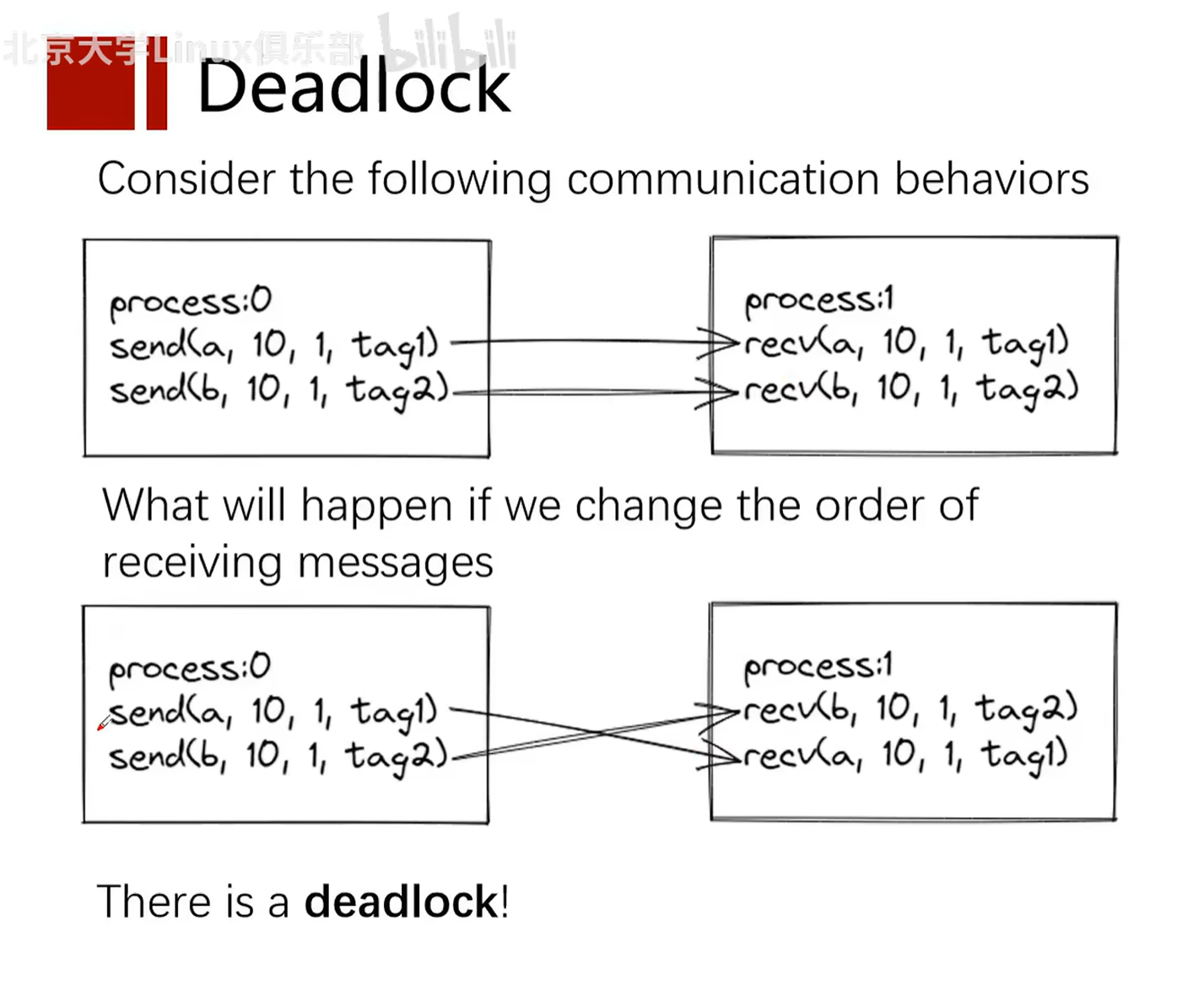
Deadlock
Deadlock is a concept in computer science, particularly in concurrent control, multithreaded, and multiprocess programming. It refers to a specific blocking state where two or more running threads or processes are waiting for each other to stop, or waiting for some event that cannot be controlled by these threads or processes, resulting in none of them being able to proceed.
Here is a classic deadlock example:
Suppose there are two processes (Process A and Process B) and two resources (Resource 1 and Resource 2):
- Process A holds Resource 1 and is waiting for Resource 2.
- At the same time, Process B holds Resource 2 and is waiting for Resource 1.
In this case, neither process can continue executing because they are both waiting for the other to release resources, forming a deadlock.
To prevent deadlock, various methods can be used, including resource allocation strategies, lock ordering, deadlock detection and recovery mechanisms, etc. For example, ensuring that the program requests resources in a consistent order can reduce the likelihood of deadlock, while deadlock detection algorithms can help the system identify and handle deadlocks. If deadlock is detected, the system can take various measures to resolve it, such as revoking certain processes or forcibly releasing resources.
Concepts
Blocking Communication
In blocking communication, a process is blocked when calling a send or receive operation until certain conditions are met. For send operations, blocking may mean waiting for data to be copied to the system buffer, or until the receiver receives the data. For receive operations, blocking means waiting until data arrives and is copied to the user's buffer.
Features:
- Simplicity: Code is easy to understand and maintain, because the process continues executing only after the send or receive operation is complete.
- Determinism: When a blocking call returns, you know the data has been sent or received.
Example:
MPI_Send(buffer, count, datatype, dest, tag, MPI_COMM_WORLD); // 发送操作
MPI_Recv(buffer, count, datatype, source, tag, MPI_COMM_WORLD, &status); // 接收操作
In both operations, the process will wait until the send or receive is complete.
Buffering
In MPI, the behavior of sending messages can be distinguished by how they handle buffering and blocking. These characteristics define how send operations interact with system buffers and whether send operations block the calling process before messages are actually delivered.
Buffering
Buffering refers to the temporary storage of messages between being sent and received. MPI implementations typically have an internal buffering system that can store sent messages until the receiving process is ready to receive them. This feature allows the sending process to continue execution before the receiving process actually calls the receive operation, potentially improving the overall performance of the parallel program.
- Buffered Send: MPI provides buffered send operations (e.g.,
MPI_Bsend). In this mode, the sent message is first copied to MPI's send buffer, and then the sending process can continue executing without waiting for the receiving process to begin receiving. If there is not enough buffer space to store the message, the send operation may block until sufficient space is available.
Blocking
Blocking refers to the send operation pausing (blocking) the calling process's execution before the message is received. In a blocking send, the send operation only returns control to the calling process after certain conditions are met.
- Standard Blocking Send:
MPI_Sendis a standard blocking send operation. In this mode, the send operation may block the calling process until the message data is copied to the system buffer (if one exists) or until the receiving process begins the receive operation, ensuring that the sending process can safely reuse or modify the data in the send buffer.
Differences
- Buffer dependency: Buffered send depends on the MPI system's buffer, while standard send may not need a buffer or uses less buffer.
- Blocking behavior: Standard send may block the process until the send operation completes (i.e., data is copied to the buffer or the receiver begins receiving), while buffered send attempts to return immediately, only blocking when there is not enough buffer space.
- Resource usage: Buffered send may consume more buffer resources because it needs to store a copy of the message in the internal buffer.
- Program complexity: Using buffered send may require the programmer to manage buffer size and availability, increasing programming complexity.
In practice, the choice of send method depends on the application's requirements, message size, communication pattern, and performance considerations. Standard send is simple and direct, suitable for most situations, but in high-performance computing applications, more fine-grained control over message buffering and sending may be needed to avoid potential blocking.
Buffered Send and Non-blocking Communication are two different concepts. Although both aim to reduce waiting time caused by communication, they work differently.
Buffered Send
Buffered send, such as MPI_Bsend, copies data to MPI's internal buffer. If the buffer has sufficient space, the send operation returns immediately, even if the receiver has not yet started receiving the message. This means the sending process can continue executing subsequent code without waiting for the receiving process to begin receiving. However, if the internal buffer does not have enough space to store the message being sent, buffered send may block.
Non-blocking Communication
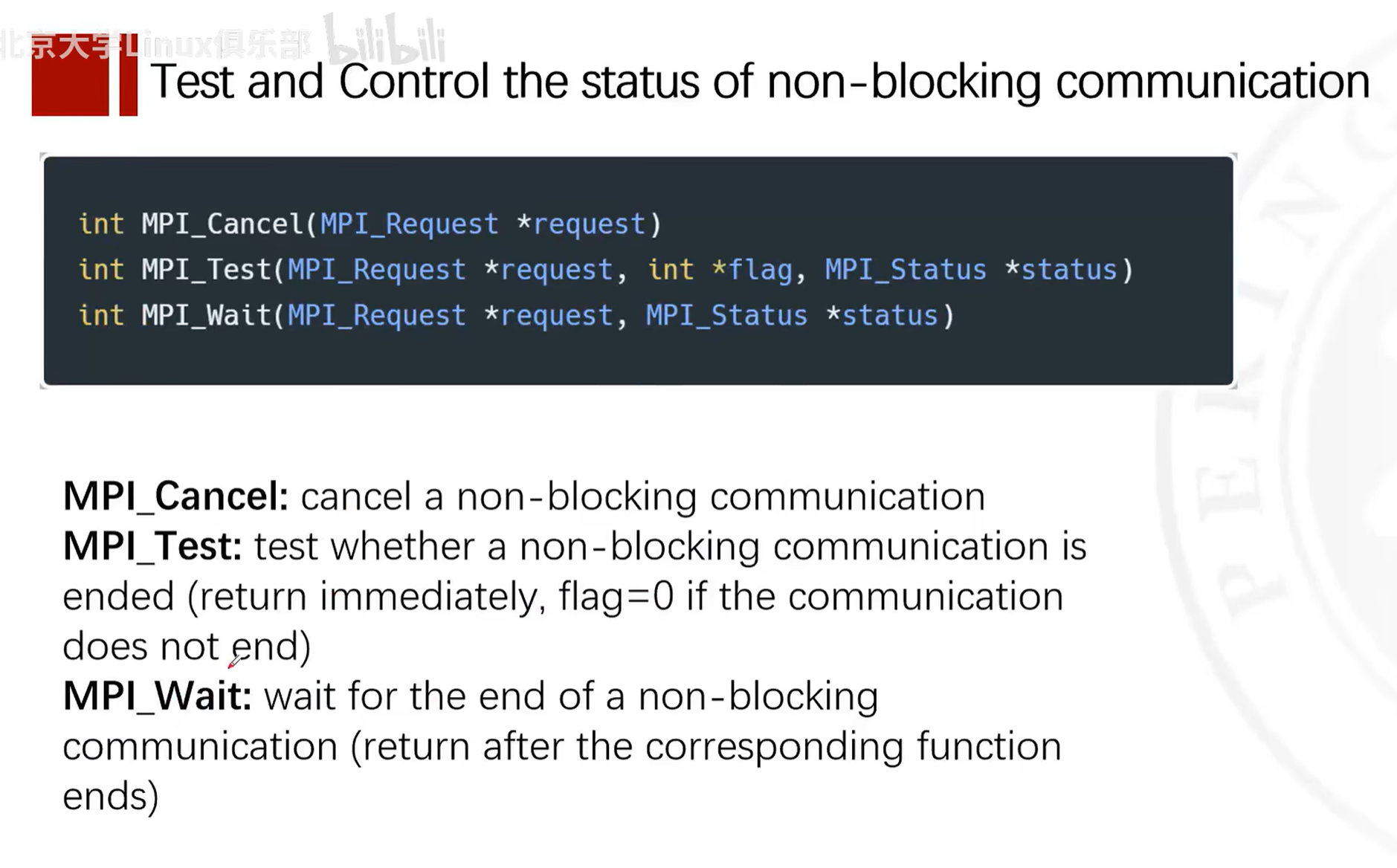
Non-blocking communication, such as MPI_Isend and MPI_Irecv, means that send and receive operations return immediately after being initiated, regardless of whether the operation has completed. This allows the program to continue performing other operations while the message is actually being transmitted. Non-blocking communication requires the programmer to manage and test communication requests before the message transfer is complete (using functions such as MPI_Test or MPI_Wait).
Differences
- Buffered send: May block if there is insufficient buffer. It relies on MPI's internal buffer to store message copies.
- Non-blocking communication: Always returns immediately, allowing the process to continue executing other tasks. It requires the programmer to manage communication state and ensure communication has completed at the appropriate time.
In summary, buffered send is an attempt to reduce blocking in send operations, but it is not truly non-blocking communication. Non-blocking communication is a communication method that allows parallel operations and more fine-grained control, ensuring that send and receive calls return immediately after initiation, giving the program the opportunity to perform other operations before communication is complete.
Non-blocking Communication
Non-blocking communication allows a process to continue executing after calling a send or receive operation, without waiting for the operation to complete. This means the process can perform other operations while data is being sent or received.
Features:
- Efficiency: Can execute computations while waiting for data transfer to complete, helping to hide communication latency.
- Complexity: Code may be harder to understand and maintain, because you must manage multiple simultaneous operations and ensure communication is complete before using data.
Example:
MPI_Isend(buffer, count, datatype, dest, tag, MPI_COMM_WORLD, &request); // 非阻塞发送操作
MPI_Irecv(buffer, count, datatype, source, tag, MPI_COMM_WORLD, &request); // 非阻塞接收操作
// ... 执行其他操作 ...
MPI_Wait(&request, &status); // 等待非阻塞操作完成
Here, after the MPI_Isend and MPI_Irecv calls, the process can immediately continue executing code, but must call MPI_Wait before actually using the data to ensure the operation is complete.
Non-blocking Communication: Isend and Irecv Functions
MPI_Isend and MPI_Irecv are two functions in MPI (Message Passing Interface) used for non-blocking communication. They allow processes to initiate send and receive operations without waiting for communication to complete, so processes can continue executing other tasks, thereby improving program parallelism and efficiency.
MPI_Isend
MPI_Isend is used to start a non-blocking send operation. Its function prototype is:
int MPI_Isend(const void *buf, int count, MPI_Datatype datatype, int dest, int tag, MPI_Comm comm, MPI_Request *request);
Parameter descriptions:
buf: Pointer to the buffer containing data to be sent.count: Number of data elements to be sent.datatype: Type of data elements to be sent.dest: Rank of the destination process.tag: Message tag for sending; the receiver will receive based on this tag.comm: Communicator to use.request:MPI_Requestvariable, used for subsequentMPI_WaitorMPI_Testcalls.
MPI_Irecv
MPI_Irecv is used to start a non-blocking receive operation. Its function prototype is:
int MPI_Irecv(void *buf, int count, MPI_Datatype datatype, int source, int tag, MPI_Comm comm, MPI_Request *request);
Parameter descriptions are similar to MPI_Isend, with the difference that the source parameter specifies the rank of the source process.
Necessary Waits in Non-blocking Communication
When using non-blocking communication, whether for send or receive operations, waiting may be needed at some point, but the reasons and timing may differ:
-
Non-blocking send: The reason a send operation usually needs to wait is to ensure that data has been copied to the system buffer or has been sent to the receiver, so that the sender can safely reuse or modify the data in the send buffer. If you modify the data immediately after sending or exit the program before sending is complete, it may lead to data corruption or undefined behavior.
-
Non-blocking receive: The reason a receive operation needs to wait is to ensure that the data in the receive buffer has arrived completely, so that it can be safely read and used.
In MPI (Message Passing Interface), MPI_Wait and MPI_Test are functions used to wait for or check the completion of non-blocking communication operations. These functions are used together with non-blocking send (MPI_Isend) and non-blocking receive (MPI_Irecv) to allow overlapping computation with communication.
MPI_Wait
The MPI_Wait function is used to wait for a specific non-blocking communication operation to complete.
The function prototype is:
int MPI_Wait(MPI_Request *request, MPI_Status *status);
Parameter descriptions:
request: A pointer to anMPI_Requesttype variable, which is assigned during the non-blocking operation.MPI_Waitwill wait for the operation corresponding to this request to complete.status: A pointer to anMPI_Statusstructure, used to store status information after the operation completes. If you are not interested in status information, you can passMPI_STATUS_IGNORE.
MPI_Wait will block the calling thread until the corresponding non-blocking operation completes. After completion, request is set to MPI_REQUEST_NULL, indicating that the request object can be reused or released.
MPI_Test
The MPI_Test function is used to check whether a specific non-blocking communication operation has completed, without blocking the calling thread.
The function prototype is:
int MPI_Test(MPI_Request *request, int *flag, MPI_Status *status);
Parameter descriptions:
request: Same as inMPI_Wait.flag: A pointer to an integer. The function sets it to a non-zero value if the corresponding operation has completed; otherwise, it is set to zero.status: Same as inMPI_Wait.
If the operation has completed, MPI_Test sets flag to a non-zero value, and request is set to MPI_REQUEST_NULL. If the operation has not yet completed, flag is set to zero, and request remains unchanged.
Example
Below is a simple example showing how to use MPI_Isend, MPI_Irecv, MPI_Wait, and MPI_Test:
#include <mpi.h>
#include <stdio.h>

int main(int argc, char *argv[]) {
    MPI_Init(&argc, &argv);

    int world_rank;
    MPI_Comm_rank(MPI_COMM_WORLD, &world_rank);
    int world_size;
    MPI_Comm_size(MPI_COMM_WORLD, &world_size);

    const int TAG = 0;
    MPI_Request request;
    MPI_Status status;

    if (world_size < 2) {
        fprintf(stderr, "World size must be greater than 1 for %s\n", argv[0]);
        MPI_Abort(MPI_COMM_WORLD, 1);
    }

    int number;
    if (world_rank == 0) {
        number = -1;
        MPI_Isend(&number, 1, MPI_INT, 1, TAG, MPI_COMM_WORLD, &request);
        MPI_Wait(&request, &status); // Wait for the send to complete
        printf("Process 0 sent number %d to process 1\n", number);
    } else if (world_rank == 1) {
        MPI_Irecv(&number, 1, MPI_INT, 0, TAG, MPI_COMM_WORLD, &request);
        int flag = 0;
        while (!flag) {
            MPI_Test(&request, &flag, &status); // Test for the receive
            // Perform other work here...
        }
        printf("Process 1 received number %d from process 0\n", number);
    }

    MPI_Finalize();
    return 0;
}
In this example, process 0 sends a number to process 1. Process 0 uses MPI_Isend and MPI_Wait to send the number and wait for the send to complete. Process 1 uses MPI_Irecv and MPI_Test to receive the number, and can perform other work while waiting. Note that in practice, the MPI_Test loop should include some useful computation or processing to avoid busy waiting.
Example
The following example code demonstrates how to use MPI_Isend and MPI_Irecv:
#include <stdio.h>
#include <mpi.h>

int main(int argc, char* argv[]) {
    MPI_Init(&argc, &argv);

    int world_rank;
    MPI_Comm_rank(MPI_COMM_WORLD, &world_rank);
    int world_size;
    MPI_Comm_size(MPI_COMM_WORLD, &world_size);

    const int TAG = 0;
    MPI_Request request;
    MPI_Status status;

    if (world_size < 2) {
        fprintf(stderr, "World size must be greater than 1 for %s\n", argv[0]);
        MPI_Abort(MPI_COMM_WORLD, 1);
    }

    int number;
    if (world_rank == 0) {
        number = -1;
        MPI_Isend(&number, 1, MPI_INT, 1, TAG, MPI_COMM_WORLD, &request);
        // 在这里可以执行其他任务
        MPI_Wait(&request, &status); // 等待发送完成
    } else if (world_rank == 1) {
        MPI_Irecv(&number, 1, MPI_INT, 0, TAG, MPI_COMM_WORLD, &request);
        // 在这里可以执行其他任务
        MPI_Wait(&request, &status); // 等待接收完成
        printf("Process 1 received number %d from process 0\n", number);
    }

    MPI_Finalize();
    return 0;
}
In this example, process 0 uses MPI_Isend to send an integer to process 1, while process 1 uses MPI_Irecv to receive this integer. Both send and receive operations are non-blocking, but we use MPI_Wait here to ensure that communication is complete before the program ends. In practice, you might perform some computation unrelated to communication before calling MPI_Wait, to hide communication latency.
Some Functions Related to Non-blocking Communication
Non-blocking Communication Example
Certainly. Below is a simple example of non-blocking communication using MPI (Message Passing Interface). In this example, we have two processes: one sends data, and the other receives data. The sending process (rank 0) uses non-blocking send (MPI_Isend), while the receiving process (rank 1) uses non-blocking receive (MPI_Irecv).
First, make sure you have an MPI environment installed. On many systems, you can use mpicc to compile MPI programs and mpirun or mpiexec to run them.
Below is a simple C program demonstrating non-blocking communication:
#include <stdio.h>
#include <mpi.h>

int main(int argc, char *argv[]) {
    MPI_Init(&argc, &argv);

    int rank;
    MPI_Comm_rank(MPI_COMM_WORLD, &rank);
    MPI_Request request;
    MPI_Status status;

    const int TAG = 0;
    if (rank == 0) {
        // 发送进程
        int data_to_send = 123; // 这是我们要发送的数据
        MPI_Isend(&data_to_send, 1, MPI_INT, 1, TAG, MPI_COMM_WORLD, &request);
        // 这里可以执行其他操作...
        MPI_Wait(&request, &status); // 等待非阻塞发送完成
        printf("Process %d sent data %d\n", rank, data_to_send);
    } else if (rank == 1) {
        // 接收进程
        int received_data;
        MPI_Irecv(&received_data, 1, MPI_INT, 0, TAG, MPI_COMM_WORLD, &request);
        // 这里可以执行其他操作...
        MPI_Wait(&request, &status); // 等待非阻塞接收完成
        printf("Process %d received data %d\n", rank, received_data);
    }

    MPI_Finalize();
    return 0;
}
To compile and run this program, you can use the following commands (assuming your filename is non_blocking_mpi.c):
mpicc -o non_blocking_mpi non_blocking_mpi.c
mpirun -np 2 ./non_blocking_mpi
Here, -np 2 tells MPI to run two processes. When you run this program, you should see process 0 sending data, process 1 receiving data, and each process printing a message after its non-blocking operation completes. Note that in practice, you might want to perform some useful work before MPI_Wait to better utilize the advantages of non-blocking communication.
Choosing Between Three Communication Methods
The best time to use blocking, buffered, or non-blocking communication usually depends on the specific requirements of the application, communication patterns, and performance goals. Below are some guidelines to help you decide:
Blocking Communication (MPI_Send, MPI_Recv)
- Simplicity: If your program logic is simple and you don't need to perform computation and communication simultaneously, standard blocking communication may be the simplest choice.
- Determinism: When you need to ensure that a message has been sent or received before executing subsequent code, blocking communication provides this certainty.
- Small messages: For small messages, the overhead of blocking communication may be negligible, as small messages are usually sent or received very quickly.
Buffered Send (MPI_Bsend)
- Available buffer: If your system has sufficient buffer resources and you want to avoid potential blocking in send operations, buffered send can be a good choice.
- Medium-sized messages: For medium-sized messages, using buffered send can reduce blocking time in send operations, as data is copied to a buffer.
- Overlap computation with communication: If you want to perform some computation while messages are being sent, buffered send can provide this overlap possibility, although it is not as flexible as non-blocking communication.
Non-blocking Communication (MPI_Isend, MPI_Irecv)
- Performance: When you need to maximize program performance, especially when computation and communication overlap is needed, non-blocking communication is usually the preferred choice.
- Large messages: For large messages, non-blocking communication allows the send operation to perform other computations during data transfer, improving resource utilization.
- Complex communication patterns: In programs with complex communication patterns, non-blocking communication can provide better control, as it allows initiating multiple communication operations simultaneously and processing them as they complete.
- Pipeline operations: If your application can be divided into multiple stages that can be processed in parallel, non-blocking communication can help you set up pipelines where computation and communication can execute in parallel across different stages.
Summary
- If your application has a simple communication pattern, or you are just starting to use MPI, then starting with standard blocking communication is reasonable.
- If your application needs to perform some computation during communication and you don't want to deal with the complexity of non-blocking communication, buffered send may be a good intermediate choice.
- If you need to maximize performance, especially with a large amount of concurrent communication and computation, then non-blocking communication is the best choice.
In any case, the best approach is to determine which communication method is most suitable for your application through experimentation and performance analysis. Different hardware and network architectures may also affect the best choice.
Collective Communication
Concepts
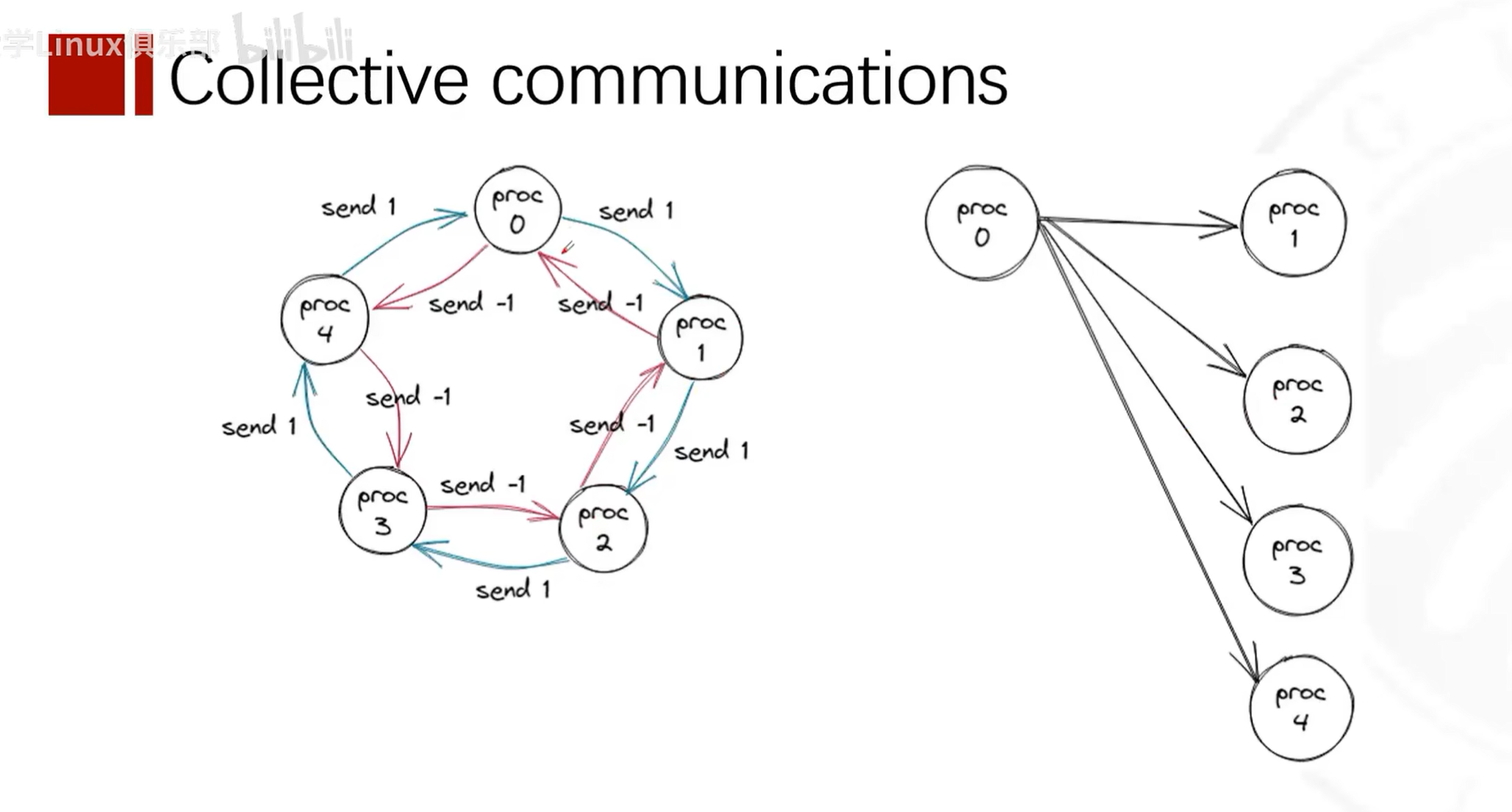
Collective communication concept -- one-to-many.
Every process calls the collective communication function, but its behavior varies based on its own rank and the set parameters. The scope of collective communication depends on the communicator.
Reduction and MPI_Op Types
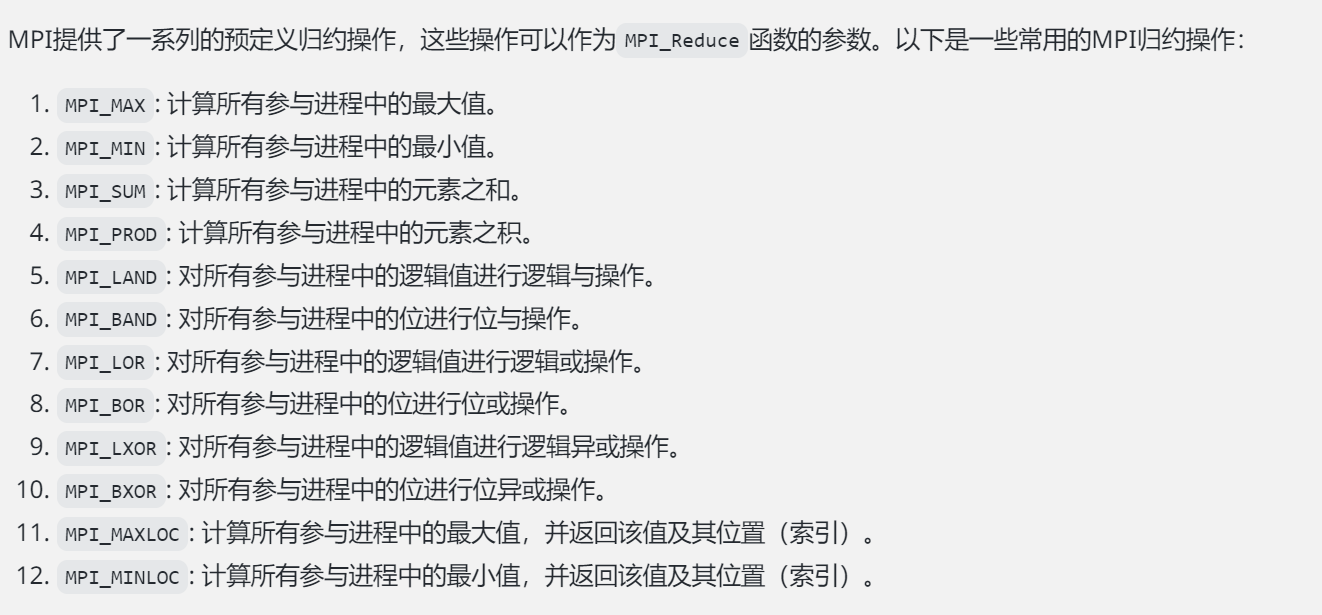
In MPI, MPI_Op is an enumeration type used to specify the reduction operation used in certain collective communication operations. A reduction operation combines elements from all processes into a single result using some mathematical operation. These operations are commonly used in functions such as MPI_Reduce, MPI_Allreduce, MPI_Scan, and MPI_Exscan.
Below are some predefined MPI_Op operations:
MPI_MAX: Returns the maximum of all elements.MPI_MIN: Returns the minimum of all elements.MPI_SUM: Computes the sum of all elements.MPI_PROD: Computes the product of all elements.MPI_LAND: Performs a logical AND on all elements.MPI_BAND: Performs a bitwise AND on all elements.MPI_LOR: Performs a logical OR on all elements.MPI_BOR: Performs a bitwise OR on all elements.MPI_LXOR: Performs a logical XOR on all elements.MPI_BXOR: Performs a bitwise XOR on all elements.MPI_MAXLOC: Returns the maximum value and its location among all elements.MPI_MINLOC: Returns the minimum value and its location among all elements.
These operations are all associative and commutative, meaning the order of operations does not affect the final result, which is a very important property in parallel computing.
When using these operations, you need to ensure that the operation and data type are compatible. For example, logical operations (MPI_LAND, MPI_LOR, MPI_LXOR) are usually used for boolean data, while bitwise operations (MPI_BAND, MPI_BOR, MPI_BXOR) are used for integer data.
For example, if you want to compute the sum of data across all processes, you can use MPI_SUM:
#include <mpi.h>

int main(int argc, char** argv) {
    MPI_Init(&argc, &argv);

    int rank;
    MPI_Comm_rank(MPI_COMM_WORLD, &rank);

    int data = rank + 1; // 假设每个进程有一个不同的数据值
    int result;

    // 将所有进程的data值相加,结果存储在rank为0的进程的result变量中
    MPI_Reduce(&data, &result, 1, MPI_INT, MPI_SUM, 0, MPI_COMM_WORLD);

    if (rank == 0) {
        // 此时,result将是所有进程data值的总和
        printf("The sum of all ranks is: %d\n", result);
    }

    MPI_Finalize();
    return 0;
}
In the above example, each process has a data variable whose value is the process's rank plus 1. The MPI_Reduce function sums all data values and stores the final sum in the result variable of the root process (rank 0).
Overall, MPI_Op provides a set of predefined operations for performing reduction operations in collective communication functions. These operations are common mathematical and logical operations in parallel computing.
Collective Communication Functions in MPI
MPI_Bcast
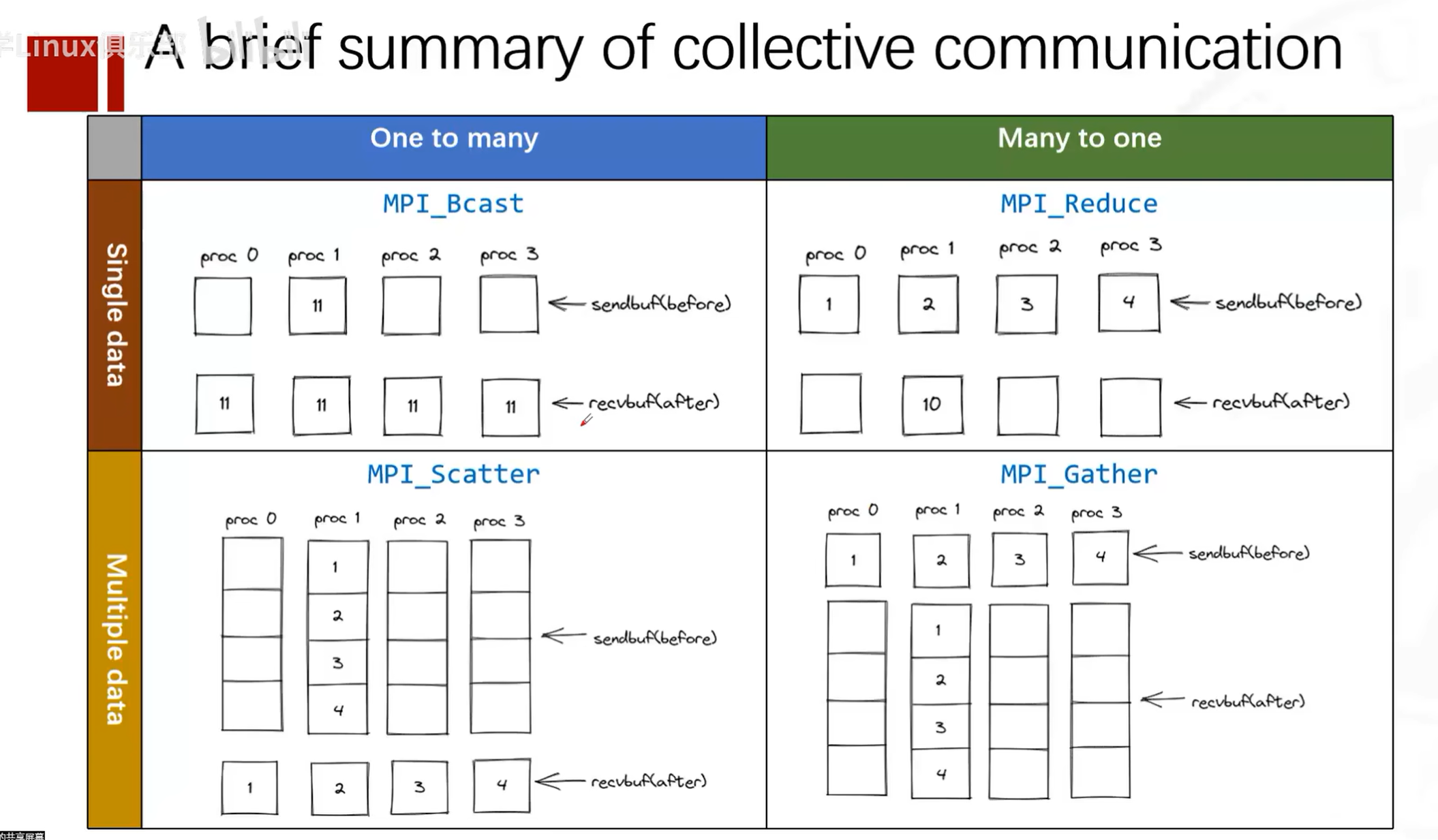
The MPI_Bcast function is used to broadcast data from one process to all processes in the communicator. The function prototype is:
int MPI_Bcast(void *buffer, int count, MPI_Datatype datatype, int root, MPI_Comm comm)
The MPI library internally handles the unicast or multicast transmission of data from the root process to all participating processes. For non-root processes, they are essentially performing an implicit receive operation. When programming with MPI, you only need to call the MPI_Bcast function to broadcast data; there is no need to explicitly call recv functions for each process to receive data.
Parameter descriptions:
- buffer: Pointer to the data to be broadcast.
- count: Number of data elements to broadcast.
- datatype: Type of the data to be broadcast.
- root: Rank of the root process for the broadcast, i.e., which process starts the broadcast.
- comm: Communicator.
Example:
#include <mpi.h>
#include <stdio.h>

int main(int argc, char *argv[]) {
    int rank, size, data = 0;

    MPI_Init(&argc, &argv);
    MPI_Comm_rank(MPI_COMM_WORLD, &rank);
    MPI_Comm_size(MPI_COMM_WORLD, &size);

    if (rank == 0) {
        data = 123;
    }

    MPI_Bcast(&data, 1, MPI_INT, 0, MPI_COMM_WORLD);

    printf("Process %d received data: %d\n", rank, data);

    MPI_Finalize();
    return 0;
}
MPI_Scatter
The MPI_Scatter function is used to distribute data from one process to all processes in the communicator. The function prototype is:
This function distributes data in order of process rank from the vector, i.e., process 0 receives the first (or 0th) sendcount objects from the vector, process 1 receives the second (or 1st) sendcount objects
This is a block distribution function
sendcount indicates the amount of data to send to each process. This function sends the first block of sendcount objects from the vector to the first process, and the next block of sendcount objects to the second process
int MPI_Scatter(void *sendbuf, int sendcount, MPI_Datatype sendtype, void *recvbuf, int recvcount, MPI_Datatype recvtype, int root, MPI_Comm comm)
Parameter descriptions:
- sendbuf: Pointer to the data to be sent.
- sendcount: Amount of data to send to each process (note: this is the amount sent to each process).
- sendtype: Type of the data to be sent.
- recvbuf: Pointer to the data to be received.
- recvcount: Amount of data each process will receive.
- recvtype: Type of the data to be received.
- root: Rank of the root process for scattering.
- comm: Communicator.
Example:
#include <mpi.h>
#include <stdio.h>

int main(int argc, char *argv[]) {
    int rank, size;
    int sendbuf[4] = {0, 1, 2, 3};
    int recvbuf;

    MPI_Init(&argc, &argv);
    MPI_Comm_rank(MPI_COMM_WORLD, &rank);
    MPI_Comm_size(MPI_COMM_WORLD, &size);

    MPI_Scatter(sendbuf, 1, MPI_INT, &recvbuf, 1, MPI_INT, 0, MPI_COMM_WORLD);

    printf("Process %d received data: %d\n", rank, recvbuf);

    MPI_Finalize();
    return 0;
}
MPI_Gather
This function collects data in order of process rank, i.e., process 0 sends to the first (or 0th) recvcount objects position in the vector, process 1 sends to the second (or 1st) sendcount objects position
The MPI_Gather function is used to collect data from all processes in the communicator into one process. The function prototype is:
int MPI_Gather(void *sendbuf, int sendcount, MPI_Datatype sendtype, void *recvbuf, int recvcount, MPI_Datatype recvtype, int root, MPI_Comm comm)
Parameter descriptions:
- sendbuf: Pointer to the data to be sent.
- sendcount: Amount of data to be sent.
- sendtype: Type of the data to be sent.
- recvbuf: Pointer to the data to be received.
- recvcount: Amount of data to receive from each process (note: this is the amount received from each process).
- recvtype: Type of the data to be received.
- root: Rank of the root process for gathering.
- comm: Communicator.
Example:
#include <mpi.h>
#include <stdio.h>

int main(int argc, char *argv[]) {
    int rank, size;
    int sendbuf = 123;
    int recvbuf[4];

    MPI_Init(&argc, &argv);
    MPI_Comm_rank(MPI_COMM_WORLD, &rank);
    MPI_Comm_size(MPI_COMM_WORLD, &size);

    MPI_Gather(&sendbuf, 1, MPI_INT, recvbuf, 1, MPI_INT, 0, MPI_COMM_WORLD);

    if (rank == 0) {
        printf("Root process received data:");
        for (int i = 0; i < size; i++) {
            printf(" %d", recvbuf[i]);
        }
        printf("\n");
    }

    MPI_Finalize();
    return 0;
}
MPI_Allgather
The MPI_Allgather function is used to collect data from all processes in the communicator into all processes. The function prototype is:
int MPI_Allgather(void *sendbuf, int sendcount, MPI_Datatype sendtype, void *recvbuf, int recvcount, MPI_Datatype recvtype, MPI_Comm comm)
Parameter descriptions:
- sendbuf: Pointer to the data to be sent.
- sendcount: Amount of data to be sent.
- sendtype: Type of the data to be sent.
- recvbuf: Pointer to the data to be received.
- recvcount: Amount of data to be received.
- recvtype: Type of the data to be received.
- comm: Communicator.
Example:
#include <mpi.h>
#include <stdio.h>

int main(int argc, char *argv[]) {
    int rank, size;
    int sendbuf = 123;
    int recvbuf[4];

    MPI_Init(&argc, &argv);
    MPI_Comm_rank(MPI_COMM_WORLD, &rank);
    MPI_Comm_size(MPI_COMM_WORLD, &size);

    MPI_Allgather(&sendbuf, 1, MPI_INT, recvbuf, 1, MPI_INT, MPI_COMM_WORLD);

    printf("Process %d received data:", rank);
    for (int i = 0; i < size; i++) {
        printf(" %d", recvbuf[i]);
    }
    printf("\n");

    MPI_Finalize();
    return 0;
}
MPI_Alltoall
The MPI_Alltoall function is used to send data from all processes to all processes in the communicator. The function prototype is:
int MPI_Alltoall(void *sendbuf, int sendcount, MPI_Datatype sendtype, void *recvppbuf, int recvcount, MPI_Datatype recvtype, MPI_Comm comm)
Parameter descriptions:
- sendbuf: Pointer to the data to be sent.
- sendcount: Amount of data to be sent.
- sendtype: Type of the data to be sent.
- recvbuf: Pointer to the data to be received.
- recvcount: Amount of data to be received.
- recvtype: Type of the data to be received.
- comm: Communicator.
Example:
#include <mpi.h>
#include <stdio.h>

int main(int argc, char *argv[]) {
    int rank, size;
    int sendbuf[4] = {0, 1, 2, 3};
    int recvbuf[4];

    MPI_Init(&argc, &argv);
    MPI_Comm_rank(MPI_COMM_WORLD, &rank);
    MPI_Comm_size(MPI_COMM_WORLD, &size);

    MPI_Alltoall(sendbuf, 1, MPI_INT, recvbuf, 1, MPI_INT, MPI_COMM_WORLD);

    printf("Process %d received data:", rank);
    for (int i = 0; i < size; i++) {
        printf(" %d", recvbuf[i]);
    }
    printf("\n");

    MPI_Finalize();
    return 0;
}
MPI_Reduce
The MPI_Reduce function is used to reduce data from all processes in the communicator to one process. The function prototype is:
int MPI_Reduce(void *sendbuf, void *recvbuf, int count, MPI_Datatype datatype, MPI_Op op, int root, MPI_Comm comm)
Parameter descriptions:
- sendbuf: Pointer to the data to be sent.
- recvbuf: Pointer to the data to be received.
- count: Amount of data to reduce.
- datatype: Type of the data to reduce.
- op: Reduction operation, such as MPI_SUM, MPI_MAX, etc.
- root: Rank of the root process for reduction.
- comm: Communicator.
Example:
#include <mpi.h>
#include <stdio.h>

int main(int argc, char *argv[]) {
    int rank, size;
    int sendbuf = 123;
    int recvbuf;

    MPI_Init(&argc, &argv);
    MPI_Comm_rank(MPI_COMM_WORLD, &rank);
    MPI_Comm_size(MPI_COMM_WORLD, &size);

    MPI_Reduce(&sendbuf, &recvbuf, 1, MPI_INT, MPI_SUM, 0, MPI_COMM_WORLD);

    if (rank == 0) {
        printf("Root process received data: %d\n", recvbuf);
    }

    MPI_Finalize();
    return 0;
}
MPI_Allreduce
The MPI_Allreduce function is used to reduce data from all processes in the communicator to all processes. The function prototype is:
int MPI_Allreduce(void *sendbuf, void *recvbuf, int count, MPI_Datatype datatype, MPI_Op op, MPI_Comm comm)
All processes will have a copy of the reduced data
Parameter descriptions:
- sendbuf: Pointer to the data to be sent.
- recvbuf: Pointer to the data to be received.
- count: Amount of data to reduce.
- datatype: Type of the data to reduce.
- op: Reduction operation, such as MPI_SUM, MPI_MAX, etc.
- comm: Communicator.
Example:
#include <mpi.h>
#include <stdio.h>

int main(int argc, char *argv[]) {
    int rank, size;
    int sendbuf = 123;
    int recvbuf;

    MPI_Init(&argc, &argv);
    MPI_Comm_rank(MPI_COMM_WORLD, &rank);
    MPI_Comm_size(MPI_COMM_WORLD, &size);

    MPI_Allreduce(&sendbuf, &recvbuf, 1, MPI_INT, MPI_SUM, MPI_COMM_WORLD);

    printf("Process %d received data: %d\n", rank, recvbuf);

    MPI_Finalize();
    return 0;
}
MPI_Scan
The MPI_Scan function is used to perform a partial reduction of data from all processes in the communicator and distribute intermediate results within the process group. The function prototype is:
int MPI_Scan(void *sendbuf, void *recvbuf, int count, MPI_Datatype datatype, MPI_Op op, MPI_Comm comm)
Parameter descriptions:
- sendbuf: Pointer to the data to be sent.
- recvbuf: Pointer to the data to be received.
- count: Amount of data to reduce.
- datatype: Type of the data to reduce.
- op: Reduction operation, such as MPI_SUM, MPI_MAX, etc.
- comm: Communicator.
Detailed Function Explanation
Of course, let's use a very vivid example to explain the functionality of MPI_Scan.
Suppose you and your friends (4 people in total) are standing in a line, and each person has some candies. You want to know, from the beginning of the line to each person, how many candies everyone has in total. Each person only knows how many candies they have and can only communicate with the person in front of them.
This is your initial state, suppose the candy counts are:
- You (number 0): 5 candies
- Friend number 1: 3 candies
- Friend number 2: 6 candies
- Friend number 3: 2 candies
Now you start the "scan" (MPI_Scan):
- You (number 0) are the first person in line, so you have no one in front to communicate with. You can only state how many candies you have: 5.
- Friend number 1 hears you have 5 candies and they have 3, so they can say that from the beginning of the line to them, there are 8 candies total.
- Friend number 2 hears friend number 1 has 8 candies and they have 6, so they can say that from the beginning of the line to them, there are 14 candies total.
- Friend number 3 hears friend number 2 has 14 candies and they have 2, so they can say that from the beginning of the line to them, there are 16 candies total.
In this process, each person only communicated once with the person before them and calculated the total number of candies from the beginning of the line to themselves. This is the functionality of MPI_Scan: it helps each process accumulate data from all preceding processes and get a local cumulative result. For process 0 (you), the result is your own data; for other processes, the result is their own data plus the sum of all preceding processes' data.
In actual MPI programs, this operation is executed in parallel, and each process gets a local cumulative result without computing one by one as we did. This is why MPI_Scan can work together efficiently.
Example:
#include <mpi.h>
#include <stdio.h>

int main(int argc, char *argv[]) {
    int rank, size;
    int sendbuf = 123;
    int recvbuf;

    MPI_Init(&argc, &argv);
    MPI_Comm_rank(MPI_COMM_WORLD, &rank);
    MPI_Comm_size(MPI_COMM_WORLD, &size);

    MPI_Scan(&sendbuf, &recvbuf, 1, MPI_INT, MPI_SUM, MPI_COMM_WORLD);

    printf("Process %d received data: %d\n", rank, recvbuf);

    MPI_Finalize();
    return 0;
}
MPI_Barrier
The MPI_Barrier function is used to synchronize all processes in the communicator. Execution can only continue after all processes have reached this point. The function prototype is:
int MPI_Barrier(MPI_Comm comm)
Parameter descriptions:
- comm: Communicator.
Example:
#include <mpi.h>
#include <stdio.h>

int main(int argc, char *argv[]) {
    int rank, size;

    MPI_Init(&argc, &argv);
    MPI_Comm_rank(MPI_COMM_WORLD, &rank);
    MPI_Comm_size(MPI_COMM_WORLD, &size);

    printf("Process %d before barrier\n", rank);
    MPI_Barrier(MPI_COMM_WORLD);
    printf("Process %d after barrier\n", rank);

    MPI_Finalize();
    return 0;
}
Above is a detailed introduction and short examples of collective communication functions in MPI. Each function has different parameters and usage methods, but they are all used for collective communication among all processes in a communicator.
Allgather and Alltoall
Of course. Let's illustrate the difference between MPI_Alltoall and MPI_Allgather with a simple example.
Suppose we have 4 processes numbered 0, 1, 2, 3, and each process starts with an array containing 4 elements, identified by the process number and element index. For example, process 0 has an array [00, 01, 02, 03], where 00 represents the first element of process 0, 01 represents the second element of process 0, and so on.
MPI_Alltoall Example:
Initial data state:
- Process 0: [00, 01, 02, 03]
- Process 1: [10, 11, 12, 13]
- Process 2: [20, 21, 22, 23]
- Process 3: [30, 31, 32, 33]
After executing MPI_Alltoall, each process will receive one element from every other process and place it in the corresponding position. The result is:
- Process 0: [00, 10, 20, 30]
- Process 1: [01, 11, 21, 31]
- Process 2: [02, 12, 22, 32]
- Process 3: [03, 13, 23, 33]
As you can see, after the MPI_Alltoall operation, process 0 collected the first element from all processes, process 1 collected the second element from all processes, and so on. Each process sent different data to other processes and received different data from other processes.
MPI_Allgather Example:
Let's use the same initial data state:
- Process 0: [00, 01, 02, 03]
- Process 1: [10, 11, 12, 13]
- Process 2: [20, 21, 22, 23]
- Process 3: [30, 31, 32, 33]
After executing MPI_Allgather, each process sends its complete array to all other processes. The result is:
- Process 0: [00, 01, 02, 03, 10, 11, 12, 13, 20, 21, 22, 23, 30, 31, 32, 33]
- Process 1: [00, 01, 02, 03, 10, 11, 12, 13, 20, 21, 22, 23, 30, 31, 32, 33]
- Process 2: [00, 01, 02, 03, 10, 11, 12, 13, 20, 21, 22, 23, 30, 31, 32, 33]
- Process 3: [00, 01, 02, 03, 10, 11, 12, 13, 20, 21, 22, 23, 30, 31, 32, 33]
After the MPI_Allgather operation, each process has an array containing all data from all processes.
From this example, it is clear that MPI_Alltoall is for personalized data exchange between processes, while MPI_Allgather is for each process to collect the same data from all other processes.
MPI_Scatterv
MPI_Scatterv is an MPI (Message Passing Interface) function used for distributing data in parallel computing. Similar to MPI_Scatter, it distributes data from an array to a group of processes, but unlike MPI_Scatter, it allows sending different amounts of data to different processes.
The function prototype of MPI_Scatterv is:
int MPI_Scatterv(
    const void *sendbuf, // 根进程中待发送数据的起始地址
    const int sendcounts[], // 数组,包含发送到每个进程的数据数量
    const int displs[], // 数组,包含每个进程接收的数据在sendbuf中的偏移量
    MPI_Datatype sendtype, // 发送数据的类型
    void *recvbuf, // 接收数据的起始地址(对于接收进程)
    int recvcount, // 接收数据的数量(对于接收进程)
    MPI_Datatype recvtype, // 接收数据的类型
    int root, // 发送数据的根进程的排名
    MPI_Comm comm // 通信器
);
Here is an example using MPI_Scatterv, assuming we have a root process with an integer array to send, wanting to send different parts of this array to different processes. Each process receives a different number of elements.
#include <mpi.h>
#include <stdio.h>
#include <stdlib.h>

int main(int argc, char** argv) {
    MPI_Init(&argc, &argv);

    int rank, size;
    MPI_Comm_rank(MPI_COMM_WORLD, &rank);
    MPI_Comm_size(MPI_COMM_WORLD, &size);

    // 根进程的数据
    int *sendbuf = NULL;
    int sendcounts[size];
    int displs[size];

    // 每个进程接收的数据缓冲区
    int recvbuf[10]; // 假设最大接收数量为10

    if (rank == 0) {
        // 根进程初始化发送缓冲区
        int sendbuf_size = 0;
        for (int i = 0; i < size; ++i) {
            sendcounts[i] = i + 1; // 第i个进程将接收i+1个元素
            sendbuf_size += sendcounts[i];
        }

        sendbuf = (int*)malloc(sendbuf_size * sizeof(int));

        // 填充发送缓冲区
        for (int i = 0; i < sendbuf_size; ++i) {
            sendbuf[i] = i;
        }

        // 初始化偏移量数组
        displs[0] = 0;
        for (int i = 1; i < size; ++i) {
            displs[i] = displs[i - 1] + sendcounts[i - 1];
        }
    }

    // 分发数据
    MPI_Scatterv(sendbuf, sendcounts, displs, MPI_INT, recvbuf, 10, MPI_INT, 0, MPI_COMM_WORLD);

    // 打印接收到的数据
    printf("Process %d received:", rank);
    for (int i = 0; i < sendcounts[rank]; ++i) {
        printf(" %d", recvbuf[i]);
    }
    printf("\n");

    // 根进程需要释放发送缓冲区
    if (rank == 0) {
        free(sendbuf);
    }

    MPI_Finalize();
    return 0;
}
In this example, the root process (rank 0) has an integer array sendbuf that it wants to scatter to all processes. The number of elements each process will receive is specified by the sendcounts array, and the displs array specifies the starting position of each process's received elements in sendbuf. Each process has a receive buffer recvbuf. In this example, we assume each process can receive at most 10 elements; this is a simplified assumption, and in practice you would allocate the receive buffer size based on actual needs.
MPI_Gatherv
MPI_Gatherv is an MPI (Message Passing Interface) function used to collect different amounts of data from a group of processes and gather them into the receive buffer of the root process. Compared to MPI_Gather, MPI_Gatherv allows each process to send different amounts of data to the root process.
The function prototype of MPI_Gatherv is:
int MPI_Gatherv(
    const void *sendbuf, // 发送数据的起始地址(对于发送进程)
    int sendcount, // 发送数据的数量(对于发送进程)
    MPI_Datatype sendtype, // 发送数据的类型
    void *recvbuf, // 接收数据的起始地址(仅对根进程有效)
    const int recvcounts[], // 数组,包含每个进程将发送的数据数量
    const int displs[], // 数组,包含每个进程的数据在recvbuf中的偏移量
    MPI_Datatype recvtype, // 接收数据的类型(仅对根进程有效)
    int root, // 接收数据的根进程的排名
    MPI_Comm comm // 通信器
);
Below is an example using MPI_Gatherv, assuming we have a group of processes, each with an integer array, wanting to send a portion of this array's data to the root process.
#include <mpi.h>
#include <stdio.h>
#include <stdlib.h>

int main(int argc, char** argv) {
    MPI_Init(&argc, &argv);

    int rank, size;
    MPI_Comm_rank(MPI_COMM_WORLD, &rank);
    MPI_Comm_size(MPI_COMM_WORLD, &size);

    // 每个进程的发送缓冲区
    int sendbuf[10]; // 假设每个进程发送10个整数
    for (int i = 0; i < 10; ++i) {
        sendbuf[i] = rank * 10 + i;
    }

    // 根进程的接收缓冲区和相关数组
    int *recvbuf = NULL;
    int recvcounts[size];
    int displs[size];

    if (rank == 0) {
        // 根进程计算总的接收数量和每个进程的偏移量
        int total_count = 0;
        for (int i = 0; i < size; ++i) {
            recvcounts[i] = i + 10; // 假设第i个进程发送i+10个整数
            displs[i] = total_count;
            total_count += recvcounts[i];
        }
        recvbuf = (int*)malloc(total_count * sizeof(int));
    }

    // 收集数据
    MPI_Gatherv(sendbuf, 10, MPI_INT, recvbuf, recvcounts, displs, MPI_INT, 0, MPI_COMM_WORLD);

    // 根进程打印接收到的数据
    if (rank == 0) {
        printf("Root process has gathered the following data:\n");
        for (int i = 0; i < displs[size - 1] + recvcounts[size - 1]; ++i) {
            printf("%d ", recvbuf[i]);
        }
        printf("\n");
        free(recvbuf);
    }

    MPI_Finalize();
    return 0;
}
In this example, we assume each process has a send buffer sendbuf containing 10 integers, each initialized to the process's rank multiplied by 10 plus the index value. The root process (the process with rank 0) needs to prepare a sufficiently large receive buffer recvbuf to receive all data sent by other processes.
Each process calls MPI_Gatherv to send data from its sendbuf. The root process uses the recvcounts array to specify the expected amount of data from each process, and the displs array to specify the offset of each process's data in the receive buffer.
More Advanced Features

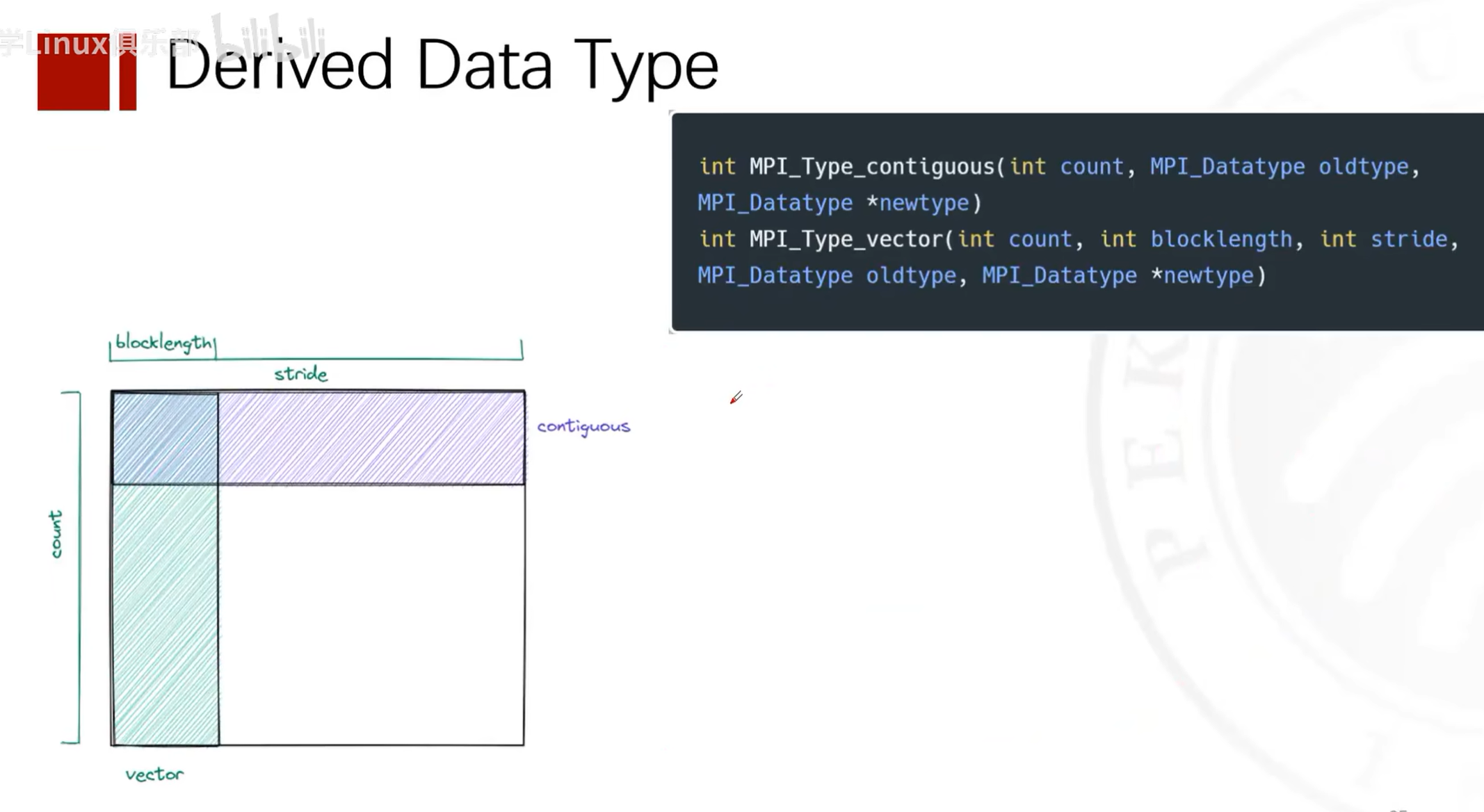
Defining Matrix Types
Splitting Communicators
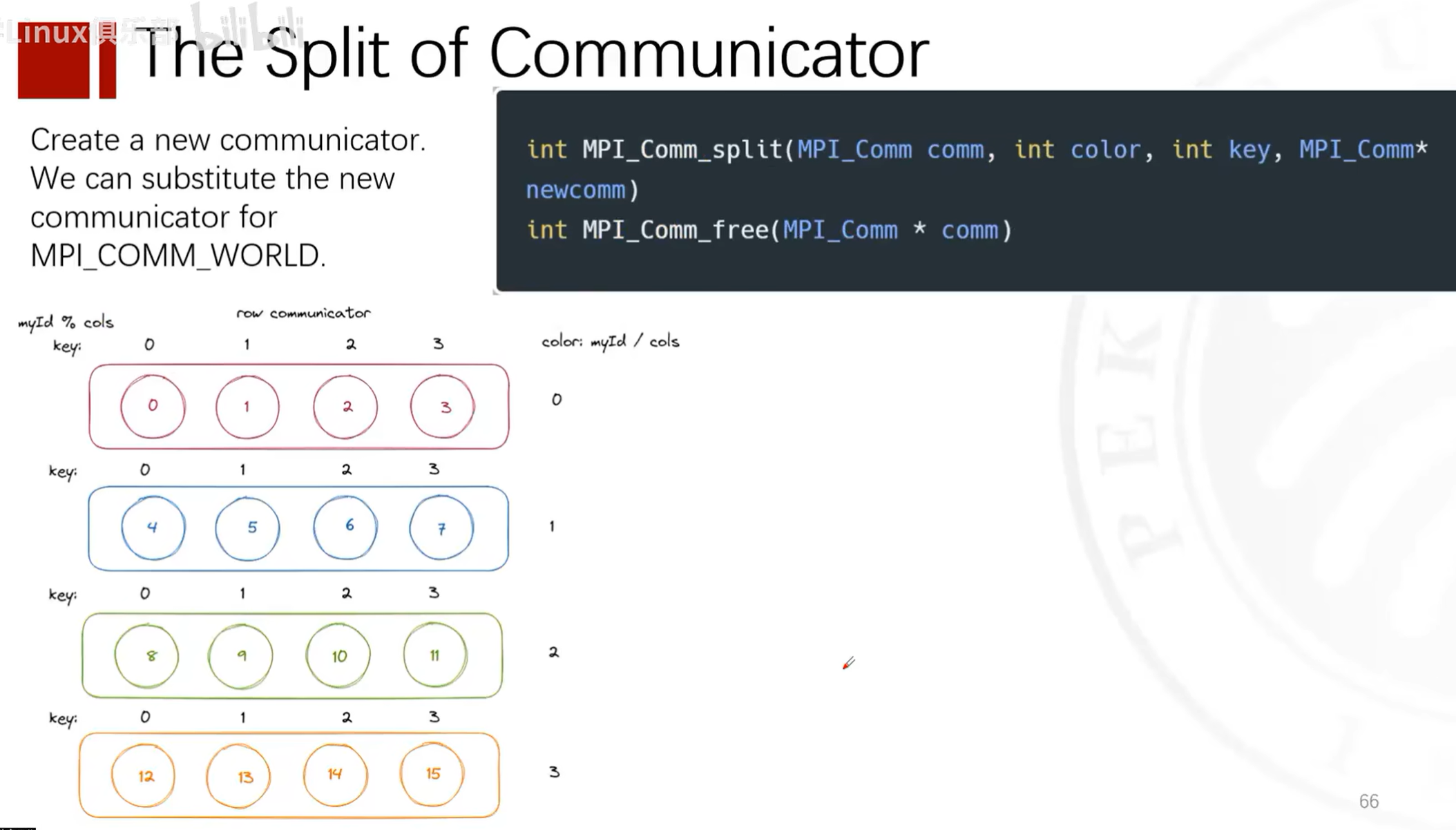
Dividing Process Groups
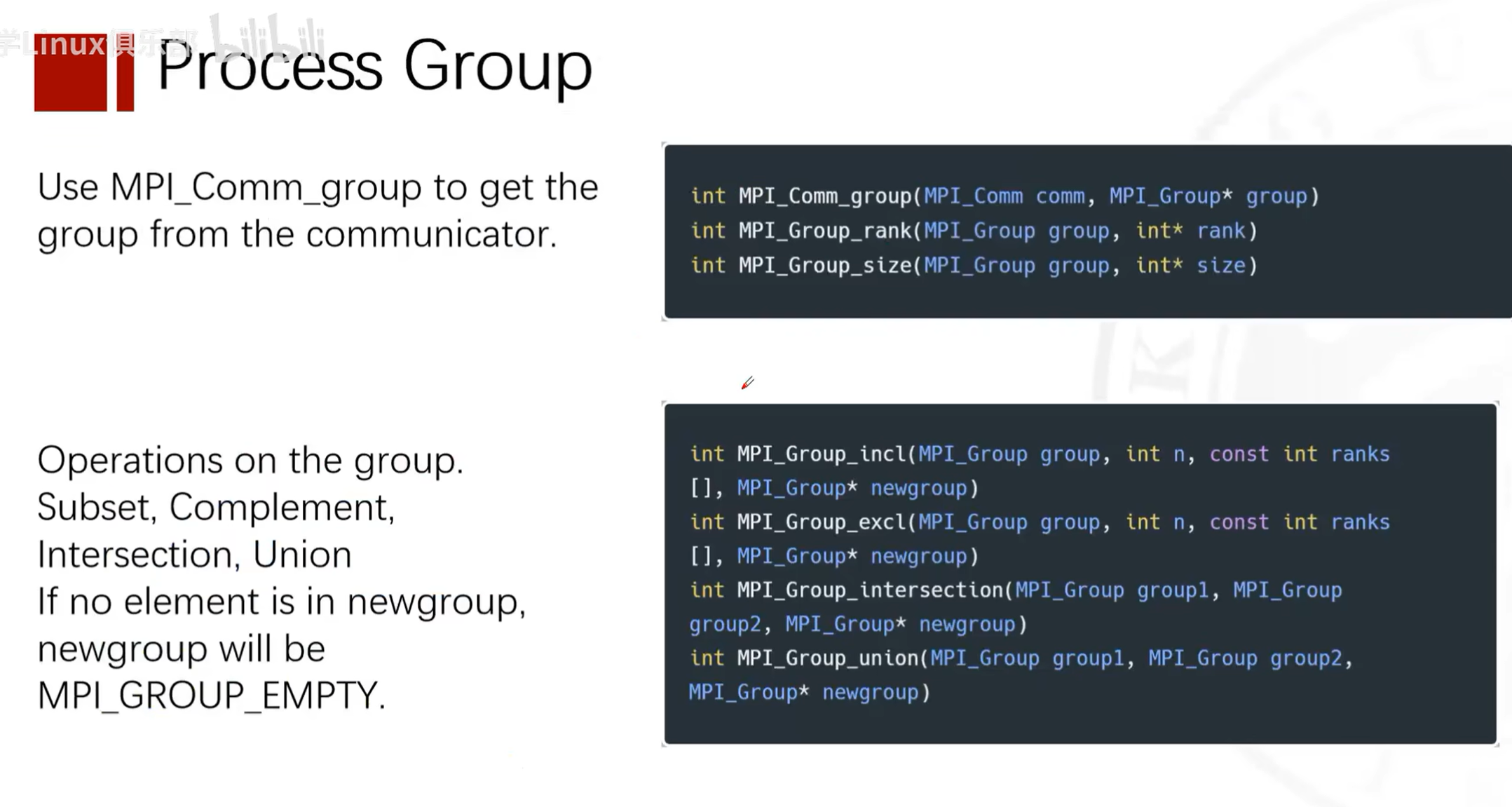
See Reference Materials for Details
Running MPI Programs on Slurm
Process
Q: I want to run this ping-pong program with two processes on two compute nodes of my cluster. Each node has 56 cores. How should I compile and write a Slurm script?
A: To run a ping-pong program using MPI on two compute nodes, you need to compile the program and create a Slurm job script to submit the job. Here are the steps:
Compile the MPI Program
First, make sure your cluster has an MPI library installed, such as Open MPI or MPICH. Then use the corresponding compiler (such as mpicc) to compile your program. If your program is saved in a file named pingpong.c, you can compile it using the following command:
mpicc -o pingpong pingpong.c
This will produce an executable file pingpong.
Write the Slurm Script
A Slurm job script is a text file that contains Slurm directives and commands to run. Create a file named pingpong.slurm and write the following content:
#!/bin/bash
#SBATCH --job-name=pingpong       # 作业名
#SBATCH --output=pingpong.out     # 标准输出和错误输出文件
#SBATCH --time=00:10:00           # 预计运行时间 (D-HH:MM:SS)
#SBATCH --partition=your_partition # 集群的分区名,根据您的集群情况填写
#SBATCH --nodes=2                 # 需要使用的节点数
#SBATCH --ntasks=2                # 启动的进程总数
#SBATCH --ntasks-per-node=1       # 每个节点上的进程数
#SBATCH --cpus-per-task=56        # 每个进程的CPU核心数


# 加载MPI模块,如果需要的话
# module load mpi

# 使用mpirun运行程序
mpi ./pingpong
Note that you need to adjust the parameters in the #SBATCH directives based on your cluster environment. In particular, the --partition option needs to be set to the appropriate partition name for your cluster.
Submit the Job
Use the sbatch command to submit the Slurm job script:
sbatch pingpong.sh
After submission, Slurm will queue your job and run it when resources are available.
Notes
-
If your cluster requires loading specific modules to use MPI (e.g., using the
module loadcommand), make sure to include these commands in the Slurm script. -
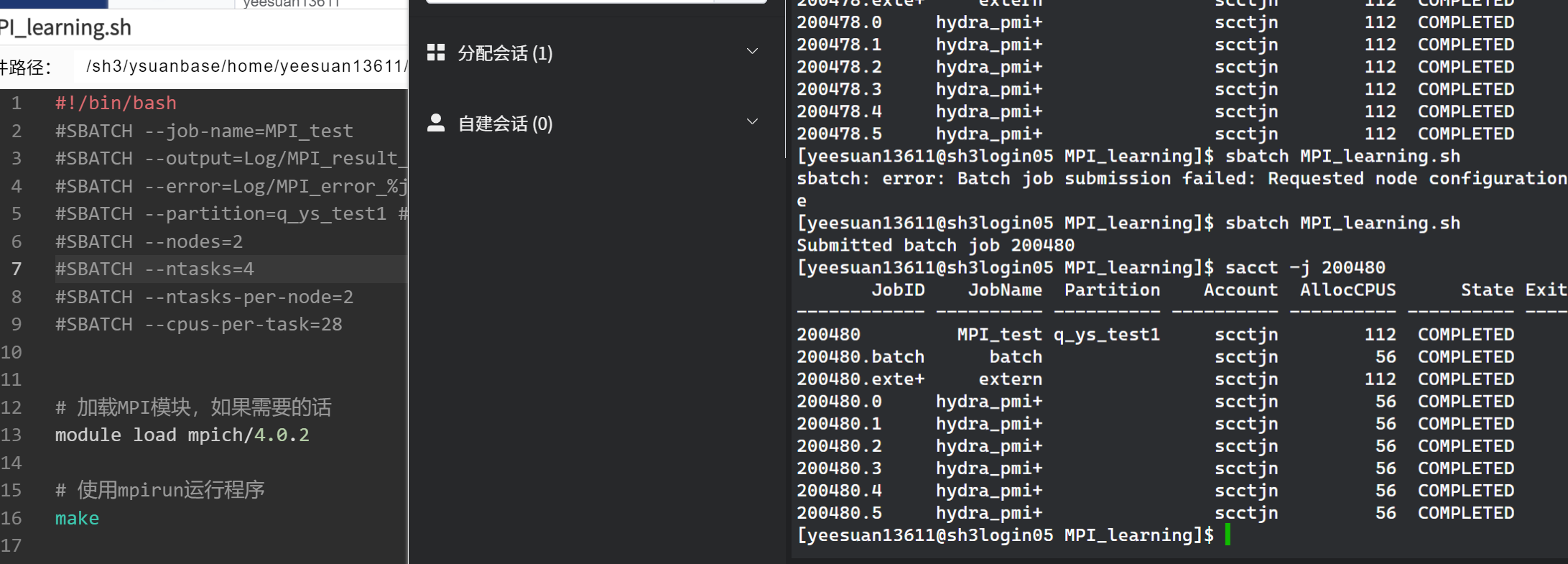
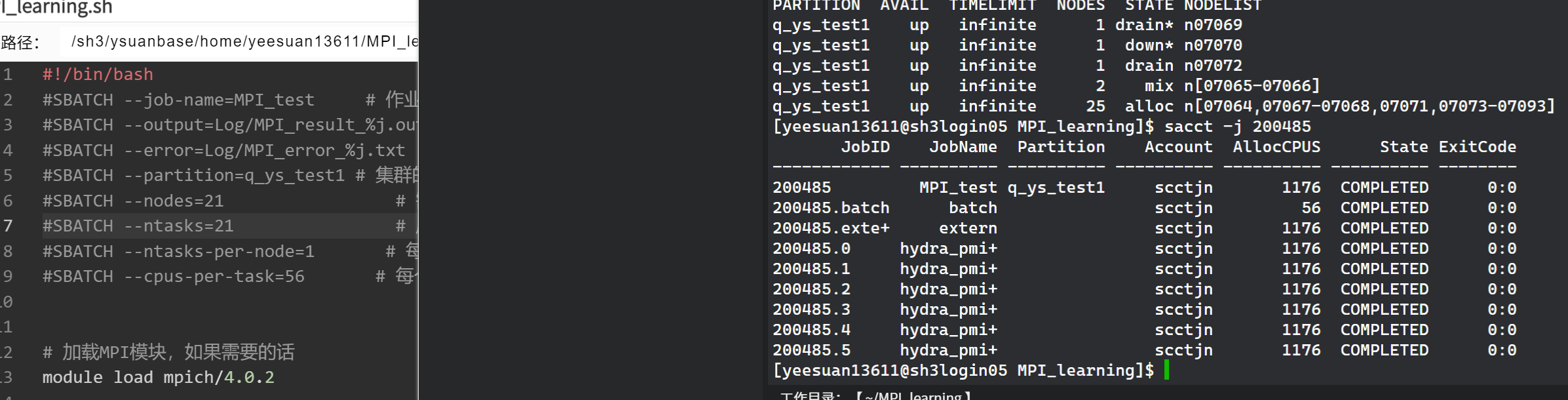
Only one process needs to run on each node, because Slurm can only allocate all cores of a node to one process. So even if you request multiple processes on a node, the actual number of cores used per node is only the number of cores allocated to one process, i.e.,: actual cores used = requested nodes (nodes) * cores per process (cpus-per-task). However, if you truly want to run one process per core, adjust
--ntasks-per-nodeand--cpus-per-taskoptions accordingly. -
Actual cores used = requested nodes (nodes) * cores per process (cpus-per-task)
-
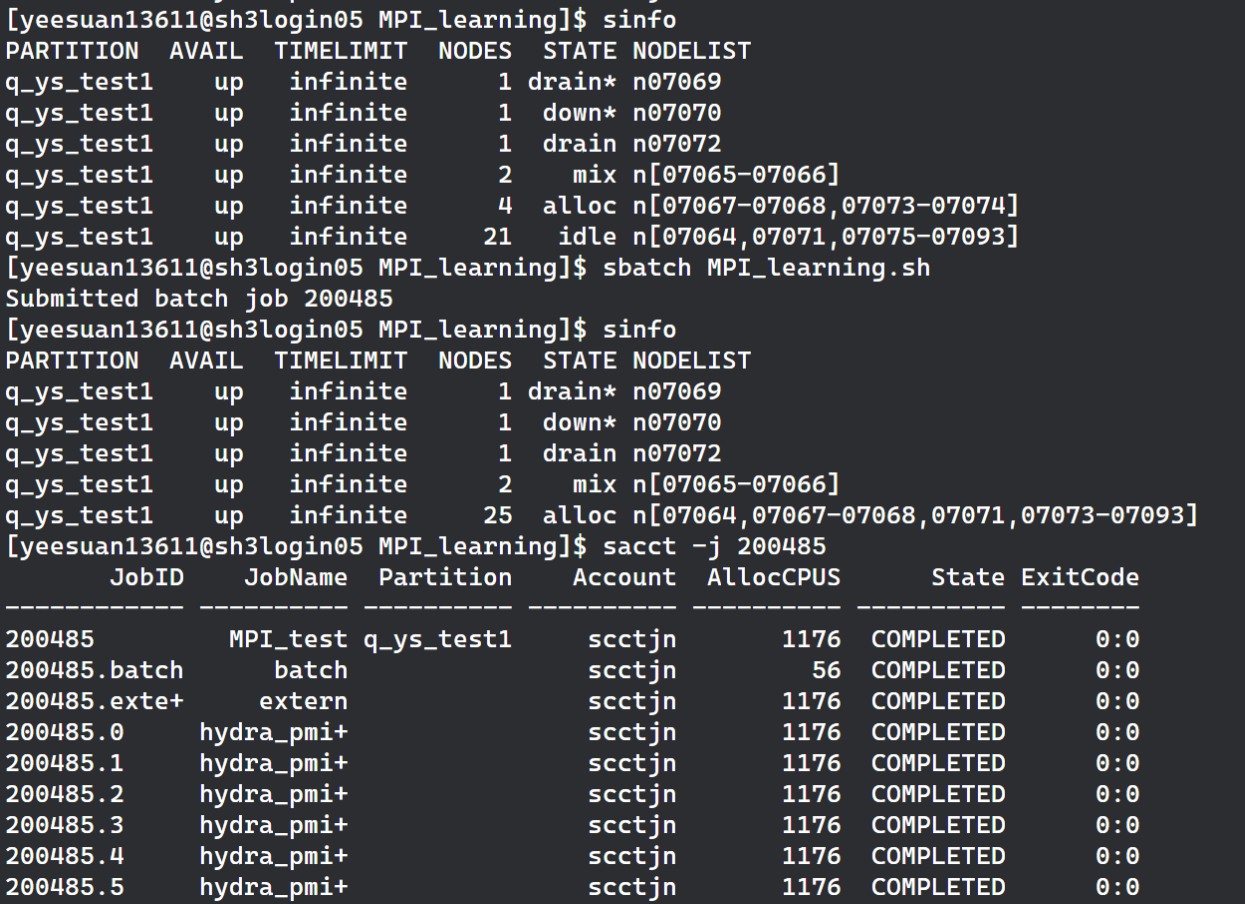
The number of launched processes equals your total requested tasks (ntasks)
-
If you choose to use
mpirunormpiexec, in some cases they may not automatically obtain the process count from Slurm, so you may need to manually specify the-npparameter. However, many modern MPI implementations can integrate with Slurm and automatically recognize Slurm-allocated resources, so even when usingmpirunormpiexec, in many cases you do not need to manually specify the-npparameter. This depends on your specific MPI implementation and cluster configuration.
Errors and Problems Encountered
Issue with Variable Definition in Reduce
Original code
if (rank == 0)
    {
        double max_elapsed_time;
    }
    MPI_Reduce(&elapsed_time, &max_elapsed_time, 1, MPI_DOUBLE, MPI_MAX, 0, MPI_COMM_WORLD);
==Undefined identifier max_elapsed_time==
Problem
The max_elapsed_time in the MPI_Reduce call is only declared inside the rank == 0 block, which will cause a compilation error because it is undeclared in other processes.
Question
Why does declaring max_elapsed_time only in the rank == 0 block for the MPI_Reduce call cause an error? All processes' data is reduced to process 0's max_elapsed_time. Isn't it sufficient to define max_elapsed_time only in process 0?
Answer
In the MPI_Reduce function, all participating processes need to provide an input value (in this case elapsed_time), and all processes need a variable to receive the result (max_elapsed_time). This is because MPI_Reduce is a collective operation involving all processes in the communicator (in this case MPI_COMM_WORLD). Even though the result is only collected in the root process (rank 0), all processes must participate in this operation.
When calling MPI_Reduce, each process needs to know the address of the max_elapsed_time variable because it does not know whether it is the root process. The MPI runtime needs to be able to access this address across all processes in order to correctly pass data to the root process.
If max_elapsed_time is only declared in the root process, then other processes will not be able to access an undeclared variable when executing MPI_Reduce, which will cause compilation errors or runtime errors.
To fix this issue, you need to declare the max_elapsed_time variable in all processes, not just in the root process. This way, each process has a valid address to use in the MPI_Reduce call, while the result will only be updated in the root process's max_elapsed_time variable.
Here is the corrected code snippet, where max_elapsed_time is declared in all processes:
// ...

double elapsed_time = end_time - start_time;
double max_elapsed_time; // 声明在所有进程中

MPI_Reduce(&elapsed_time, &max_elapsed_time, 1, MPI_DOUBLE, MPI_MAX, 0, MPI_COMM_WORLD);

if (rank == 0) {
    printf("Max elapsed time: %f seconds\n", max_elapsed_time);
}

// ...
In the above code, max_elapsed_time is declared by all processes, but only in the root process will it be updated by the MPI_Reduce operation to the maximum elapsed_time value across all processes. The max_elapsed_time variables of other processes will not be updated because they are not the recipients of the reduction operation.